Associations and communitiesDemo with sample data
Dost Yuva: screen-by-screen guide
The full version of the short description on the product page: every feature, how each screen is used step by step, all limits and the delivery details.
All features
The functions listed were tried in local tests; the live demo sends no notifications, and user and password actions are locked.
- Filters for species, age group, city and district, size, gender, temperament and neutered, vaccinated and microchipped, plus search, a “Found a home” list and a permanent address for every listing
- Listing management: listings with photos; the statuses waiting, live, foster needed, adopted and hidden; every status change is written, with who made it and when, to a status history shown only in the panel
- Health history: vaccines, parasite treatment and vet check-ups are recorded with their dates and shown on the public listing page; a wrong entry is removed with “Yanlış girdim, sil” (I entered it wrong, delete)
- Adoption, foster and volunteer applications are taken with data-protection consent (KVKK) and get an SB-YYYY-NNNN number; the applicant checks the status with the number and the last four digits of the phone; the adoption form also asks about the landlord’s permission, whether everyone at home agrees, how escape-proof the home is and how many hours a day the animal would be alone, and the answers show in the application details under “Ev ortamı” (home setting)
- The manager changes an application’s status, writes a note only the manager sees and sees the history; an adoption agreement is filled in from a template and printed
- A listing posted by a visitor goes to an approval queue and appears on the site once the manager puts it live
- Favourites are kept in the browser; a listing is shared as a ready WhatsApp message or its link is copied; a printable A4 poster with a QR code is made for the public address
- Manager and volunteer roles: a volunteer manages listings and applications and never sees the settings or the users
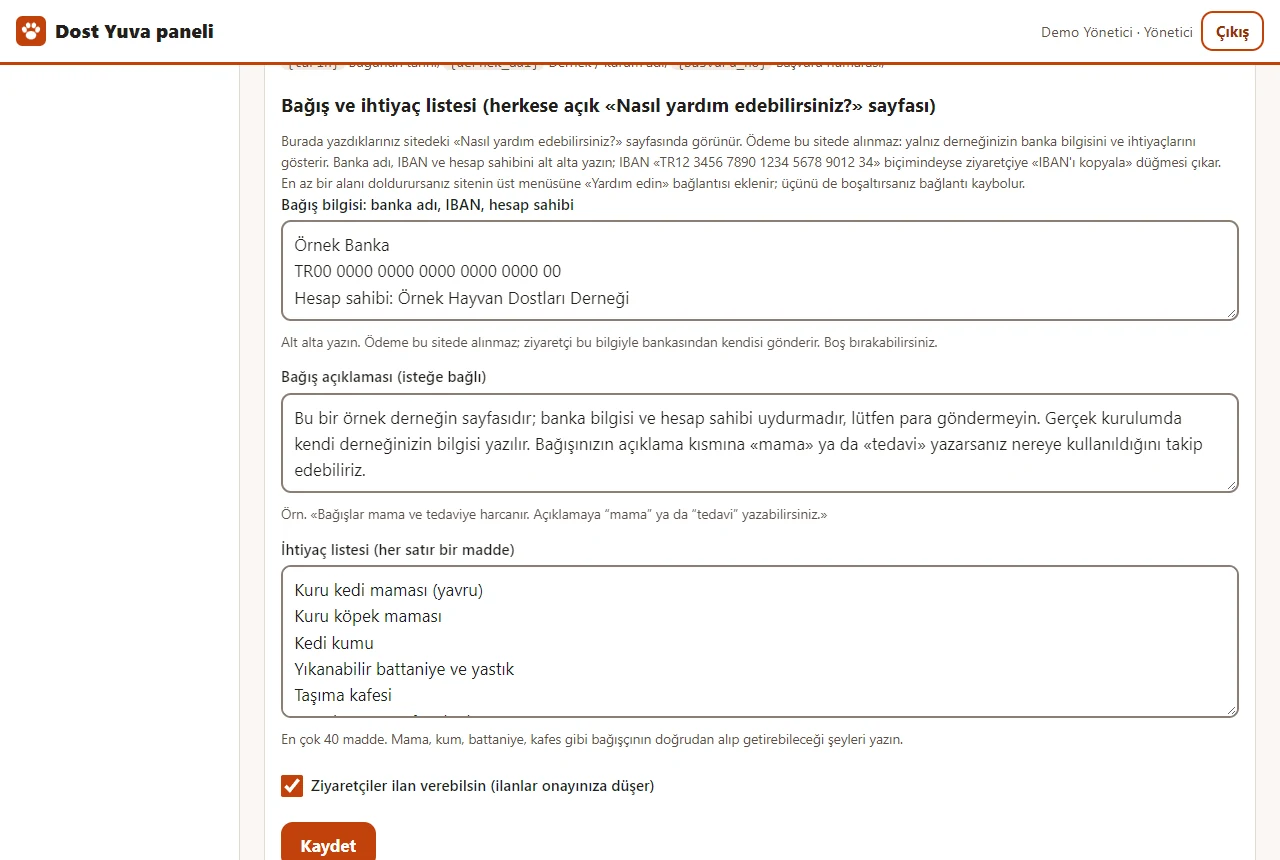
- Site name, main colour, WhatsApp phone and texts are changed in the panel; the association’s bank (IBAN) details and a needs list are written there too and shown on the public “Nasıl yardım edebilirsiniz?” (how can you help?) page (no payment is taken on the site, donations go straight to the bank); listings and applications are downloaded as CSV, and a listing list is imported from Excel or CSV with a preview and can be taken back
- For a new application or listing: a badge in the panel, a free phone notification (Web Push) and an e-mail; no SMS or WhatsApp message is sent
- A setup wizard and a step-by-step setup guide, a help box on every screen, a backup download from the panel; it installs on a phone or computer
Screen by screen: how it is used
The demo’s interface is in Turkish and there is no English version; only the captions and explanations on this page are in English.
- Who uses it?
- A visitor who wants to adopt a pet, and the association or volunteer group (manager and volunteer) that publishes the listings and reviews the applications.
- Where do they start?
- The visitor goes from the home page to the listings. The association side starts from the panel sign-in; in the demo the buttons in the “Demo hesapları” (demo accounts) box sign in without a password.
What do they do on screen? Step by step
-
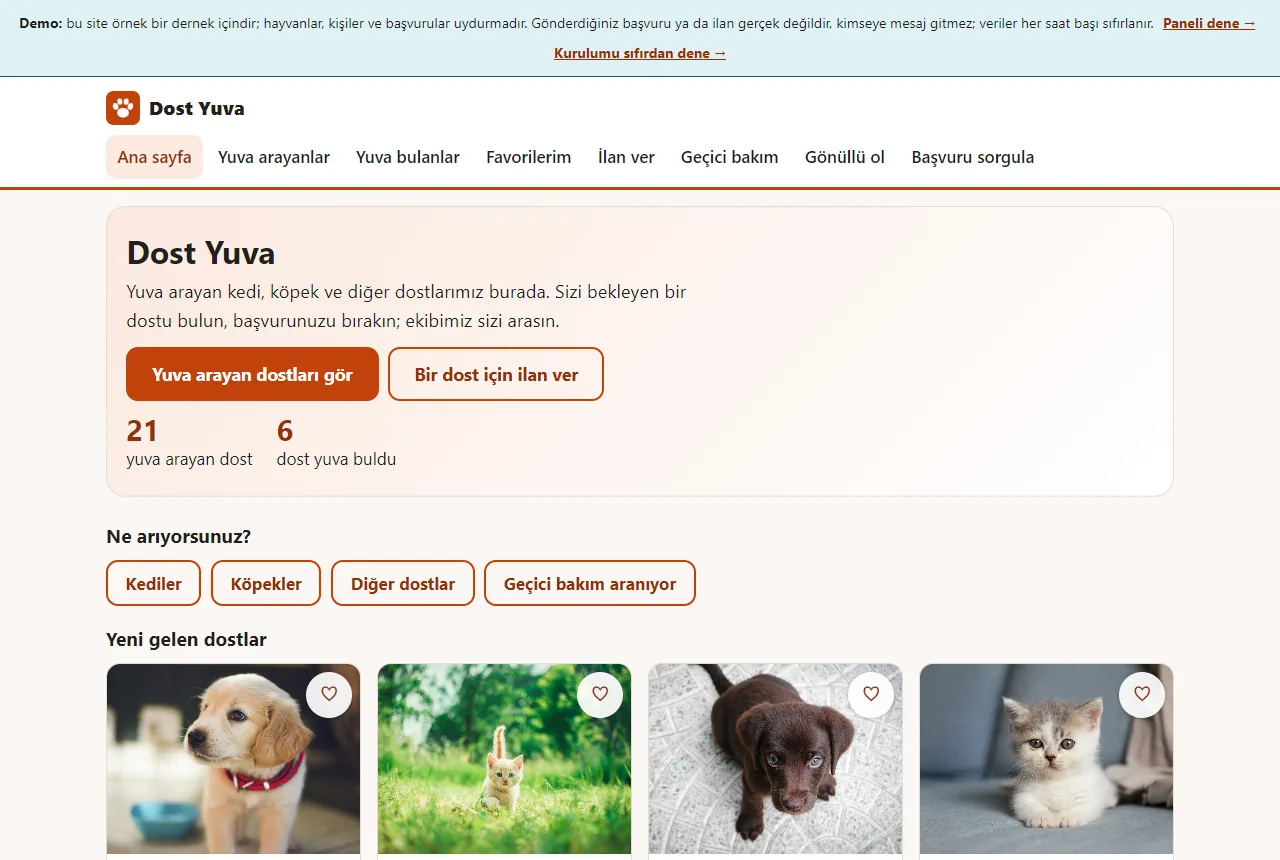
Home page
The number of friends looking for a home and of those who found one, shortcuts by kind of animal and the latest listings. The numbers are sample data.
- On screen (Turkish interface)
- “Ana sayfa / Yuva arayanlar / Yuva bulanlar / Favorilerim / İlan ver / Geçici bakım / Gönüllü ol / Başvuru sorgula” — top nav: Home / Looking for a home / Found a home / My favourites / Post a listing / Foster / Become a volunteer / Check an application
- “Yuva arayan dostları gör / Bir dost için ilan ver” — hero buttons: see friends looking for a home / post a listing for a friend
- “Kediler / Köpekler / Diğer dostlar / Geçici bakım aranıyor” — shortcuts: cats / dogs / other friends / foster needed
- “Paneli dene → / Kurulumu sıfırdan dene →” — demo strip links: try the panel / try the setup from scratch
-
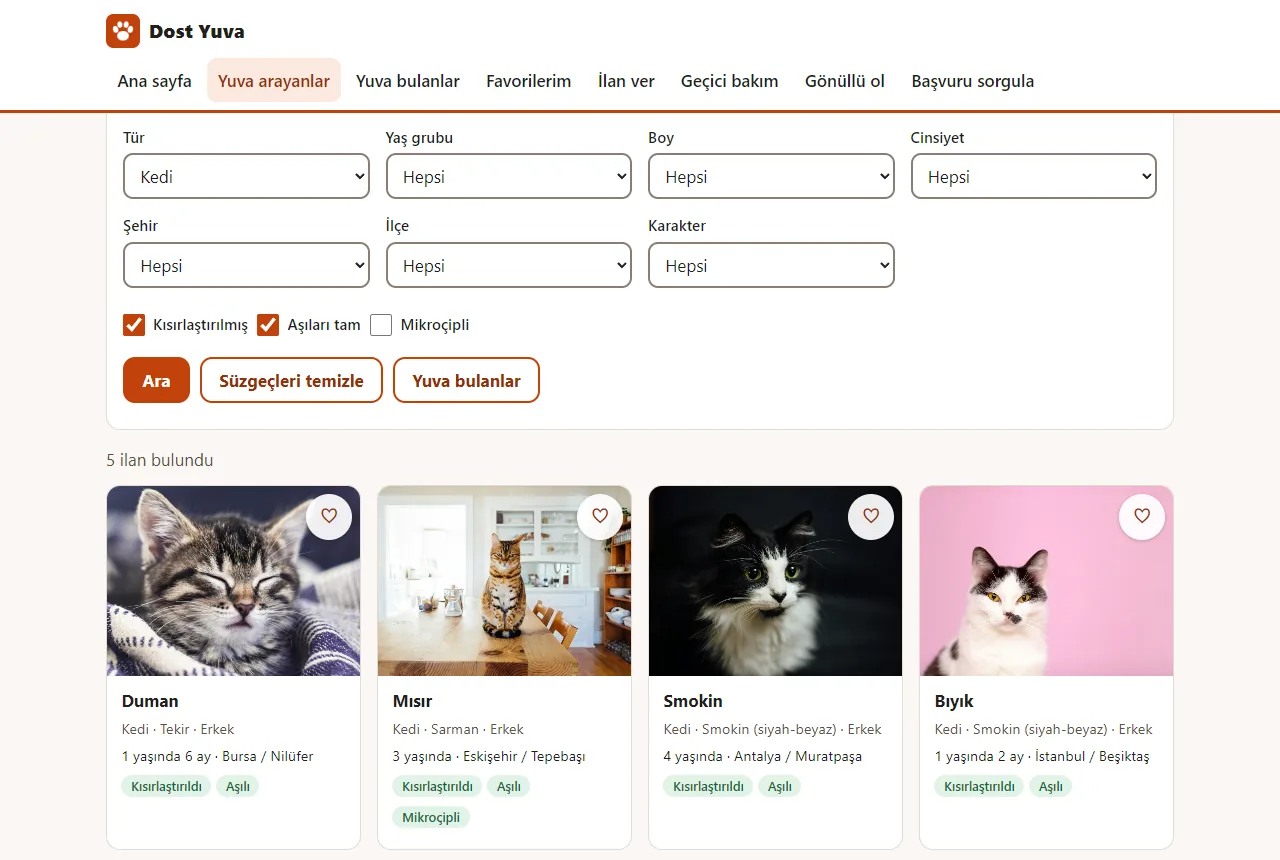
Filter the listings
Lists for species, age group, size, gender, city, district and temperament, and the “Kısırlaştırılmış”, “Aşıları tam” and “Mikroçipli” boxes (here: neutered and fully vaccinated cats).
- On screen (Turkish interface)
- “Tür / Yaş grubu / Boy / Cinsiyet / Şehir / İlçe / Karakter” — filter lists: species / age group / size / gender / city / district / temperament
- “Kısırlaştırılmış / Aşıları tam / Mikroçipli” — check boxes: neutered / vaccinations complete / microchipped
- “Ara / Süzgeçleri temizle / Yuva bulanlar” — buttons: search / clear the filters / found a home
- “5 ilan bulundu” — result count: 5 listings found
-
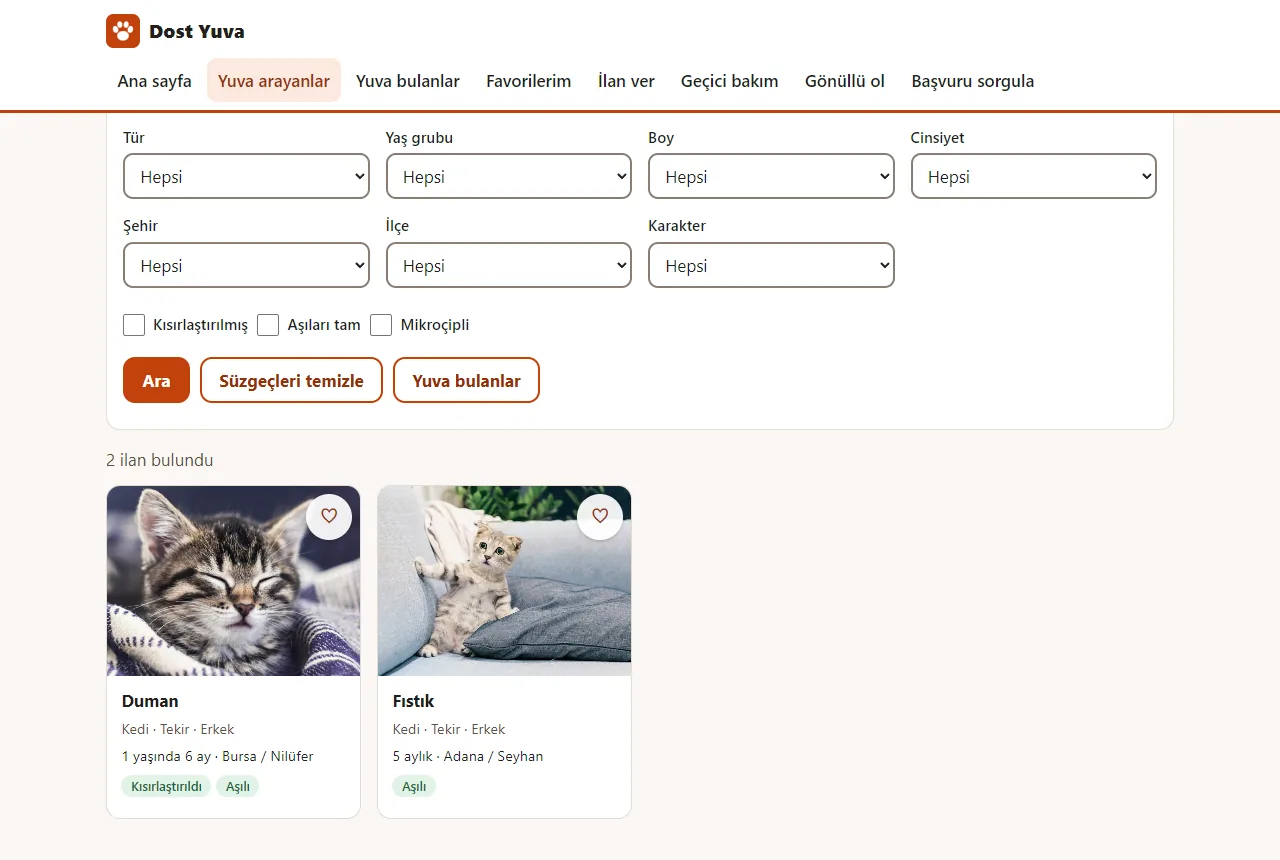
Search
Type a name, breed or city and the list narrows (here: “tekir”, tabby).
- On screen (Turkish interface)
- “Ara (ad, cins, şehir…)” — search box: name, breed, city
- “2 ilan bulundu” — result count: 2 listings found
- “Kedi · Tekir · Erkek” — on a card: species · breed · gender
- “Kısırlaştırıldı / Aşılı” — card badges: neutered / vaccinated
-
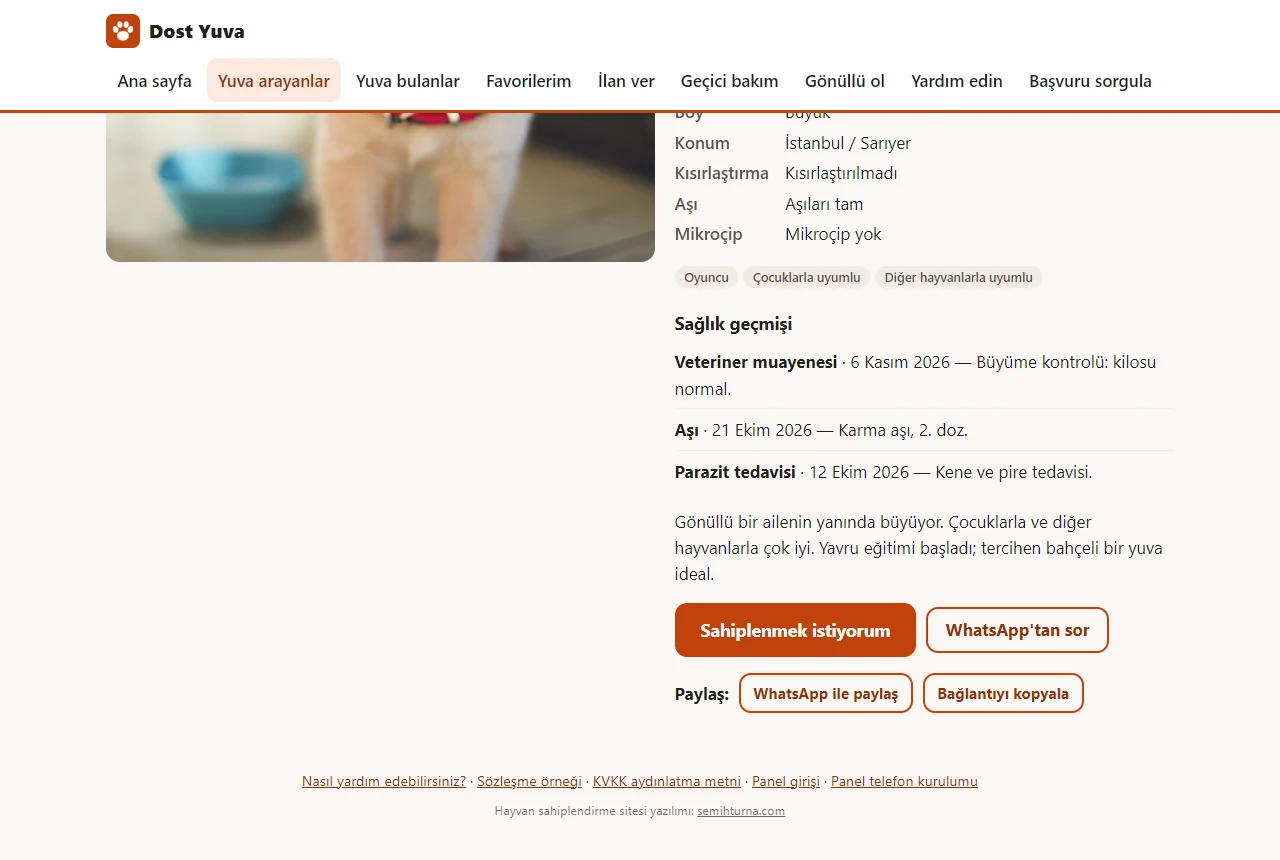
Listing page
The animal’s temperament, story and a dated health history (vaccines, parasite treatment, vet check-ups) together. The adoption application, asking on WhatsApp and sharing start here.
- On screen (Turkish interface)
- “Sağlık geçmişi” — section: health history
- “Sahiplenmek istiyorum” — primary button: I want to adopt
- “WhatsApp’tan sor / WhatsApp ile paylaş” — ask on WhatsApp / share on WhatsApp
- “Favoriye ekle” — add-to-favourites button
- “Yuva arıyor” — status badge: looking for a home
- “Kısırlaştırılmadı / Aşıları tam / Mikroçip yok” — health lines: not neutered / vaccinations complete / no microchip
-
Application form
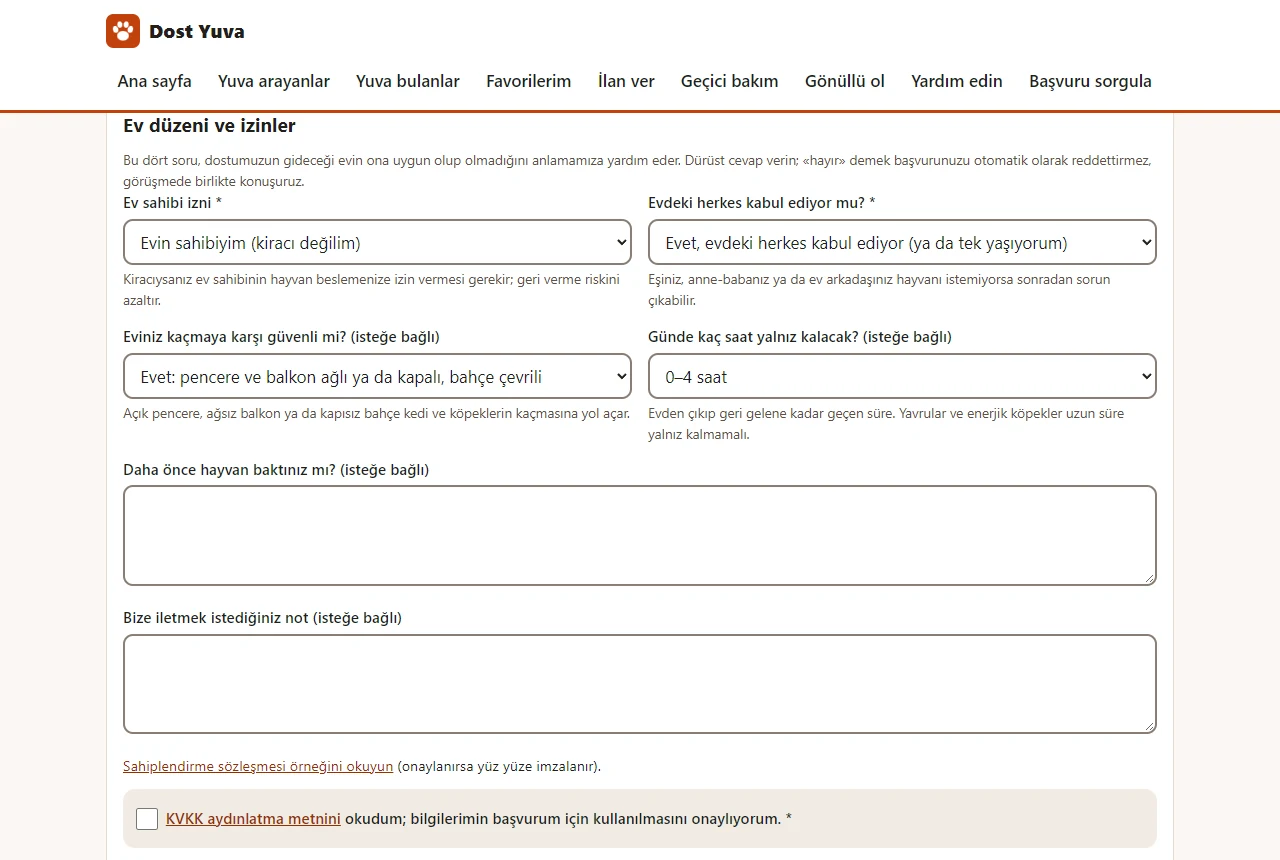
Someone who wants to adopt writes contact, housing, garden or balcony, pets and children at home; the “Ev düzeni ve izinler” (home and permissions) section asks about the landlord’s permission, whether everyone at home agrees, how escape-proof the home is and how many hours a day the animal would be alone (here with made-up details); the KVKK consent box is below the form. No real details should be entered, this is a demo.
- On screen (Turkish interface)
- “Bal için sahiplenme başvurusu” — page title: adoption application for Bal
- “Ad soyad / Telefon / E-posta (isteğe bağlı) / Yaşadığınız şehir” — form field labels: full name / phone / e-mail (optional) / city you live in
- “Konut tipi / Bahçe / balkon” — housing type / garden or balcony
- “Evde başka hayvan var mı? / Evde çocuk var mı?” — other pets at home? / children at home?
- “Ev sahibi izni / Evdeki herkes kabul ediyor mu? / Eviniz kaçmaya karşı güvenli mi? / Günde kaç saat yalnız kalacak?” — landlord’s permission / does everyone at home agree? / is your home escape-proof? / how many hours alone a day?
-
Application number
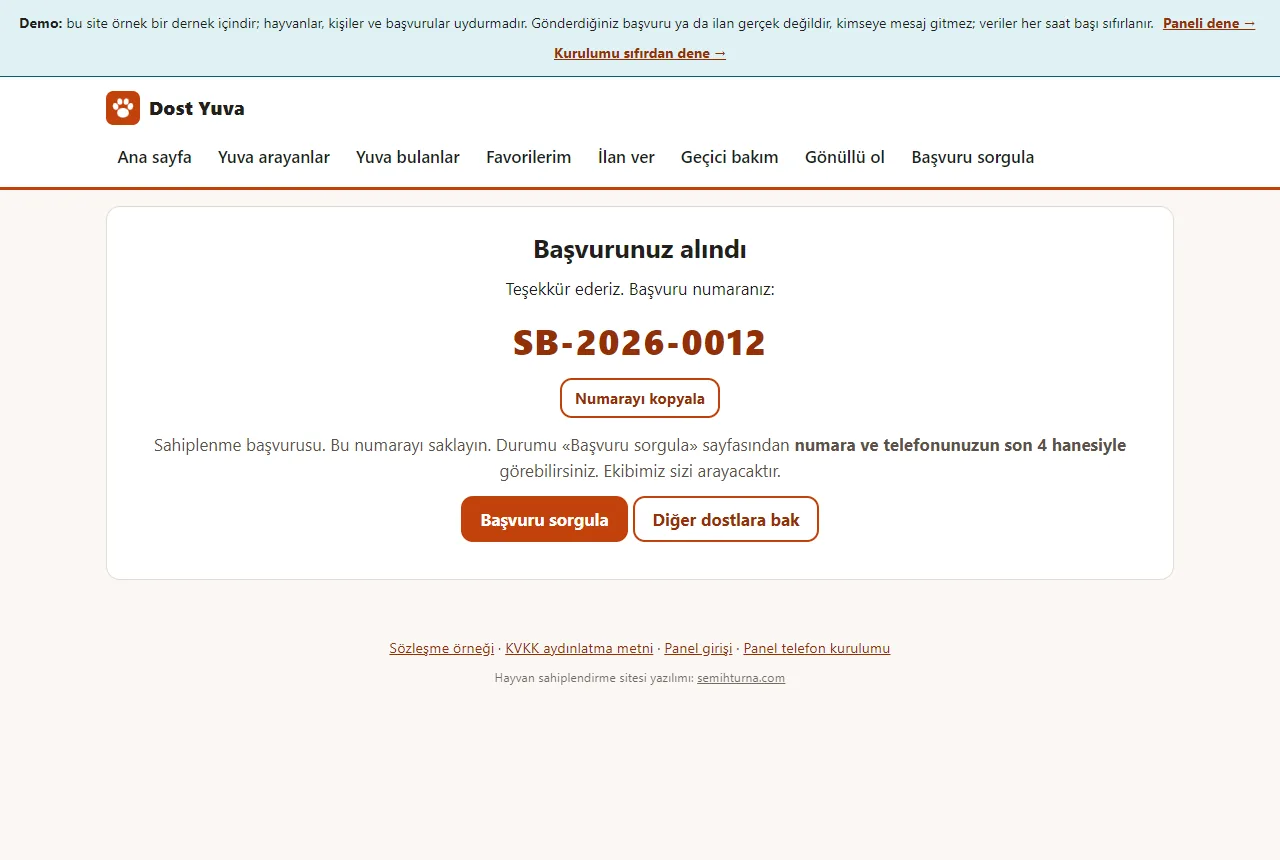
An application number is given (SB-YYYY-NNNN); the status is seen on the “Başvuru sorgula” page with the number and the last four digits of the phone. Nothing is sent to the association in the demo.
- On screen (Turkish interface)
- “Başvurunuz alındı” — confirmation title: your application was received
- “Numarayı kopyala” — copy-the-number button
- “Başvuru sorgula / Diğer dostlara bak” — buttons: check an application / see other friends
-
Visitors can post a listing too
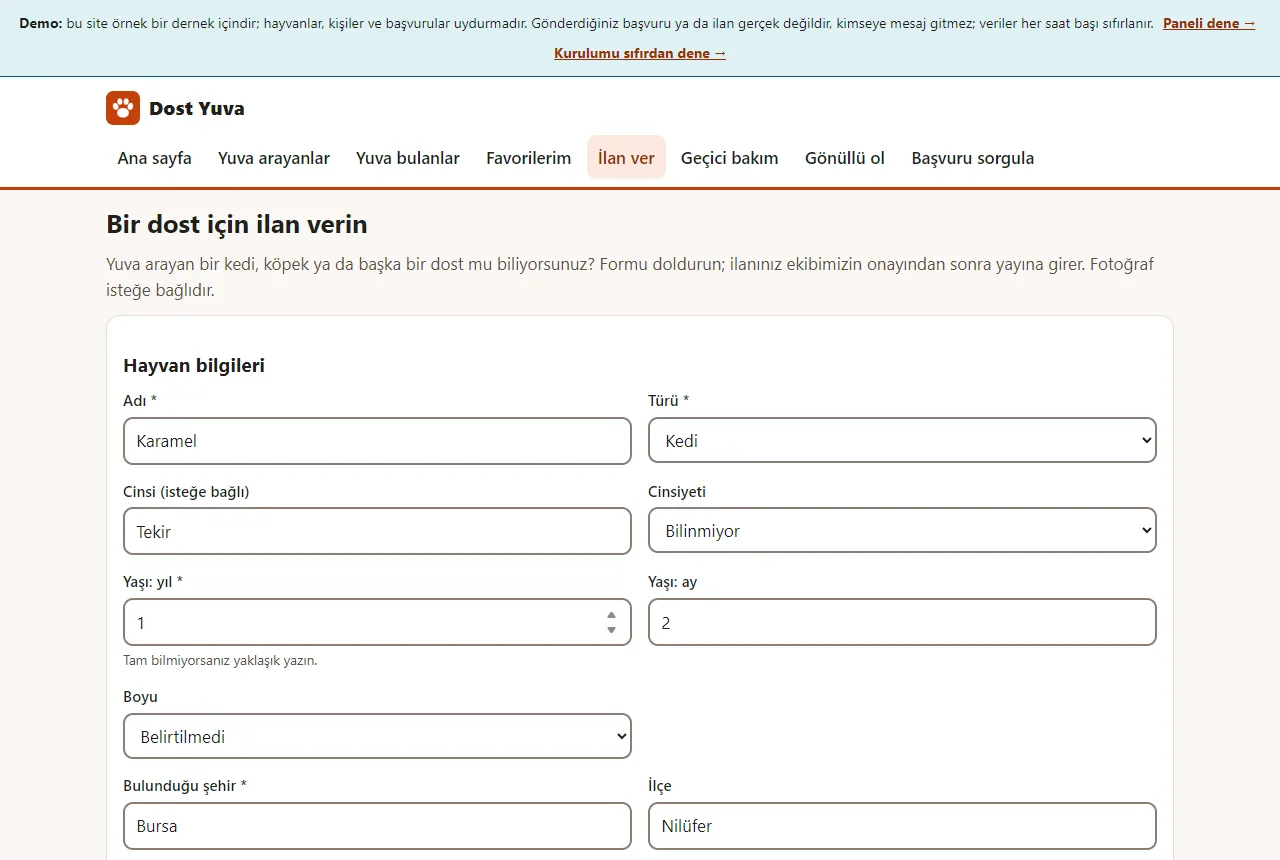
The animal’s name, species, age, city, temperament, health details and an optional photo are written, with contact details (here with made-up details).
- On screen (Turkish interface)
- “Bir dost için ilan verin” — page title: post a listing for a friend
- “Hayvan bilgileri” — section title: animal details
- “Adı / Türü / Cinsi (isteğe bağlı) / Cinsiyeti” — name / species / breed (optional) / gender
- “Yaşı: yıl / Yaşı: ay / Boyu / Bulunduğu şehir / İlçe” — age: years / age: months / size / city / district
-
The listing awaits approval
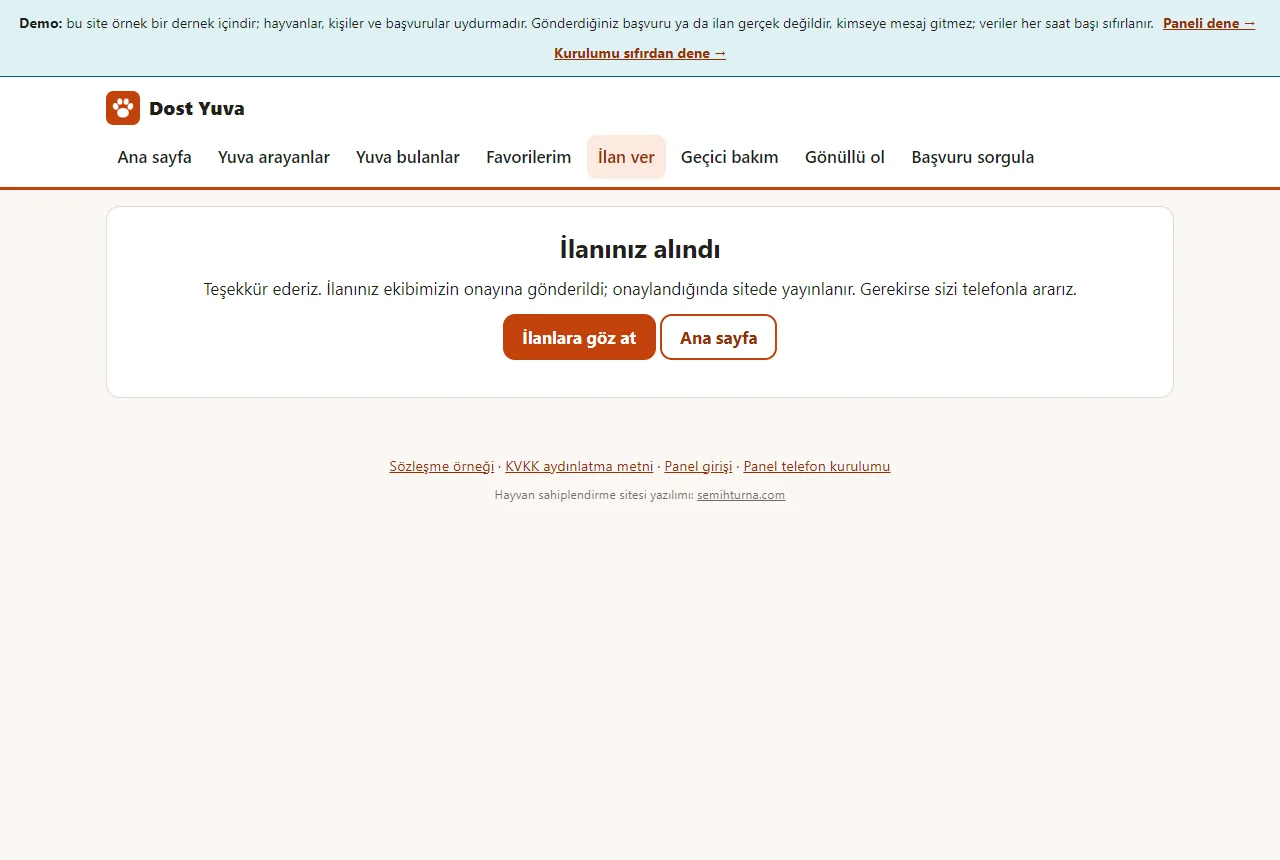
A posted listing is not published straight away; it goes to the manager for approval.
- On screen (Turkish interface)
- “İlanınız alındı” — confirmation title: your listing was received
- “İlanlara göz at / Ana sayfa” — buttons: browse the listings / home page
-
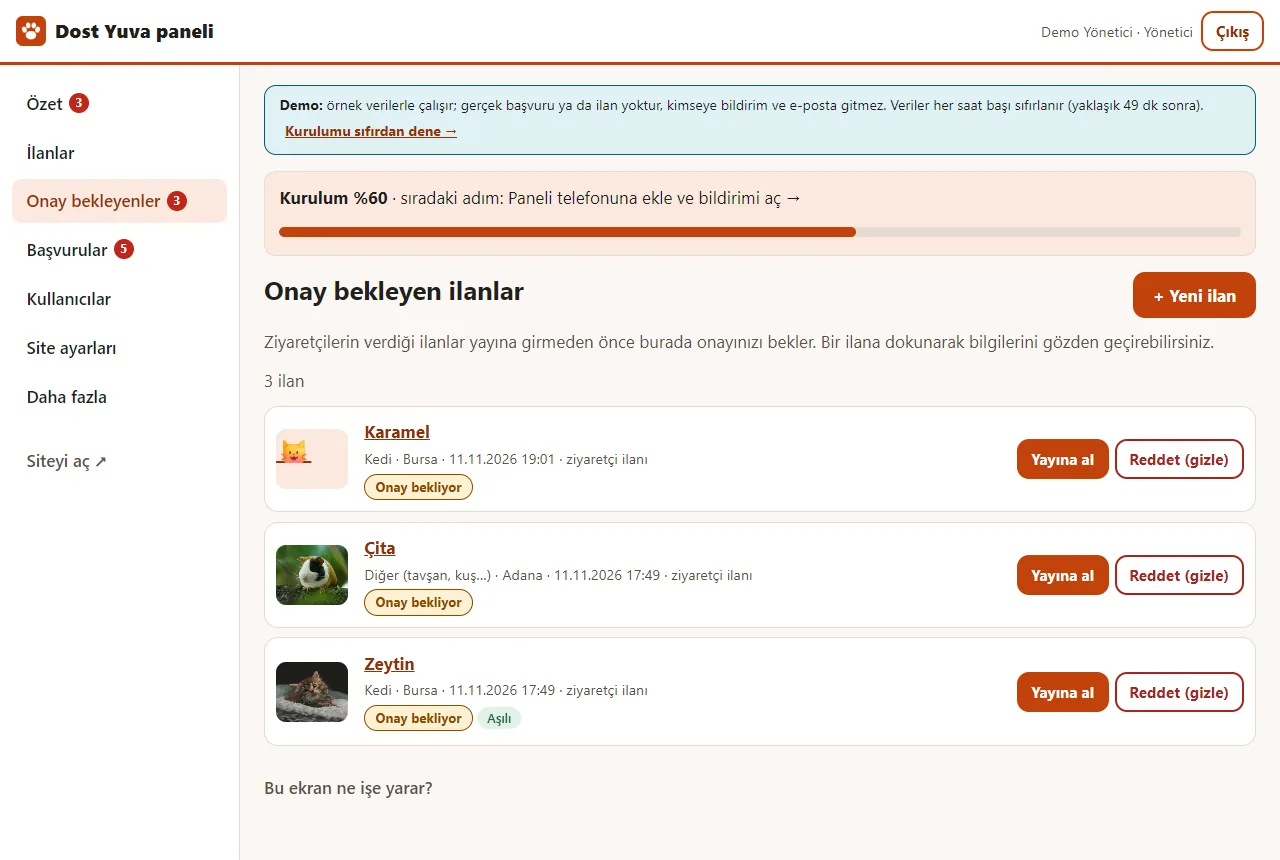
The manager approves it
In the panel, a pending listing is put live with “Yayına al” or hidden with “Reddet (gizle)”; the listings posted by visitors are collected here.
- On screen (Turkish interface)
- “Özet / İlanlar / Onay bekleyenler / Başvurular / Kullanıcılar / Site ayarları / Daha fazla” — panel menu: overview / listings / awaiting approval / applications / users / site settings / more
- “Yayına al / Reddet (gizle)” — buttons: put live / reject (hide)
- “Onay bekliyor” — badge: awaiting approval
- “+ Yeni ilan” — button: add a new listing
- “Kurulum %60 · sıradaki adım” — setup progress bar: setup 60% · next step
-
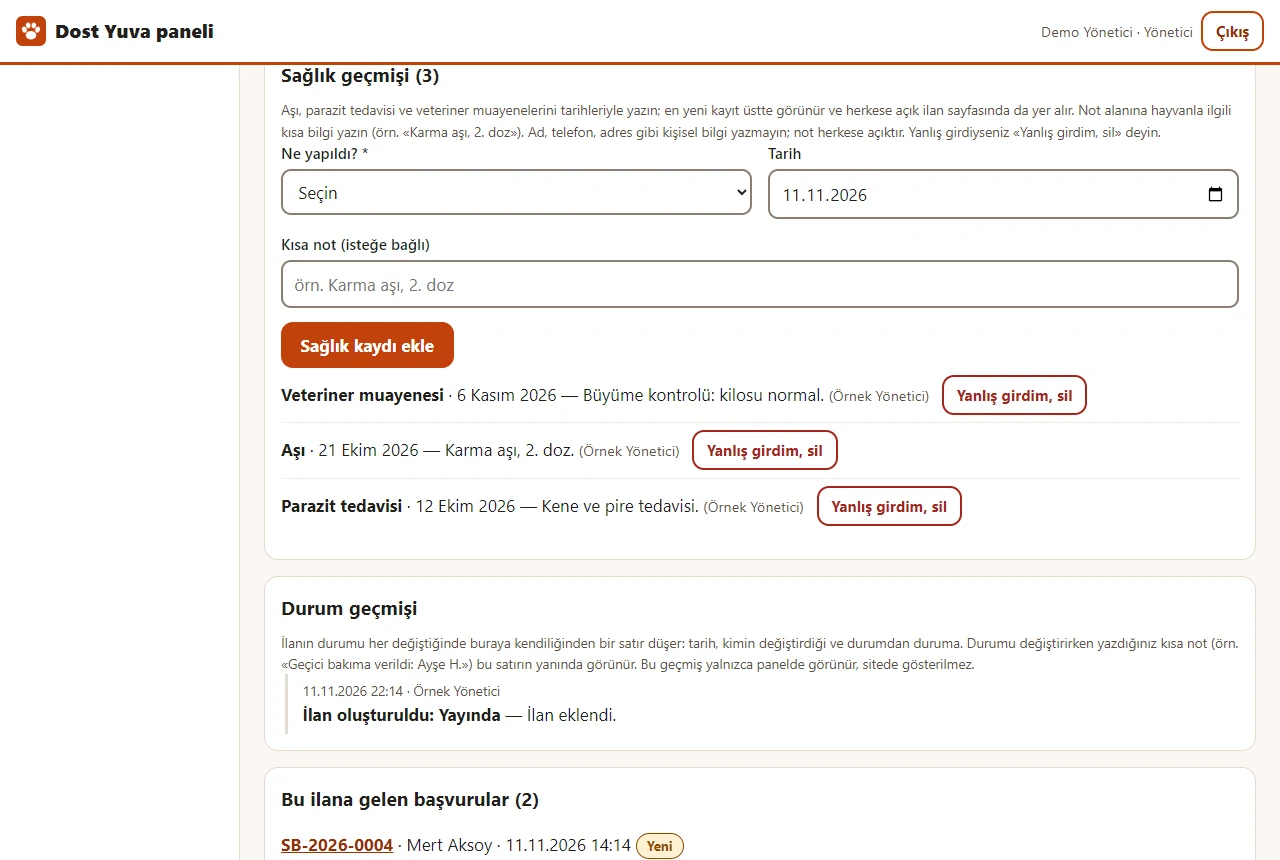
A listing’s health and status history
In the panel, on a listing’s edit page, a health entry (what was done, date, short note) is added and removed with “Yanlış girdim, sil” (I entered it wrong, delete); the entries show on the public listing page. Below it the listing’s status history (who put it into which status, and when) is kept and shown only in the panel.
- On screen (Turkish interface)
- “Sağlık geçmişi” — section: health history
- “Ne yapıldı? / Tarih / Kısa not (isteğe bağlı)” — what was done? / date / short note (optional)
- “Sağlık kaydı ekle / Yanlış girdim, sil” — buttons: add a health entry / I entered it wrong, delete
- “Durum geçmişi” — section: status history
-
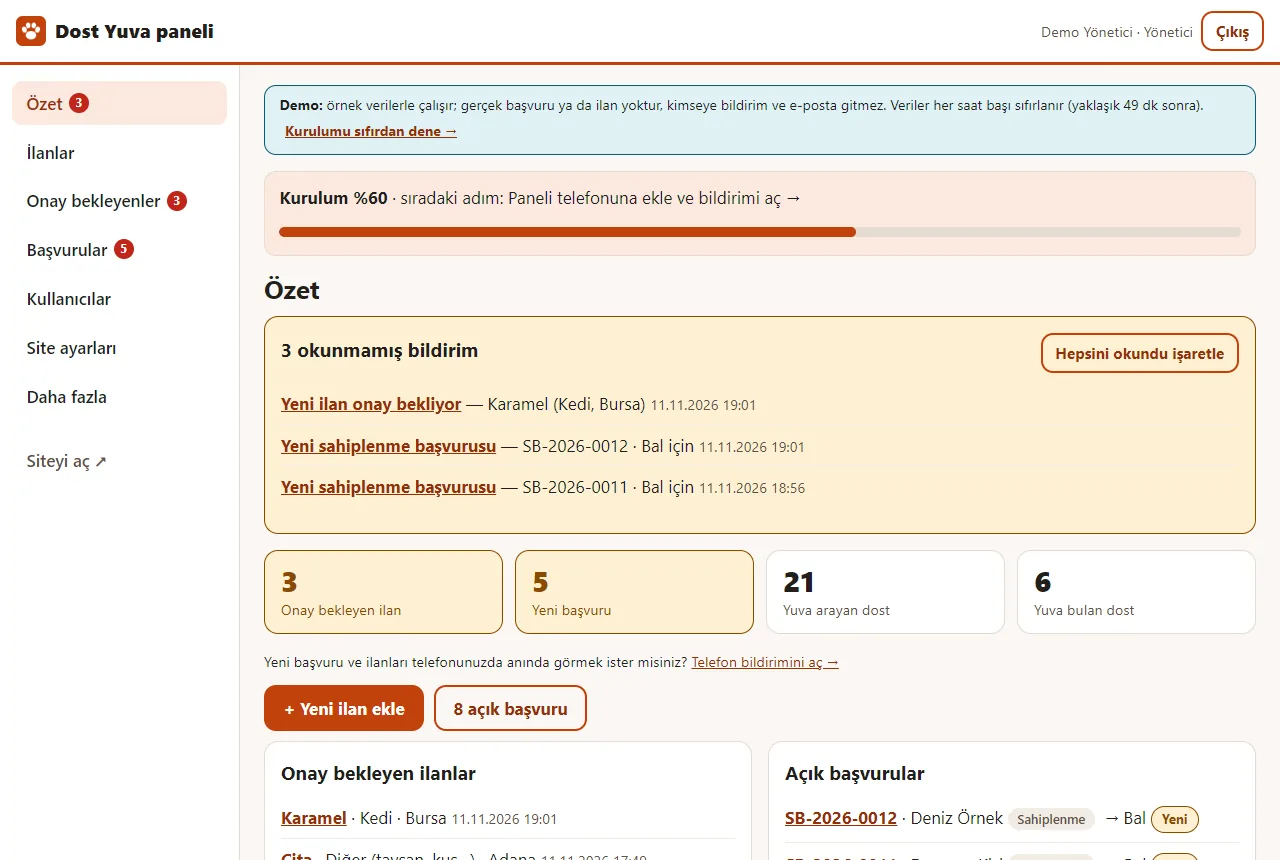
Panel overview
Unread notifications, listings awaiting approval, new applications, friends looking for a home and friends who found one, and open applications; the setup guide bar sits on top. The figures are sample data.
- On screen (Turkish interface)
- “3 okunmamış bildirim / Hepsini okundu işaretle” — 3 unread notifications / mark all as read
- “Onay bekleyen ilan / Yeni başvuru / Yuva arayan dost / Yuva bulan dost” — tiles: listings awaiting approval / new applications / friends looking for a home / friends who found a home
- “+ Yeni ilan ekle / açık başvuru” — add a new listing / open applications
- “Telefon bildirimini aç →” — link: turn on the phone notification
-
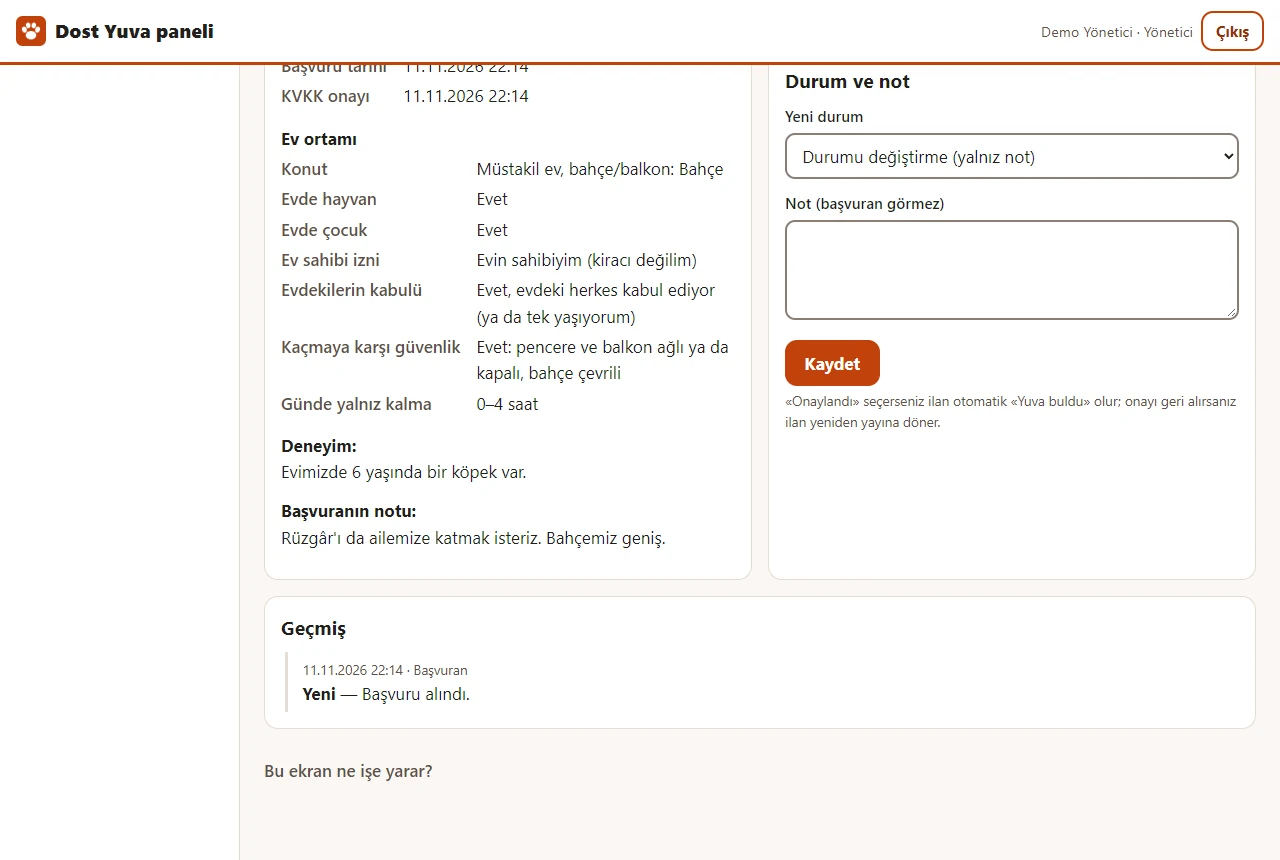
Application details
The applicant’s details, the “Ev ortamı” (home setting) answers (the landlord’s permission, whether everyone at home agrees, how escape-proof the home is, the hours alone) and the friend they asked for are shown; the status is changed and a note only the manager sees is written. “Sözleşmeyi yazdır” opens the adoption agreement on a print page. Nothing is sent in the demo.
- On screen (Turkish interface)
- “Başvuru SB-2026-0001” — page title: application SB-2026-0001
- “Sahiplenme / Yeni” — badges: adoption application / new
- “İstenen dost” — the friend they asked for
- “Sözleşmeyi yazdır” — button: print the agreement
- “Durum ve not / Yeni durum / Not (başvuran görmez)” — status and note / new status / note (the applicant does not see it)
-
Site settings
The site name, main colour, WhatsApp phone, notification e-mail, home page intro text and the KVKK text are changed in the panel; the association’s bank (IBAN) details and a needs list are written there too (here with sample details). Once saved they show on the site.
- On screen (Turkish interface)
- “Site adı / Ana renk” — site name / main colour
- “WhatsApp / iletişim telefonu” — WhatsApp / contact phone
- “Bildirim e-posta adresi (isteğe bağlı)” — notification e-mail address (optional)
- “Ana sayfa tanıtım metni / KVKK aydınlatma metni” — home page intro text / KVKK (data-protection) notice
- “Bağış bilgisi / Bağış açıklaması / İhtiyaç listesi” — donation details / donation note / needs list
-
How can you help?
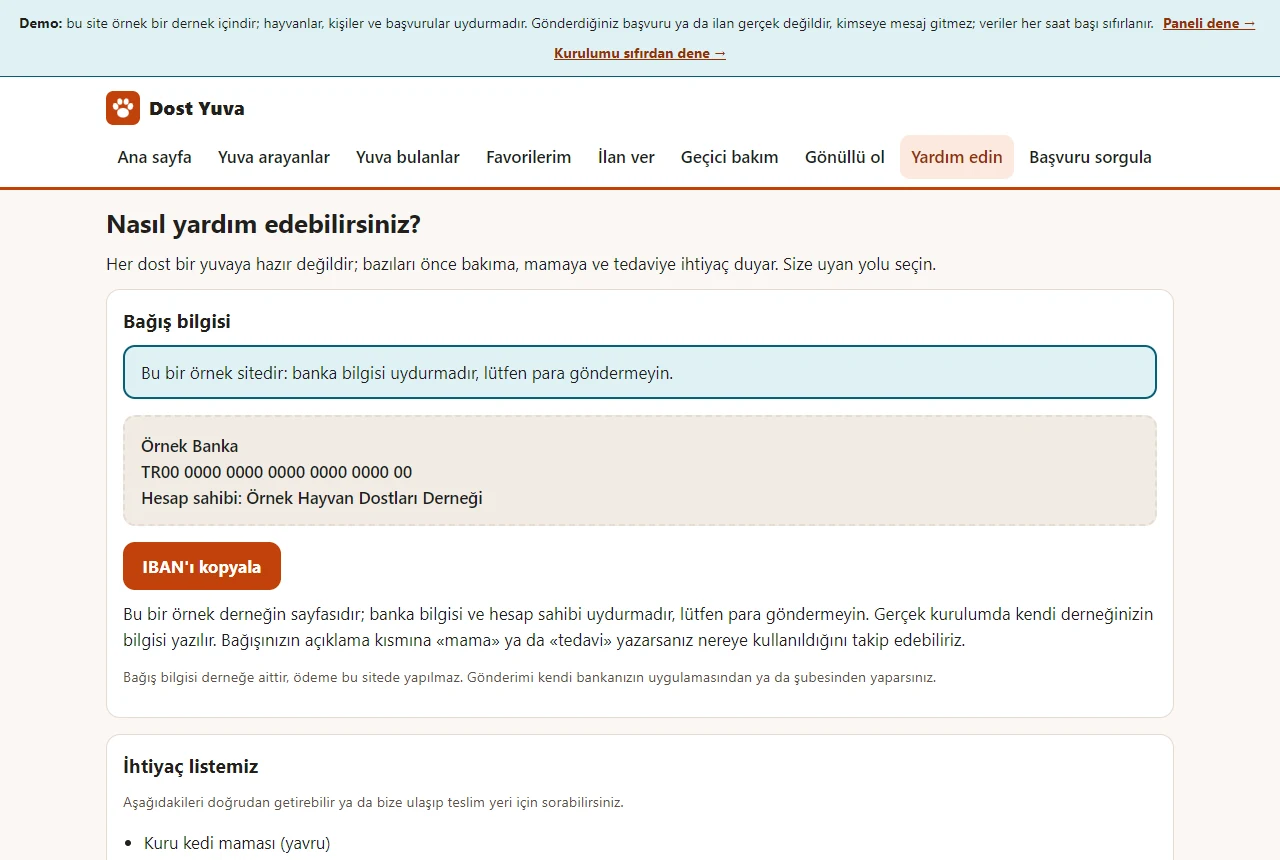
The public page shows the association’s bank details, a “IBAN’ı kopyala” (copy the IBAN) button and a needs list (food, litter, blankets and so on). No payment is taken on the site, a donation goes straight to the bank; the IBAN and the association here are samples.
- On screen (Turkish interface)
- “Nasıl yardım edebilirsiniz?” — page title: how can you help?
- “Bağış bilgisi” — section: donation details
- “IBAN’ı kopyala” — button: copy the IBAN
- “İhtiyaç listemiz” — section: our needs list
-
The demo sign-in box
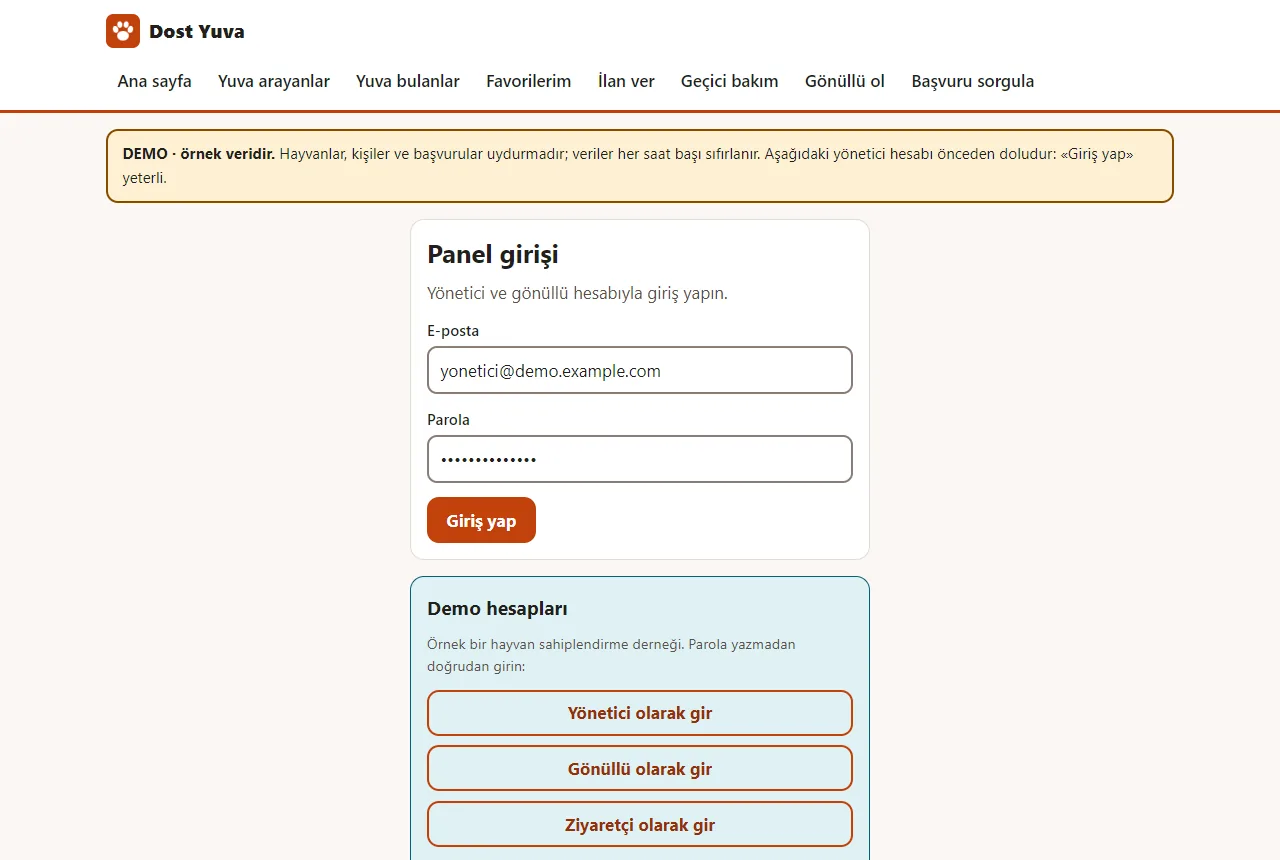
In the demo the manager account is pre-filled; the “Yönetici olarak gir”, “Gönüllü olarak gir” and “Ziyaretçi olarak gir” buttons in the “Demo hesapları” box sign in directly without a password. The box is shown only in the demo.
- On screen (Turkish interface)
- “Panel girişi” — page title: panel sign-in
- “E-posta / Parola / Giriş yap” — e-mail / password / sign in
- “Demo hesapları” — box title: demo accounts
- “Yönetici olarak gir / Gönüllü olarak gir / Ziyaretçi olarak gir” — sign in as manager / as volunteer / as visitor
- What do they see at the end?
- The visitor gets an application number and checks the status with it. The association follows the application, with its status, in the panel; a listing posted by a visitor goes live once the manager presses “Yayına al” (put live).
- What is it good for?
- The association follows applications in one panel instead of hunting through e-mail and messages, and the listings stay tidy and searchable.
Everything that is not included, and all limits
- Not delivered to a client and not used by a real association or platform; it has been run only on my own demo hosting account (PHP 8.3). The delivery package is ready and checked with SHA-256 (details: the “Delivery and sales status” section).
- The live demo is public, runs on sample data and resets at the start of every hour; no e-mail or notification leaves it, and user and password actions are locked.
- There is no card donation or payment, no SMS or WhatsApp automation, no e-signature, no map or distance search, no automatic posting to other sites, no microchip registry network, no automatic matching and no membership system; a visitor opens no account and follows an application with its number.
- E-mail goes through the hosting’s mail() function and its arrival is not certain; the phone notification is a quick heads-up and its delivery is not certain either.
- Add to Home Screen on a real phone, Safari and Firefox, real notification and e-mail delivery and other hosting have not been tried.
- Listings, people and numbers are sample data, and photos are from Unsplash. The interface is in Turkish; there is no English version.
Delivery and sales status
How does it work?
You try the demo and tell us about your association or group, and we send you a quote. We install it and we host it. The yearly price includes installation, hosting, data transfer and support; it is for a single association or group and there is no extra charge by number of listings or applications.
Price
The yearly list price is 1,500 TL. Installation, one year of hosting, data transfer, bug fixes and written usage support are included; it is for a single association or group and there is no extra charge by number of listings or applications. Card donations or payment, automatic SMS or WhatsApp sending, e-signature, a map or distance search, automatic posting to other sites, a connection to a microchip registry network, automatic matching and a membership system are not included; e-mail goes through the hosting’s mail() function and its arrival is not certain.
Possible delivery options
Other delivery options
What the package contains
- The server application 0.4.0: a public listing site, application forms and a manager and volunteer panel; the data is in a single SQLite file, no separate database server is needed
- A setup wizard (install.php), a step-by-step setup guide, a help box on every screen; it installs on a phone or computer
- Optional sample data: 30 listings, 10 applications and 33 photos (with a source note)
- The installation and user guides, the version history and a zip checked with a SHA-256 hash (129 files)
- Not included: card donations or payment, automatic SMS and WhatsApp messages, e-signature, map and distance search, automatic posting to other sites, a microchip registry network, automatic matching, a membership system; e-mail goes through the hosting’s mail() function and its arrival is not certain
Requirements and version history
What you do
- You provide the hosting (PHP 8.1 or newer) and the domain; with the setup wizard you create the site name and the manager account.
- You prepare the listings, photos, the agreement and the KVKK text for your association; the ready texts are examples.
- You download the backup from the panel regularly and keep it off the server.
Installation requirements
- PHP 8.1 or newer; pdo_sqlite and mbstring are required; gd, openssl with curl and zip are recommended (without them photo processing, the phone notification and a backup with photos do not work or are limited). No database server is needed.
- Apache or LiteSpeed (it uses .htaccess; nginx rules are in the guide), HTTPS, PHP upload_max_filesize of at least 6M, and writable data and uploads folders.
- It has been run only on PHP 8.3 and on my own demo hosting account; the .htaccess protection working on real Apache or LiteSpeed has not been tried with this package separately.
Release notes
- Summarised from the version history; no version has been delivered to a client. The live demo runs version 0.4.0; the delivery package is 0.4.0 too. The earlier browser demo is no longer used on this product page.
- 0.4.0 (11 November 2026): home questions on the adoption form (the landlord’s permission, whether everyone at home agrees, how escape-proof the home is, hours alone a day) and “Ev ortamı” (home setting) in the application details; a dated health history for each animal (shown on the public listing page) and a status history shown only in the panel; a public “Nasıl yardım edebilirsiniz?” (how can you help?) page (the association’s IBAN, a copy button, a needs list; no payment is taken); the database schema upgrades by itself.
- 0.3.0 (11 November 2026): a guidance pack (a setup guide with a progress bar, help boxes, and in the demo “Boş siteyle yeniden başla” – start with an empty site – and “Örnek veriyi geri yükle” – restore the sample data); a ready WhatsApp message, a copy-the-link button and an A4 poster with a QR code for the public address; a demo sign-in box (manager, volunteer, visitor); it installs on a phone or computer (manifest, service worker, a setup page without sign-in, an add-to-home-screen box); a “semihturna.com” maker line on the public pages; a short menu and “Daha fazla” (more); a volunteer never sees the manager areas.
- 0.2.0 (11 November 2026): foster and volunteer applications (the same number and KVKK consent, a type filter in the panel); a microchipped filter and badges; an adoption agreement template and printing; downloading listings and applications as CSV; importing a listing list from Excel or CSV (a preview, duplicate and wrong rows, taking it back); an unread-notification badge in the panel, a free phone notification (Web Push) and an e-mail; a backup download from the panel and a command-line backup; the database schema upgrades by itself.
- 0.1.0 (11 November 2026): first version; a versioned database schema, a setup wizard, sign-in and roles (manager, volunteer), listing management and safe photo upload, a public filtered list and listing page (permanent address, share on WhatsApp, favourites), the adoption application and a lookup by number, a visitor’s listing and an approval queue, application management, site settings and an activity log; sample data: 30 listings, 10 applications.
- Tests: all local tests passed (0.4.0: 2745 of 2745 checks); the 0.3.0 package was also tried after being unpacked in a clean folder, with the installation and the main flows (56 of 56 checks).
Decisions not made yet
- Rights to use, modify, transfer and receive the source code: to be set in a written agreement; not decided yet.
- How the terms of use of the example photos (Unsplash) will be stated in the sales package.
- The price and payment method have not been decided yet.
There is no cart, customer account or online payment on this site for now. Reach out by phone, WhatsApp or the form; in a first conversation your need and the software’s fit are reviewed. The form does not create an order, a contract or a payment.