Jewelers and gold shopsDemo with sample data
Jeweler Stock, Ledger and Scrap Tracking: screen-by-screen guide
The full version of the short description on the product page: every feature, how each screen is used step by step, all limits and the delivery details.
All features
The flows below were run in the app’s version with sample data (0.1.0). The screens were taken on 14 November 2026 from the live demo of the same version; the shop is “Örnek Kuyumcu (demo)” (sample), and its ledger accounts, pieces, prices, phone numbers, requests and amounts are made up. The application does not fetch the day’s price from the internet, does not issue invoices and sends customers no automatic messages.
- Installs on a phone or computer; a free phone notification goes to the shop owner for a new showcase request (no SMS)
- The day’s price: the pure-gold buy and sell price is written by hand each morning (quarter, half, full, Ata, silver, dollar and euro are optional); the screens warn if the price was not updated that day
- Piece card: carat and grams, labour (per gram, a percentage or a fixed amount), stone and a fixed amount; the sale price is worked out on its own from the day’s pure-gold price; the piece’s state (in stock, sold, on consignment, in repair, scrap) shows on the card; a barcode label is printed
- Counter sale: a piece is picked, the payment is split into cash, card, scrap the customer brings (grams and carat, with its pure-gold equivalent) and the rest on credit; a discount can be written and a receipt is printed; a wrong sale is cancelled, the record is not deleted
- Ledger account: each account carries two balances, TL and pure-gold grams; a positive balance is what the customer owes you, a negative one what you owe them (a scrap price, gold on consignment); payments in and out are written in TL or in grams; there is a debtors list and a ready WhatsApp reminder
- Scrap: buying scrap from a customer (grams, carat, pure-gold equivalent), selling scrap and the scrap stock followed in pure-gold grams
- Consignment and repairs: gold (grams and fineness) or a piece a customer leaves with the shop (consignment) and a repair slip (received, in progress, ready, delivered) are followed; an overdue job is marked; the fee is taken on delivery in cash, by transfer or on credit
- Cash and end of day: cash and gram movements are in the cash book, at the end of the day the counted cash is set against the expected amount; a Reports screen gives the chosen period’s sales, profit and scrap summary and the cash book downloads as CSV
- Sales commission: worked out from the pieces a sales assistant sold at a rate; the assistant sees their own commission
- Sign-in-free showcase page: the day’s prices and the pieces you marked “add to the page” are shown (the code, cost, stock and ledger data never appear); a customer says “fiyat sor” (ask the price) or “rezerve ettir” (reserve it); in the request list “WhatsApp’tan dön” (reply on WhatsApp) opens a ready message to the customer’s number with the current price; a hidden field and a limit of five requests an hour guard against fake requests; a QR A4 poster is printed
- Importing the piece and ledger lists from Excel/CSV: a file or a paste, a sample CSV, columns recognised from their headings, a preview before saving, a duplicate check and undoing the last import; nobody is sent a message
- Roles: owner, sales assistant, cashier and showcase manager; a role without access never sees that page, button or card, and the server refuses an address typed by hand
- Today screen and quick setup: the day’s price, today’s sales, cash, the showcase, scrap stock and waiting requests on one screen; a nine-step setup guide, a progress bar and a closed “Bu ekran ne işe yarar?” (what is this screen for) box on every screen
- Backup and CSV export; a 15-day trial install; in the demo a “Demo hesapları” (demo accounts) box, “Boş siteyle yeniden başla” (start again with an empty site) and “Örnek veriyi geri yükle” (restore the sample data)
Screen by screen: how it is used
The interface in these screens is Turkish; only the captions and explanations on this page are in English. The screens were taken on 14 November 2026 from the live demo of version 0.1.0 of the app. The shop (“Örnek Kuyumcu (demo)”), ledger accounts, pieces, prices, phone numbers, requests and amounts are made up.
- Who uses it?
- A single-shop jeweler, the sales assistant who sells at the counter, the cashier who closes the till and the customer who asks a price.
- Where do they start?
- In the morning the pure-gold price is written; the pieces are recorded with their carat, grams and labour and their sale prices are worked out from that price. A piece is picked, the payment is split into cash, card, scrap and credit, and a receipt is printed. A customer who asks a price leaves a request from the sign-in-free showcase page.
What do they do on screen? Step by step
-
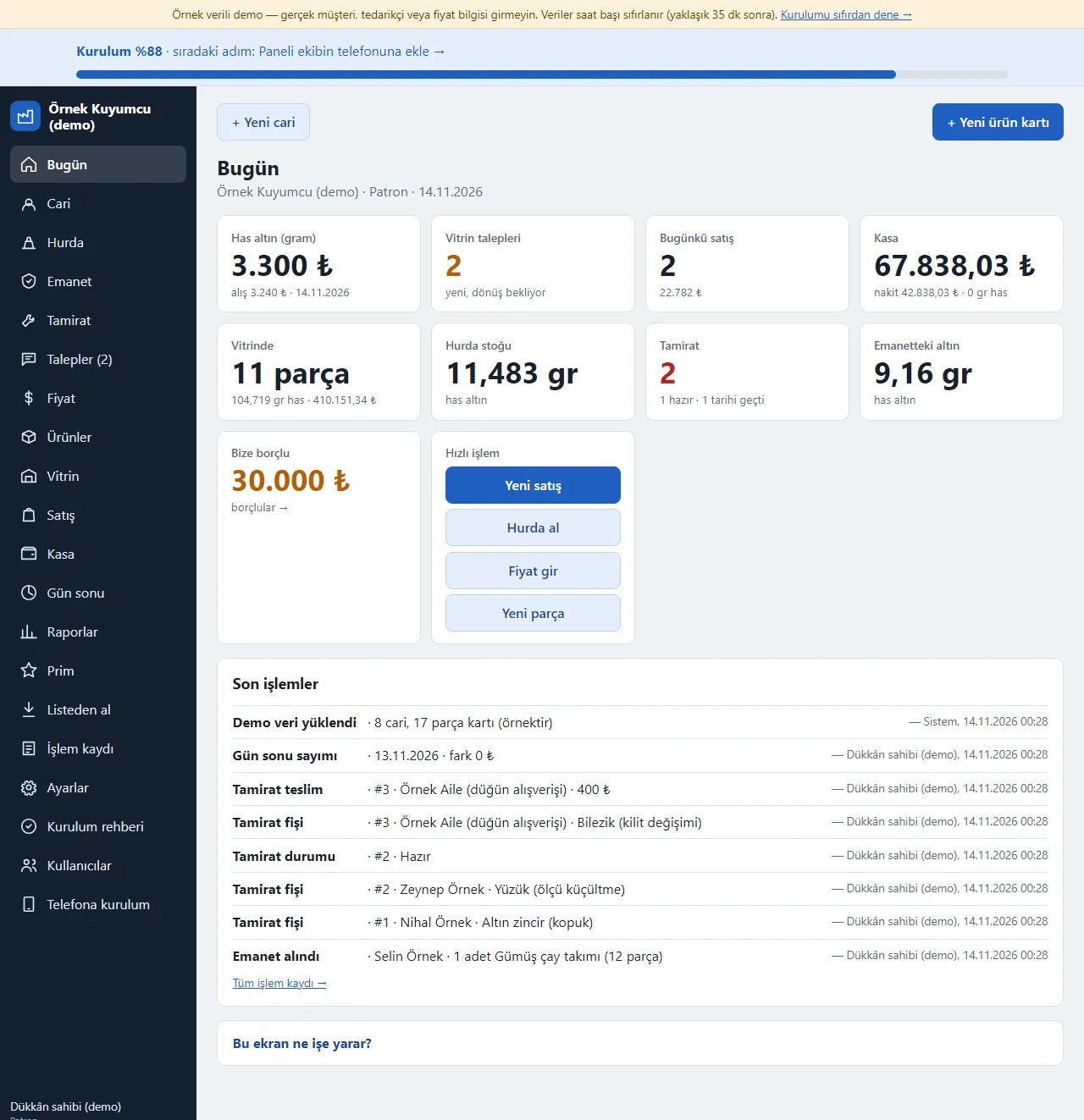
0.1.0 · 14 November 2026 Today screen
The day’s pure-gold price, waiting showcase requests, today’s number and amount of sales, the cash, the number of pieces in the showcase with their pure-gold equivalent, the scrap stock, repairs in progress and ready, gold on consignment and the total owed to us show as tappable boxes. The “Hızlı işlem” (quick actions) box has Yeni satış, Hurda al, Fiyat gir and Yeni parça; the latest actions are listed below. The setup percentage and the next step sit at the top.
- On screen (Turkish interface)
- “Hızlı işlem” — quick actions
- “Yeni satış” — new sale
- “Hurda al” — buy scrap
- “Fiyat gir” — enter the price
- “Yeni parça” — new piece
- “Bize borçlu” — owes us
-
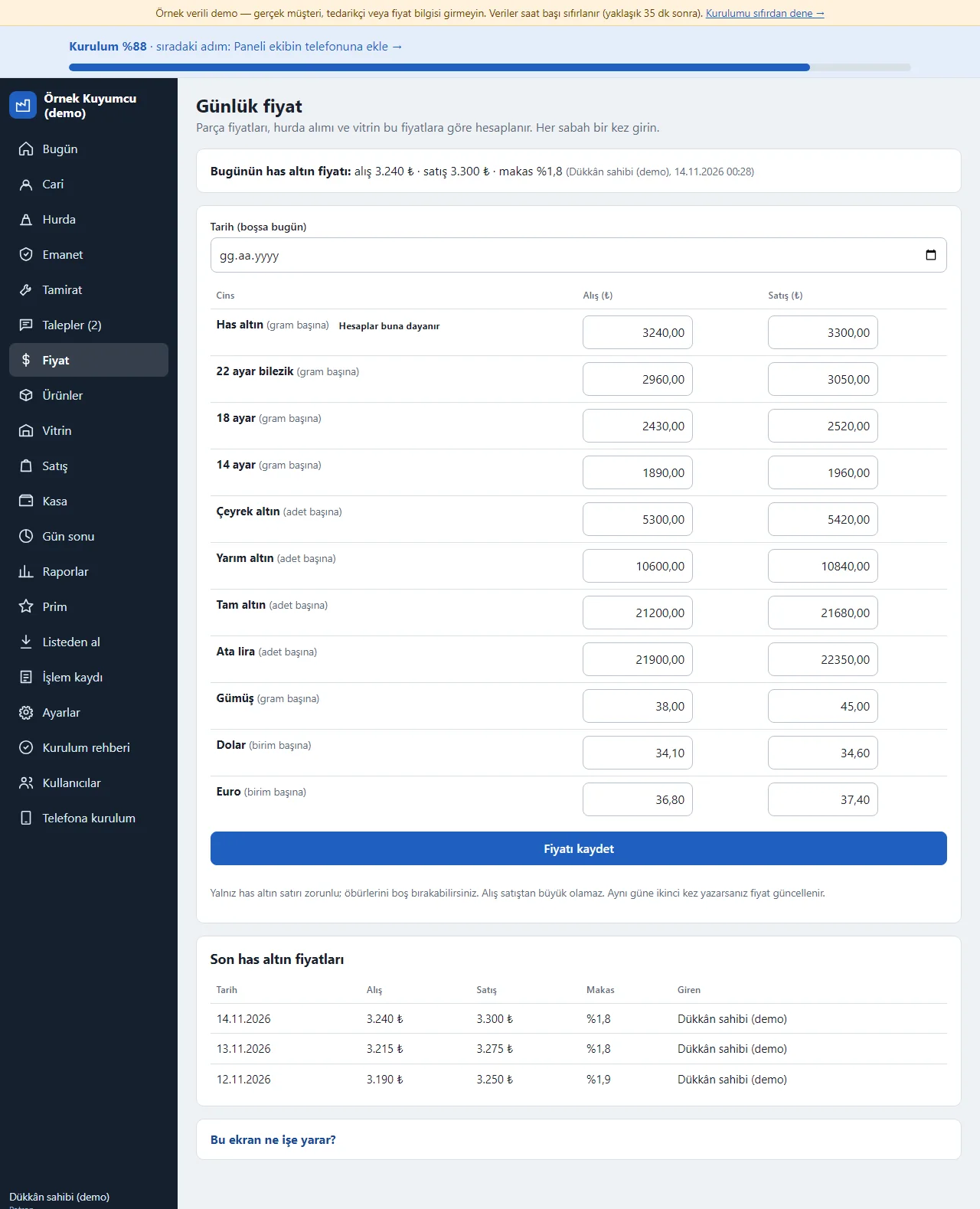
0.1.0 · 14 November 2026 The day’s price
Every morning the pure-gold buy and sell price is written; the quarter, half, full, Ata, silver, dollar and euro rows are optional. The screens warn if the price was not updated that day. Piece prices, scrap buying and the customer page are worked out from this price; no price is fetched from the internet automatically. The price history (date, buy, sell, spread and who entered it) sits below.
- On screen (Turkish interface)
- “Günlük fiyat” — daily price
- “Has altın” — pure gold
- “Alış” — buy
- “Satış” — sell
- “Makas” — spread
-
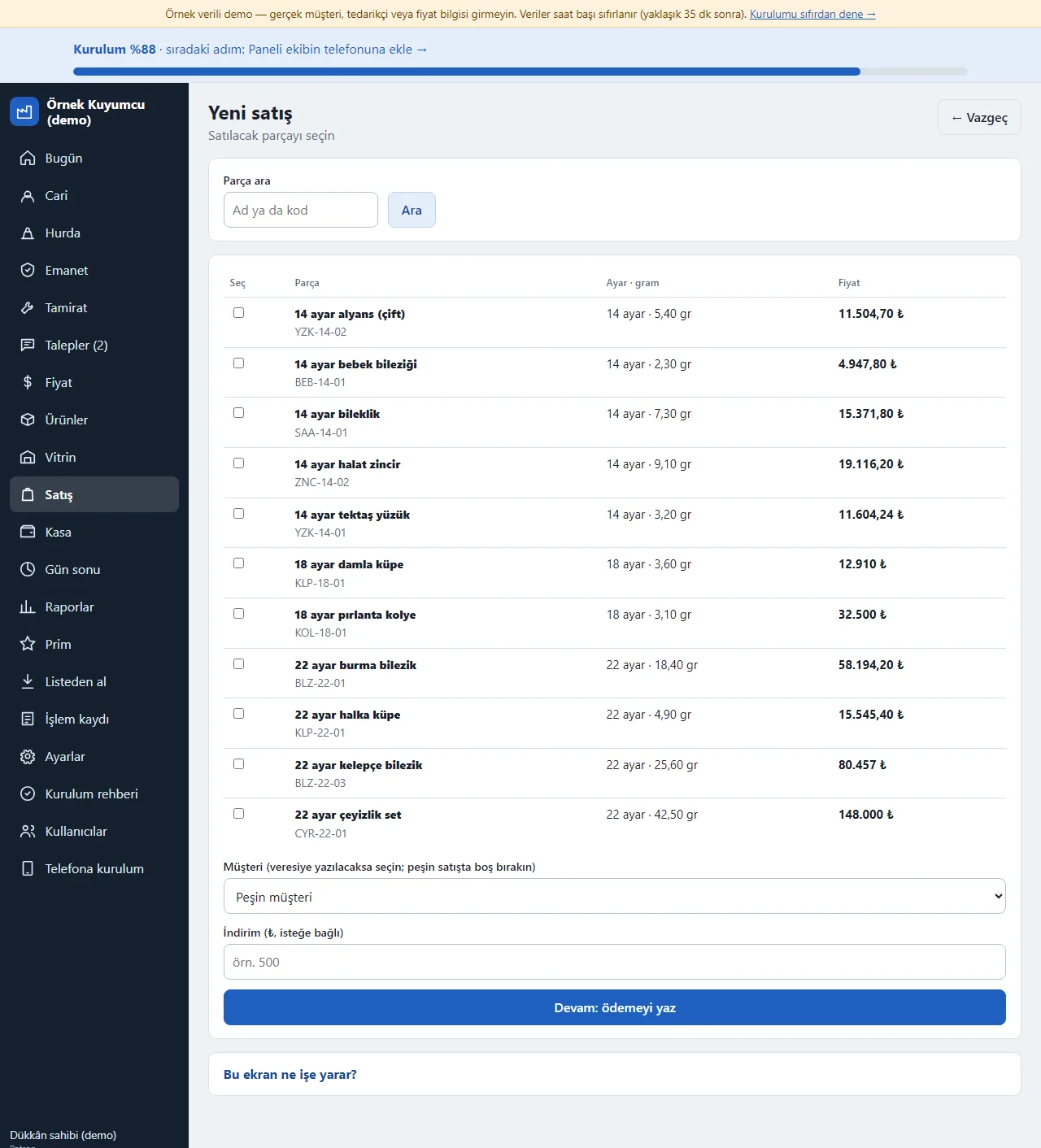
0.1.0 · 14 November 2026 New sale: picking pieces
The piece to sell is searched by name or code; the list shows its carat, grams and the sale price worked out from the day’s price, and several pieces can be picked. A piece that is sold, on consignment or in repair does not appear in the list. “Devam: ödemeyi yaz” moves on to the payment screen.
- On screen (Turkish interface)
- “Yeni satış” — new sale
- “Parça ara” — search for a piece
- “Devam: ödemeyi yaz” — next: write the payment
-
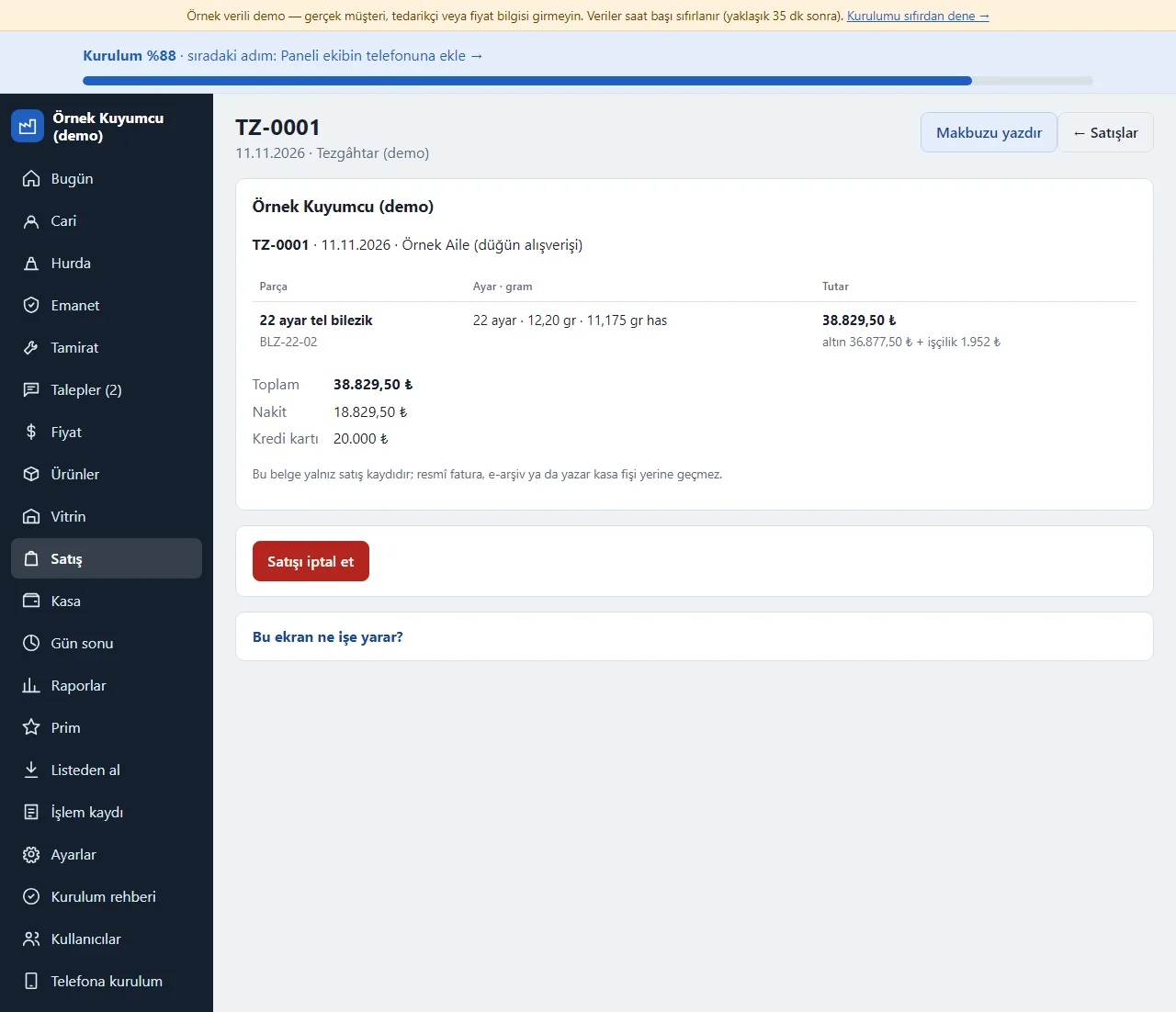
0.1.0 · 14 November 2026 Receipt
When the sale is saved the receipt opens: the sale number, date, customer, the pieces (code, carat, grams, pure-gold equivalent; the gold and labour amounts written apart), the total and the payments (cash, credit card, scrap offset, remaining credit) on separate lines. “Makbuzu yazdır” (print the receipt) sends it to paper. The receipt is only a record of the sale; it does not replace an official invoice, e-archive or cash-register slip. The owner or cashier cancels a wrong sale with “Satışı iptal et” (cancel the sale): the pieces go back to the showcase, the till and the credit are reversed; the record is not deleted.
- On screen (Turkish interface)
- “Makbuzu yazdır” — print the receipt
- “Satışı iptal et” — cancel the sale
- “Nakit” — cash
- “Kredi kartı” — credit card
-
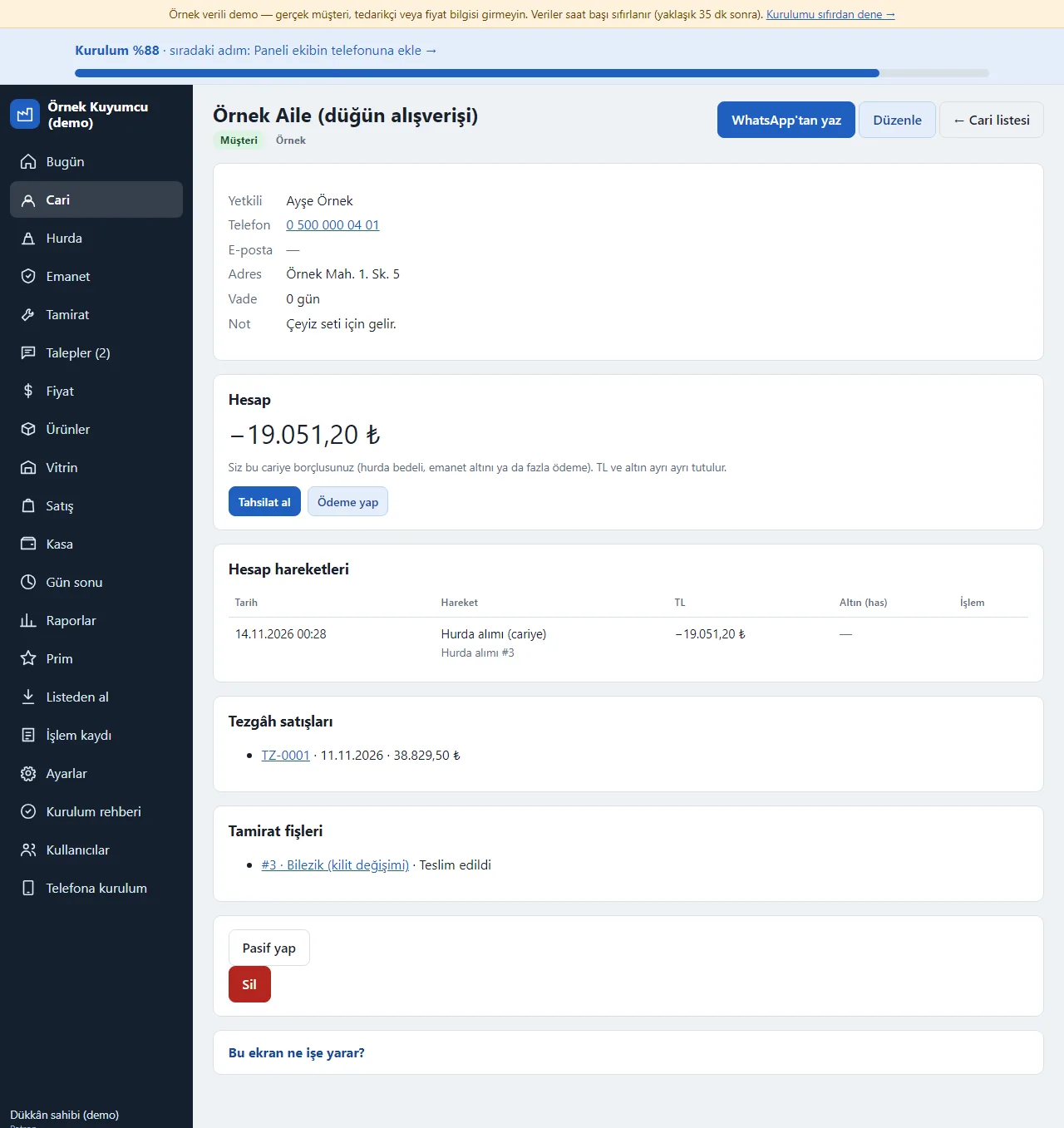
0.1.0 · 14 November 2026 Ledger account
Each account has two balances: TL and pure-gold grams. Sales, payments, scrap offsets and consignment movements show in one ledger in date order; a positive balance is what the customer owes you and a negative one what you owe them (a scrap price or gold on consignment, for example). “Tahsilat al” (take a payment) and “Ödeme yap” (make a payment) are written in TL or in grams; the Borçlular (debtors) list shows everyone with a balance with their last movement date and opens a ready WhatsApp reminder for a debt, and you send the message yourself.
- On screen (Turkish interface)
- “Tahsilat al” — take a payment
- “Ödeme yap” — make a payment
- “WhatsApp’tan hatırlat” — remind on WhatsApp
- “Hesap” — account (balance)
-
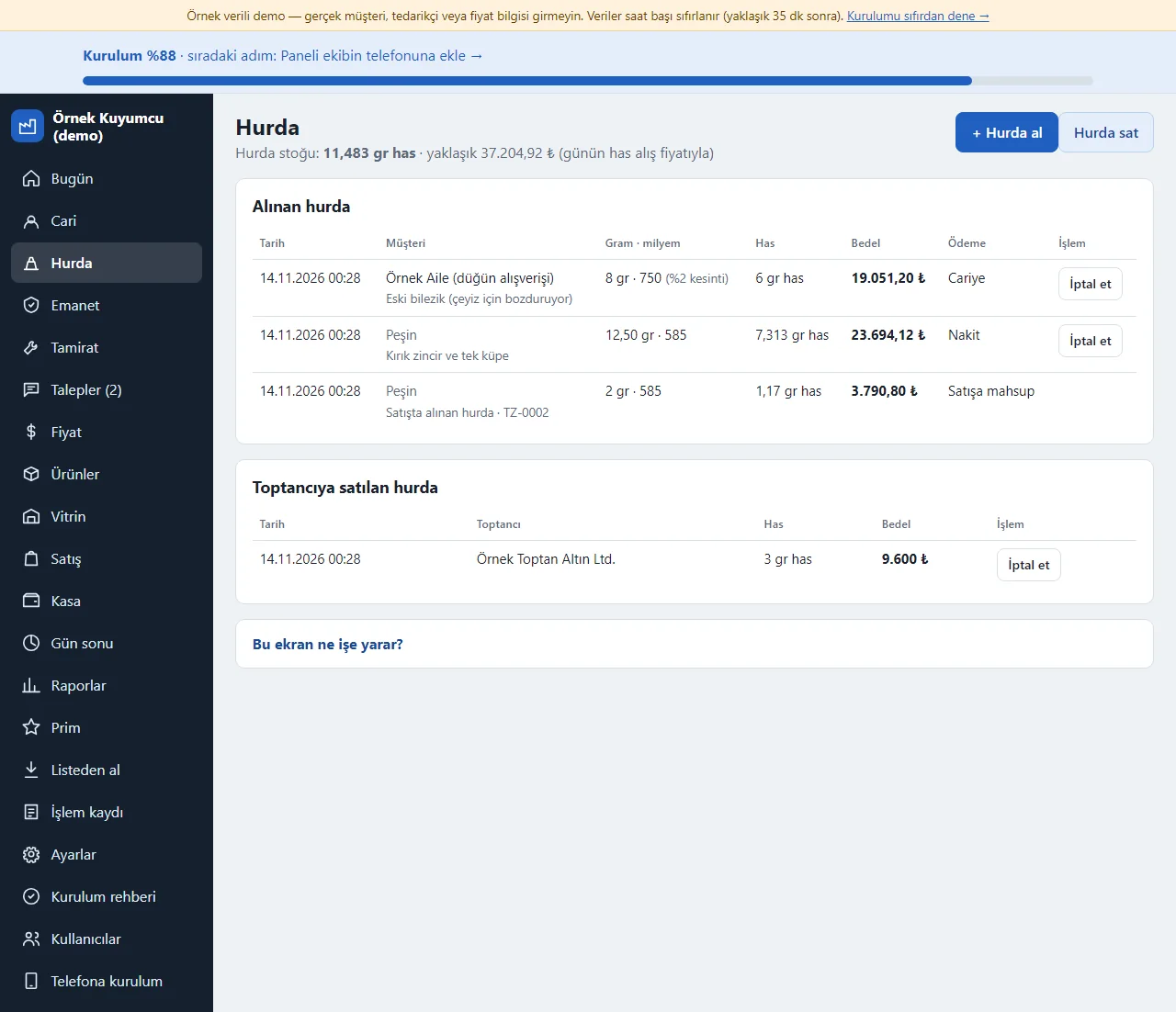
0.1.0 · 14 November 2026 Scrap
Buying scrap from a customer is written with grams, fineness and the day’s buy price; the pure-gold equivalent and the price are worked out (with a deduction percentage if you like), the payment is cash or goes onto the account, and it is added to the scrap stock in pure-gold grams. “Hurda sat” (sell scrap) writes a sale to a wholesaler. During a sale the scrap the customer brings can be offset directly; those lines show as “Satışa mahsup” (offset against the sale).
- On screen (Turkish interface)
- “Hurda al” — buy scrap
- “Hurda sat” — sell scrap
- “Hurda stoğu” — scrap stock
- “Satışa mahsup” — offset against the sale
- “İptal et” — cancel
-
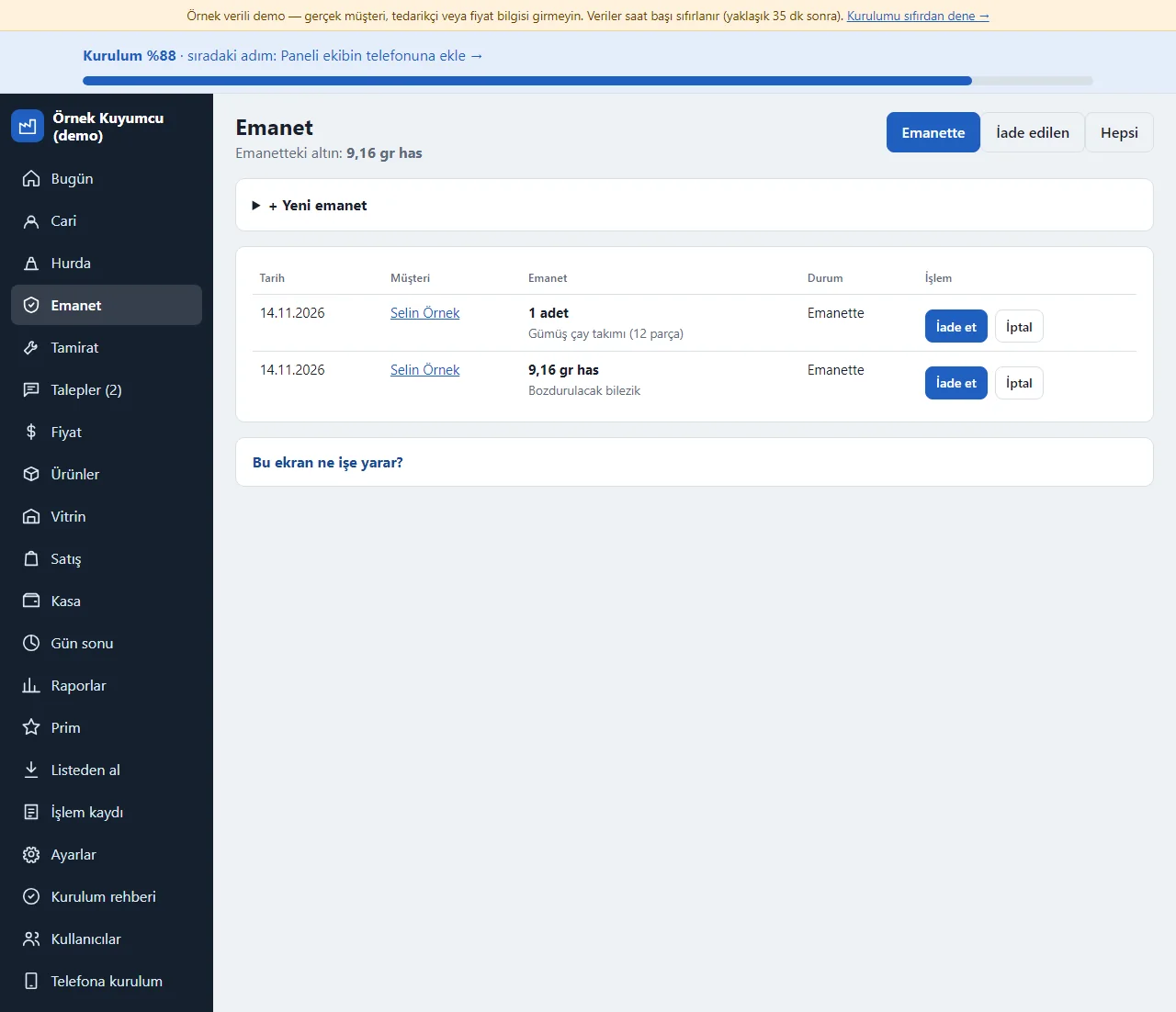
0.1.0 · 14 November 2026 Consignment
Gold (net grams and fineness) or a piece (a number of items, for example a silver tea set) that a customer leaves with the shop is written with the customer, date and a note; open items are listed and are handed back with “İade et” or cancelled with “İptal”. Gold on consignment shows on the Today screen in pure-gold grams.
- On screen (Turkish interface)
- “Emanet” — consignment
- “Yeni emanet” — new consignment
- “İade et” — hand back
- “İptal” — cancel
-
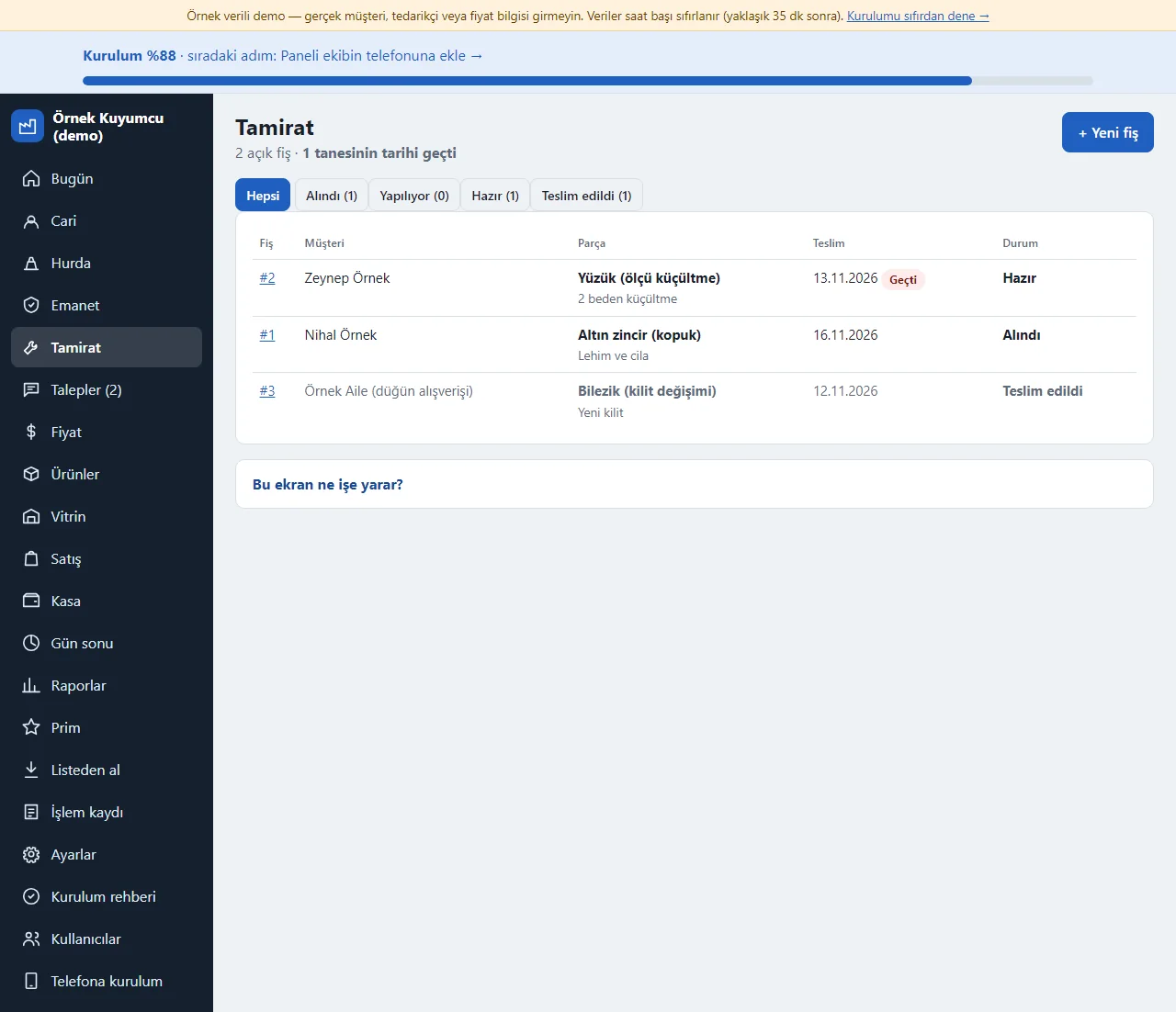
0.1.0 · 14 November 2026 Repairs
A repair or special-order slip is opened for a piece taken from a customer (the customer, piece, work, delivery date, a fee); the status moves through Alındı, Yapılıyor, Hazır and Teslim edildi (received, in progress, ready, delivered) and ready jobs sit at the top. An overdue job is marked “Geçti”; the fee is taken on delivery in cash, by transfer or on credit and written to the till. You send the customer the “ready” message from WhatsApp yourself.
- On screen (Turkish interface)
- “Alındı” — received
- “Yapılıyor” — in progress
- “Hazır” — ready
- “Teslim edildi” — delivered
- “Geçti” — overdue
-
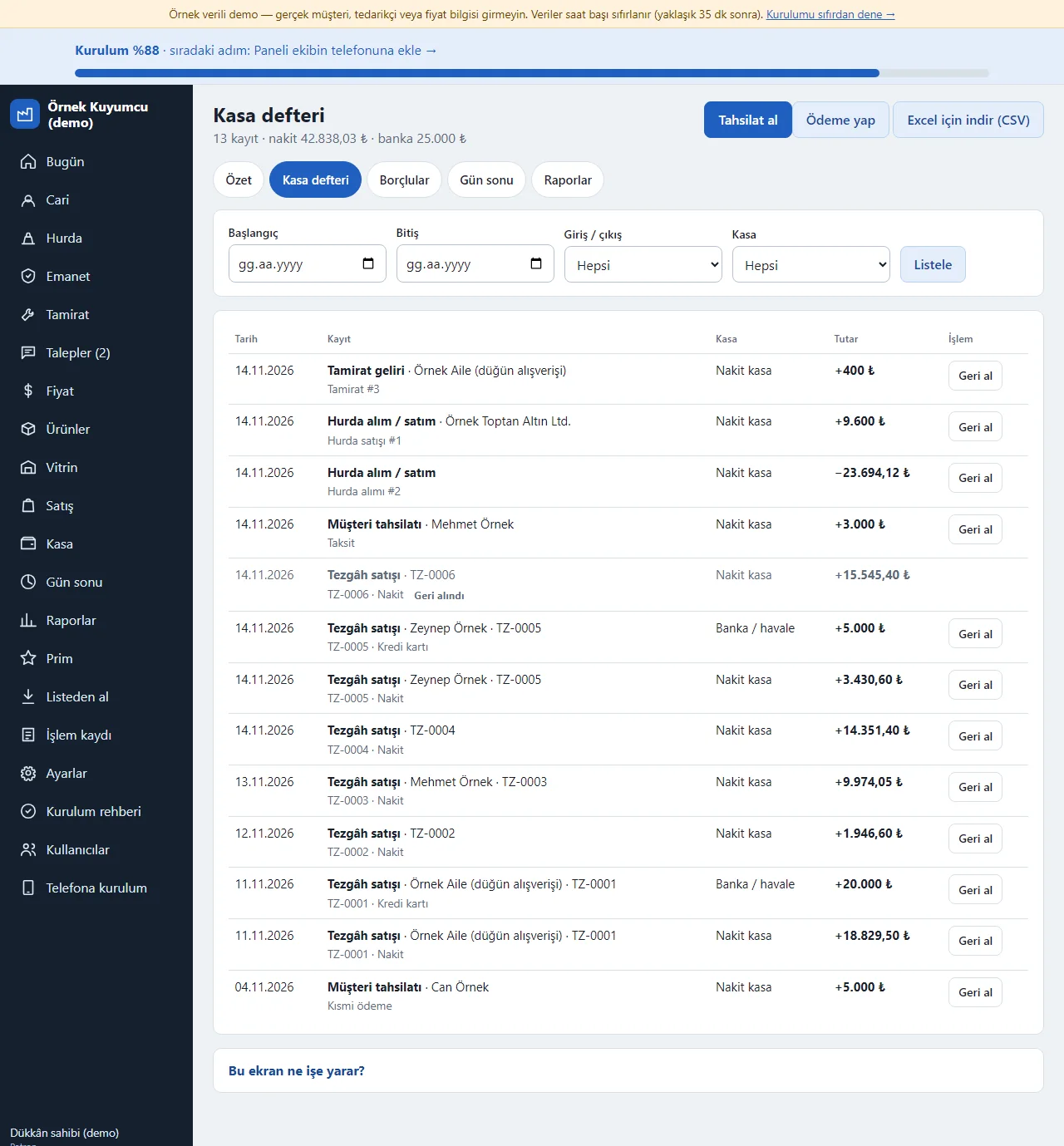
0.1.0 · 14 November 2026 Cash book
Cash and gram movements (counter sales, payments received, scrap buying and selling, repair income) show in date order; the record count and the cash and bank totals are at the top. You filter by date, in or out and the till (cash, bank/transfer). “Tahsilat al” (take a payment) and “Ödeme yap” (make a payment) add a movement; a wrong entry is undone with “Geri al” (undo) and the record is not deleted. The book downloads with “Excel için indir (CSV)”.
- On screen (Turkish interface)
- “Kasa defteri” — cash book
- “Tahsilat al” — take a payment
- “Ödeme yap” — make a payment
- “Geri al” — undo
- “Excel için indir (CSV)” — download for Excel (CSV)
-
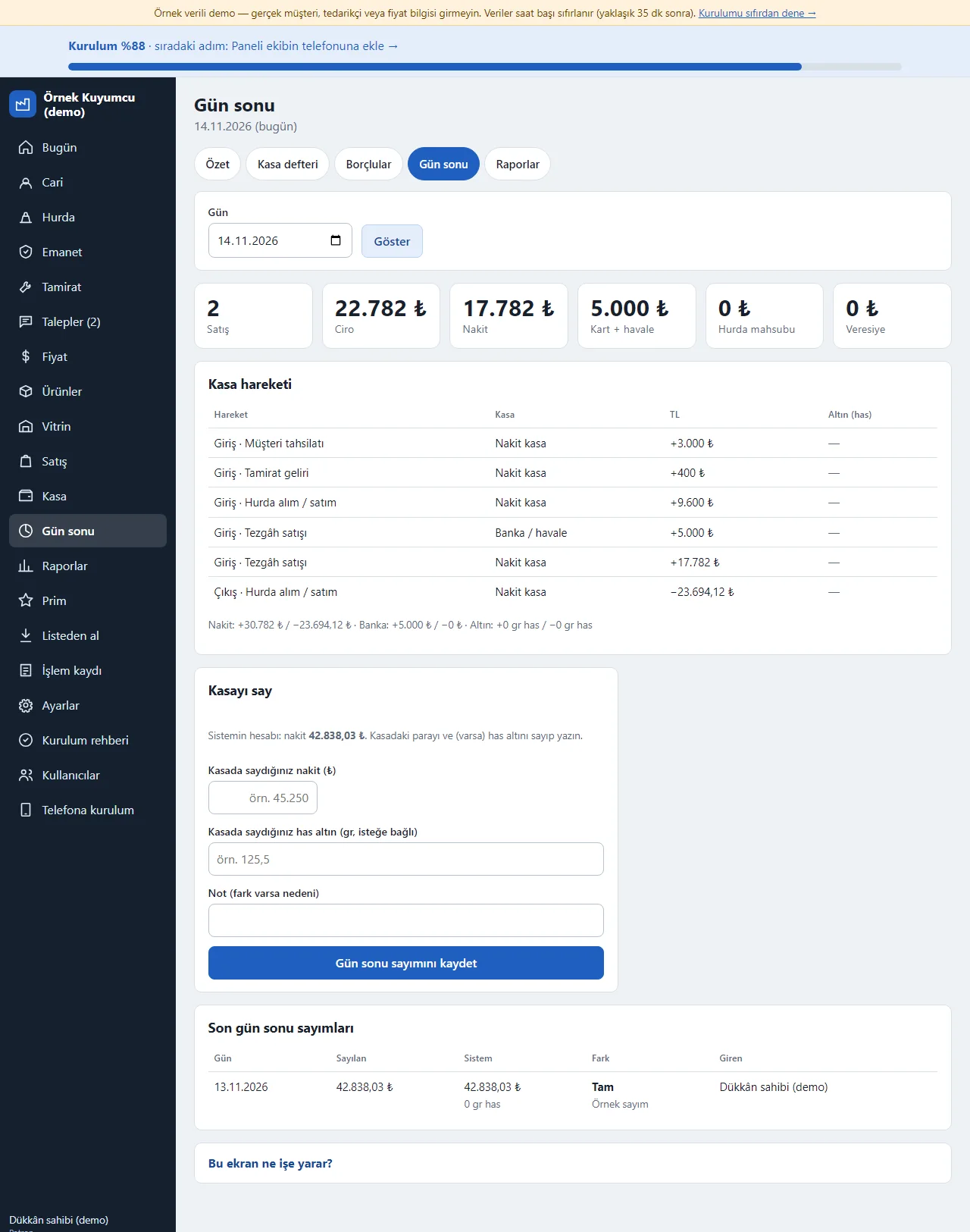
0.1.0 · 14 November 2026 End of day
For the chosen day the number and amount of sales, the turnover, cash, card and transfer, scrap offset and credit are at the top, with that day’s till movements below. In the “Kasayı say” (count the till) section the cash in the till and (if any) the pure-gold is counted and written; the program finds the difference from the system’s figure and a reason can be written in a note. The count is saved and stays in the “Son gün sonu sayımları” (latest end-of-day counts) list as counted, system and difference.
- On screen (Turkish interface)
- “Kasayı say” — count the till
- “Gün sonu sayımını kaydet” — save the end-of-day count
- “Sayılan” — counted
- “Fark” — difference
-
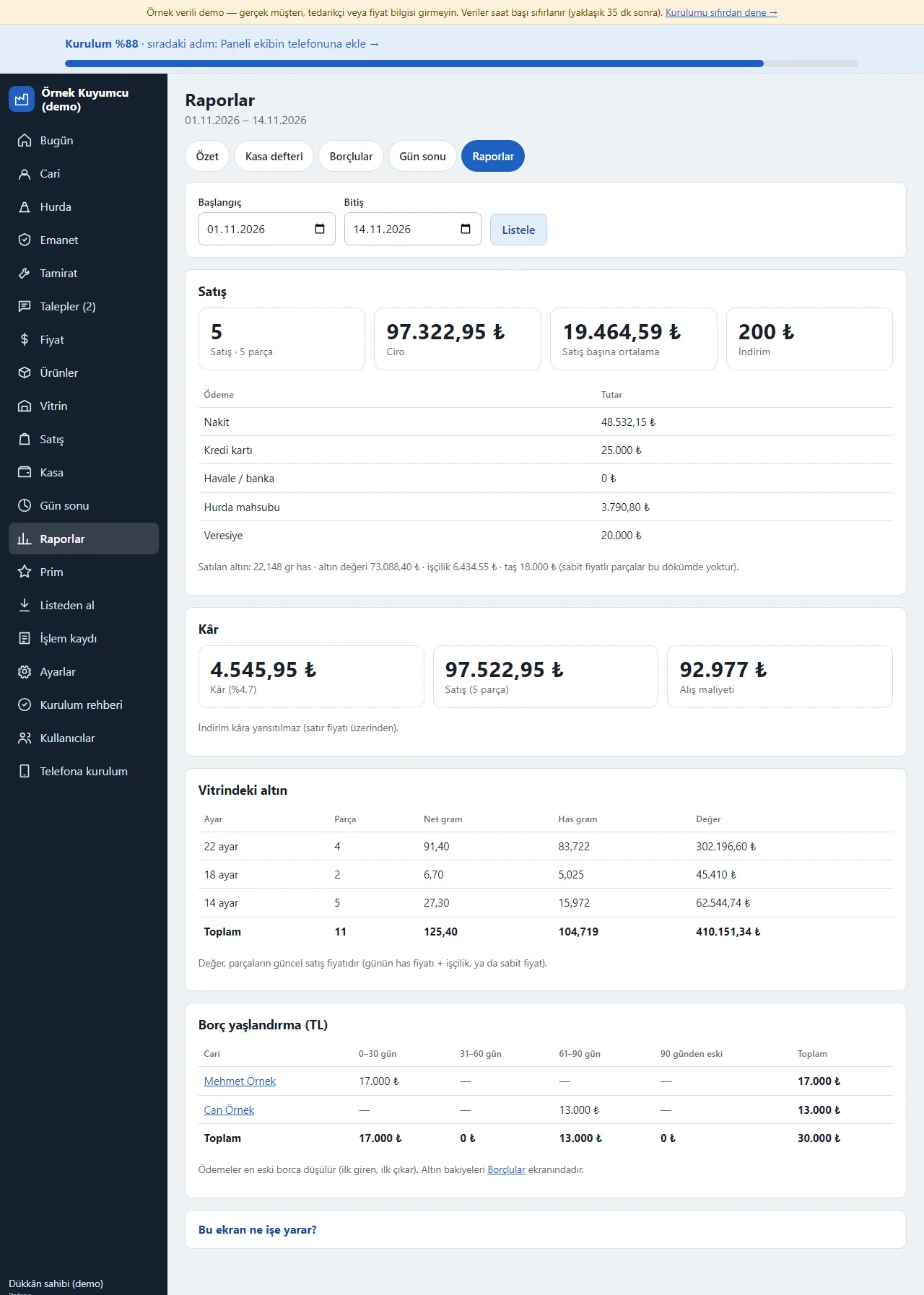
0.1.0 · 14 November 2026 Reports
The chosen period’s number and turnover of sales, the payment split (cash, credit card, transfer, scrap offset, credit), the pure-gold grams sold, the labour and stone amounts, the profit, the carat breakdown of the gold in the showcase and an ageing table of TL debts are shown. Reports rest only on recorded data; they are not an official accounting or tax report.
- On screen (Turkish interface)
- “Raporlar” — reports
- “Ödeme” — payment
- “Kâr” — profit
- “Vitrindeki altın” — gold in the showcase
- “Borç yaşlandırma” — debt ageing
-
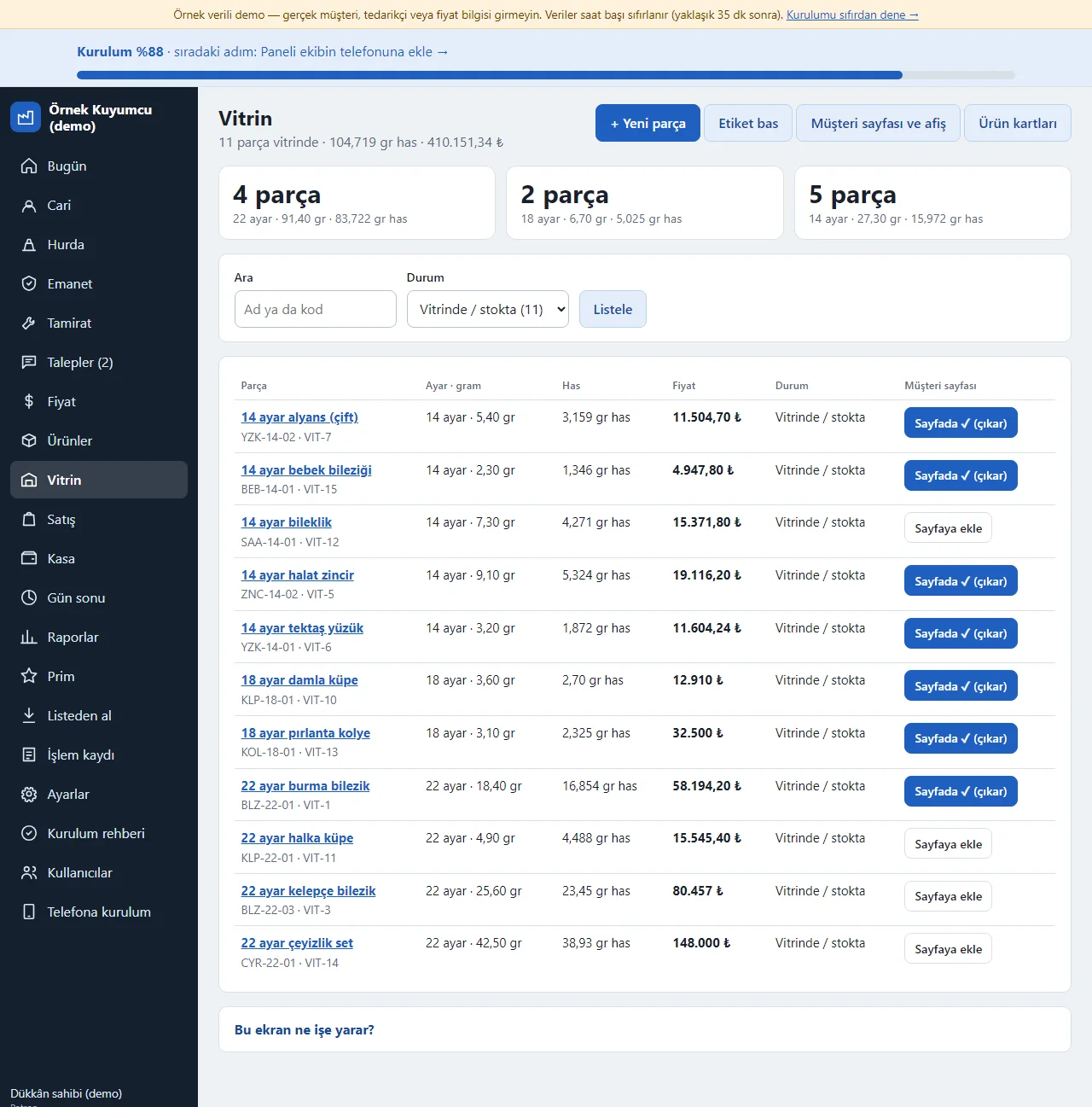
0.1.0 · 14 November 2026 Showcase: pieces and the customer page
The Vitrin screen lists the pieces in stock with their carat, grams and price. Each piece has “Sayfaya ekle” (add to the page) or “Sayfada ✓ (çıkar)” (on the page, remove): only the pieces you mark show on the customer page. When a piece is sold it drops off the page by itself. At the top are the “Yeni parça” (new piece), “Etiket bas” (print labels, a barcode A4 sheet), “Müşteri sayfası ve afiş” (customer page and poster) and “Ürün kartları” (product cards) buttons; a status filter separates pieces in the showcase, sold, on consignment, in repair and turned into scrap.
- On screen (Turkish interface)
- “Sayfaya ekle” — add to the page
- “Sayfada ✓ (çıkar)” — on the page (remove)
- “Müşteri sayfası ve afiş” — customer page and poster
- “Etiket bas” — print labels
-
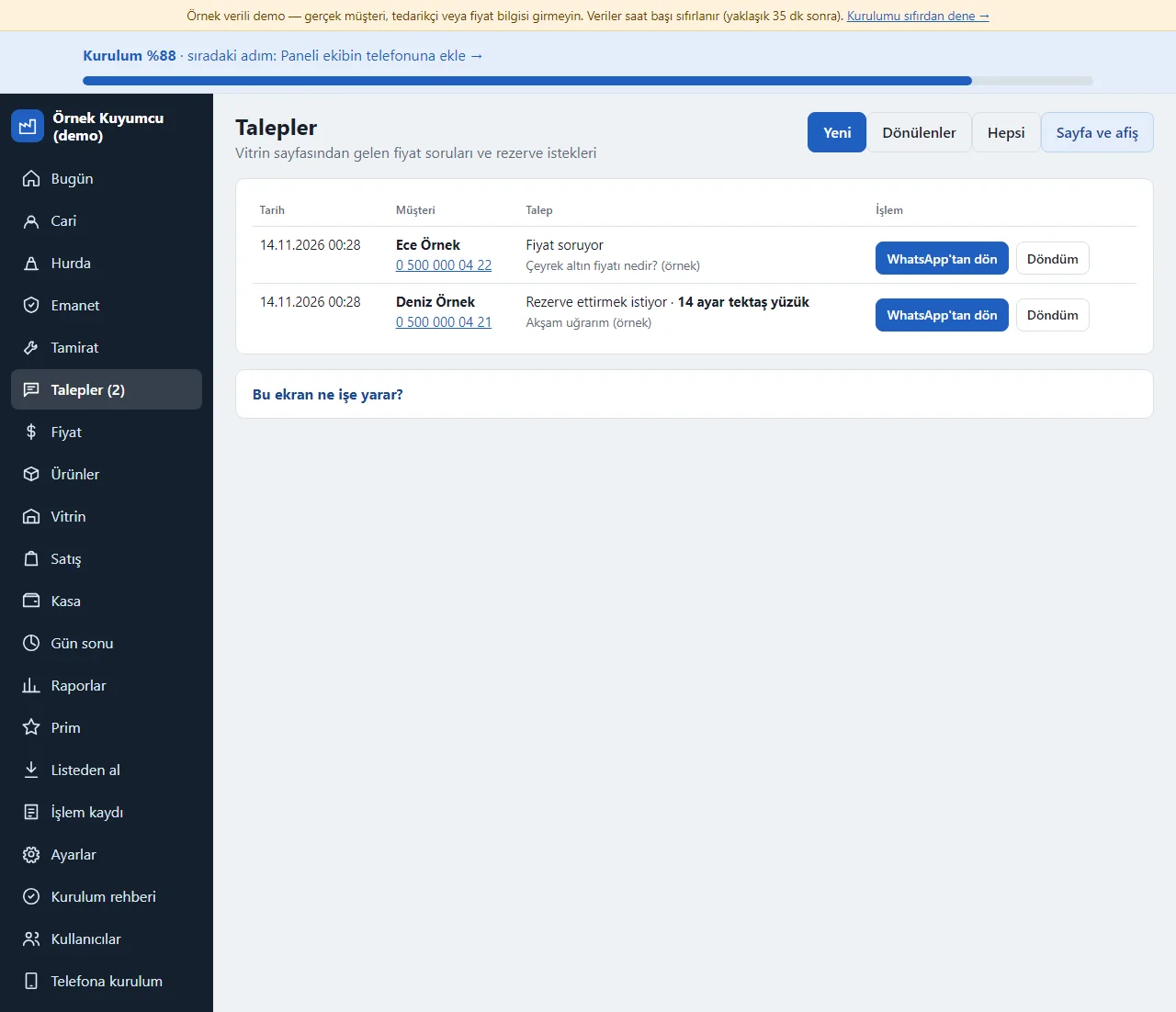
0.1.0 · 14 November 2026 Showcase requests
The “fiyat sor” (ask the price) and “rezerve ettir” (reserve it) requests that come from the customer page are listed with name, phone, piece and message. A new request sends a notification to the shop owner’s phone. “WhatsApp’tan dön” opens a ready message to the customer’s number with the piece’s current price; you send the message. A request answered is marked “Döndüm”.
- On screen (Turkish interface)
- “Talepler” — requests
- “WhatsApp’tan dön” — reply on WhatsApp
- “Döndüm” — I replied
- “Rezerve ettirmek istiyor” — wants to reserve
-
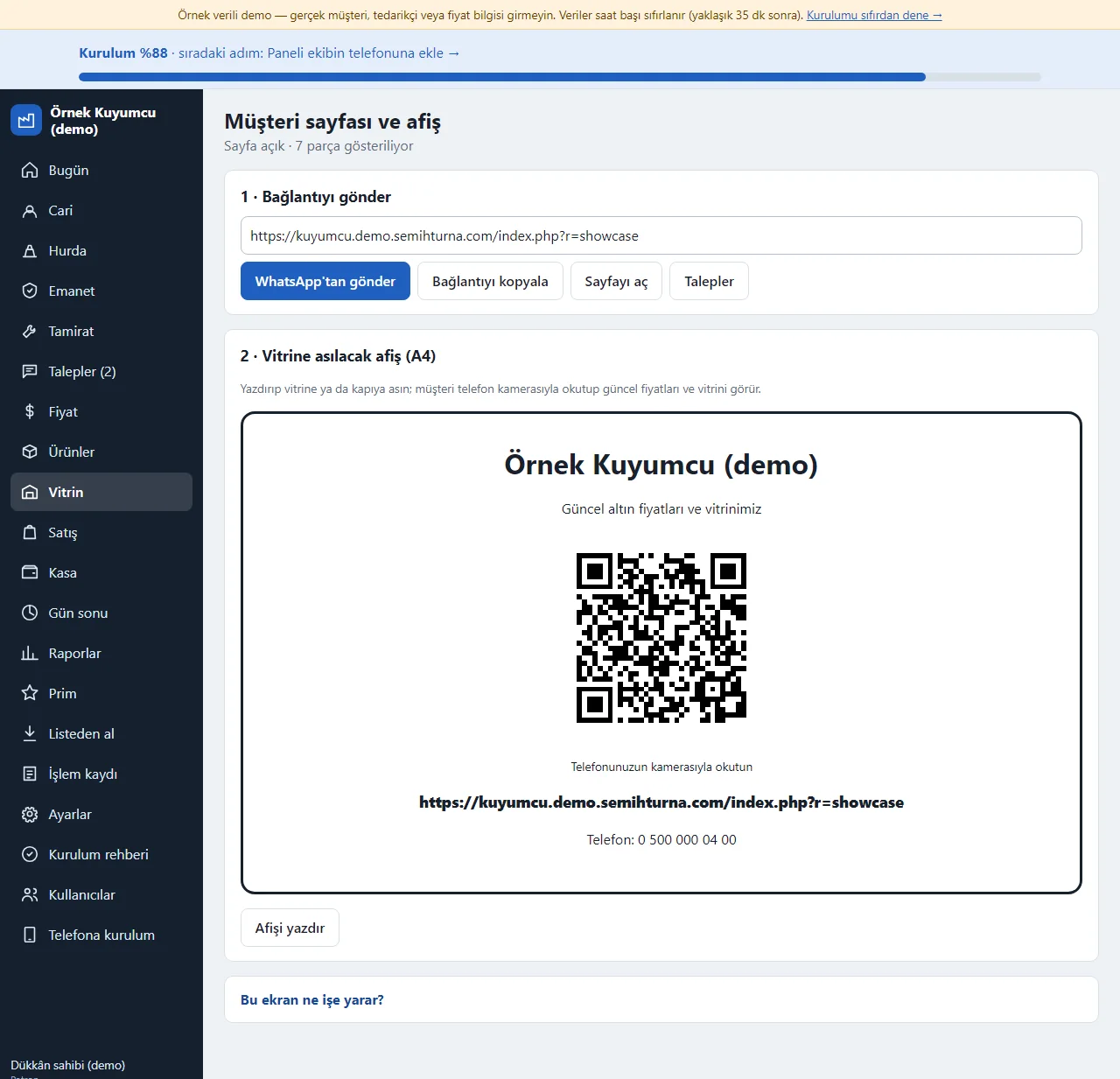
0.1.0 · 14 November 2026 Customer page and QR poster
The customer page’s link is sent from WhatsApp, copied and printed as a QR A4 poster to hang in the window. Whether the page is open, whether prices show and a short note are chosen in Ayarlar (settings). The page never shows a piece code, cost, stock or ledger data.
- On screen (Turkish interface)
- “Afişi yazdır” — print the poster
- “WhatsApp’tan gönder” — send on WhatsApp
- “Bağlantıyı kopyala” — copy the link
- “Sayfa açık” — page open
-
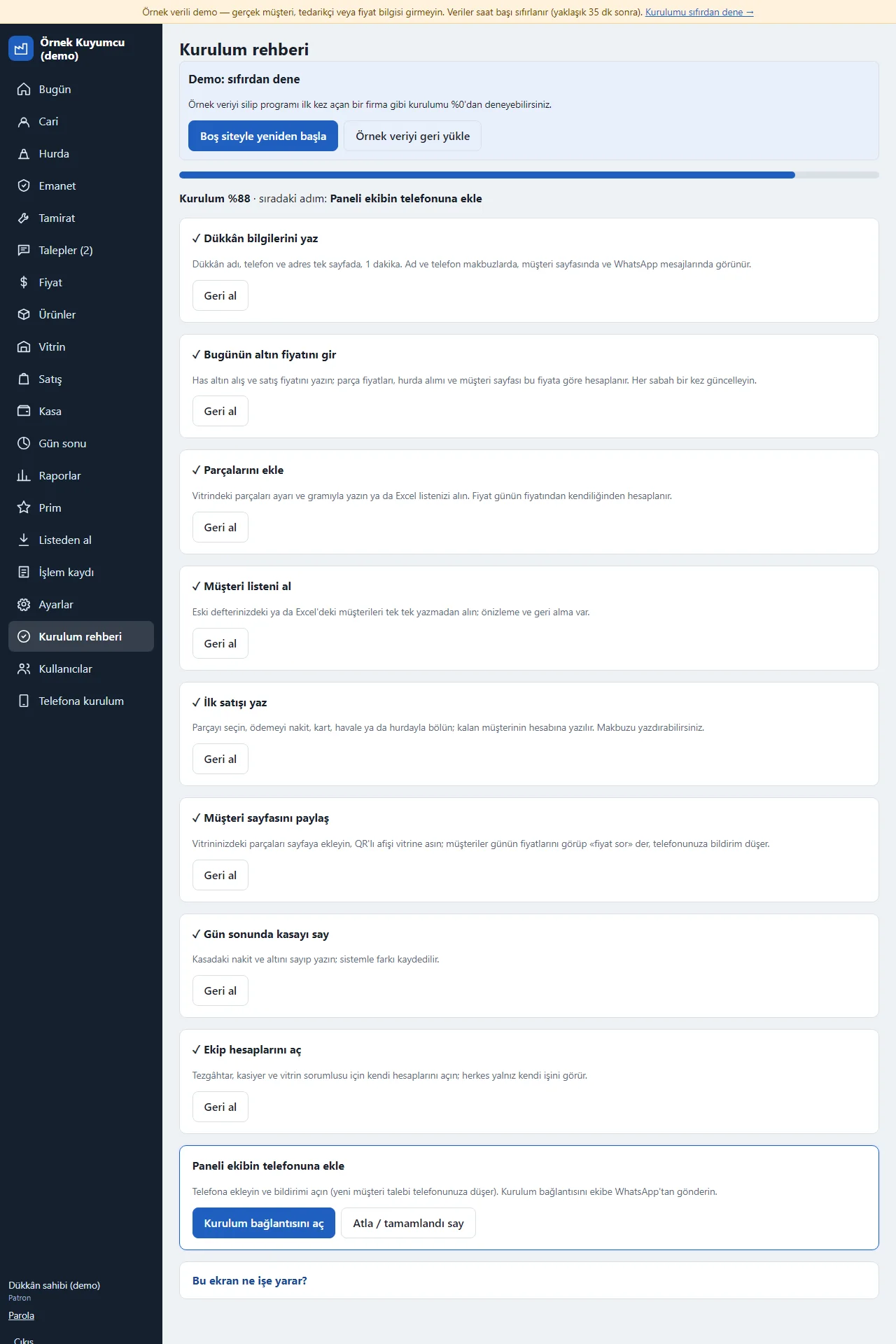
0.1.0 · 14 November 2026 Setup guide
Setup is nine small steps: shop details, the day’s price, pieces, ledger accounts, a first sale, the customer page, an end-of-day count, team accounts and adding the panel to the phone. Each step is saved on its own, undone with “Geri al” (undo) and the progress percentage sits at the top. In the demo the “Boş siteyle yeniden başla” and “Örnek veriyi geri yükle” buttons are at the top of the page.
- On screen (Turkish interface)
- “Kurulum rehberi” — setup guide
- “Geri al” — undo
- “Boş siteyle yeniden başla” — start again with an empty site
- “Örnek veriyi geri yükle” — restore the sample data
-
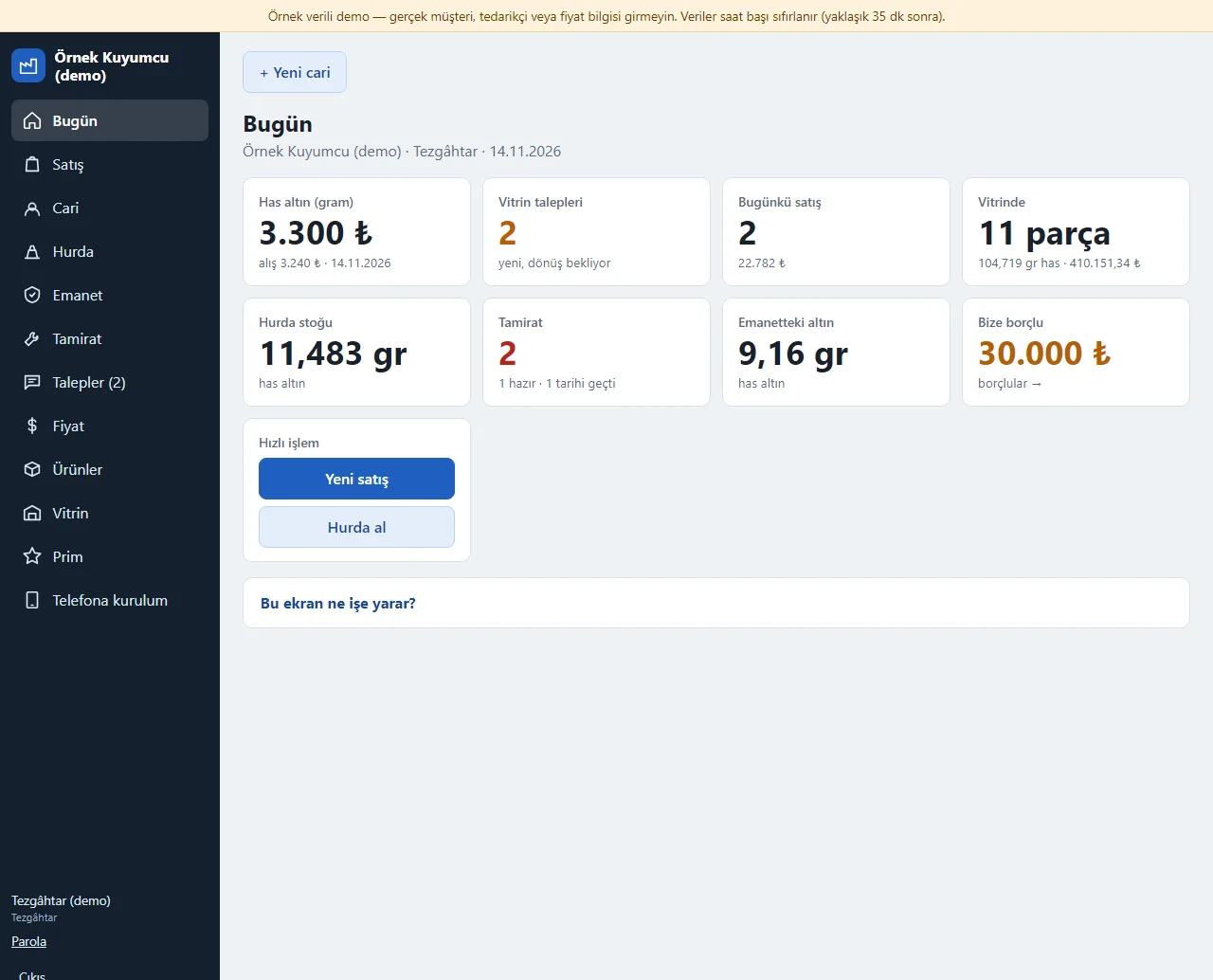
0.1.0 · 14 November 2026 The sales assistant’s screen
Signed in as a sales assistant the menu shows Bugün, Satış, Cari, Hurda, Emanet, Tamirat, Talepler, Fiyat, Ürünler, Vitrin, Prim and the phone setup; Kasa, Gün sonu, Raporlar, Ayarlar, Kullanıcılar and the log are not there at all. The server refuses those addresses even if typed by hand.
- On screen (Turkish interface)
- “Tezgâhtar” — sales assistant
- “Prim” — commission
-
0.1.0 · 14 November 2026 The customer page on a phone
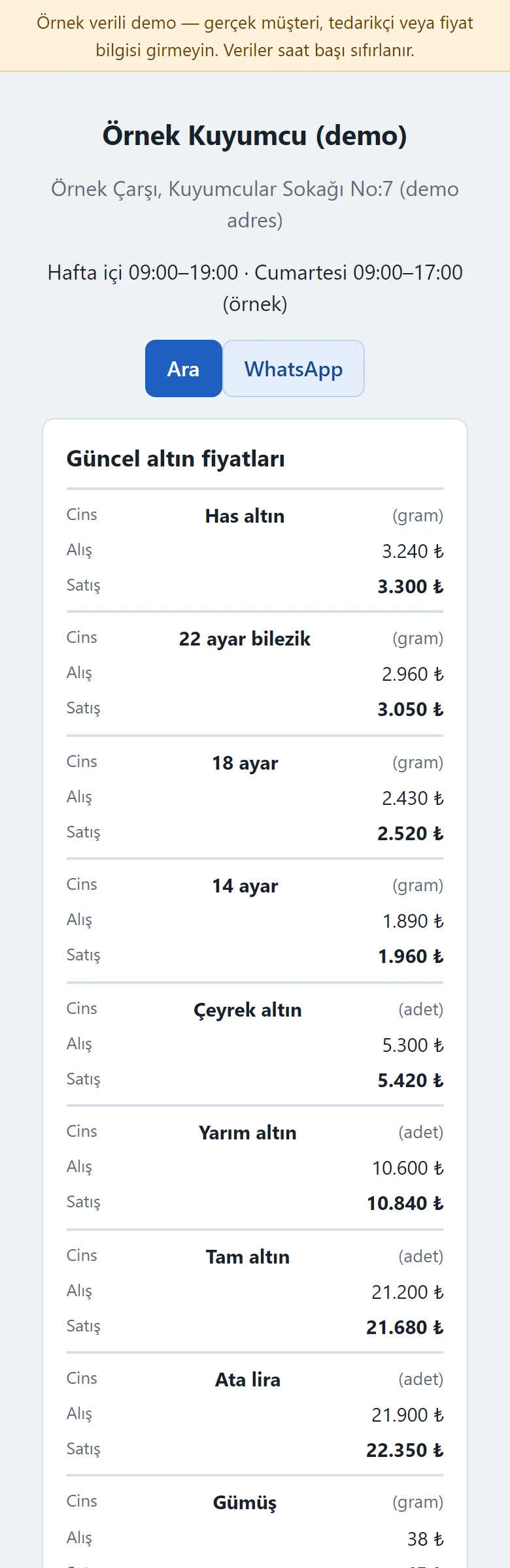
A customer opens the link without an account: the shop’s name, address and hours, the day’s gold prices, the pieces in the showcase with carat, grams and price, and at the bottom the “fiyat sor ya da rezerve ettir” (ask a price or reserve) form. The page is large-print and plain; the maker’s line sits at the bottom.
- On screen (Turkish interface)
- “Güncel altın fiyatları” — current gold prices
- “Vitrinimizden” — from our showcase
- “Talebi gönder” — send the request
- “Fiyat sor / rezerve et” — ask the price / reserve
- What do they see at the end?
- The ledger account is updated in TL and pure-gold grams, the scrap stock and the cash change on their own, and in the evening the end-of-day count is set against the expected cash; the request reaches the phone as a notification and is answered with a ready WhatsApp message.
- What is it good for?
- Instead of multiplying the day’s price by hand for every piece, mixing scrap and credit in a notebook and writing to each customer who asks a price, it all sits in one place.
Everything that is not included, and all limits
- Not delivered to a client and not used by a real jeweler. The shop, ledger accounts, pieces, prices, phone numbers, requests and amounts on the screens are made up.
- The day’s gold price is not fetched from the internet or the market on its own; it is written by hand every morning and piece prices are worked out with that value.
- There are no official invoices, e-documents, VAT calculation or export to an accounting program; the receipt is not an official document. There is no automatic SMS or WhatsApp sending and no card payment over the internet either: WhatsApp messages open as a ready text and you send them from your own phone; only a phone notification (Web Push) goes to the shop owner.
- There is no piece photo upload (the showcase page shows a piece’s name, carat, grams and price) and no e-mail notification for showcase requests. Reading an Excel (.xlsx) file depends on the server’s zip extension; without it the file is saved as CSV or the table is pasted.
- A real Web Push delivery, iPhone/Safari, Firefox and a real phone have not been tried; it was run on PHP 8.3 and a single hosting account (PHP, SQLite) only.
- In the demo the data is reset every hour; sign-in is without a password through role buttons. The app interface in the screens is in Turkish.
Delivery and sales status
There is no cart, customer account or online payment on this site for now. Reach out by phone, WhatsApp or the form; in a first conversation your need and the software’s fit are reviewed. The form does not create an order, a contract or a payment.
Possible delivery options
Price
There is no package on offer right now, so there is no list price. If a package is defined, the price and payment method are settled then.
Requirements and version history
Installation requirements
- PHP 8.1 or newer (with the pdo_sqlite, mbstring and openssl extensions; curl is recommended for the phone notification) and HTTPS are needed; the data is kept in a SQLite file. The live demo was run on a single hosting account and PHP 8.3 only.
Release notes
- No version has been delivered to a client. The sample-data demo is open to everyone and is shown with the screenshots on this page.
- 0.1.0 (14 November 2026): the day’s gold price and the piece card, counter sales (cash, card, scrap offset, credit, discount, receipt, cancellation), a ledger with TL and pure-gold balances, scrap, consignment, repairs, a cash book, an end-of-day count, reports, sales commission, a sign-in-free showcase page with ask-a-price and reserve requests (a QR poster, a notification to the owner’s phone), importing lists from Excel/CSV, roles, a setup guide, installing on a phone and a 15-day trial install.