EducationDemo with sample data
K Pusula: screen-by-screen guide
The full version of the short description on the product page: every feature, how each screen is used step by step, all limits and the delivery details.
All features
The flows below were run in the app’s version with sample data (0.1.0): the PHP unit and HTTP tests (142) passed, and the live demo was walked through as candidate and coach at phone (412 px) and desktop (1280 px) widths. The candidate (“Deniz”), tasks and exams on the screens are made up; no real name, phone number or e-mail should be entered. Adding to the home screen has not been tried on a real phone.
- The Pusula Coach finds the subject you are furthest behind in by itself: it looks at the progress of each subject, picks the lowest and says which subject to study today (“Most behind: Coğrafya (30%, 9/30). Consider adding a task from it to today’s plan.”); it also looks at backlog, weekly focus and the exam trend. Rule-based (no AI or outside service), a suggestion only, it never changes the plan by itself
- Today compass: a one-sentence route (“3 tasks today, about 2 h. Now: …”), Start in Focus Mode and Done buttons, study streak, days to the exam, a quote of the day and today’s tasks; the round box beside a task finishes it and tapping again undoes it
- Plan: the next 14 days of tasks; single tasks added and edited; a recurring plan (every day, weekdays, weekends, chosen days, every few days; up to 180 days); deleting a plan removes only unfinished tasks, finished ones stay
- Catch-up Route: redistributes overdue tasks as Light (at most 1 extra task a day, from tomorrow), Balanced (2 a day) or Fast (from today, 4 a day); previewed first, nothing changes until you press “Onaylıyorum, uygula” (confirm and apply); no task is deleted and the first planned date stays under the task
- Focus: time, solved questions and a note are recorded; Focus Mode shows one task with a large timer, the time is recorded when you finish, and the task can be completed too
- Practice Exam Centre: correct and wrong are entered for each subject and net = correct − wrong ÷ 4 is worked out automatically; the average of the latest exams is compared with the earlier ones and subject averages are listed; a subject entered as 0/0 is not counted
- Statistics and subjects: streak, a last-7-days chart, progress by subject and 8 badges; subjects show the topic count and finished topics, and finishing a “topic study” task adds one to the subject of the same name
- Set-up guide: 5 steps (exam date, subjects, first plan, first task, phone), a progress bar, skippable steps, a “What is this screen for?” box on every screen; in the demo “Boş siteyle yeniden başla” (start again with an empty site) and “Örnek veriyi geri yükle” (restore sample data) buttons
- Installs on a phone or computer: added to the home screen with one tap; a “Telefona ekle” page without a sign-in gives instructions for the phone
- Backup: Settings ▸ download backup gives all the data as JSON, and Restore replaces the current data with the backup (asks for confirmation)
- Roles: the Candidate does everything, the Coach only views; a page, menu item or button the coach has no right to is never shown, and the server refuses an address typed by hand
Screen by screen: how it is used
The app’s interface is in Turkish and there is no English version; only the captions and explanations on this page are in English. The screens were taken on 8 November 2026 from the live demo (version 0.1.0), signed in as the candidate and the coach; the candidate (“Deniz”), tasks and exams are samples. The last two screens are phone views (412 px wide).
- Who uses it?
- A KPSS candidate and the coach who follows them.
- Where do they start?
- The candidate opens the Today screen; the app gives the day’s route in one sentence, and the coach finds the subject the candidate is furthest behind in and suggests it for today.
What do they do on screen? Step by step
-
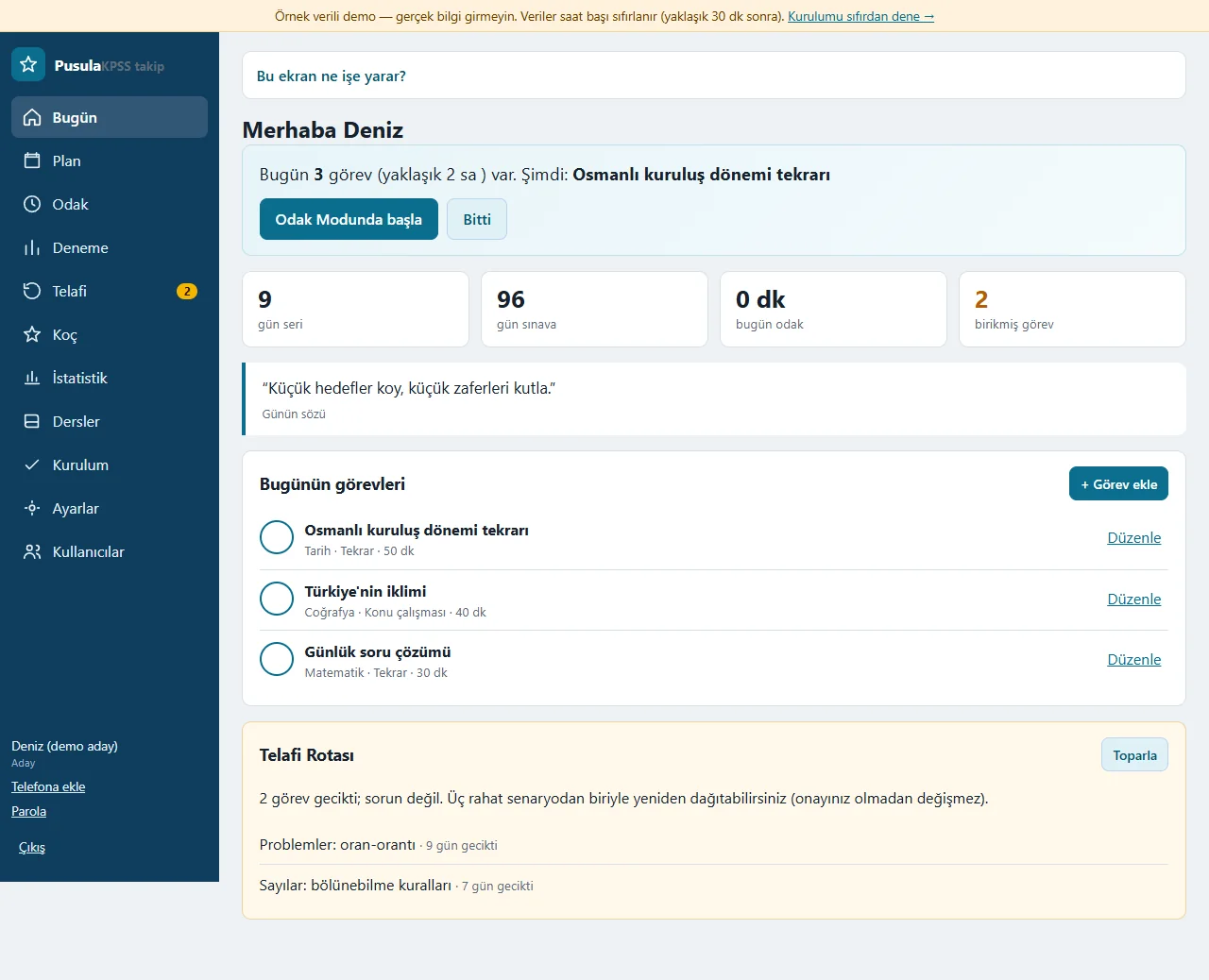
Today
A one-sentence route (“3 tasks today, about 2 h. Now: …”), Start in Focus Mode and Done buttons, study streak, days to the exam, a quote of the day and today’s tasks. The round box beside a task finishes it and tapping again undoes it; a Catch-up Route card appears when tasks are overdue. A “What is this screen for?” box sits at the top of every screen.
- On screen (Turkish interface)
- “Bu ekran ne işe yarar?” — help box: what is this screen for?
- “Odak Modunda başla” — start in Focus Mode button
- “gün seri / gün sınava” — day streak / days to the exam
- “Telafi Rotası” — Catch-up Route card
- “Toparla” — tidy-up button on the card
-
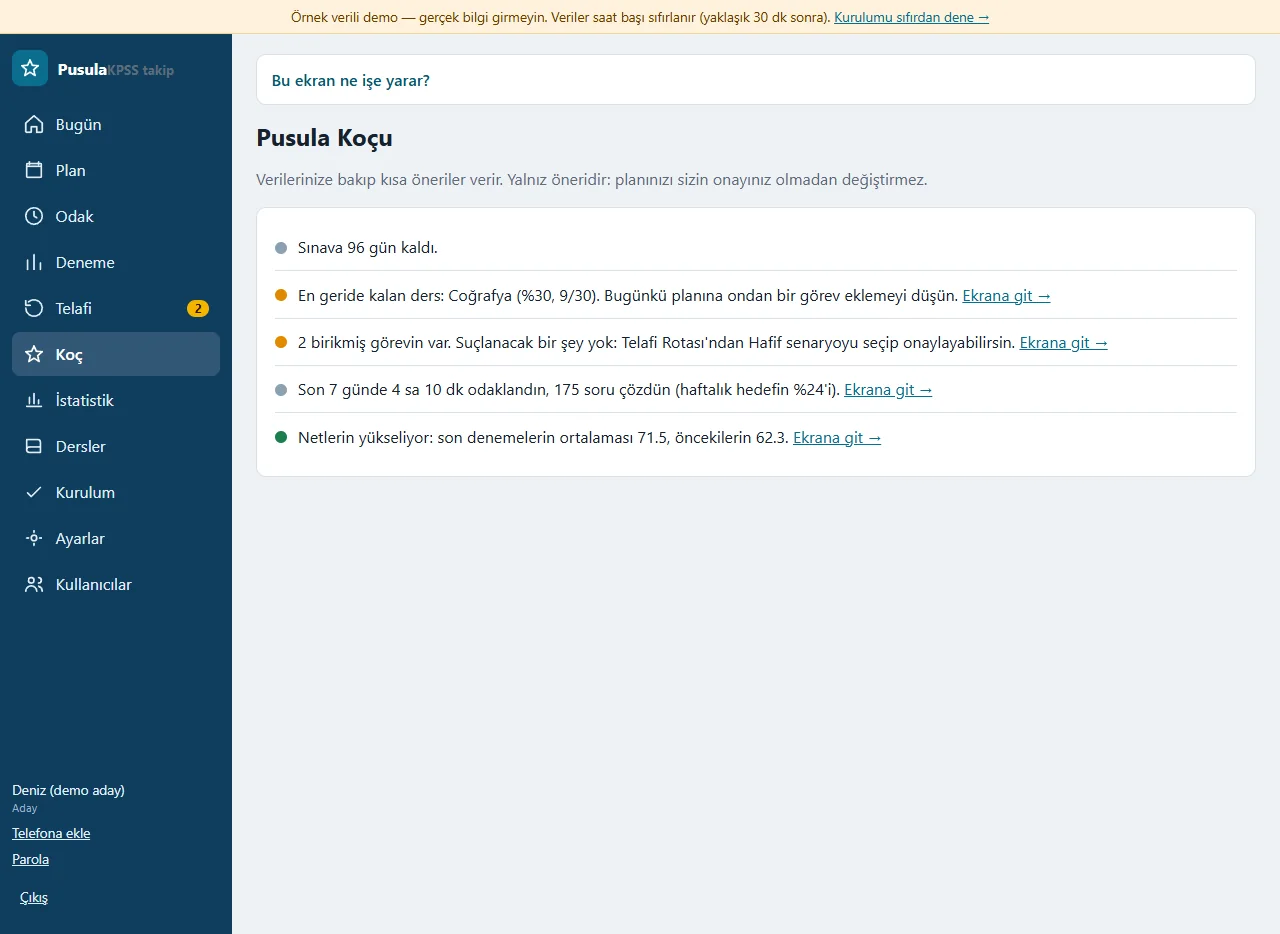
The Pusula Coach
The coach finds the subject you are furthest behind in by itself: it looks at the progress of each subject, picks the lowest and says “Most behind: Coğrafya (30%, 9/30). Consider adding a task from it to today’s plan.” It also comments on backlog, weekly focus and the exam trend, and every suggestion has an “Ekrana git” (go to the screen) link. It is rule-based (no AI) and only a suggestion: it never changes the plan without your approval.
- On screen (Turkish interface)
- “En geride kalan ders” — the subject furthest behind
- “Ekrana git →” — go-to-the-screen link
- “Sınava 96 gün kaldı.” — 96 days left to the exam
- “Netlerin yükseliyor” — your nets are rising (exam trend)
-
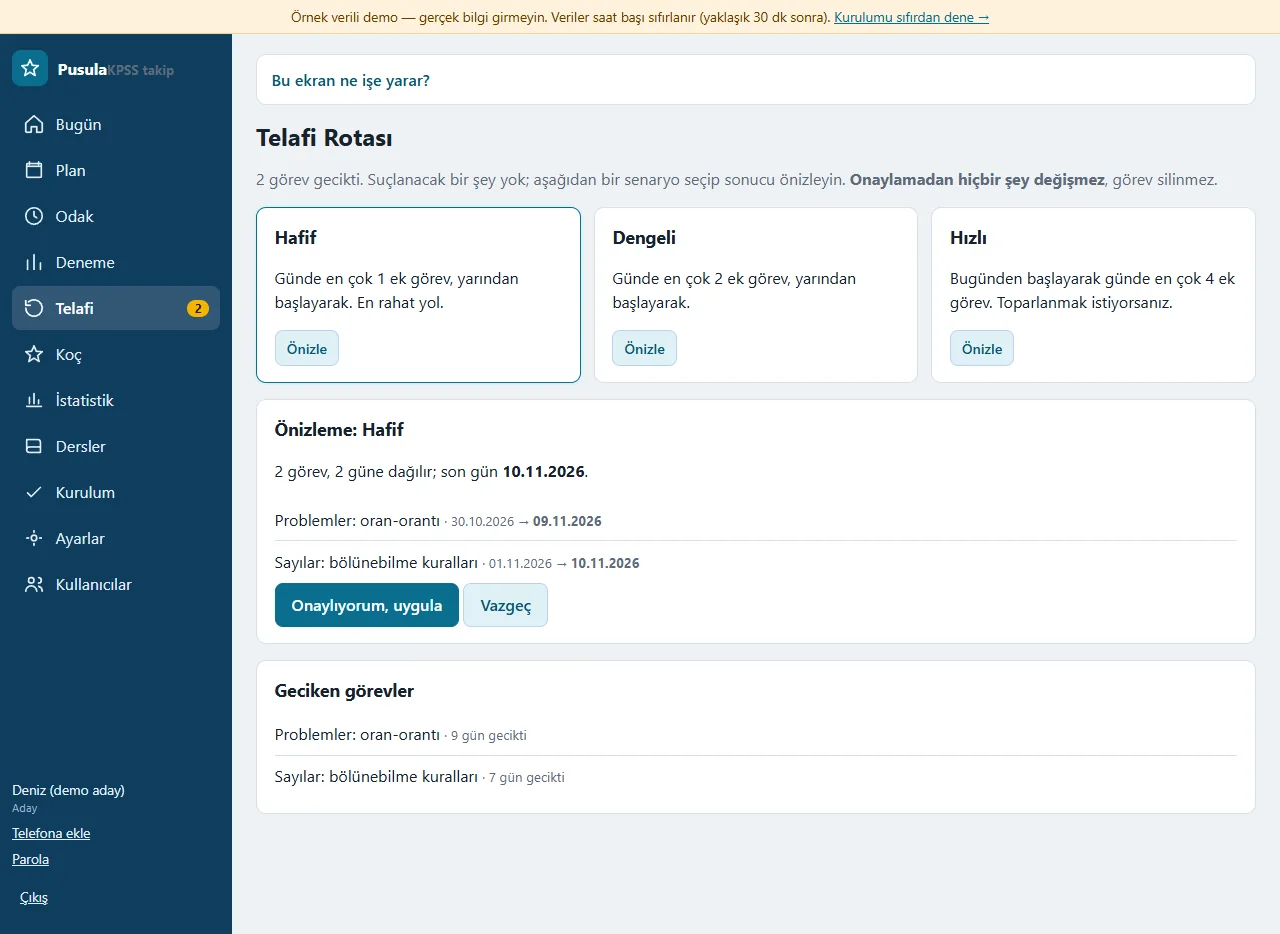
Catch-up Route
It redistributes overdue tasks without blame: Light (at most 1 extra task a day, from tomorrow), Balanced (2 a day) or Fast (from today, 4 a day). The scenario is previewed first; nothing changes until “Onaylıyorum, uygula” (confirm and apply) is pressed, no task is deleted and the first planned date stays under the task.
- On screen (Turkish interface)
- “Hafif / Dengeli / Hızlı” — Light / Balanced / Fast
- “Önizle” — preview button
- “Onaylıyorum, uygula” — confirm and apply
- “Vazgeç” — cancel
- “Geciken görevler” — overdue tasks
-
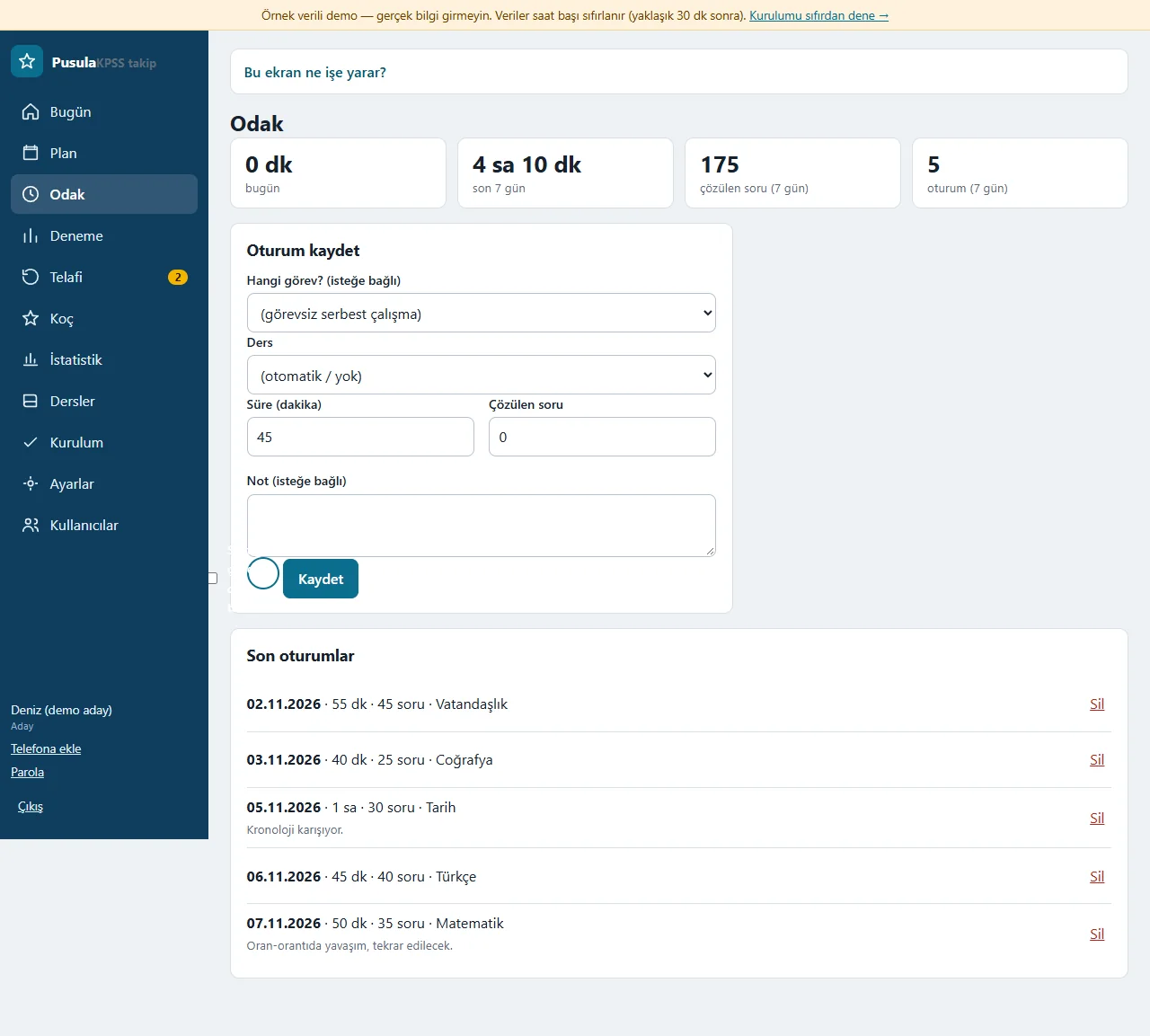
Focus
Time, solved questions and a note are recorded; the session can be tied to a task or written as free study without one. The top shows today’s and the last seven days’ time and question totals, and the latest sessions are listed below; a wrong entry is deleted.
- On screen (Turkish interface)
- “Oturum kaydet” — record a session
- “Süre (dakika)” — time (minutes)
- “Çözülen soru” — questions solved
- “Son oturumlar” — latest sessions
- “Sil” — delete
-
Plan
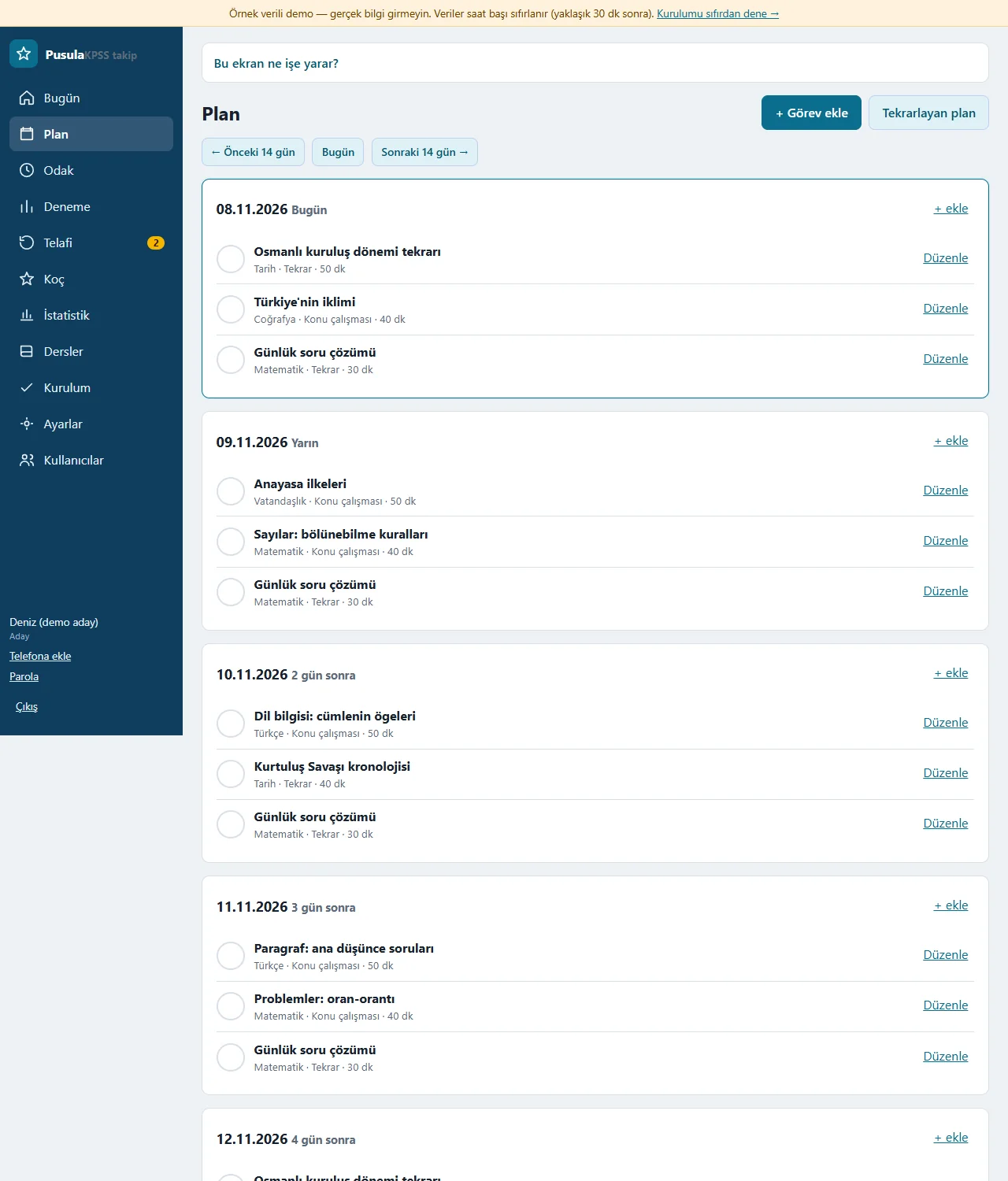
The next 14 days of tasks are lined up by day; “+ Görev ekle” (add a task) writes a single task and “Tekrarlayan plan” (recurring plan) spreads tasks over days by itself (every day, weekdays, weekends, chosen days, every few days). The previous and next 14 days can be browsed; deleting a plan removes only unfinished tasks.
- On screen (Turkish interface)
- “+ Görev ekle” — add a task
- “Tekrarlayan plan” — recurring plan
- “← Önceki 14 gün / Sonraki 14 gün →” — previous / next 14 days
- “Düzenle” — edit
-
Practice Exam Centre
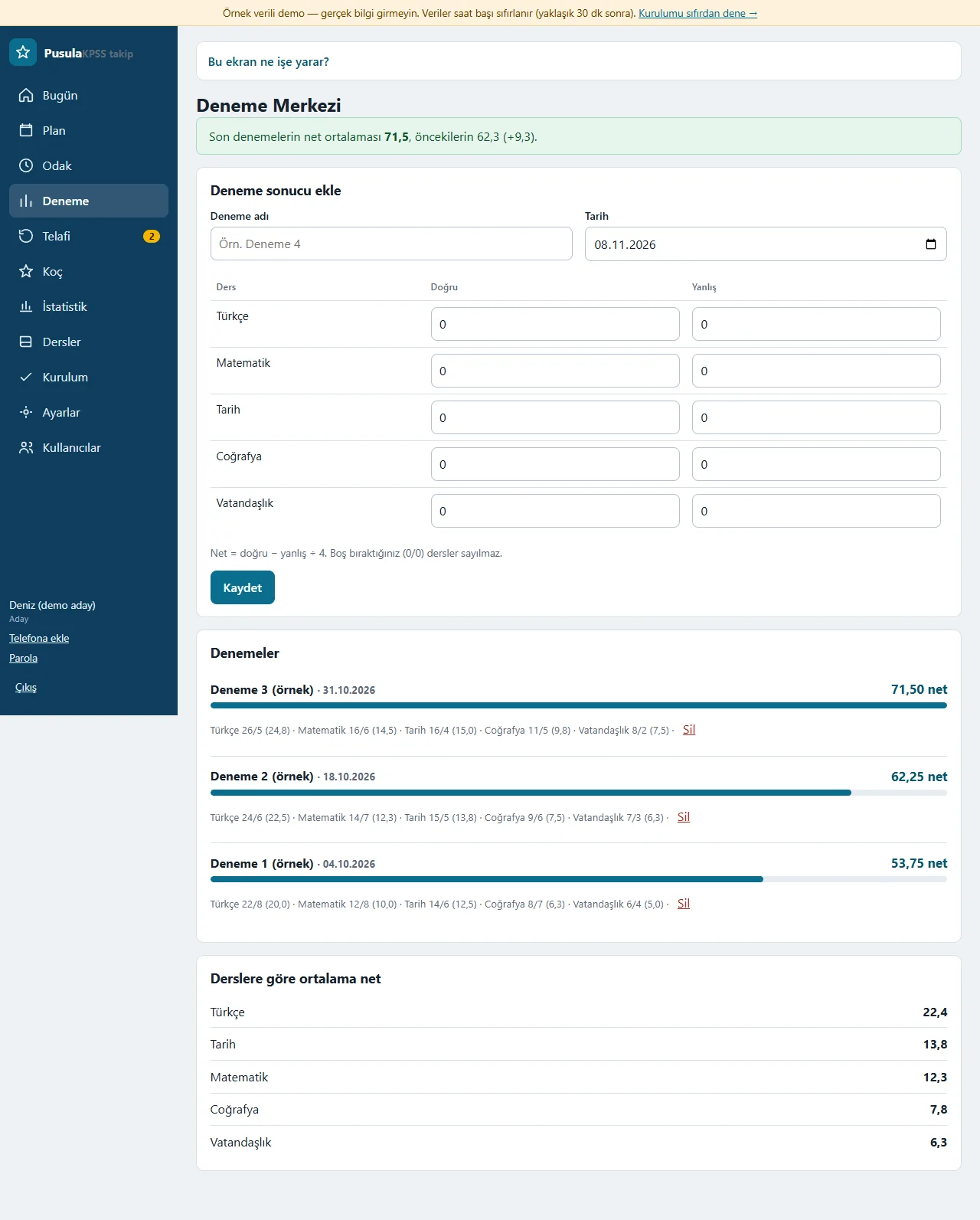
The exam’s name and date are entered; correct and wrong are typed for each subject and net = correct − wrong ÷ 4 is worked out automatically (a subject entered as 0/0 is not counted). The average of the latest exams is compared with the earlier ones; the list of exams and the average net by subject are below.
- On screen (Turkish interface)
- “Deneme sonucu ekle” — add an exam result
- “Doğru / Yanlış” — correct / wrong
- “Denemeler” — exams
- “Derslere göre ortalama net” — average net by subject
-
Statistics
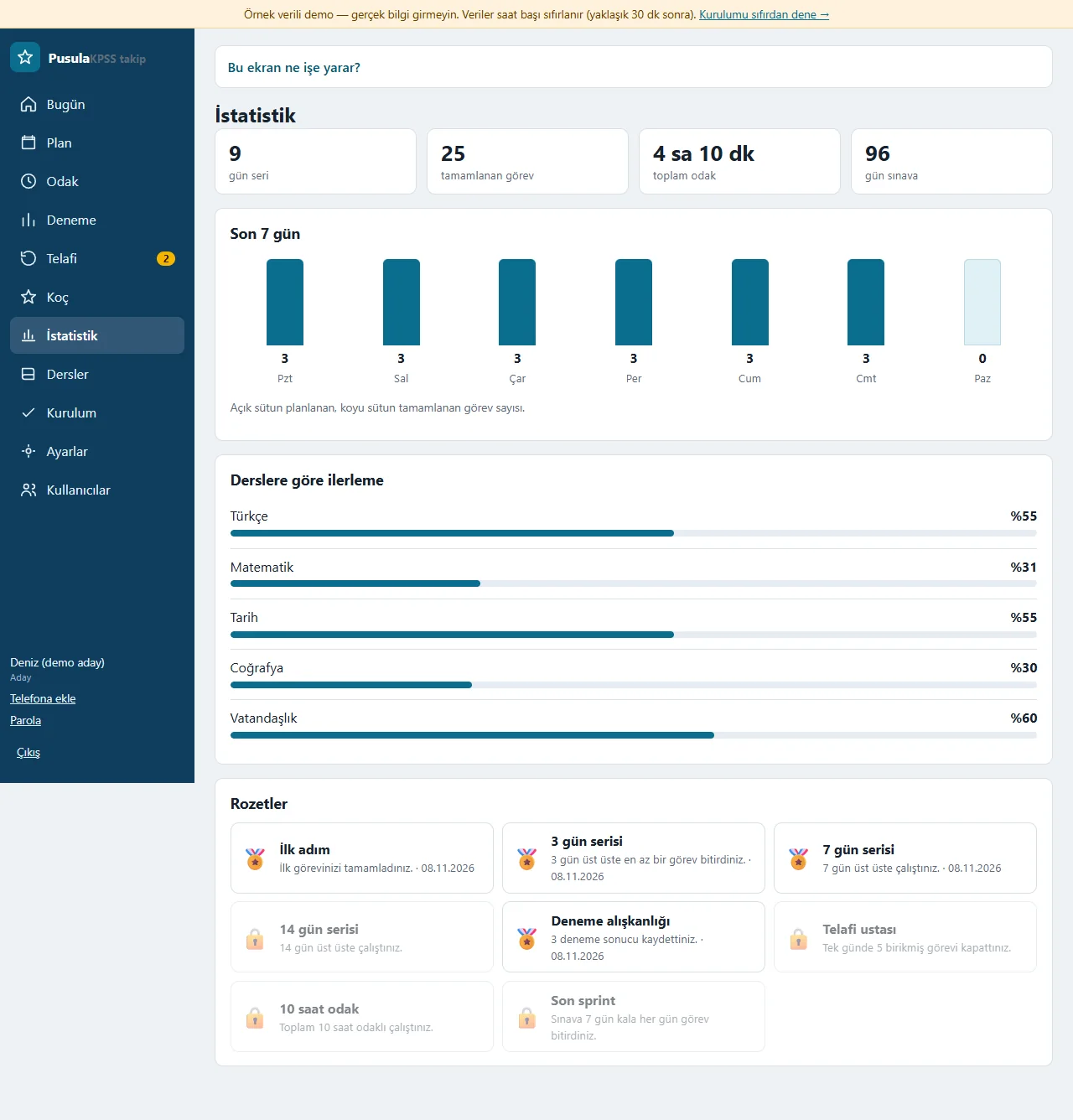
Boxes for the study streak, completed tasks, total focus time and days to the exam; bars for the last seven days’ tasks, progress by subject in per cent and 8 badges (earned ones in colour, the rest locked).
- On screen (Turkish interface)
- “gün seri” — day streak
- “Son 7 gün” — last 7 days
- “Derslere göre ilerleme” — progress by subject
- “Rozetler” — badges
-
Subjects
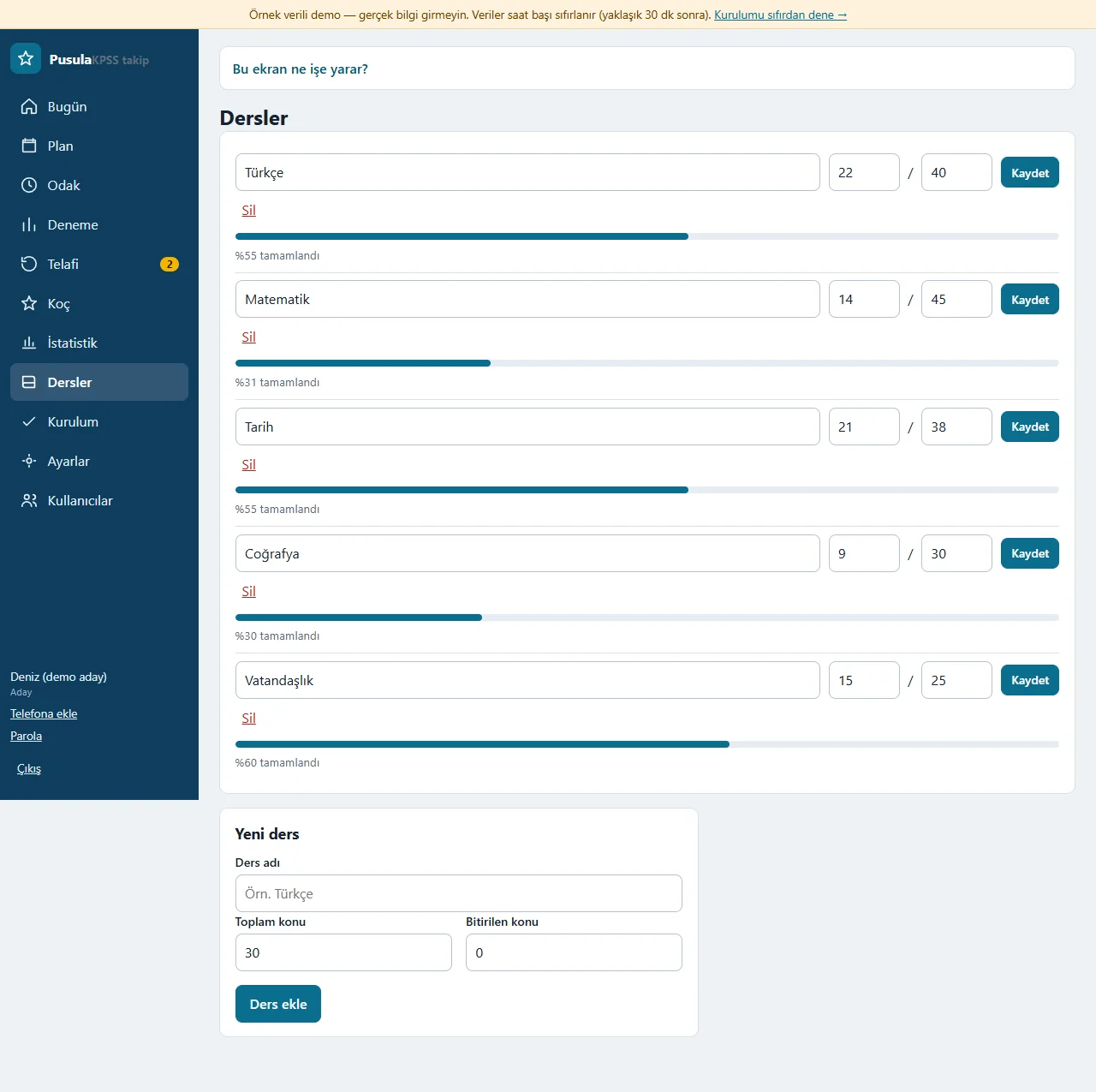
The total and finished topic counts of each subject are entered and its progress per cent is worked out from them; subjects are added or deleted. Finishing a “topic study” task adds one to the finished topics of the subject of the same name, and the coach picks the subject furthest behind by looking at these percentages.
- On screen (Turkish interface)
- “Yeni ders” — new subject
- “Toplam konu / Bitirilen konu” — total topics / finished topics
- “Ders ekle” — add subject
- “% tamamlandı” — per cent complete
-
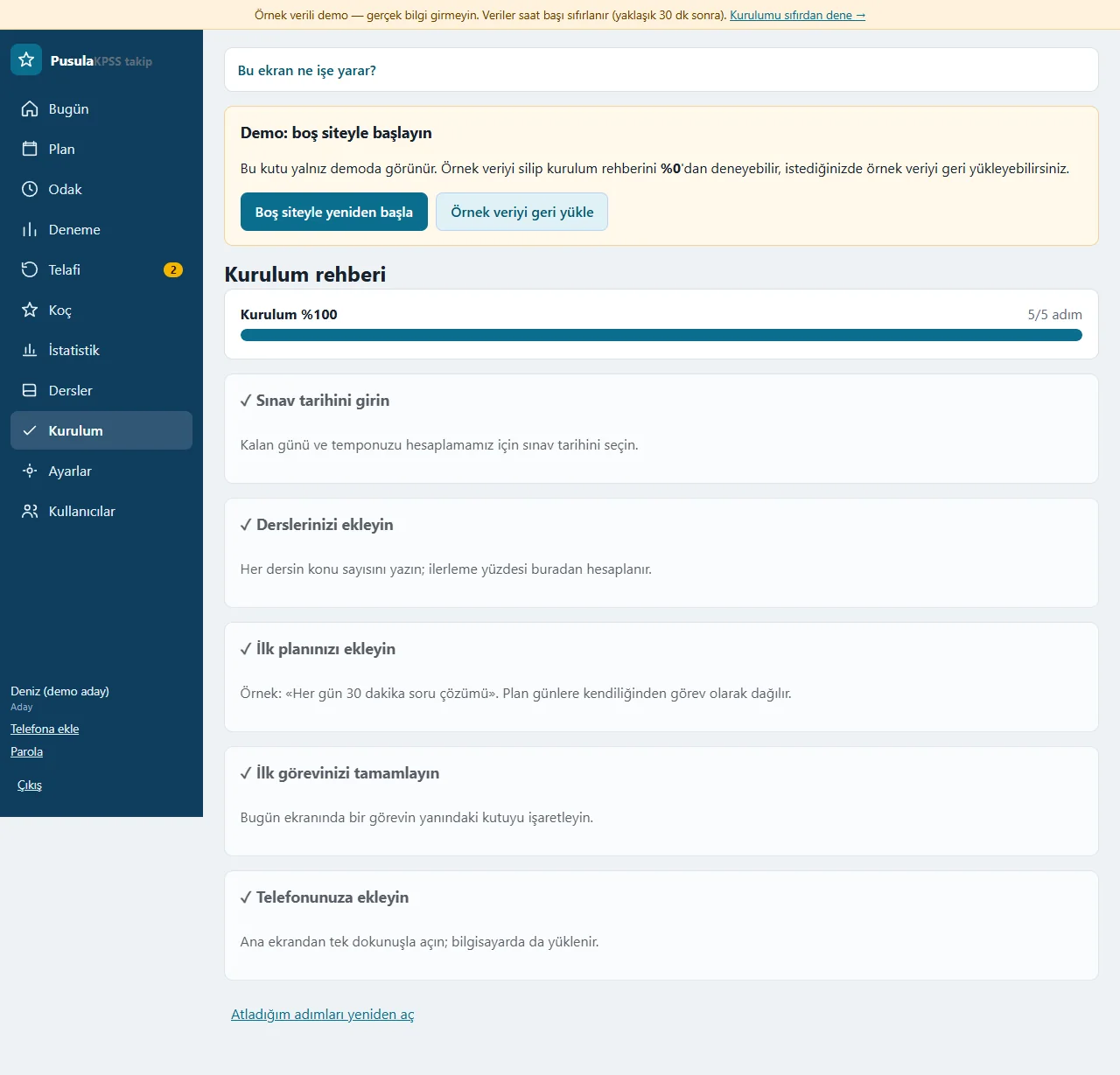
Set-up guide
Five steps are shown with a progress bar: exam date, subjects, first plan, first task, adding to the phone; each step moves on to the next when done and any step can be skipped. In the box that only shows in the demo, “Boş siteyle yeniden başla” deletes the sample data and opens the guide at 0%, and “Örnek veriyi geri yükle” brings it back.
- On screen (Turkish interface)
- “Kurulum rehberi” — set-up guide
- “Sınav tarihini girin” — enter the exam date
- “Boş siteyle yeniden başla” — start again with an empty site
- “Örnek veriyi geri yükle” — restore the sample data
-
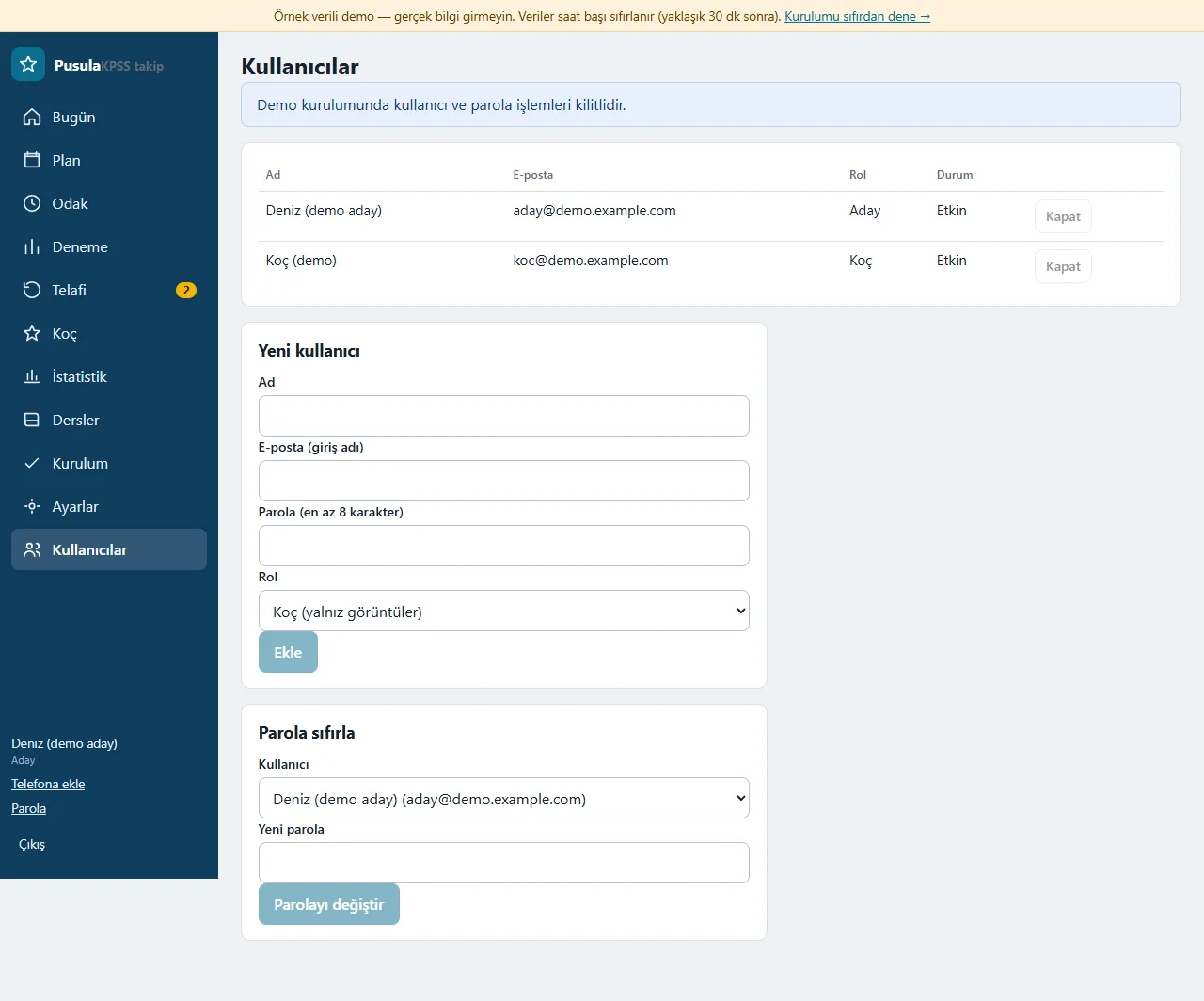
Users and roles
The Candidate and Coach users are listed; a new user is added, a password reset and a user closed. The coach only views and never sees this screen, the settings or the backup. In the demo, user and password actions are locked.
- On screen (Turkish interface)
- “Yeni kullanıcı” — new user
- “Koç (yalnız görüntüler)” — Coach (view only)
- “Parola sıfırla” — reset password
- “Kapat” — close the user
-
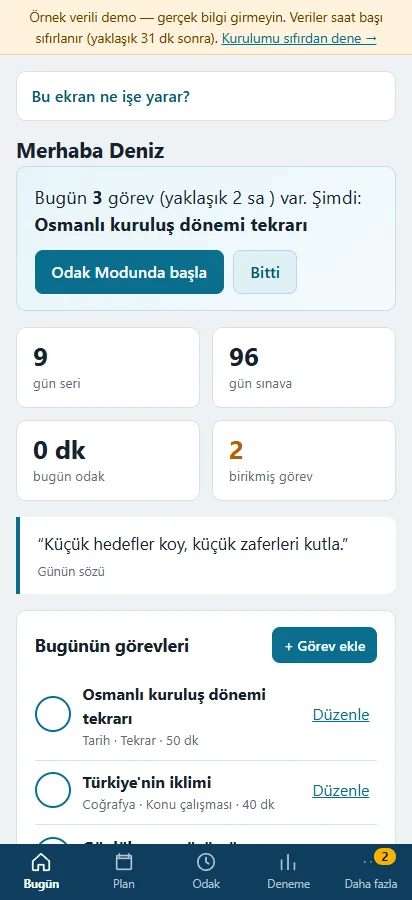
Today on a phone
The same Today screen is a single column on a phone and the app can be added to the home screen. Adding to the home screen has not been tried on a real phone.
- On screen (Turkish interface)
- “Bugün” — Today
- “Odak Modunda başla” — start in Focus Mode
-
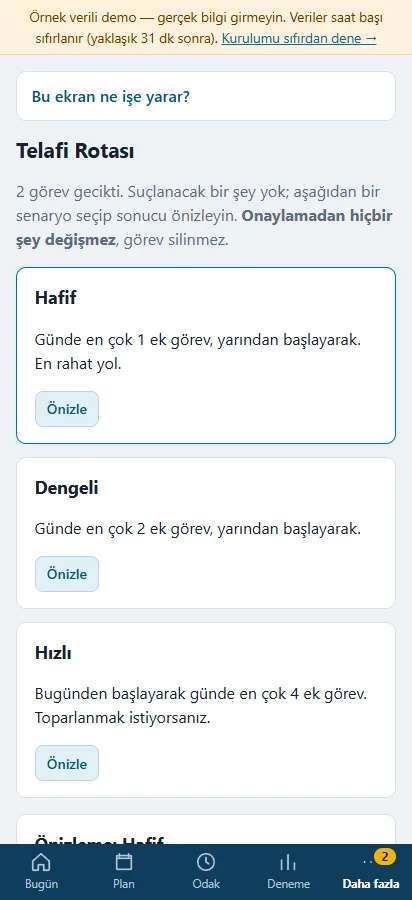
Catch-up Route on a phone
The three scenarios of the Catch-up Route stack one under another on a phone; the preview and the “Onaylıyorum, uygula” button are the same.
- On screen (Turkish interface)
- “Hafif / Dengeli / Hızlı” — Light / Balanced / Fast
- “Önizle” — preview
- “Geciken görevler” — overdue tasks
- What do they see at the end?
- The candidate finishes a task or works in Focus Mode, redistributes overdue tasks with the Catch-up Route and enters practice-exam nets; the coach only views.
- What is it good for?
- The candidate starts each day with a ready route instead of working out what to study; the app itself says which subject has fallen behind, and a missed day does not break the plan.
Everything that is not included, and all limits
- It has not been delivered to a client and is not in a real candidate’s daily use. The candidate, tasks and exams on the screens are made up.
- Some features of the original desktop app were not carried over to the web version: there is no alarm or sound alert, no current-affairs question bank, no Telegram notification and no bulk import. There is no phone notification (Web Push) or offline use either.
- The focus timer runs while the browser page is open; no sound alarm plays when the time is up.
- The Pusula Coach is rule-based; it makes no exam-result or success promise and no personal score forecast.
- The interface is in Turkish and built around the KPSS. Adding to the home screen has not been tried on a real phone, on iPhone/Safari or in the WhatsApp in-app browser.
- The live demo was run on a single hosting account only. In the demo the data is reset every hour; sign-in is without a password, through the role buttons. A normal installation asks for an e-mail and password.
Delivery and sales status
How does it work?
You try the demo and tell us about your study routine, and we send you a quote. We install it and we host it. The yearly price includes installation, hosting, data transfer and support; it is for a single candidate and coach.
Price
The yearly list price is 2,000 TL (for a single candidate and coach). Installation, one year of hosting, data transfer, bug fixes and written usage support are included. A sound alarm, a current-affairs question bank, Telegram notification, phone notification, bulk import, automatic SMS and WhatsApp sending, online card payment and an app published in the app stores (there is a web app that installs on the phone) are not included. New feature requests and work beyond the scope are priced separately and you are told before it is done.
Possible delivery options
Other delivery options
Requirements and version history
Installation requirements
- PHP 8.1 or newer and HTTPS are needed; the data is kept in a SQLite file and no database server is needed. The live demo was run on a single hosting account only.
Release notes
- No version has been delivered to a client. The sample-data demo is open to everyone and is shown with the screenshots on this page.
- 0.1.1 – 0.1.3 (8–9 November 2026): the demo bar was shortened on a narrow phone; the daily quotes were replaced with those of the desktop app; focus time is written like “2 sa 10 dk”.
- 0.1.0 (8 November 2026): the first web version; the Today compass and Focus Mode, plan and recurring plan, the Catch-up Route, focus sessions, the Practice Exam Centre, a rule-based Pusula Coach, statistics and badges, subjects, a set-up guide, installing on a phone or computer, JSON backup, Candidate and Coach roles, a demo sign-in screen and an empty start in the demo. A sound alarm, a current-affairs question bank, Telegram notification, phone notification and bulk import are not in this version.
Decisions not made yet
- Rights to use, modify, transfer and receive the source code: to be set in a written agreement; not decided yet.
- Whose name the hosting and domain are opened in, and where the software is installed, have not been decided yet.
There is no cart, customer account or online payment on this site for now. Reach out by phone, WhatsApp or the form; in a first conversation your need and the software’s fit are reviewed. The form does not create an order, a contract or a payment.