Nurseries and kindergartensDemo with sample data
Nursery and Kindergarten Student, Parent and Fee Tracking: screen-by-screen guide
The full version of the short description on the product page: every feature, how each screen is used step by step, all limits and the delivery details.
All features
The flows below were run in the app’s version with sample data (0.3.2). The screens were taken on 11 November 2026 from the live demo; the school in the demo is “Minik Adımlar Anaokulu (demo)” (sample), and its children, parents, phone numbers and amounts are made up. The application has no child photos or gallery, on purpose.
- Student record: name, date of birth, class, monthly fee, an allergy and health note (information given by the parent; not medical advice or a diagnosis), up to three parents or authorised persons, a “may pick up” mark and a sibling link; for quick adding a name, class, parent name and phone are enough
- Classes and capacity: the class name, capacity and teacher are written; a student cannot be added to a full class and the class fill level shows as a bar
- Daily attendance: on the class list the teacher marks each child Geldi, Gelmedi or İzinli with one tap, or all at once with “Hepsi geldi”; the arrival and departure time and who picked the child up are written; a ready WhatsApp message opens for the parent of an absent child
- Daily report: tap ready options for meals, sleep, mood and toilet, write the medicine (who, when) and a short note; saving moves on to the next child’s report in the class
- Monthly fees: bulk charging at the start of the month with one button, a sibling discount, a pro-rated amount option for a mid-month enrolment, part payments, the payment method (cash, bank transfer or the school’s own POS), a printable receipt, lists of those who owe and those who are late, and a ready WhatsApp reminder; the program takes no payment
- Parent page (no sign-in): where a parent sees their own child’s status for today, the daily report, the last 14 days, the fees and payments, announcements and the meal list; the link is sent from WhatsApp, copied or handed out on a QR A4 poster; a link that went to the wrong person is renewed
- Pre-enrolment and a waiting list: a public pre-enrolment form, a free phone notification to the team for a new application, filtering by age and class fill level, and “Öğrenci olarak kaydet” (save as a student)
- Announcements and a weekly meal list: announcements to the whole school or one class; the weekly meal list is written, copied from the week before and shows on the parent’s page; an announcement can be sent from WhatsApp
- Incident record: falls, knocks and similar events are written down, the parent sees them on their own page and confirms with “Gördüm” (seen), and a printable report is prepared
- Height, weight and temperature records, a simple survey (a question to parents and a count of answers) and a kiosk check-in and check-out screen
- A late-pickup fee suggestion: for children picked up after closing time an amount per minute is suggested; the office approves it, nothing is written on its own and the feature is off by default
- Multi-day closed days: a holiday range or the same hours every day are written; upcoming closed days are listed and removed with “Yanlış girdim, sil” (entered by mistake, delete)
- Roles: manager, office and teacher; a teacher sees only their own class, the fee and payment areas are never shown to them and the server refuses an address typed by hand
- Importing students and parents from Excel/CSV: column recognition from the header, a preview before saving, duplicate checking and undo for the last import; no message is sent during an import
- A setup guide (with a progress percentage), a “Bu ekran ne işe yarar?” (what is this screen for) box on every screen, installing on a phone or computer for the manager and teachers with a sign-in-free setup page, CSV export and a backup download; in the demo “Boş siteyle yeniden başla” and “Örnek veriyi geri yükle”
Screen by screen: how it is used
The interface in these screens is Turkish; only the captions and explanations on this page are in English. The screens were taken on 11 November 2026 from the live demo of version 0.3.2 of the app (with sample data). The school (“Minik Adımlar Anaokulu (demo)”), children, parents, phone numbers and amounts are made up; the application has no child photos.
- Who uses it?
- The owner and office worker of a nursery or kindergarten, the teacher who runs a class, and the parent who wants to know how the child’s day went.
- Where do they start?
- A child is recorded, placed in a class and the parents’ phones are written; in the morning the teacher takes attendance and through the day writes the daily report. The parent is sent the link to a page of their own, without a sign-in.
What do they do on screen? Step by step
-
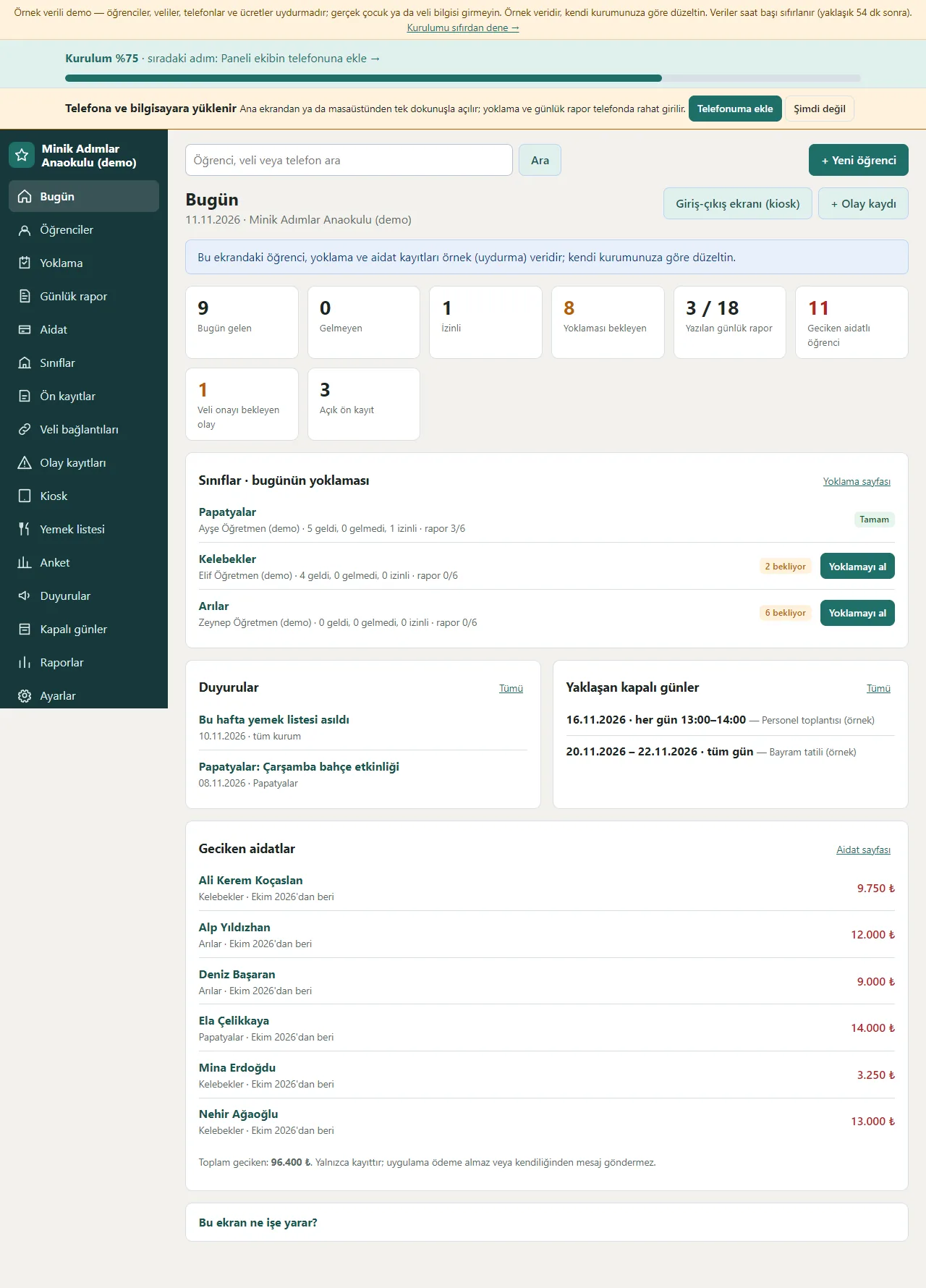
Today screen
Counts of children present, absent, excused and waiting for attendance today, the number of daily reports written and the number of students with late fees show as tappable boxes; today’s attendance by class, announcements, upcoming closed days and late fees are listed one under another. The setup percentage and an “add to phone” suggestion sit at the top.
- On screen (Turkish interface)
- “Bugün gelen” — present today
- “Gelmeyen” — absent
- “İzinli” — excused
- “Geciken aidat” — late fees
-
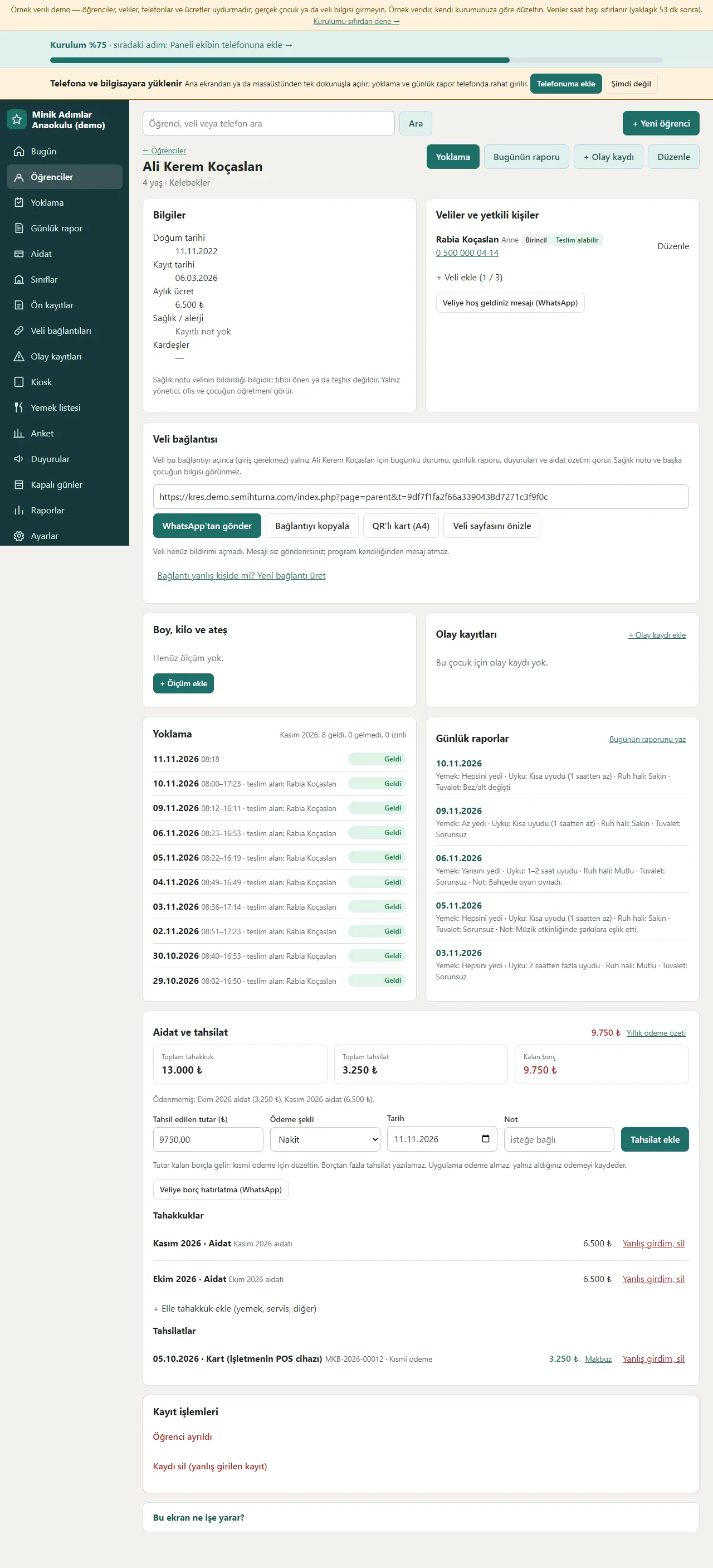
Student card
The child’s details (date of birth, enrolment date, monthly fee, health and allergy note), up to three parents or authorised persons, the child’s own parent link (send from WhatsApp, copy the link, a QR card), height and weight records, incident records, attendance history, daily reports and fees with payments are gathered on one card.
- On screen (Turkish interface)
- “Veli bağlantısı” — parent link
- “Teslim alabilir” — may pick up
- “Günlük raporlar” — daily reports
- “Aidat ve tahsilat” — fees and payments
-
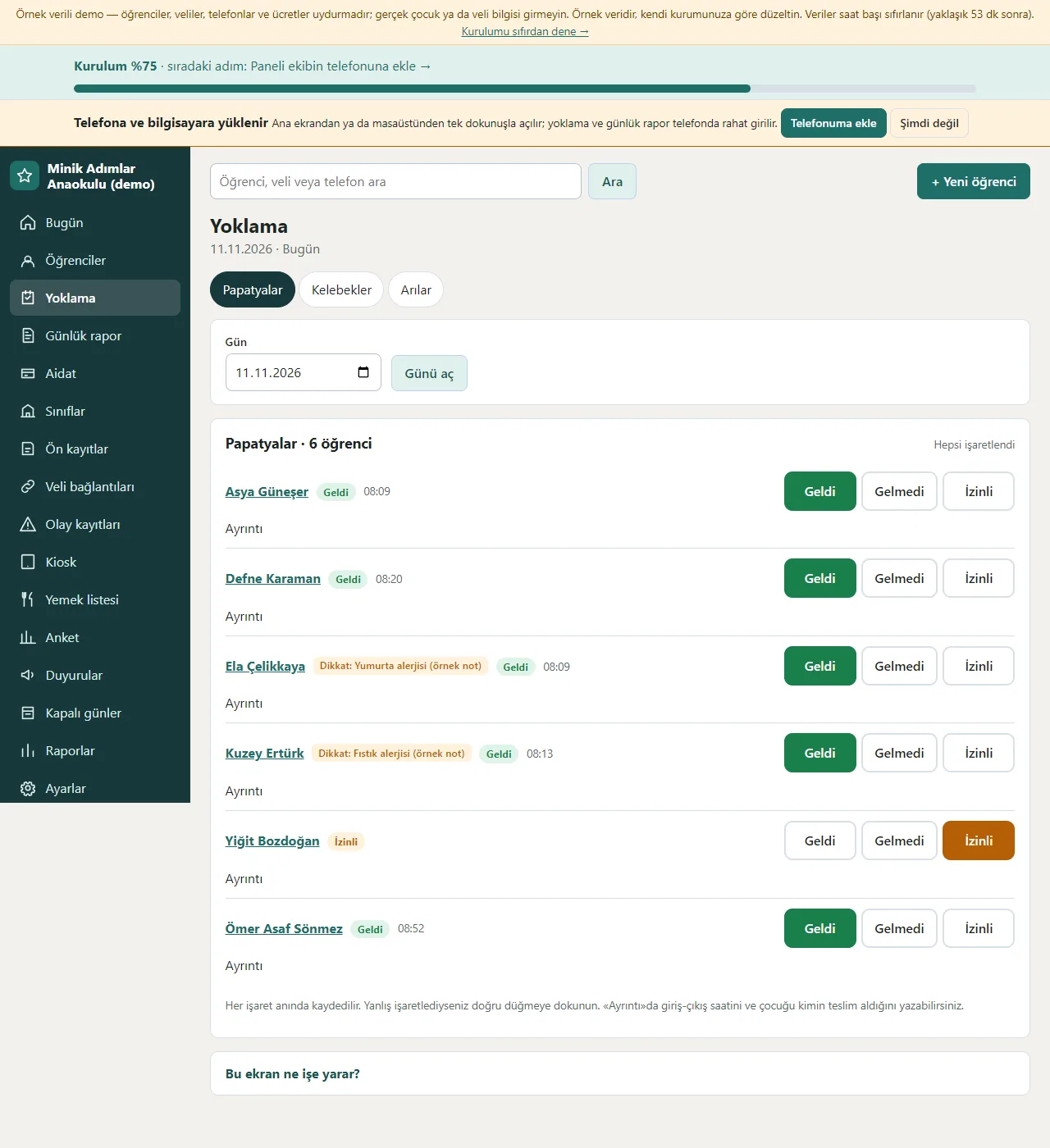
Attendance
The class is chosen, the day is opened and the Geldi, Gelmedi or İzinli button next to each child is tapped; every mark is saved at once. A child with an allergy has a notice next to the name; “Ayrıntı” writes the arrival and departure time and who picked the child up.
- On screen (Turkish interface)
- “Geldi” — present
- “Gelmedi” — absent
- “İzinli” — excused
- “Ayrıntı” — details
-
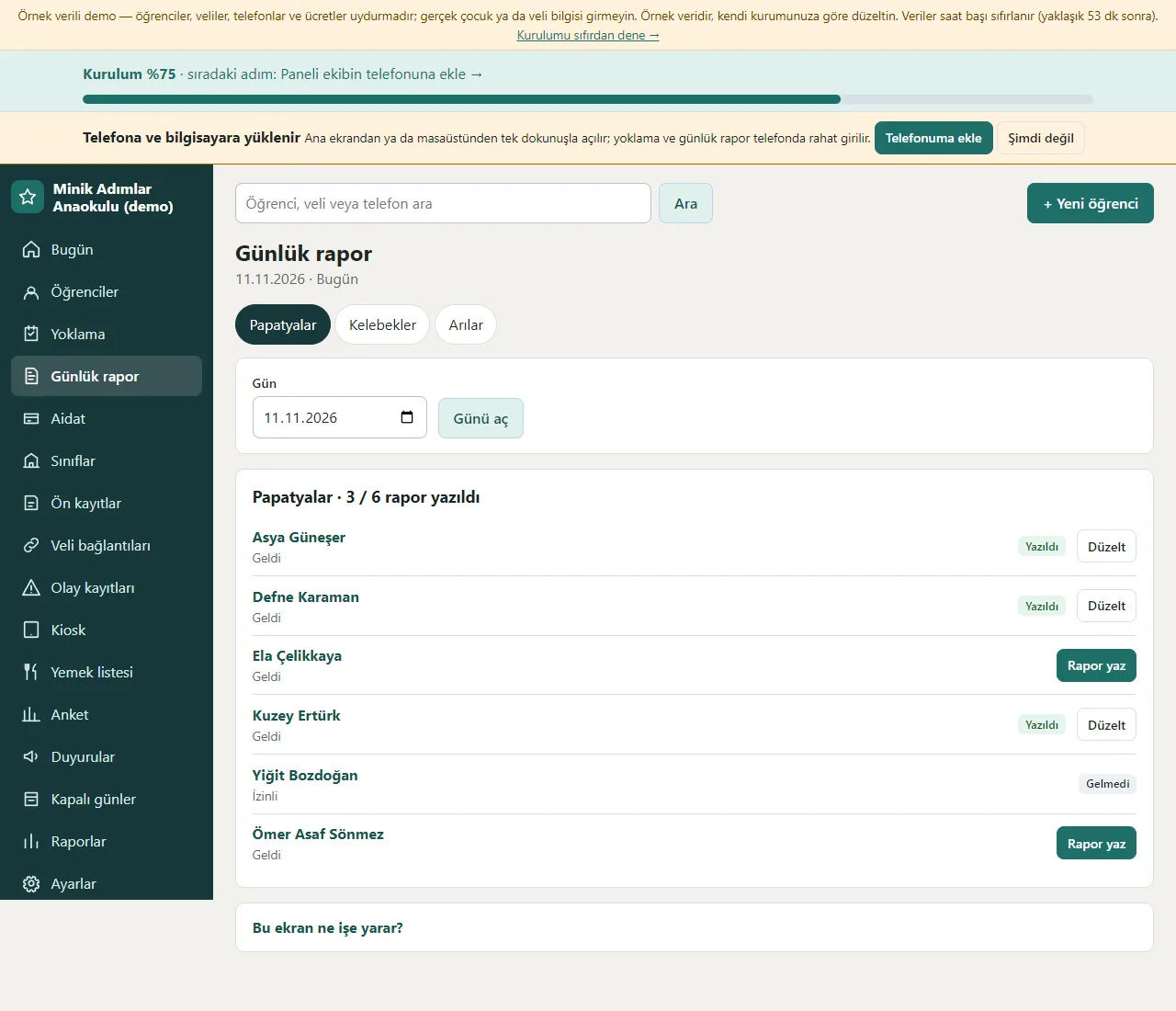
Daily report
For each child in the class the report status shows: written, not written or absent. Tapping a child opens ready options for meals, sleep, mood and toilet, medicine and a short note; saving moves on to the next child.
- On screen (Turkish interface)
- “Rapor yaz” — write report
- “Yazıldı” — written
- “Düzelt” — edit
- “Günü aç” — open the day
-
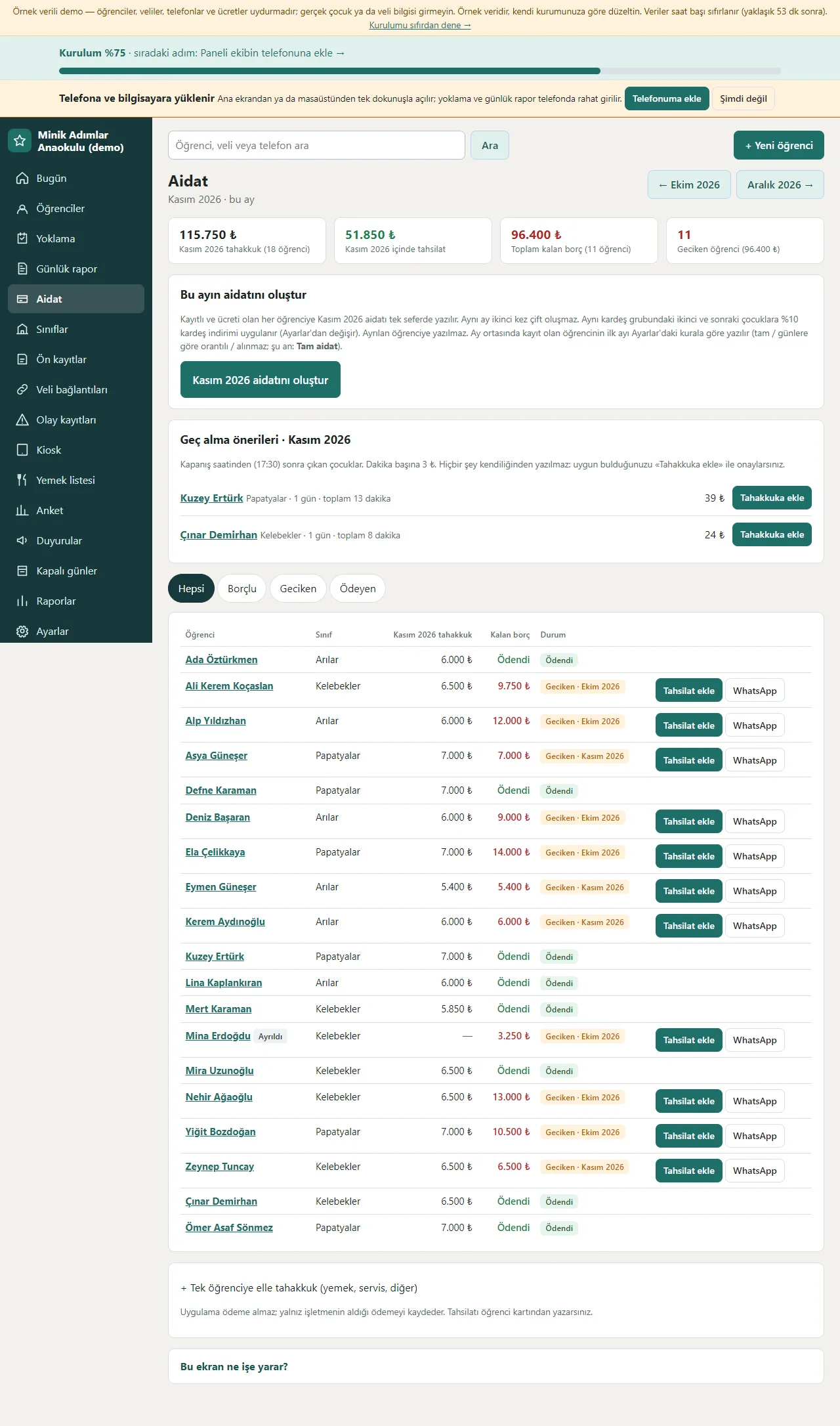
Fees
The month’s charges, payments, the balance left and the number of late students show at the top; the “aidatını oluştur” (create the fees) button writes the monthly fee once for every enrolled student and the sibling discount is applied. The table below shows the charge, balance and status per student, with Tahsilat ekle (add a payment) and a ready WhatsApp reminder on each row. Late-pickup suggestions for children picked up after closing are on this screen too; nothing is written until the office approves.
- On screen (Turkish interface)
- “Tahsilat ekle” — add a payment
- “Geciken” — late
- “Borçlu” — owes
- “Tahakkuka ekle” — add to the charges
-
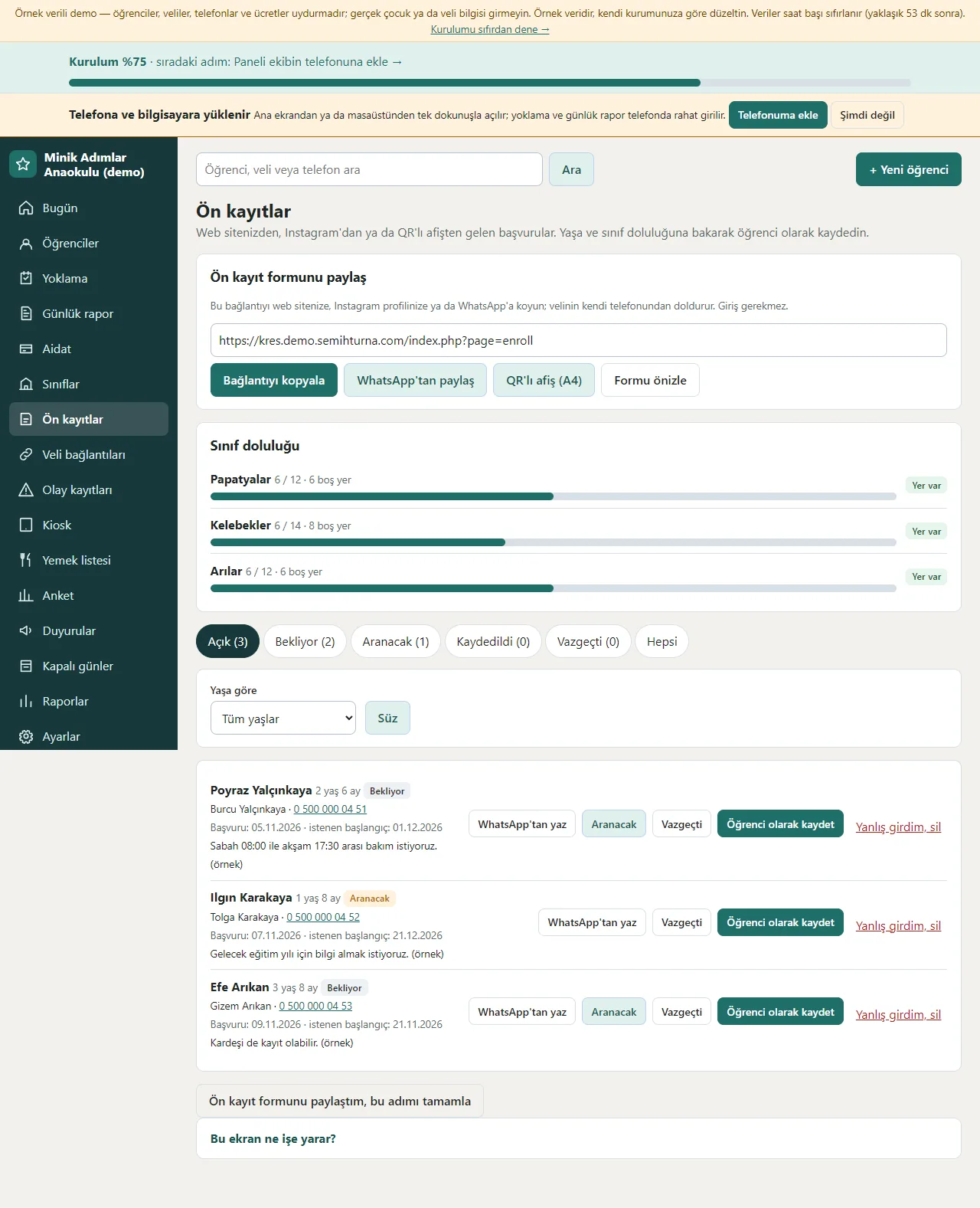
Pre-enrolments
The link of the public pre-enrolment form is copied and shared from WhatsApp or on a QR poster. Class fill levels show as bars; incoming applications are filtered by age and each has WhatsApp’tan yaz (write on WhatsApp), Aranacak (to call), Vazgeçti (withdrew) and “Öğrenci olarak kaydet” (save as a student) buttons.
- On screen (Turkish interface)
- “Ön kayıt formunu paylaş” — share the pre-enrolment form
- “Sınıf doluluğu” — class fill level
- “Aranacak” — to call
- “Vazgeçti” — withdrew
-
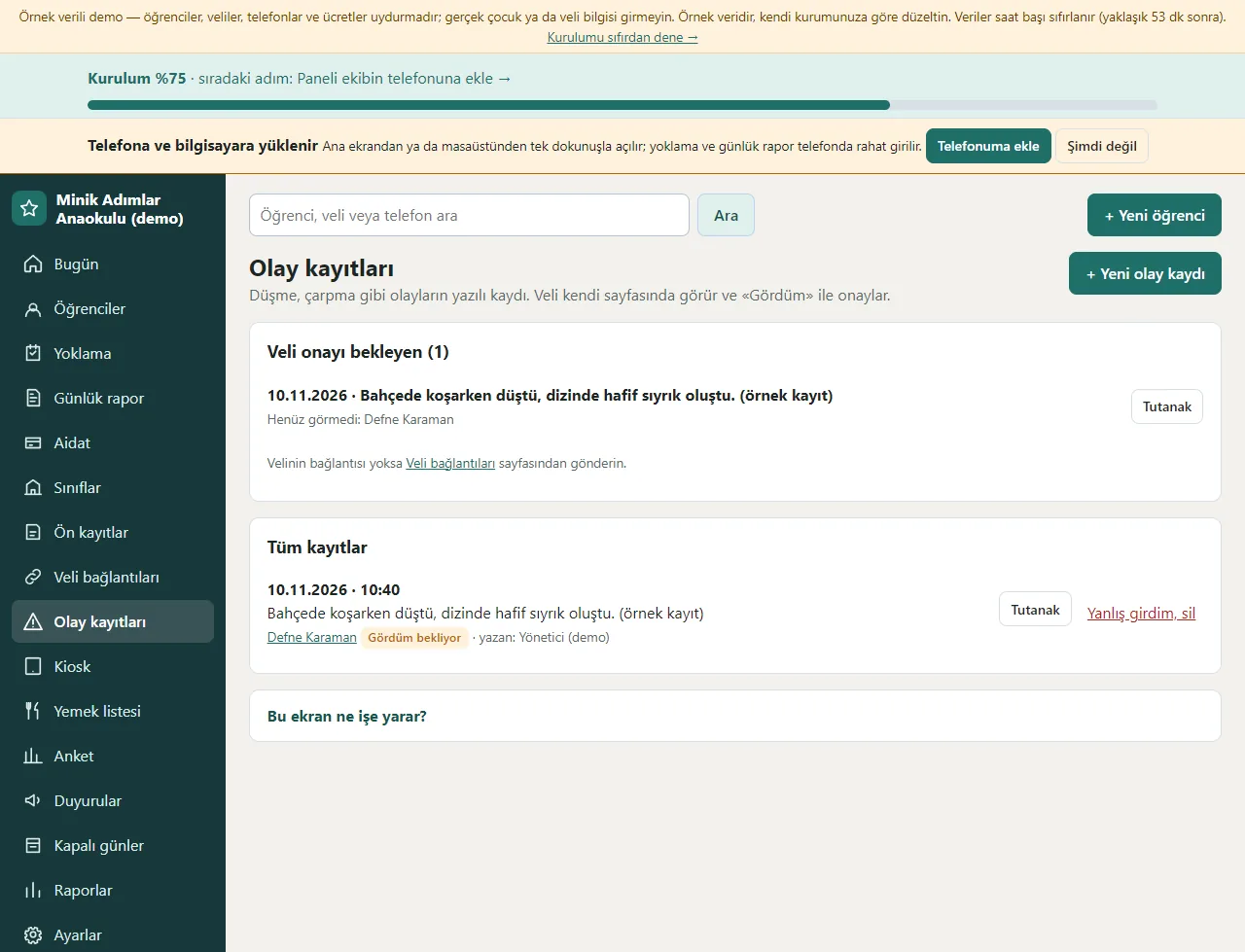
Incident records
Falls, knocks and similar events are written with what happened, first aid, the action taken and the precaution. The parent sees it on their own page and confirms with “Gördüm”; incidents waiting for a parent’s confirmation are listed apart and the report is printed.
- On screen (Turkish interface)
- “Veli onayı bekleyen” — waiting for parent confirmation
- “Tutanak” — report
- “Gördüm bekliyor” — “seen” pending
-
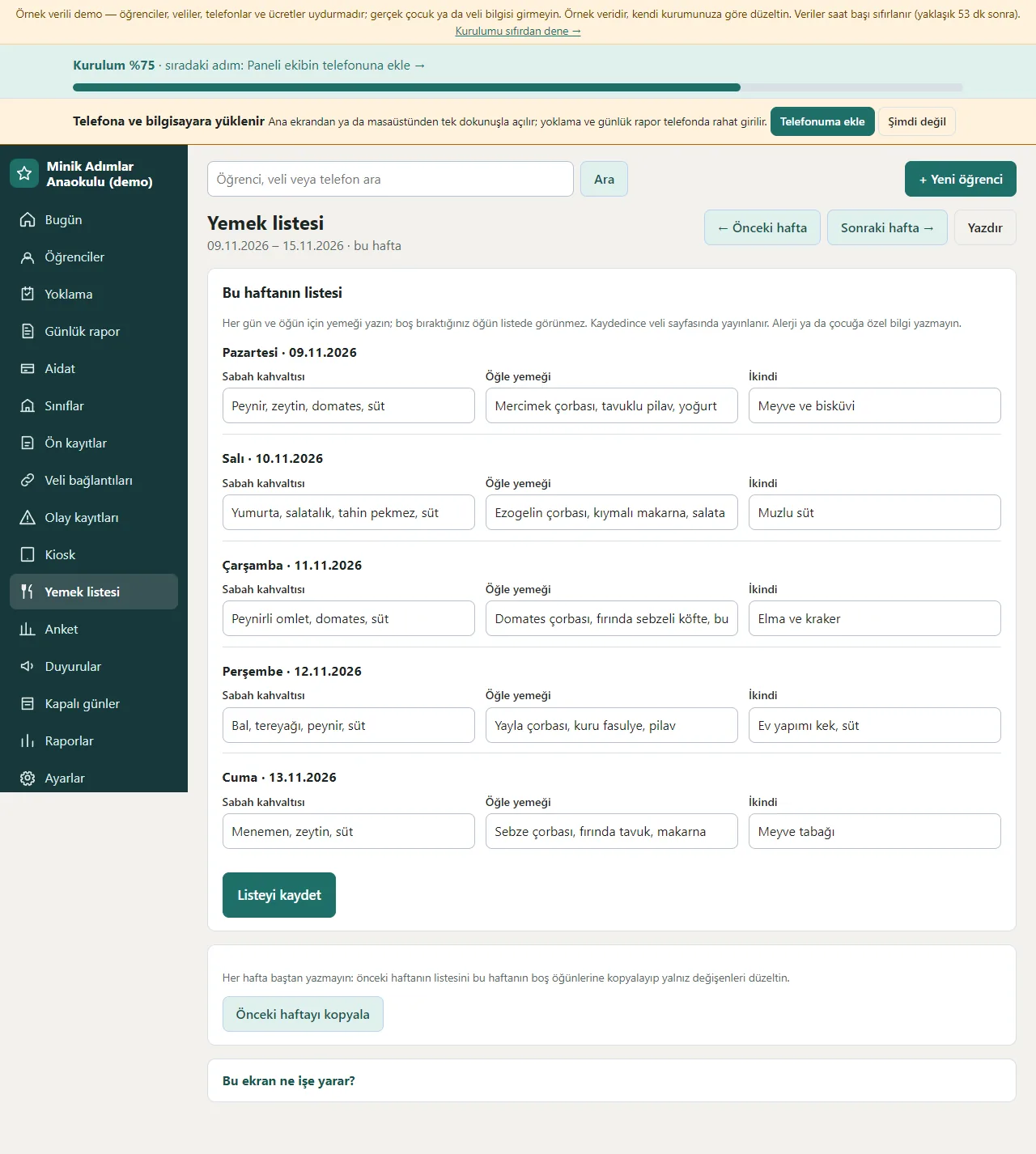
Meal list
For each day of the week the breakfast, lunch and afternoon snack are written; the previous week’s list is copied with one button. The saved list shows on the parent’s page.
- On screen (Turkish interface)
- “Listeyi kaydet” — save the list
- “Önceki haftayı kopyala” — copy the previous week
- “Sabah kahvaltısı” — breakfast
- “Öğle yemeği” — lunch
-
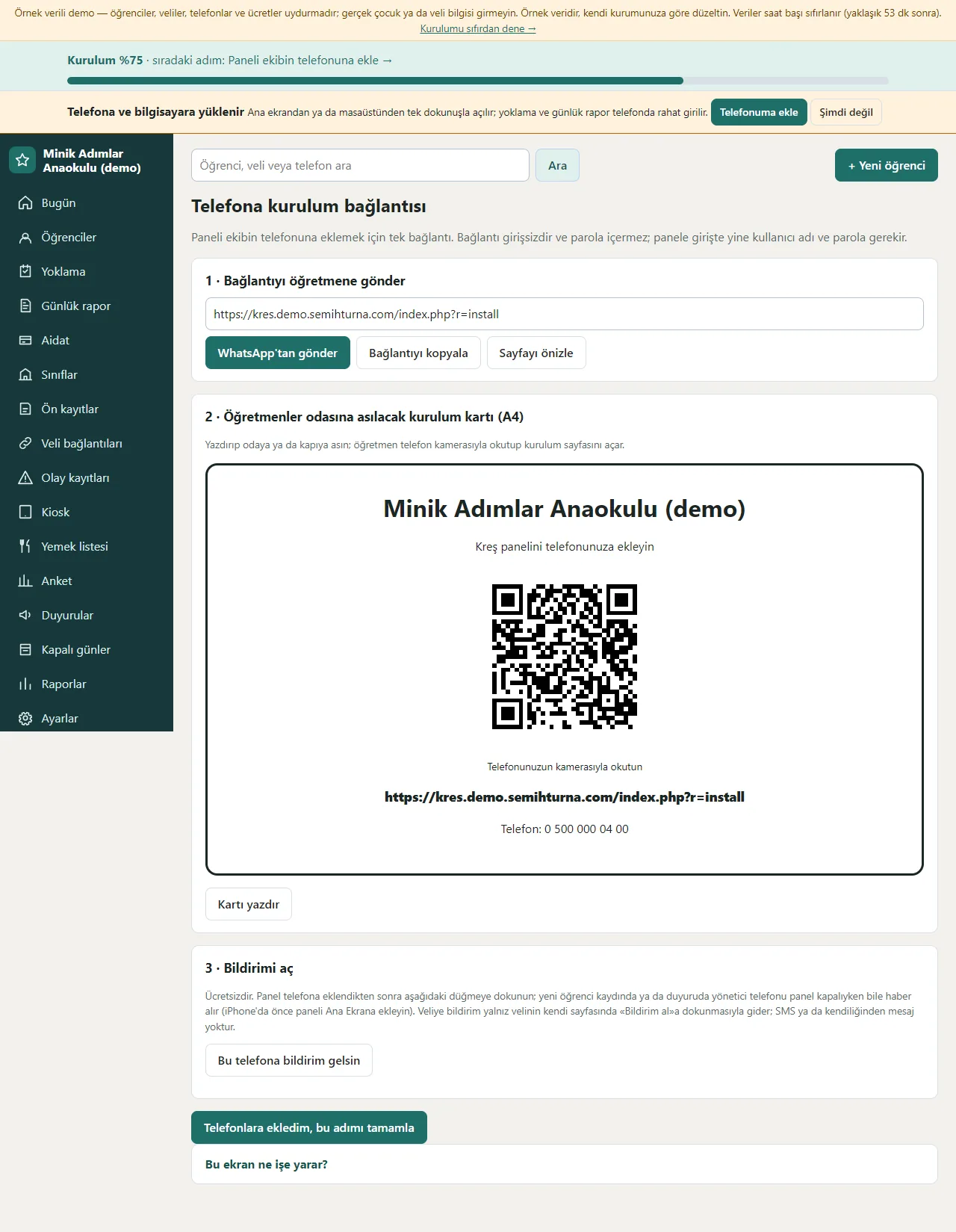
Add to the phone
The sign-in-free setup link to send to a teacher, a QR A4 setup card to hang in the staff room and a “Bu telefona bildirim gelsin” (notify this phone) button are on one page; the panel installs on a phone and a computer.
- On screen (Turkish interface)
- “Telefona kurulum bağlantısı” — setup link for the phone
- “Kurulum kartı” — setup card
- “Bildirimi aç” — turn on notifications
-
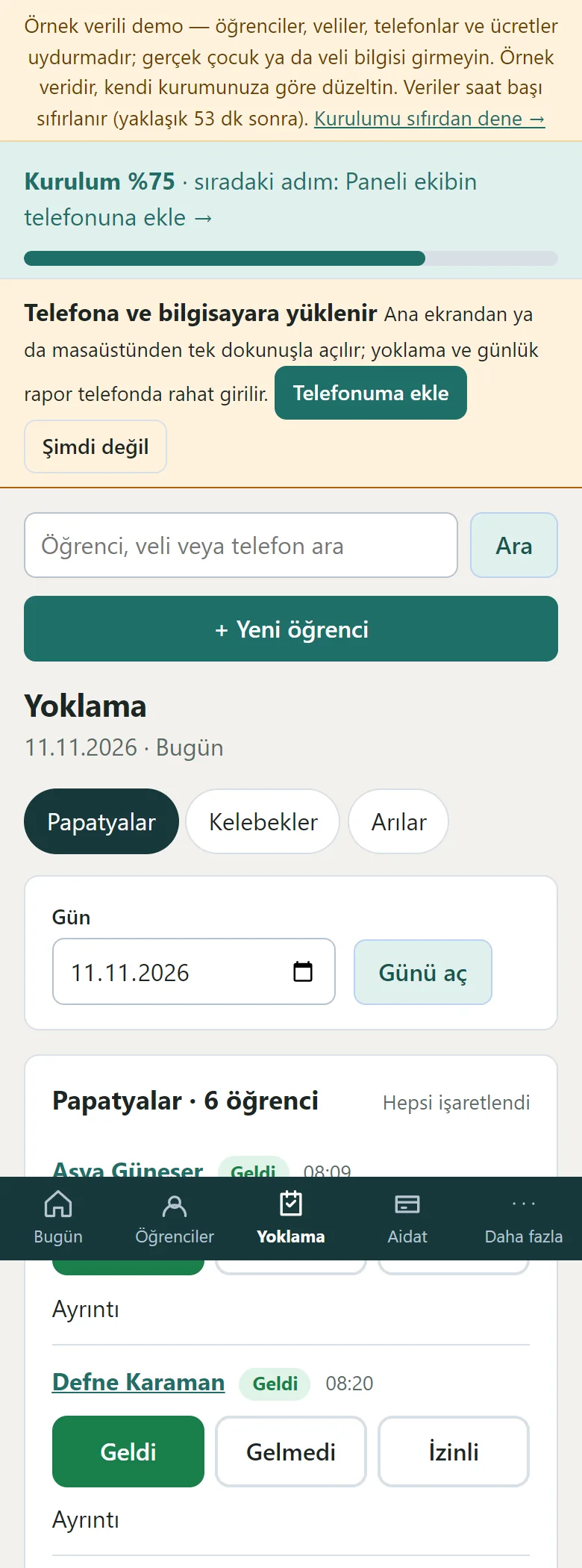
Attendance on a phone
On a phone the class buttons are at the top and each child sits one under another with large Geldi, Gelmedi and İzinli buttons; a tap is enough. The bottom menu is Bugün, Öğrenciler, Yoklama, Aidat and Daha fazla.
- On screen (Turkish interface)
- “Yoklama” — attendance
- “Papatyalar” — the class
- “Geldi” — present
-
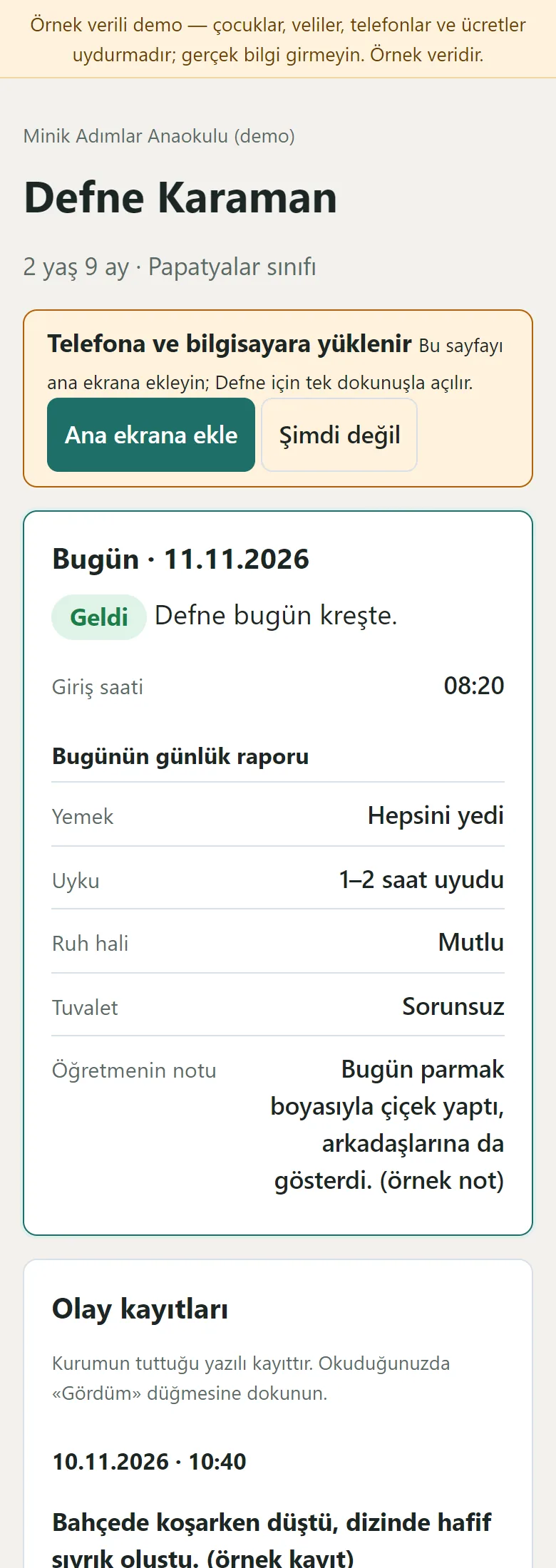
Parent page on a phone
A parent opens the link without an account: the child’s status for today, the daily report, an incident record with a “Gördüm” button, announcements, this week’s and next week’s meal lists, the last 14 days, the fee status and payments, a survey and the authorised persons. The page is large-print and simple; the health note does not appear on this page.
- On screen (Turkish interface)
- “Bugün” — today
- “Bugünün günlük raporu” — today’s daily report
- “Yemek listesi” — meal list
- “Aidat” — fees
- “Gördüm” — seen
- What do they see at the end?
- A parent sees the child’s status for today, the daily report and the fee balance on their own page; at the start of the month the fees are written in bulk, payments and receipts are recorded and late payments are listed.
- What is it good for?
- Attendance, daily information and fees no longer scatter over paper, a notebook and phone calls; they are in one place.
Everything that is not included, and all limits
- Not delivered to a client and not used by a real school. The school, children, parents, phone numbers and amounts on the screens are made up.
- There is no automatic SMS sending; WhatsApp messages open as a ready text and the school sends them from its own phone. The program sends parents no message on its own; only a phone notification (Web Push) is sent.
- There is no live school-bus location, card payment of fees over the internet, e-invoice or e-archive, QR, turnstile or card hardware, face recognition, MEB, e-Okul or TEFBİS integration, child photos or gallery, multi-branch use or official reporting; the health note is a record only.
- A real Web Push delivery, iPhone/Safari, Firefox, the WhatsApp in-app browser and a real phone have not been tried; it was run on PHP 8.3 and a single hosting account (PHP, SQLite) only.
- In the demo the data is reset every hour; sign-in is without a password through role buttons. The app interface in the screens is in Turkish.
Delivery and sales status
How does it work?
You try the demo and tell us about your school, and we send you a quote. We install it and we host it. The yearly price includes installation, hosting, data transfer and support; it is for a single school and there is no extra charge by number of students.
Price
The yearly list price is 3,000 TL. Installation, one year of hosting, data transfer, bug fixes and written usage support are included; it is for a single school and there is no extra charge by number of students. Automatic SMS, online card payment of fees, e-invoice / e-archive, live shuttle location, QR or turnstile hardware, face recognition and MEB e-Okul integration are not included; messages to parents go the free way (a phone notification, or the school sending it in WhatsApp itself).
Possible delivery options
Other delivery options
Requirements and version history
Installation requirements
- PHP 8.1 or newer (with the pdo_sqlite, mbstring and openssl extensions; curl is recommended for the phone notification) and HTTPS are needed; the data is kept in a SQLite file. The live demo was run on a single hosting account and PHP 8.3 only.
Release notes
- No version has been delivered to a client. The sample-data demo is open to everyone and is shown with the screenshots on this page.
- 0.3.2 (12 November 2026): when the public pre-enrolment form is filled in, the team gets a free phone notification (and an e-mail if it is set up).
- 0.3.1 (12 November 2026): the late-pickup suggestions in the demo sample data were reduced and the amount columns in list rows are right-aligned.
- 0.3.0 (11 November 2026): a weekly meal list, a simple survey and parent-link and pre-enrolment steps in the setup guide; the teacher’s “Daha fazla” link was fixed.
- 0.2.0 (11 November 2026): a sign-in-free parent page and a phone notification to parents, a pre-enrolment form and a waiting list, height, weight and temperature records, pro-rated fees for a mid-month enrolment, an incident record, a yearly payment summary, a kiosk, a late-pickup suggestion, time-range closed days and WhatsApp templates.
- 0.1.0 (11 November 2026): student and parent records, classes and capacity, daily attendance and daily reports, monthly fees, payments and receipts, announcements, roles, importing from Excel/CSV, a setup guide and installing on a phone.
There is no cart, customer account or online payment on this site for now. Reach out by phone, WhatsApp or the form; in a first conversation your need and the software’s fit are reviewed. The form does not create an order, a contract or a payment.