Retail and e-commerceDemo with sample data
Online bookshop: screen-by-screen guide
The full version of the short description on the product page: every feature, how each screen is used step by step, all limits and the delivery details.
All features
Every feature listed here can be seen in the screenshots or in the tests. Filling in book details from an ISBN uses an outside book service; it was not tried on the live demo and was tested with a fake answer.
- Book details: ISBN, author, publisher, pages, year, language and binding; author and publisher pages; search looks at title, author, publisher and ISBN
- School book list: the customer pastes the list, books are matched by ISBN or title and go to the cart in one click; books that are not found are left with the shop as a supply request
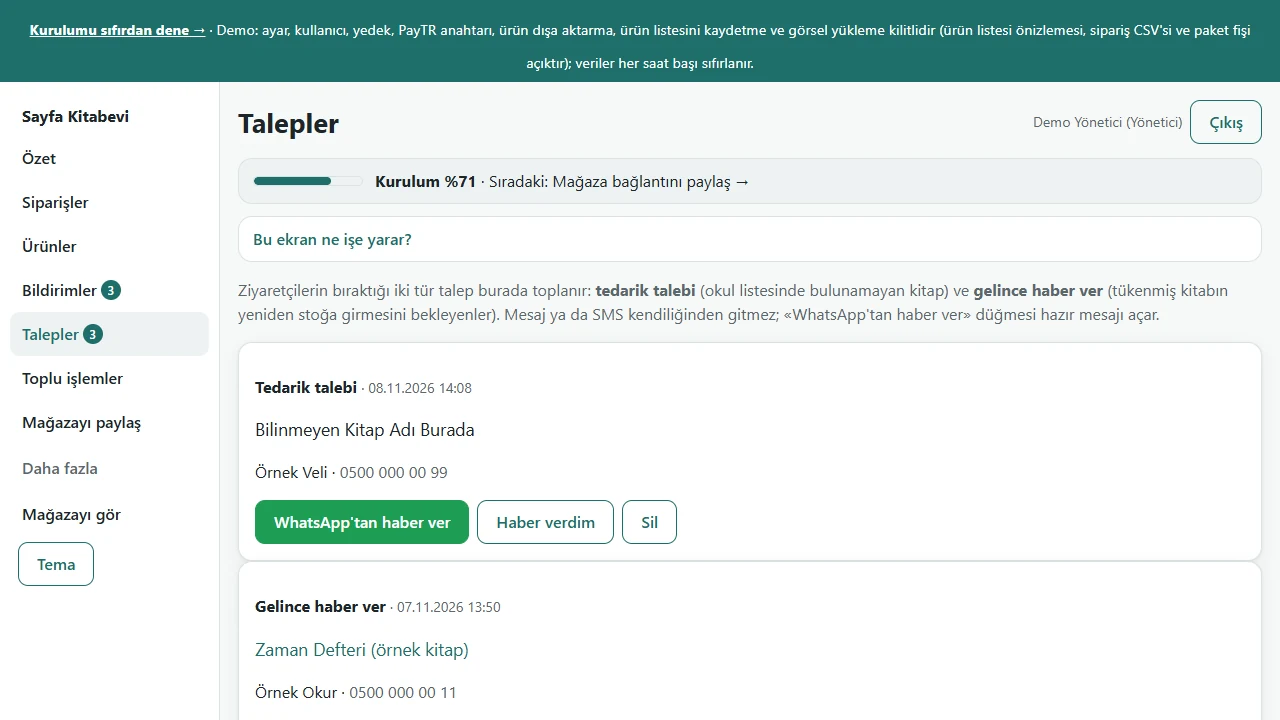
- “Tell me when it is back” on a sold-out book: a Requests list in the panel, an “in stock” badge when the book is back and a ready WhatsApp message (you send it yourself)
- Bulk stock entry: one ISBN;count per line, a preview, goods added or a stocktake, and the last entry can be undone
- Percentage price increase or discount per publisher, category or all books, with a preview; the old price is struck through on a discount; undo
- “Buy 3, pay 2” offer in the cart (a category can be chosen; the cheapest book is free), coupon and free-shipping threshold
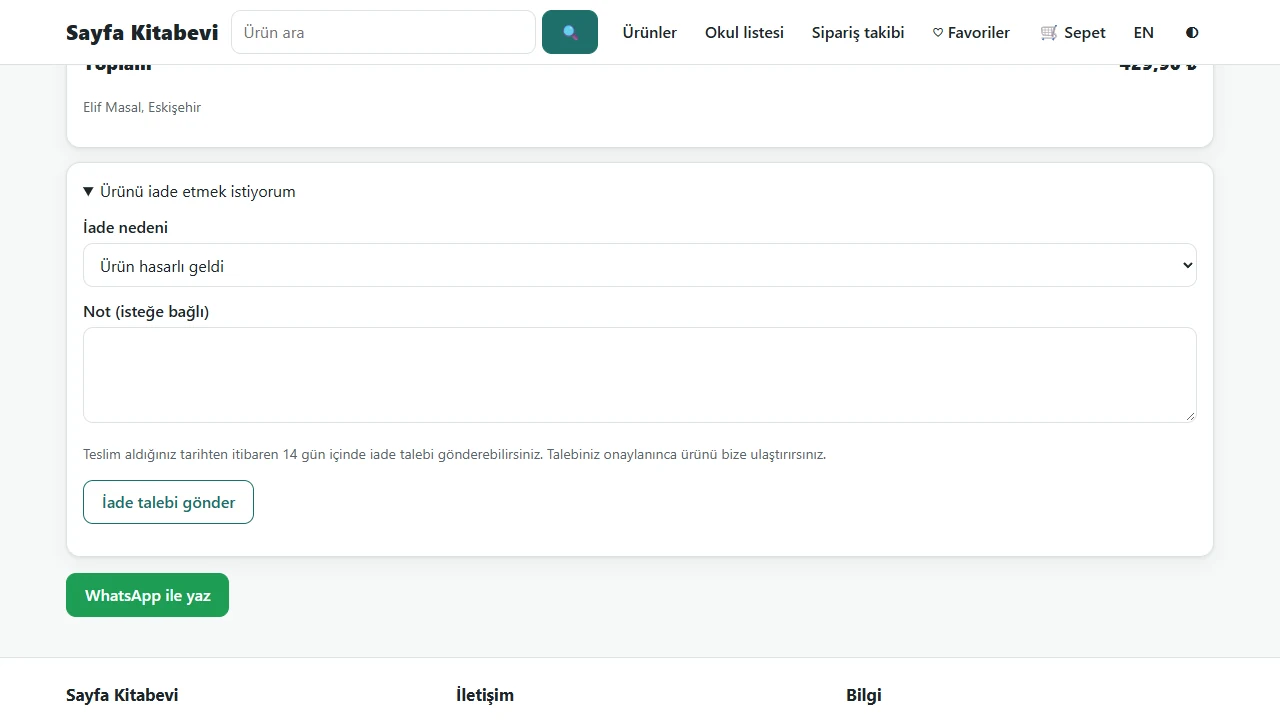
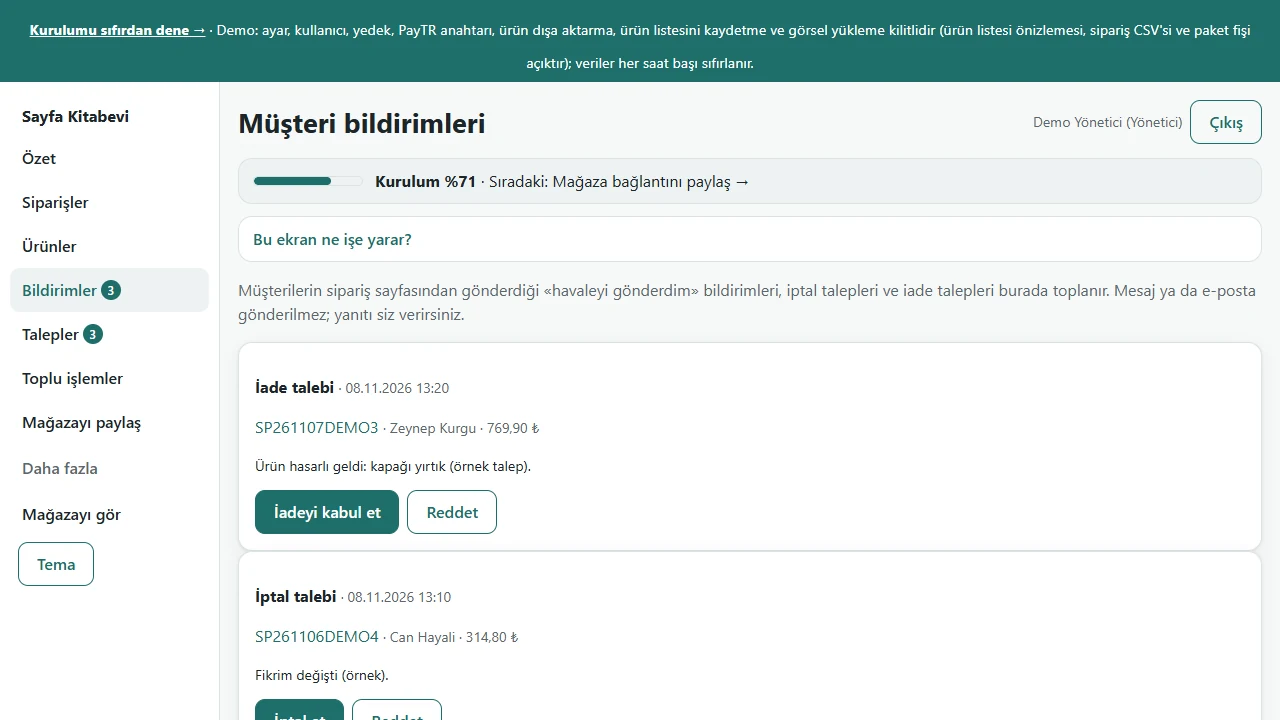
- Returns: for a delivered order the customer opens a request with a reason; the owner accepts it and, when the parcel arrives, adds the books back to stock or not; cancellation requests and bank-transfer notices too
- “Fill in from ISBN” on the product form (Open Library): title, author, publisher, pages, year; only empty fields are filled
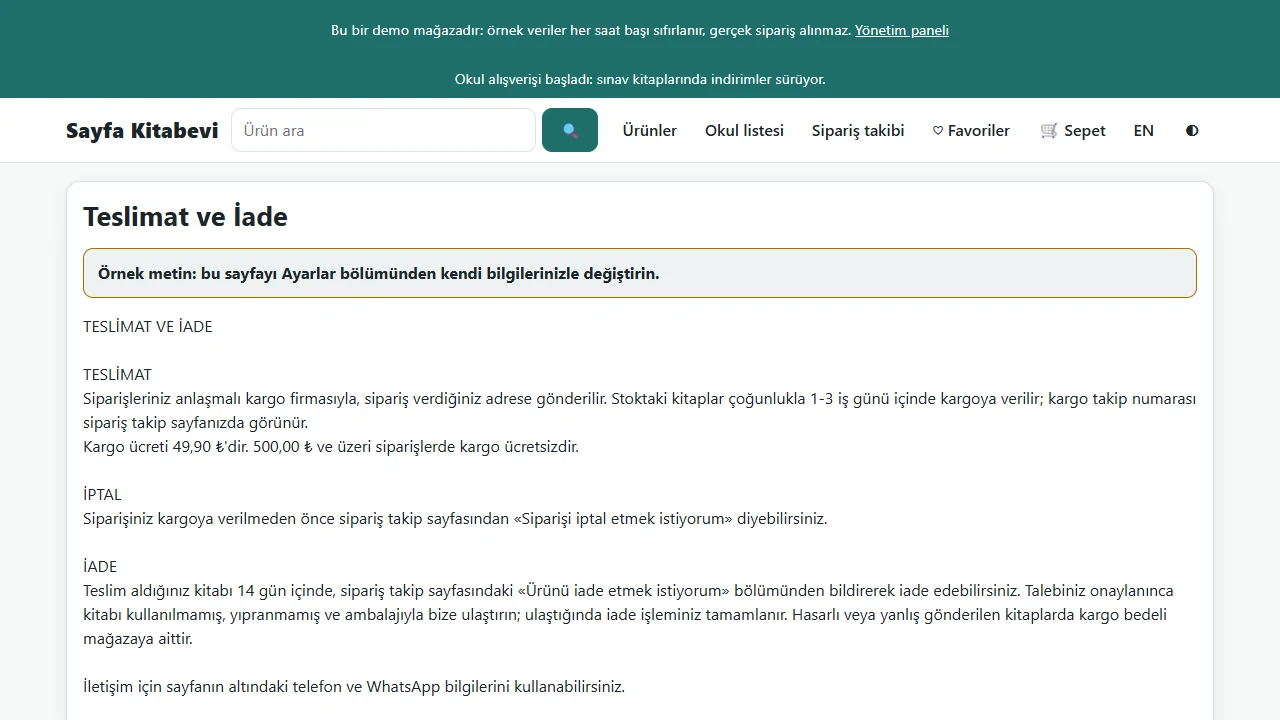
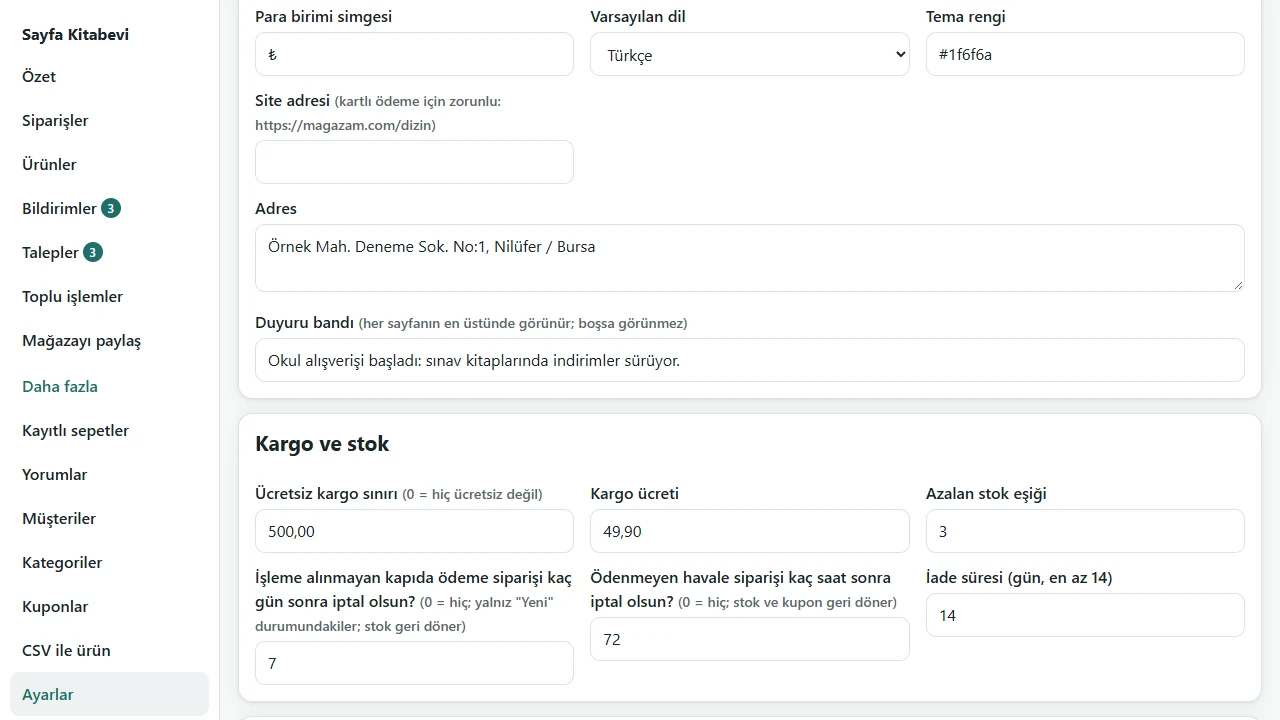
- The About and Delivery & returns pages and an announcement band on every page are edited from the panel
- Manager and staff accounts: staff see only stock entry; prices, the offer and settings belong to the manager
- Free instant notice on the phone: once the panel is added to the home screen and notifications are allowed, a new order, request or customer notice makes the phone buzz even when the panel is closed (the notice carries no customer name); an optional e-mail notice too
- Bank transfer and cash on delivery, order tracking, backup and restore, a setup guide, and a Turkish and English storefront
Screen by screen: how it is used
The screens were taken from the live demo (bookshop server edition 0.3.0, 8 November 2026) signed in as the manager; the books, people, orders and requests are sample data. The book covers are sample covers drawn for this project. The storefront has an English version, but the admin panel and these screenshots are in Turkish; only the captions here are in English.
- Who uses it?
- A customer who wants to buy books (especially a parent arriving with the school’s book list) and the bookshop staff who handle orders, stock and requests.
- Where do they start?
- The customer searches for a book, browses the categories or pastes the school list. The shop side opens, in the demo, from the “Yönetici olarak gir” (manager) and “Personel olarak gir” (staff) buttons.
What do they do on screen? Step by step
-
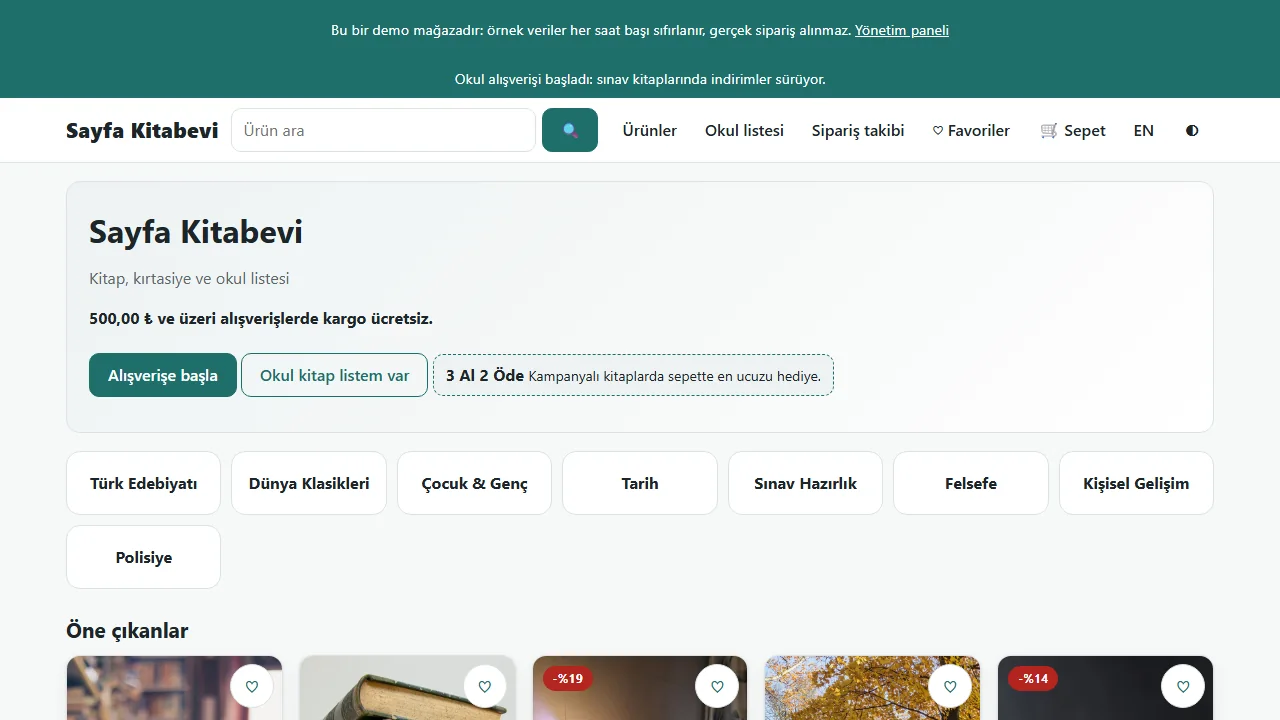
0.5.3 · 10 November 2026 Home page
The visitor sees an announcement band, the book categories, a search box and the “Buy 3, pay 2” offer. The “Okul kitap listem var” (I have a school list) button leads to the school list.
-
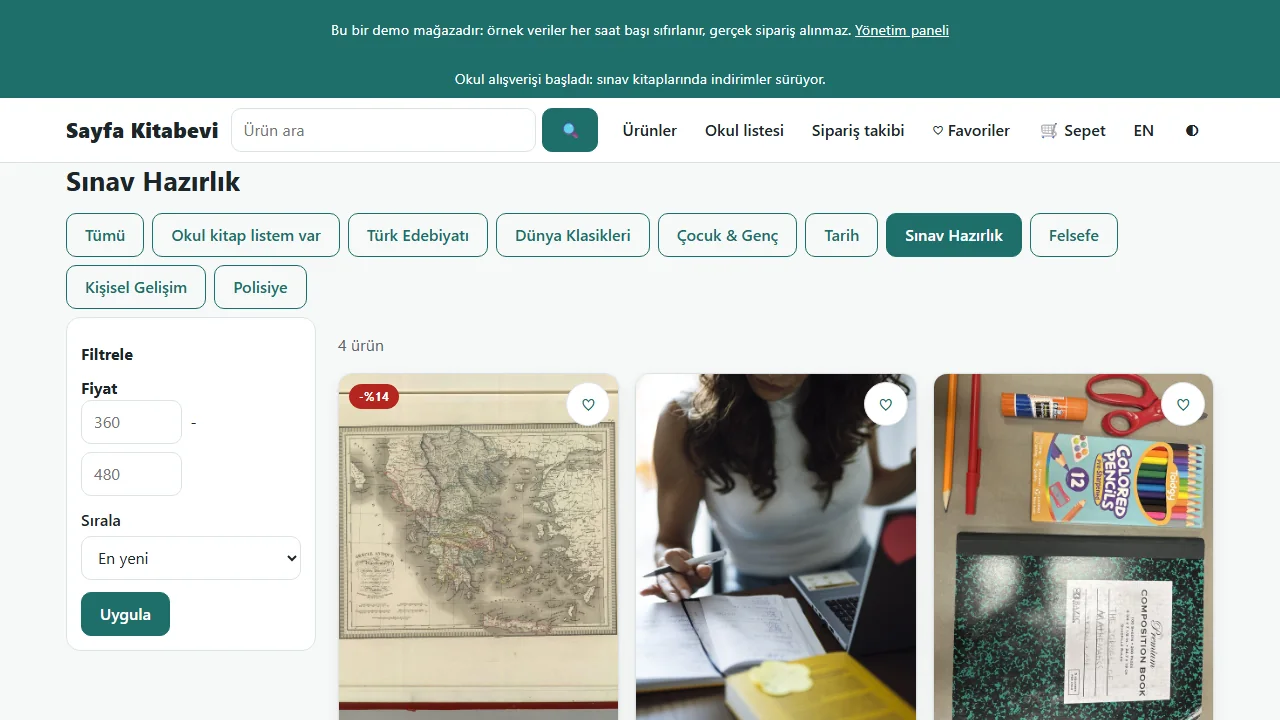
0.5.3 · 10 November 2026 Browse by category and price
Pick a category and sort the books by price (here: exam preparation, dearest first).
-
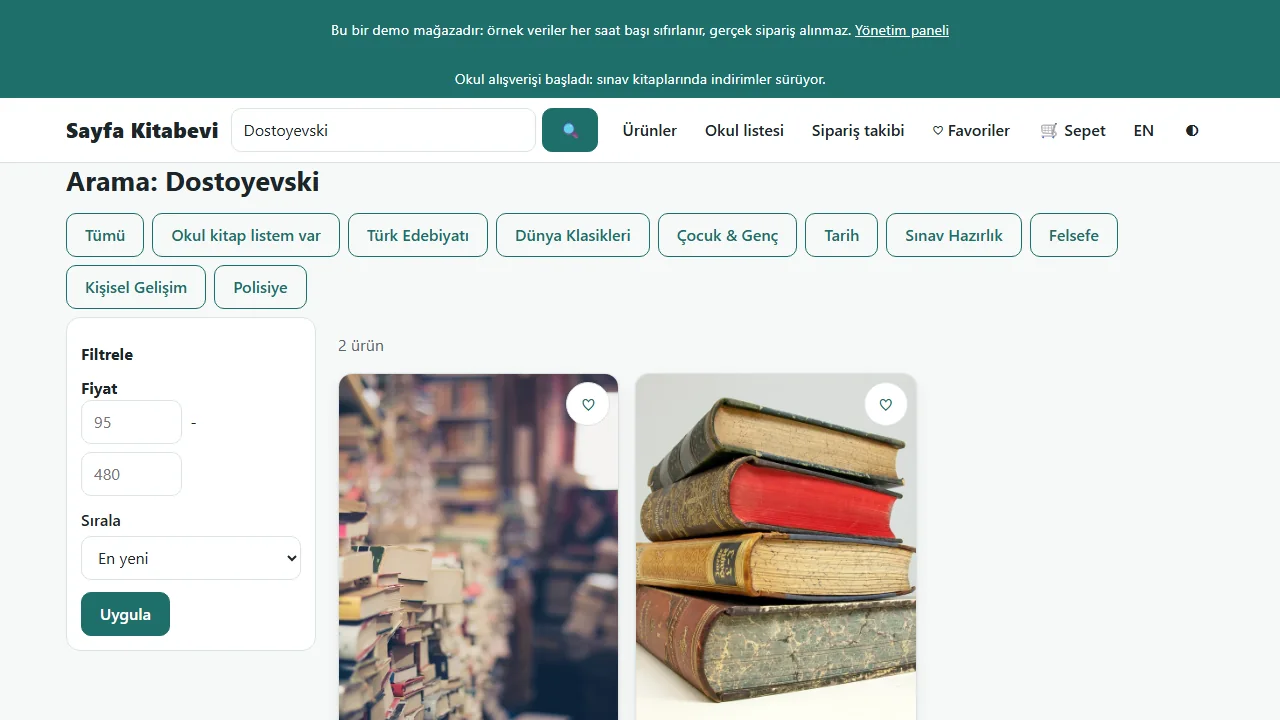
0.5.3 · 10 November 2026 Search by title, author, publisher or ISBN
The search box looks at a book’s title, author, publisher and ISBN (here: Dostoyevski).
-
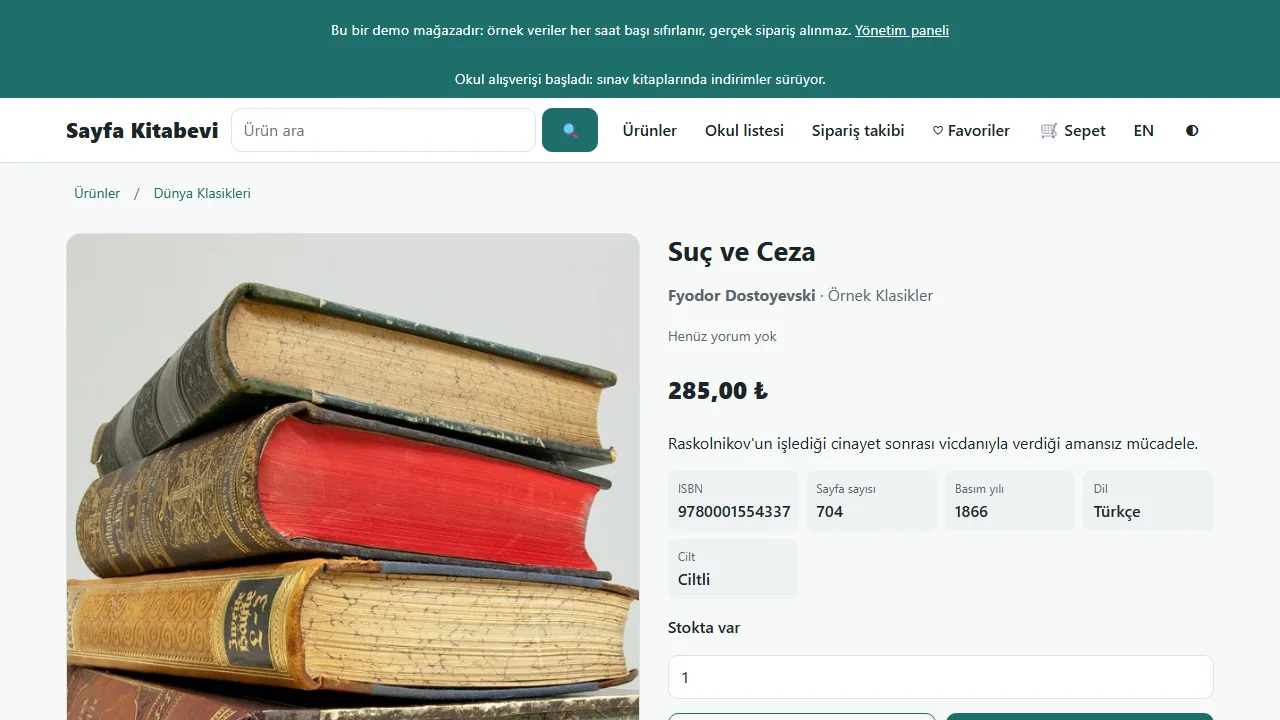
0.5.3 · 10 November 2026 Book page
Author and publisher links, ISBN, pages, year, language and binding; an add-to-cart button. A sold-out book shows a “tell me when it is back” form.
-
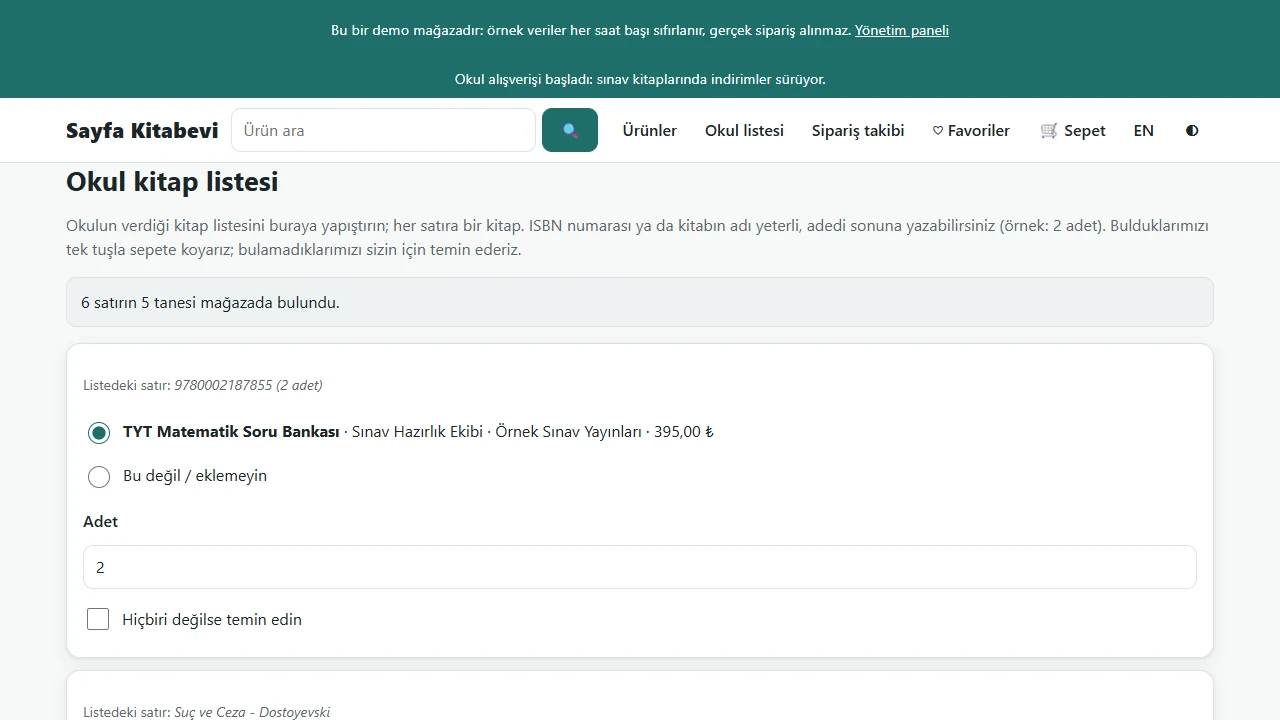
Paste the school book list
The parent’s list is pasted; each line is matched by ISBN or title, with the count at the end. Found books come pre-selected, and unfound ones can be left as “please get this for me”.
-
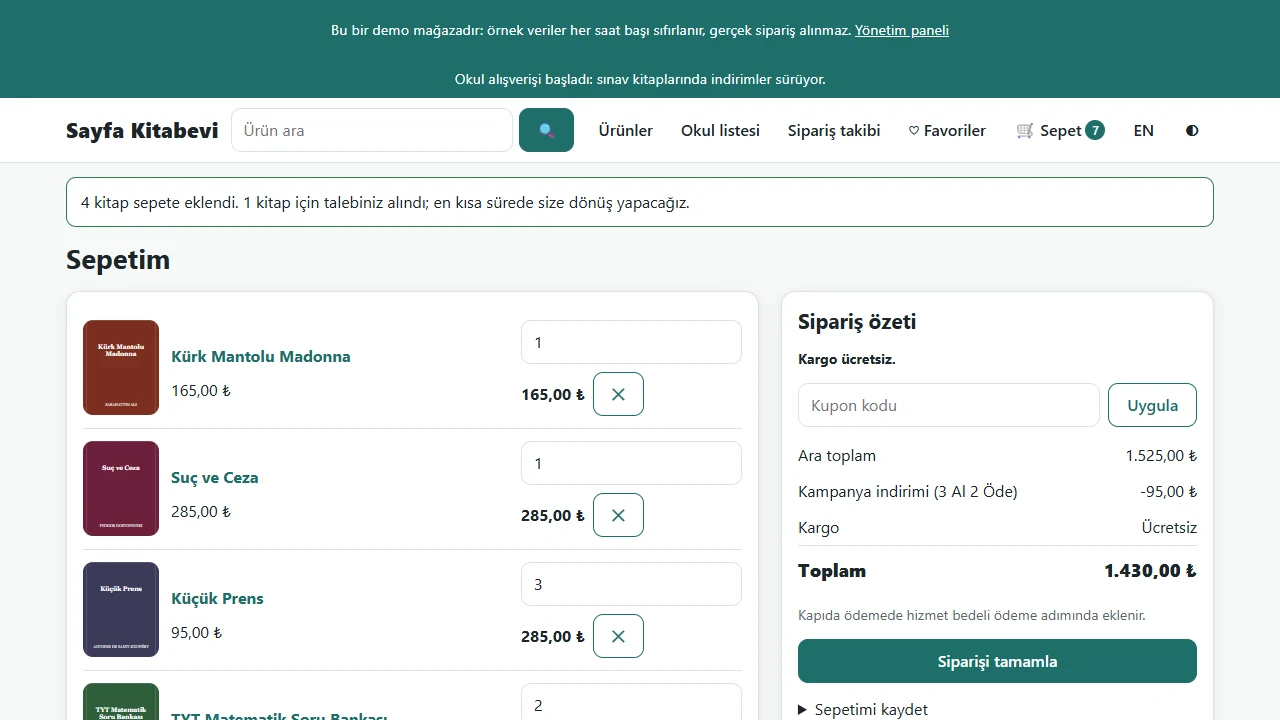
Cart
The chosen books go to the cart; the “Buy 3, pay 2” discount, the coupon and the free-shipping threshold are worked out there.
-
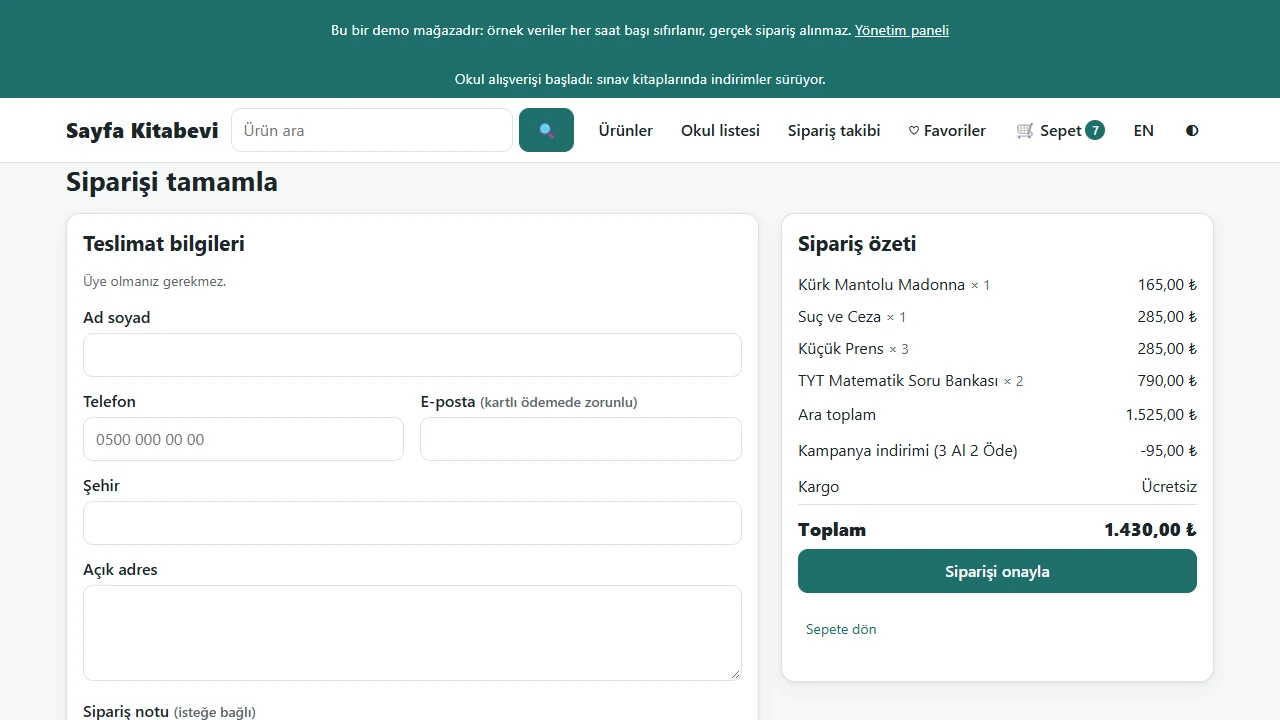
Order form
Name, phone and address; bank transfer or cash on delivery. Do not enter real details in the demo; use sample details.
-
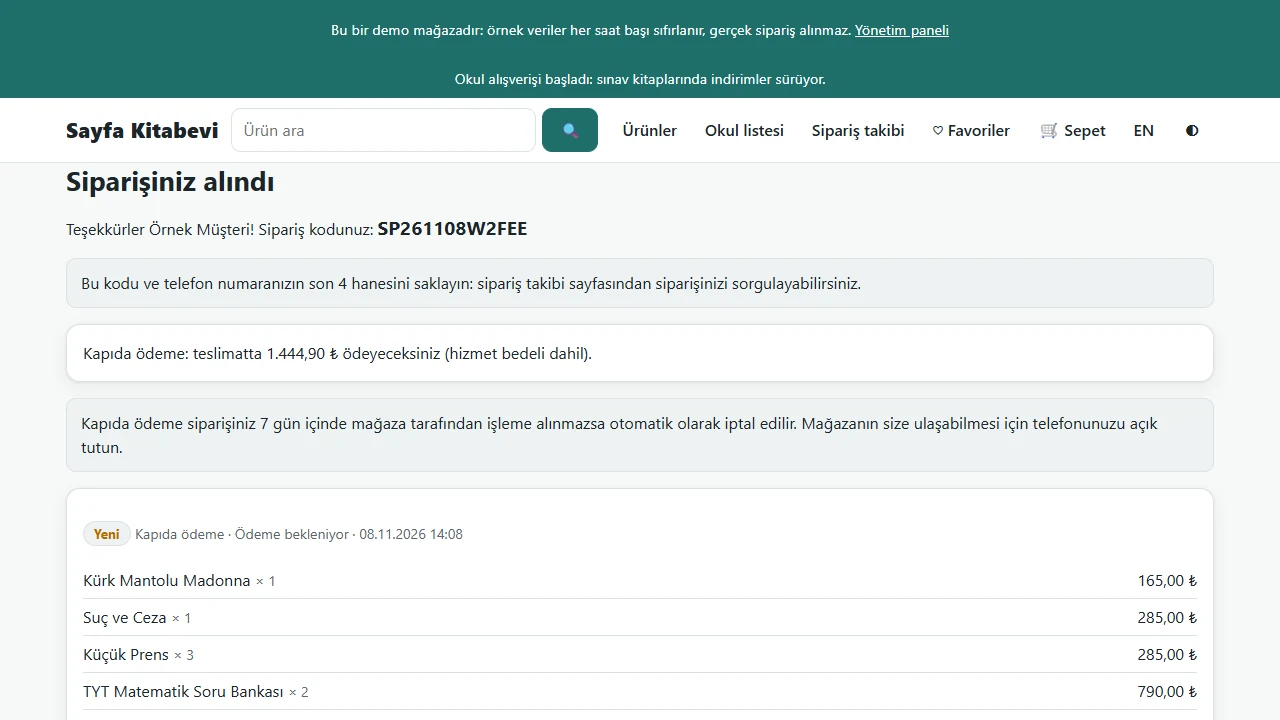
Order result
The order code appears; the customer tracks the order with the code and the last four digits of the phone. In the demo the order goes to nobody and no payment is taken.
-
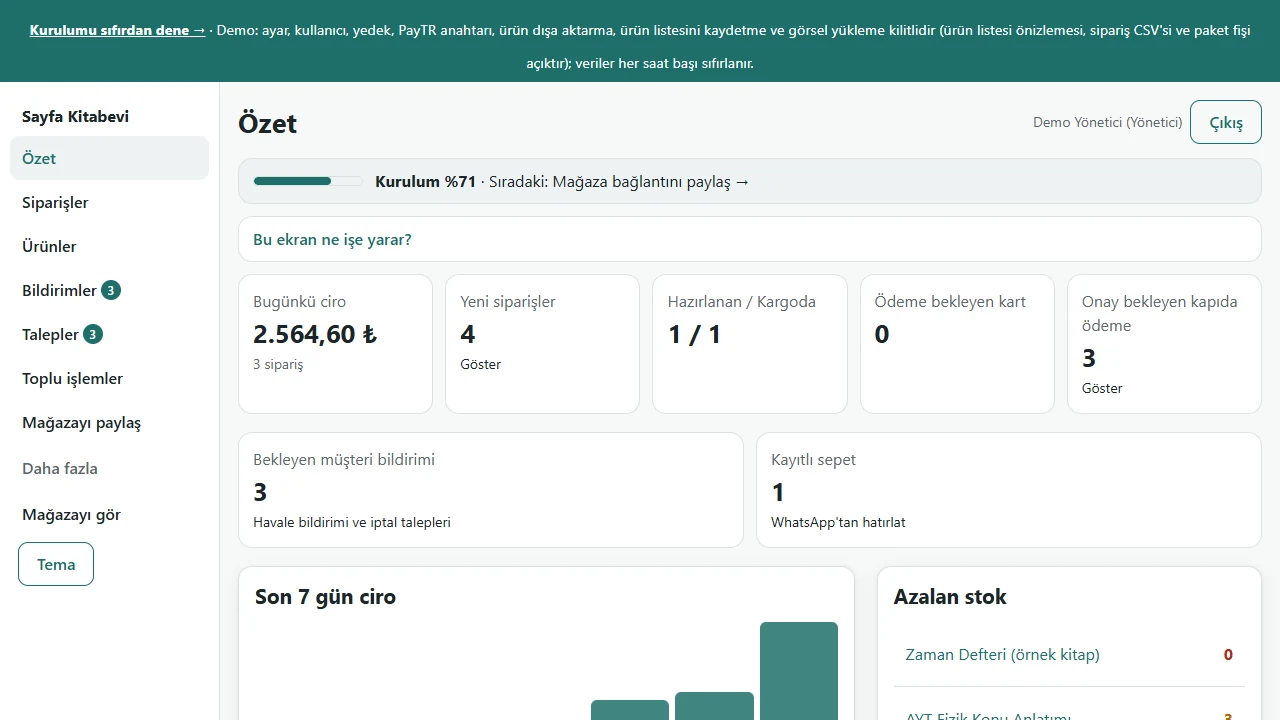
Admin panel: overview
Today’s turnover, new orders, waiting customer notices and low stock together. The figures are sample data.
-
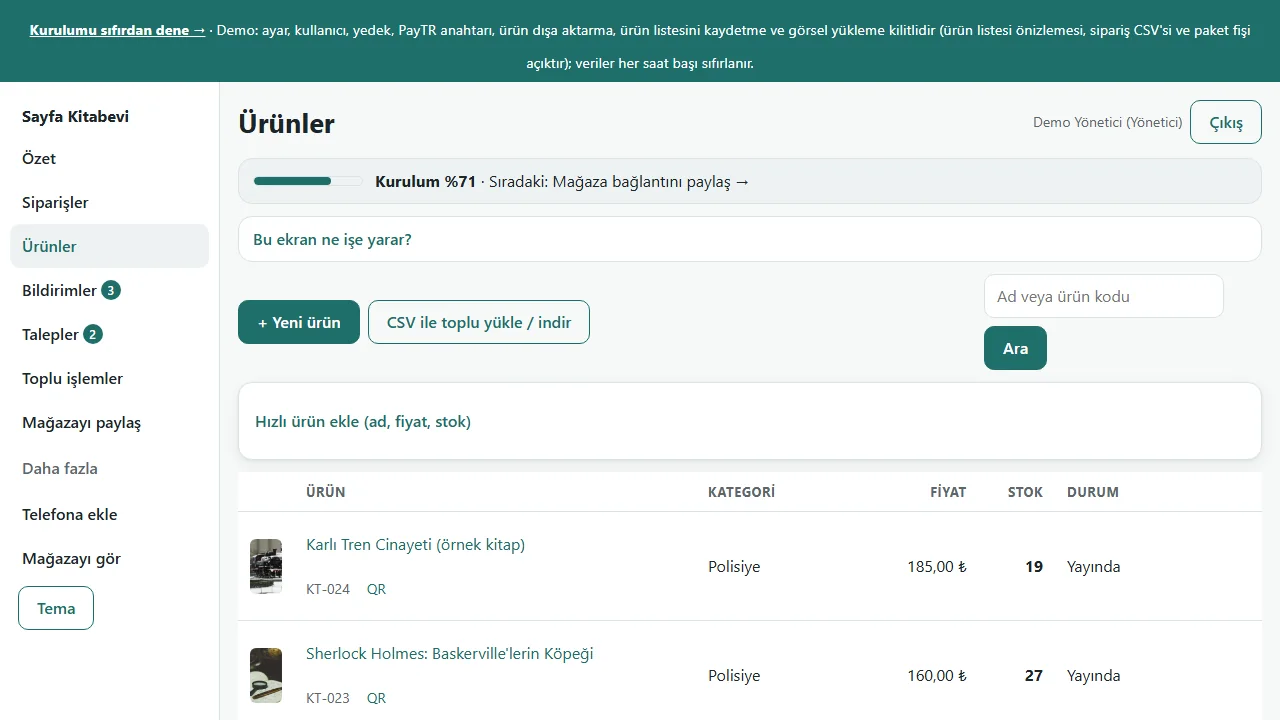
0.5.3 · 10 November 2026 Books
The book list with price and stock; CSV upload/download, and “fill in from ISBN” on the book form.
-
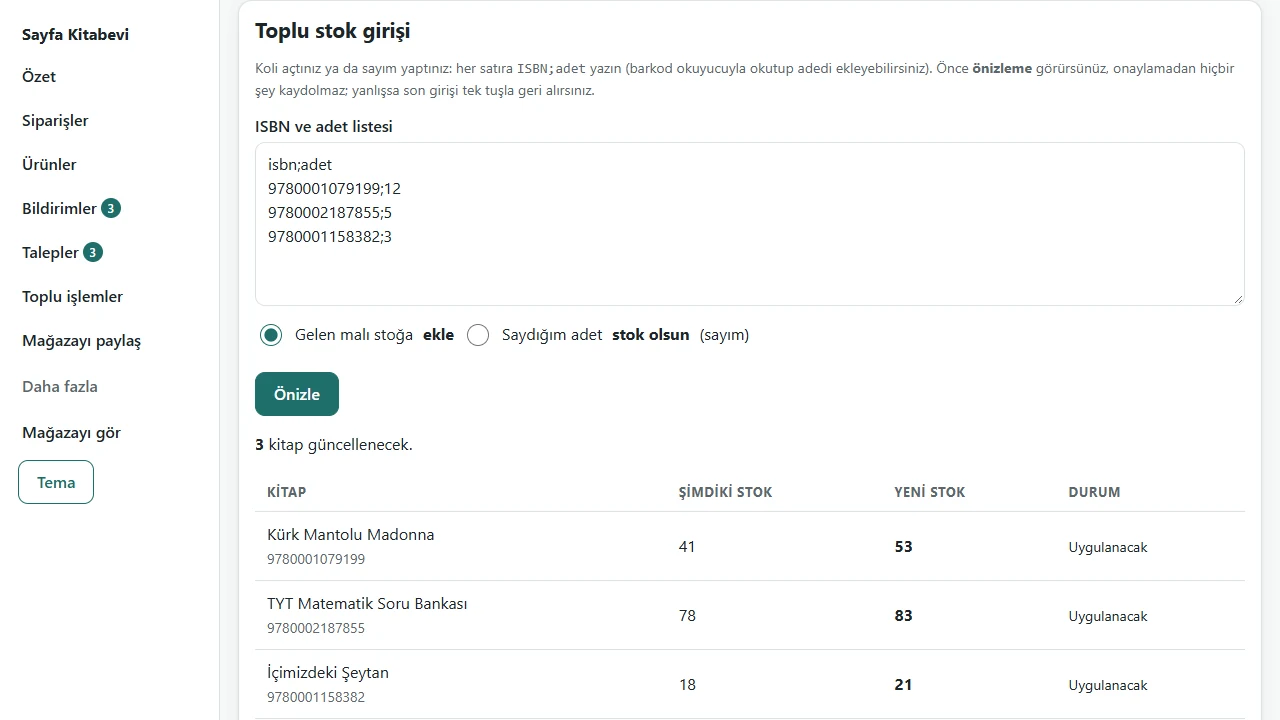
Bulk stock entry
One ISBN;count per line; the preview shows current and new stock and says why a faulty line is skipped. Stock is updated on confirmation and the last entry can be undone.
-
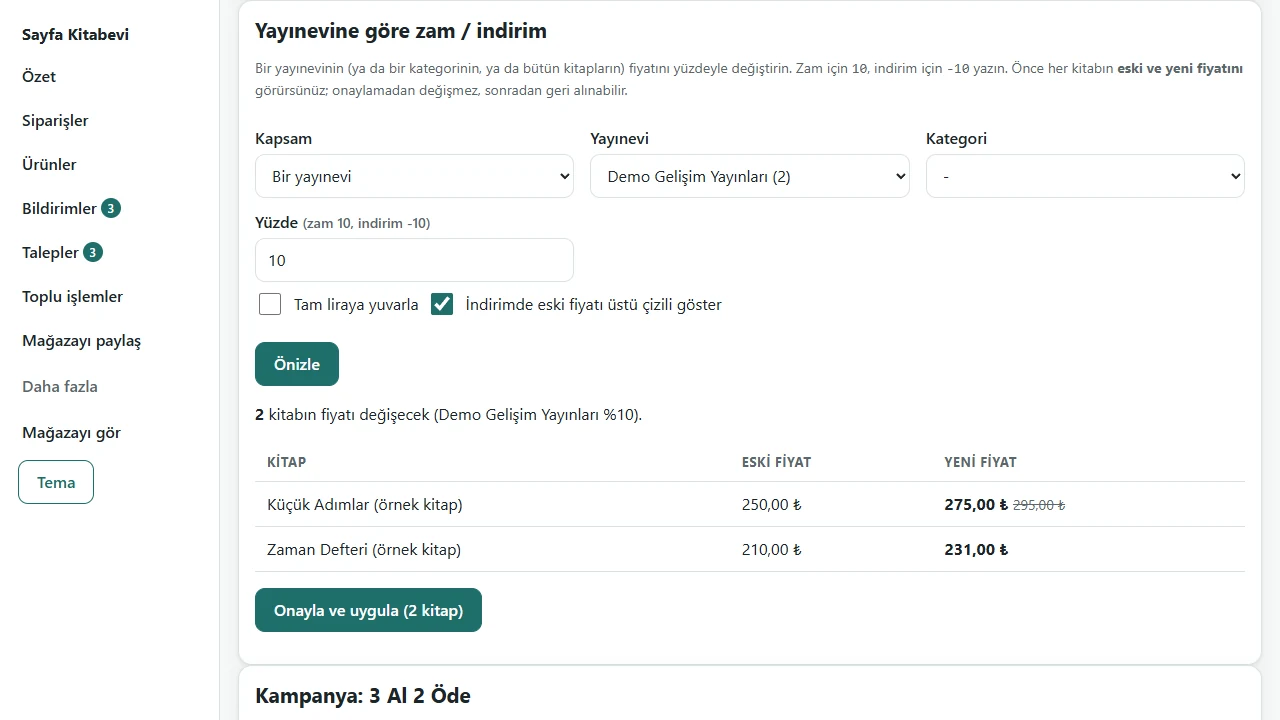
Price change per publisher
Choose a publisher (or a category, or all books) and a percentage; old and new prices are previewed first. It is applied on confirmation and can be undone. The “Buy 3, pay 2” offer is switched on and off on the same page.
-
Requests
Books not found on a school list and “tell me when it is back” requests are collected here; an “in stock” badge appears when the book is back and a ready WhatsApp message opens.
-
Orders
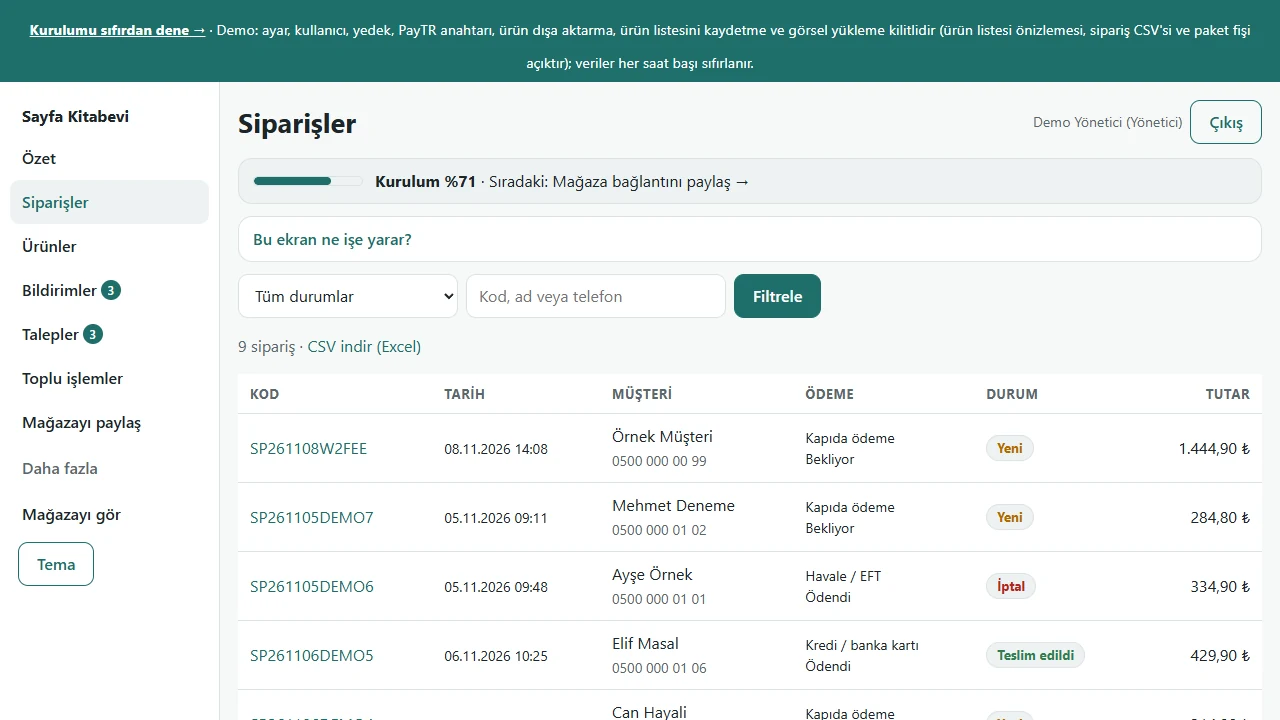
Each order’s status, payment method and total in one list; the detail has shipping data and a ready WhatsApp message for the customer.
-
Customer return request
For a delivered order the customer asks for a return from order tracking and picks a reason. The return period is set in the settings.
-
Returns in the panel
The return request shows in the notices: “İadeyi kabul et” (accept), then “Ürün geldi, stoğa ekle” (parcel arrived, add to stock) or leave it out of stock if unsaleable. The customer sees the status on the tracking page.
-
Information pages
The About and Delivery & returns pages in the footer; a “sample text” note shows until the text is changed in the panel.
-
Announcement band and settings
The announcement band appears at the top of every page; shipping, payment, information pages and legal texts are in the same settings.
- What do they see at the end?
- The customer sees the chosen books in the cart with the offer and shipping worked out and places an order. The shop sees its orders, requests and returns in the panel and updates stock from an ISBN list.
- What is it good for?
- A parent does not have to look up each title, and the shop manages stock, prices, requests and returns in one place.
Everything that is not included, and all limits
- Not delivered to a client and not used by a real bookshop. “Sayfa Kitabevi”, the books, prices, orders, people and requests in the screenshots are sample data; the covers are sample covers drawn for this project.
- There is a live demo with sample data (demo mode, PHP 8.3 and SQLite): no real orders are taken; settings, users and backup are locked. By design the data returns to the sample every hour; this reset has not yet been observed on the live site.
- The unit (1,388) and end-to-end (684) tests passed on SQLite on 9 November 2026. The instant notice was tried with real Chrome on a computer and Google’s notification service (the send was accepted and the notification appeared in about a second); that test showed that the first send right after subscribing was sometimes refused, and this was fixed. It was not tried on MariaDB, on PHP 8.1 and 8.2, on a real customer’s hosting, on a real phone, or in Safari and Firefox (sending is off in the demo).
- Card payment through PayTR has code behind it but was not tried with a real account and is off in the demo; a business that wants real card payment must try it in test mode with its own account.
- The admin panel is in Turkish only.
- The software does not send e-mail or SMS to customers; replies to requests and returns are ready WhatsApp messages that you send. The shop does get notices (a phone notification, an optional e-mail); the e-mail depends on your hosting supporting outgoing mail. There is no payment refund, carrier connection, marketplace, e-invoicing or customer account; these can be scoped separately.
Delivery and sales status
How does it work?
You try the demo and tell us about your bookshop, and we send you a quote. We install it and we host it. The yearly price includes installation, hosting, data transfer and support; it is for a single business.
Price
The yearly list price is 1,800 TL. Installation, one year of hosting, data transfer, bug fixes and written usage support are included; it is for a single business. Not included: a card-payment provider account (PayTR is the business’s own account), automatic e-mail and SMS sending (the reply text comes ready and you send it), payment refunds, a carrier connection, marketplace and e-invoice connections, book-cover photos and logo work.
Possible delivery options
Other delivery options
What the package contains
- The software package (kitap-sunucu 0.3.0, a single zip file) and the setup wizard
- An installation document and a user guide for the bookshop owner
- Storefront and admin panel: book details, school book list, requests, bulk stock and price changes, “Buy 3, pay 2”, return requests, information pages, announcement band; orders, coupons, reviews, CSV and backup
- Not included: e-mail and SMS sending, payment refunds, a carrier connection, marketplace, e-invoicing, customer accounts, an English admin panel, book-cover photos, design and logo work
Requirements and version history
What you do
- You enter the shop details, your bank-transfer account, the shipping fee and your books (from the panel or from a CSV file), or have the scope of that work written into the quote.
- If you want card payment, you try PayTR in test mode with your own account.
Installation requirements
- PHP 8.1 or higher (the requirement in the document); the pdo_mysql and mbstring extensions; curl and openssl for card payment and for filling in details from an ISBN; GD is recommended for image upload.
- MariaDB 10.4 or higher, or MySQL. It was really tried only on Windows 11 with PHP 8.3 and SQLite; MariaDB, PHP 8.1 and 8.2, nginx and a customer’s hosting were not tried; the public demo address runs on PHP 8.3 and SQLite in demo mode.
- The software sends no e-mail; notices are ready WhatsApp messages. Filling in details from an ISBN uses an outside book service; without a network the details are typed by hand.
Release notes
- 0.1.0 (8 November 2026): forked from the general e-commerce software (1.2.1); ISBN, author, publisher and other book fields, search, author and publisher pages, 24 sample books.
- 0.2.0 (8 November 2026): school book list, requests (supply and tell-me-when-back), ISBN;count bulk stock, publisher price increase and discount, “Buy 3, pay 2”, fill in from ISBN.
- 0.3.0 (8 November 2026): return requests (accept, parcel arrived, add to stock), About and Delivery & returns pages, an announcement band on every page. The package was not delivered to a customer; it runs only at the public demo address, in demo mode.
Decisions not made yet
- Rights to use, modify, transfer and receive the source code: to be set in a written agreement; not decided yet.
- Whose name the hosting and domain are opened in, and where the software is installed, have not been decided yet.
There is no cart, customer account or online payment on this site for now. Reach out by phone, WhatsApp or the form; in a first conversation your need and the software’s fit are reviewed. The form does not create an order, a contract or a payment.