Cram schools and study centersDemo with sample data
Cram School and Study Center Student Tracking: screen-by-screen guide
The full version of the short description on the product page: every feature, how each screen is used step by step, all limits and the delivery details.
All features
The flows below were run in the app’s version with sample data (0.4.0). The screens were taken on 11 November 2026 from a copy of the same version running with sample data; the school is “Örnek Dershane (demo)” (sample), and its students, parents, phone numbers and amounts are made up. The application sends no automatic messages.
- Student record: name, date of birth, group (for example 12-A Sayısal), an important note, up to three parents or authorised persons and a sibling link; for quick adding a name, group and parent details are enough
- Instalment plan wizard: total fee, discount, down payment, 1–36 instalments, first due date and due day are written; a preview shows before confirming, the kuruş difference goes to the last instalment; unpaid instalments can be deleted, those with a payment stay
- Collect and receipt: a Tahsil et (collect) button on each instalment row, part payments, the payment method, a printable receipt; payments are spread from the oldest due date, and a wrong entry is removed with “Yanlış girdim, sil” (entered by mistake, delete)
- Late instalments: instalments past their due date are listed with the days late; each row opens a ready WhatsApp reminder (the school sends the message from its own phone) and has Tahsil et
- Class timetable: a weekly table, group, teacher and classroom filters, printing; the same teacher, group or classroom at the same time raises a clash warning when saving
- Mock exams and net scores: a TYT, AYT or LGS template or your own sections, a wrong-answer coefficient; results are entered as right and wrong per student × section, the net, rank and section averages are worked out; results are imported from Excel/CSV and the last import can be undone; a progress chart on the student card and a ready WhatsApp message to the parent
- Enrolment funnel: Yeni görüşme (new), Aranacak (to call), Olumlu (positive) and Kesin kayıt (confirmed) stages, source, grade level, a conversation note; “Kesin kayda dönüştür” (turn into a confirmed enrolment) opens the student and moves on to the instalment plan wizard; a public pre-enrolment form and a free phone notification to the team for a new application
- Attendance: pick a group, mark each student Geldi, Gelmedi or İzinli with one tap, or everyone at once with “Hepsi geldi”; a “Yoklama al” shortcut from today’s lessons; a check-in and check-out (kiosk) screen
- Critical absences: students who have not come on several recent days (the number of days is set in Settings) are listed with the parent’s name and phone; a ready WhatsApp “is everything all right?” message and a “Görüşüldü” (talked to) record with a note, who and when
- Handing out (loans): a record of books, uniforms, handouts and similar items given to a student and returned; what was handed out shows on the student card
- Activity log and archive: for the manager, who did what and when is listed; students marked “Ayrıldı” (left) are made enrolled again, and a wrongly opened student who was deleted comes back with the same records
- Parent page (no sign-in): where a parent sees only their own student’s attendance, weekly timetable, mock exams, instalments and payments, and announcements; the link is sent from WhatsApp, copied or handed out on a QR A4 poster; a link that went to the wrong person is renewed
- Roles: manager, office, teacher and parent; a teacher sees only their own groups, the fee, instalment and pre-enrolment areas are never shown to them and the server refuses an address typed by hand
- Importing students and parents from Excel/CSV: column recognition from the header, a preview before saving, duplicate checking and undo for the last import; no message is sent during an import
- A setup guide (with a progress percentage), a “Bu ekran ne işe yarar?” (what is this screen for) box on every screen, installing on a phone or computer for the manager and teachers with a sign-in-free setup page, CSV export and a backup download; in the demo “Boş siteyle yeniden başla” and “Örnek veriyi geri yükle”
Screen by screen: how it is used
The interface in these screens is Turkish; only the captions and explanations on this page are in English. The screens were taken on 11 November 2026 from a copy of version 0.4.0 of the app running with sample data. The school (“Örnek Dershane (demo)”), students, parents, phone numbers and amounts are made up.
- Who uses it?
- The owner and office worker of a cram school or study center, the teacher who takes attendance for a group, and the parent who wants to know how their student is attending and what is due.
- Where do they start?
- A student is recorded, placed in a group and the term fee is split into an instalment plan; the timetable is written and the results of mock exams are entered. The parent is sent the link to a page of their own, without a sign-in.
What do they do on screen? Step by step
-
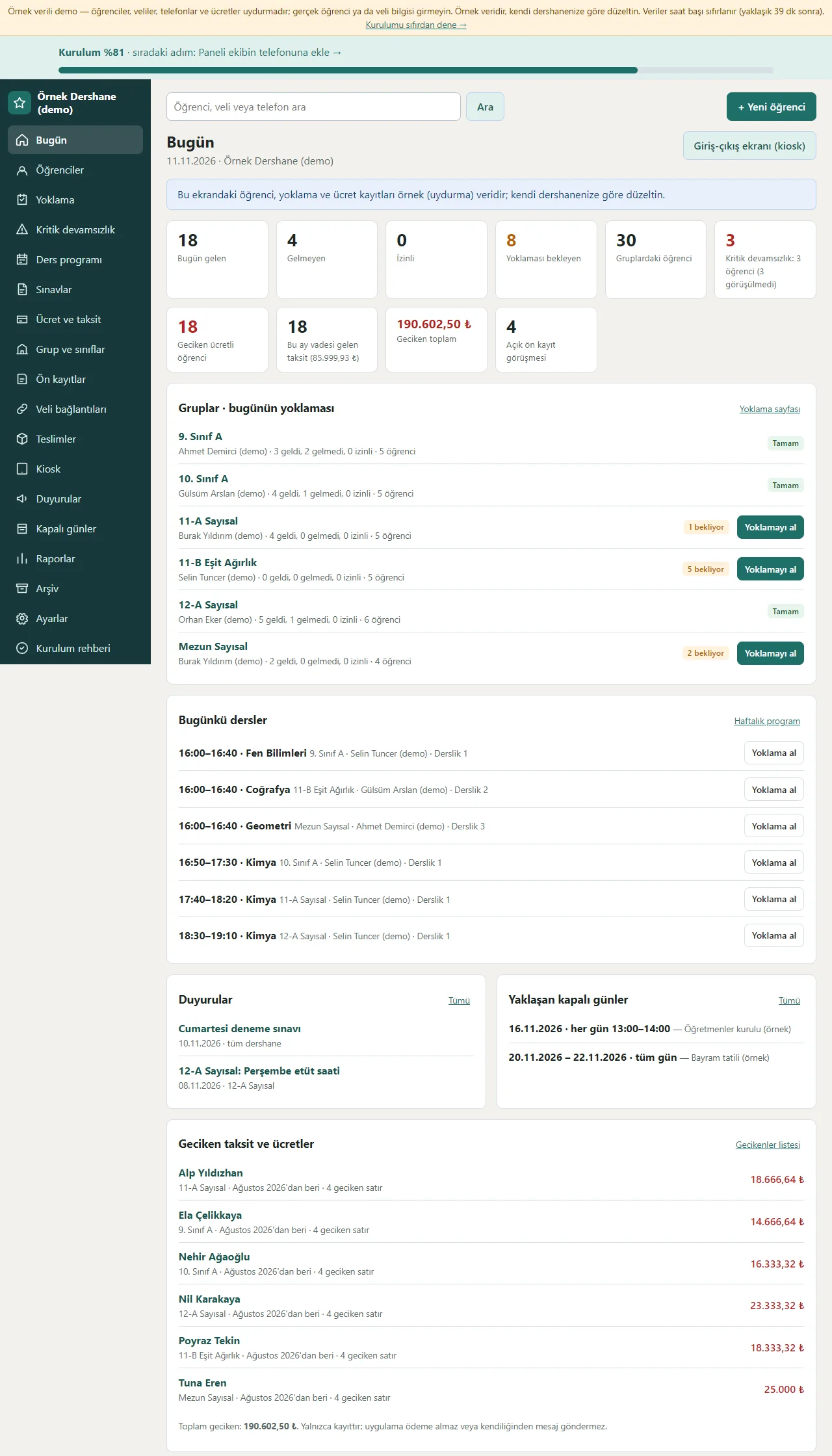
Today screen
Counts of students present, absent, excused and waiting for attendance today, critical absences, the number of students with late fees and the late total show as tappable boxes; today’s attendance by group, today’s lessons, announcements, upcoming closed days and late instalments are listed one under another. The setup percentage sits at the top.
- On screen (Turkish interface)
- “Bugün gelen” — present today
- “Gelmeyen” — absent
- “Kritik devamsızlık” — critical absence
- “Geciken toplam” — late total
-
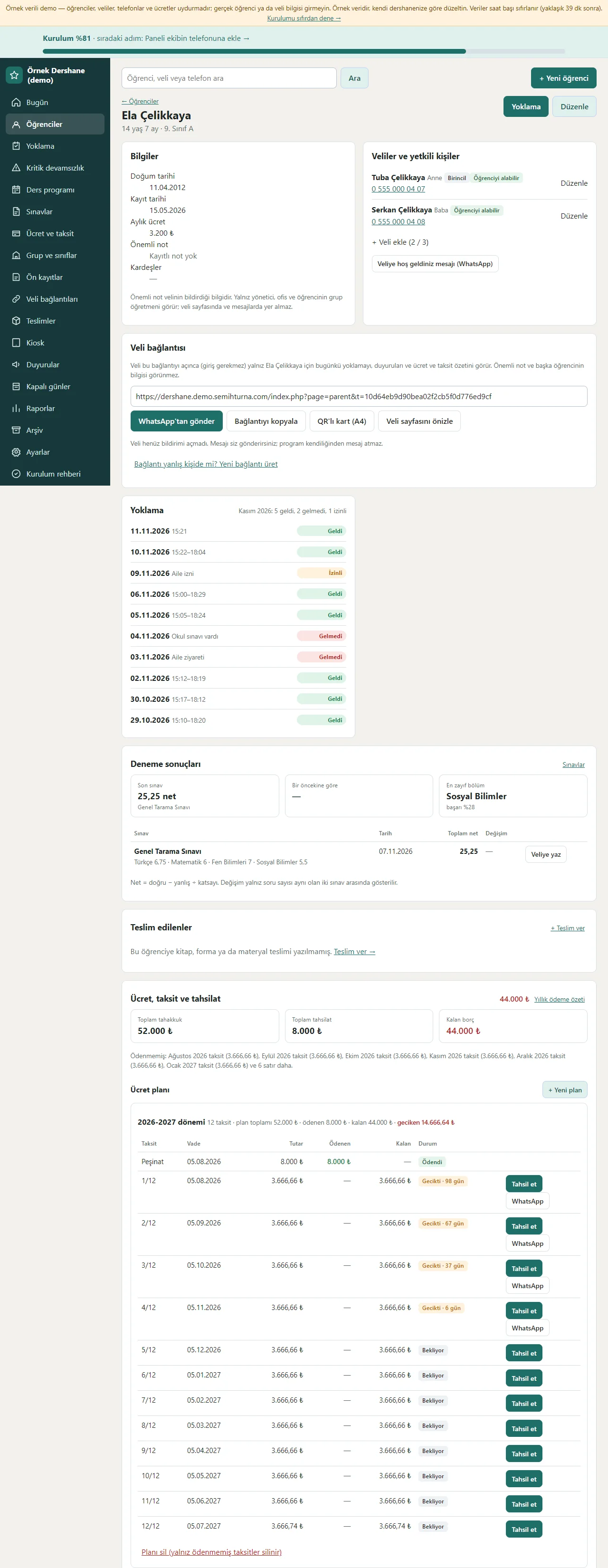
Student card
The student’s details, up to three parents or authorised persons, the student’s own parent link (send from WhatsApp, copy the link, a QR card), attendance history, mock-exam results and progress, what was handed out and the fee plan are gathered on one card. In the fee plan each instalment shows its due date, amount, amount paid and balance and its status (Ödendi, Bekliyor, Gecikti); every row has Tahsil et and a ready WhatsApp reminder.
- On screen (Turkish interface)
- “Veli bağlantısı” — parent link
- “Ücret planı” — fee plan
- “Tahsil et” — collect
- “Gecikti” — late
-
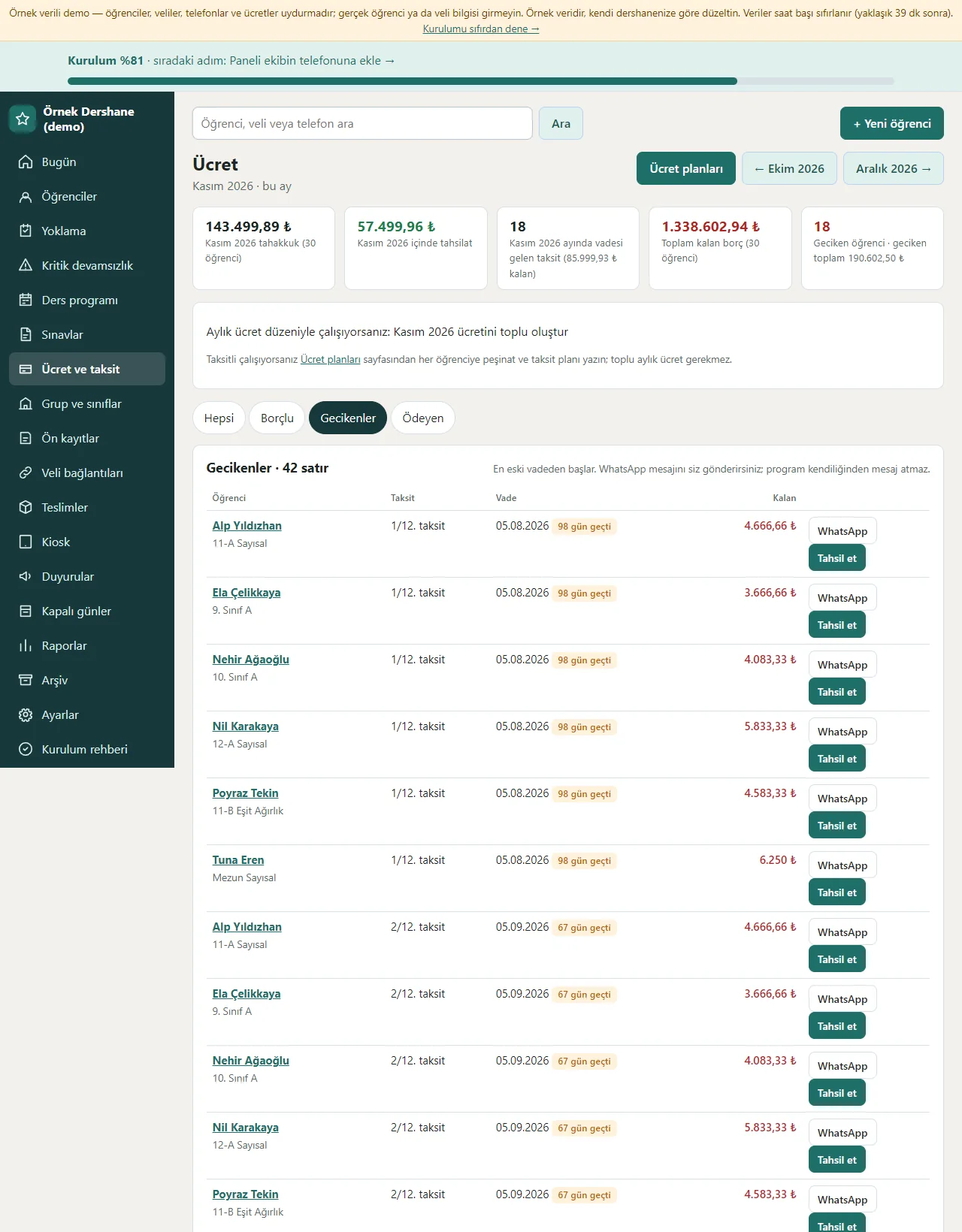
Fees and instalments
The month’s charges and payments, the total balance and the number of late students show at the top. On the Geciken (late) tab the instalments past their due date are listed one by one with the days late; each row has a ready WhatsApp reminder and Tahsil et. The program takes no payment, it only records.
- On screen (Turkish interface)
- “Geciken” — late
- “Borçlu” — owes
- “Ödeyen” — paid
- “Tahsil et” — collect
-
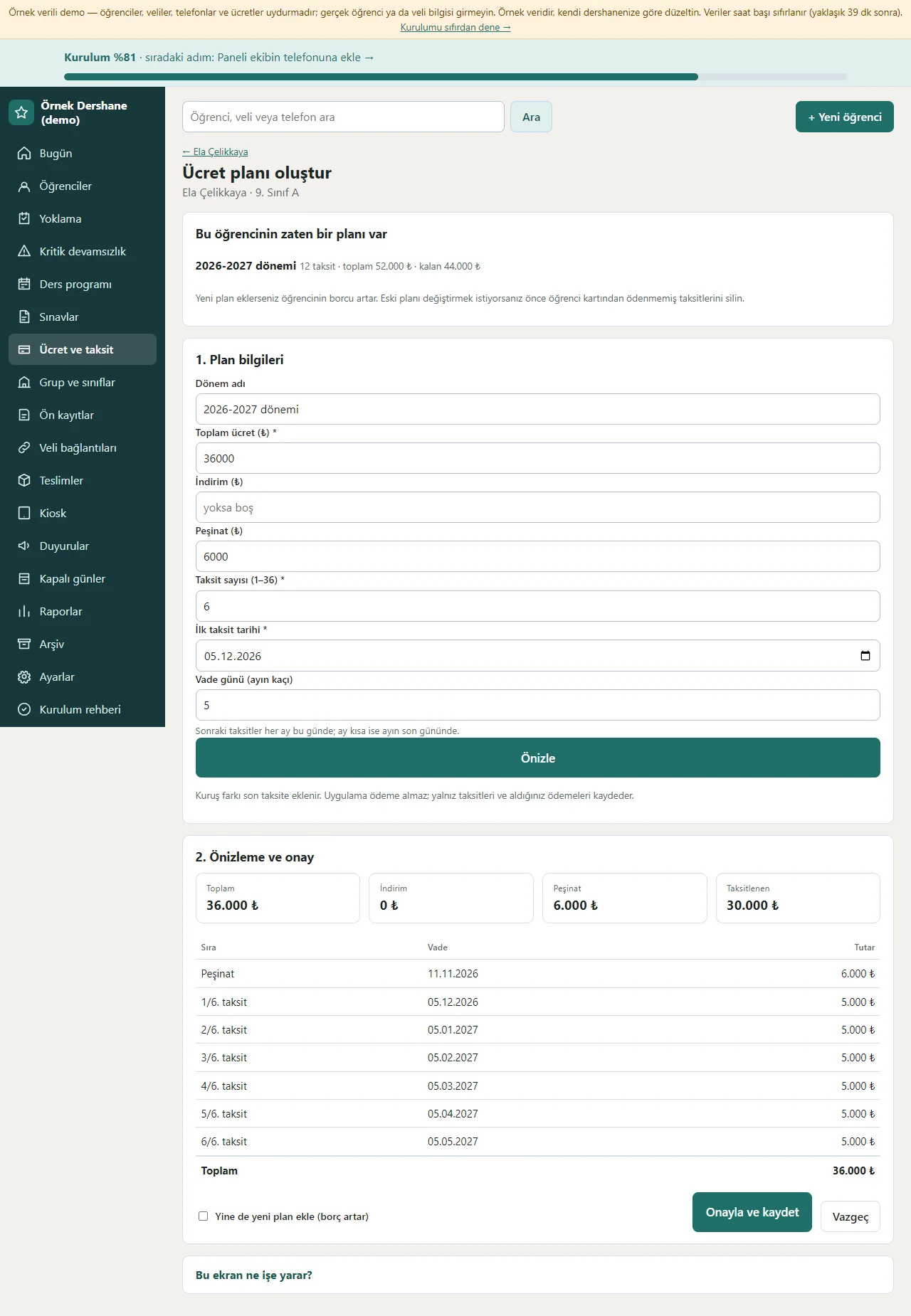
Instalment plan wizard
The plan name, total fee, discount, down payment, number of instalments (1–36), first due date and due day are written; “Önizle” (preview) shows each instalment’s due date and amount, and the kuruş difference goes to the last instalment. When confirmed the plan is written to the student’s card; unpaid instalments can be deleted later, those with a payment stay.
- On screen (Turkish interface)
- “Önizle” — preview
- “Peşinat” — down payment
- “Taksit sayısı” — number of instalments
- “Onayla ve kaydet” — confirm and save
-
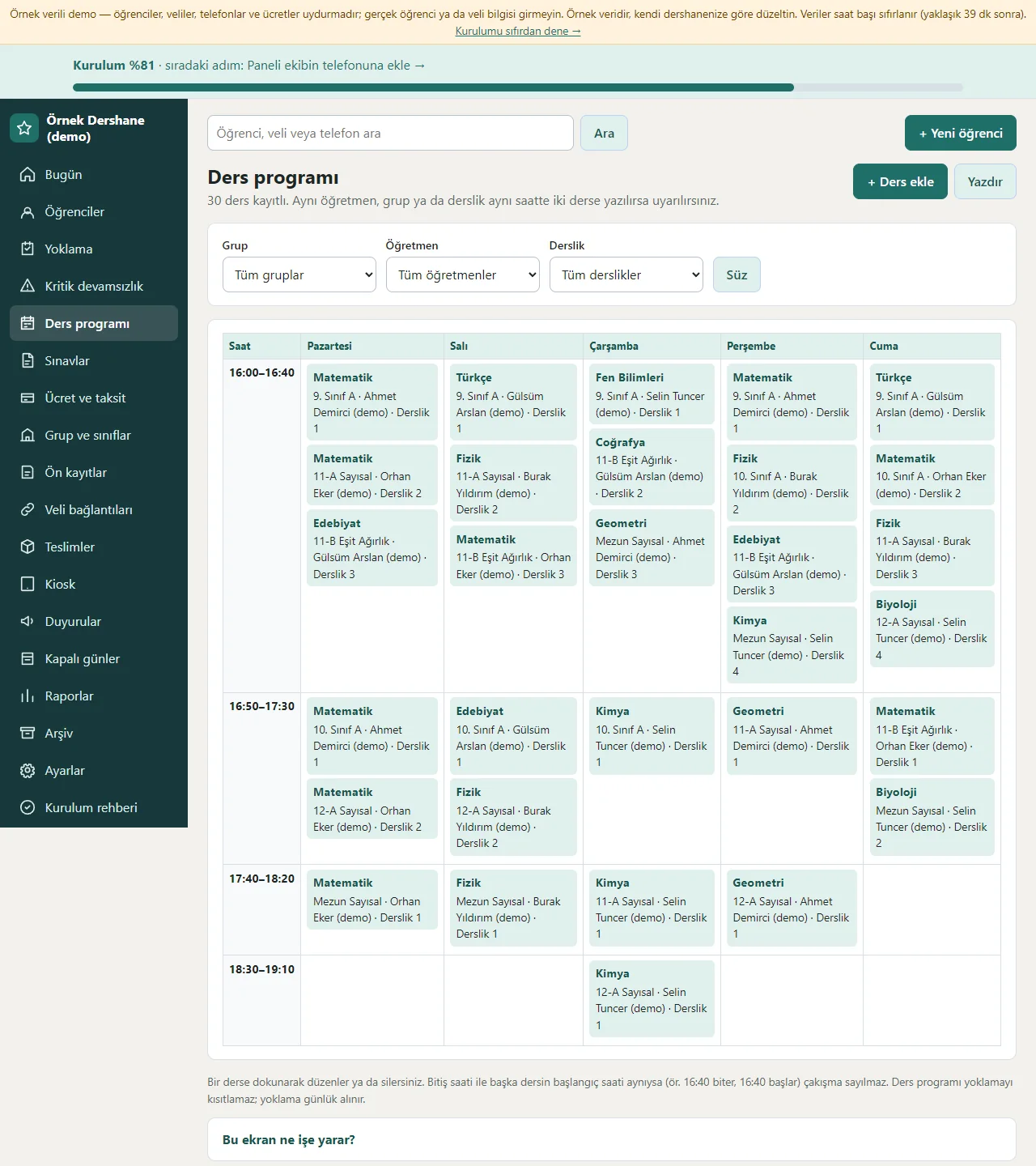
Class timetable
The weekly table shows each lesson with day columns and time rows; there are group, teacher and classroom filters and a print view. When the same teacher, group or classroom has overlapping lessons on the same day, saving shows a “Çakışma var” (clash) warning, and existing clashes are marked in the timetable.
- On screen (Turkish interface)
- “Ders ekle” — add a lesson
- “Yazdır” — print
- “Çakışma var” — clash
-
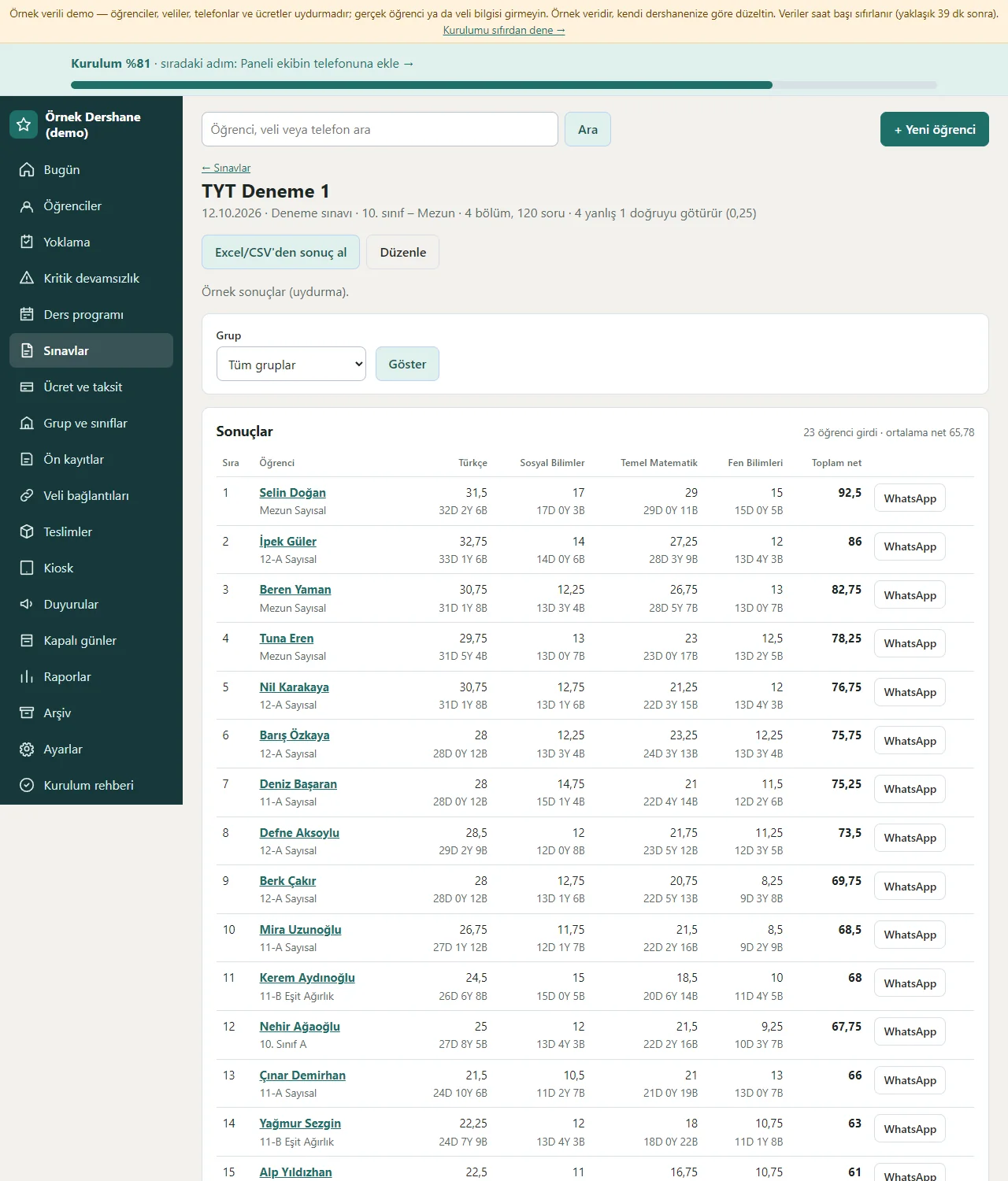
Exam results
The exam page shows, for each student, the right and wrong answers section by section, the total net and rank, and section and group averages; every row opens a ready WhatsApp message to the parent. Results are typed into the table or imported from Excel/CSV; the last import can be undone.
- On screen (Turkish interface)
- “Excel/CSV ile sonuç al” — import results
- “Toplam net” — total net
- “Sıra” — rank
-
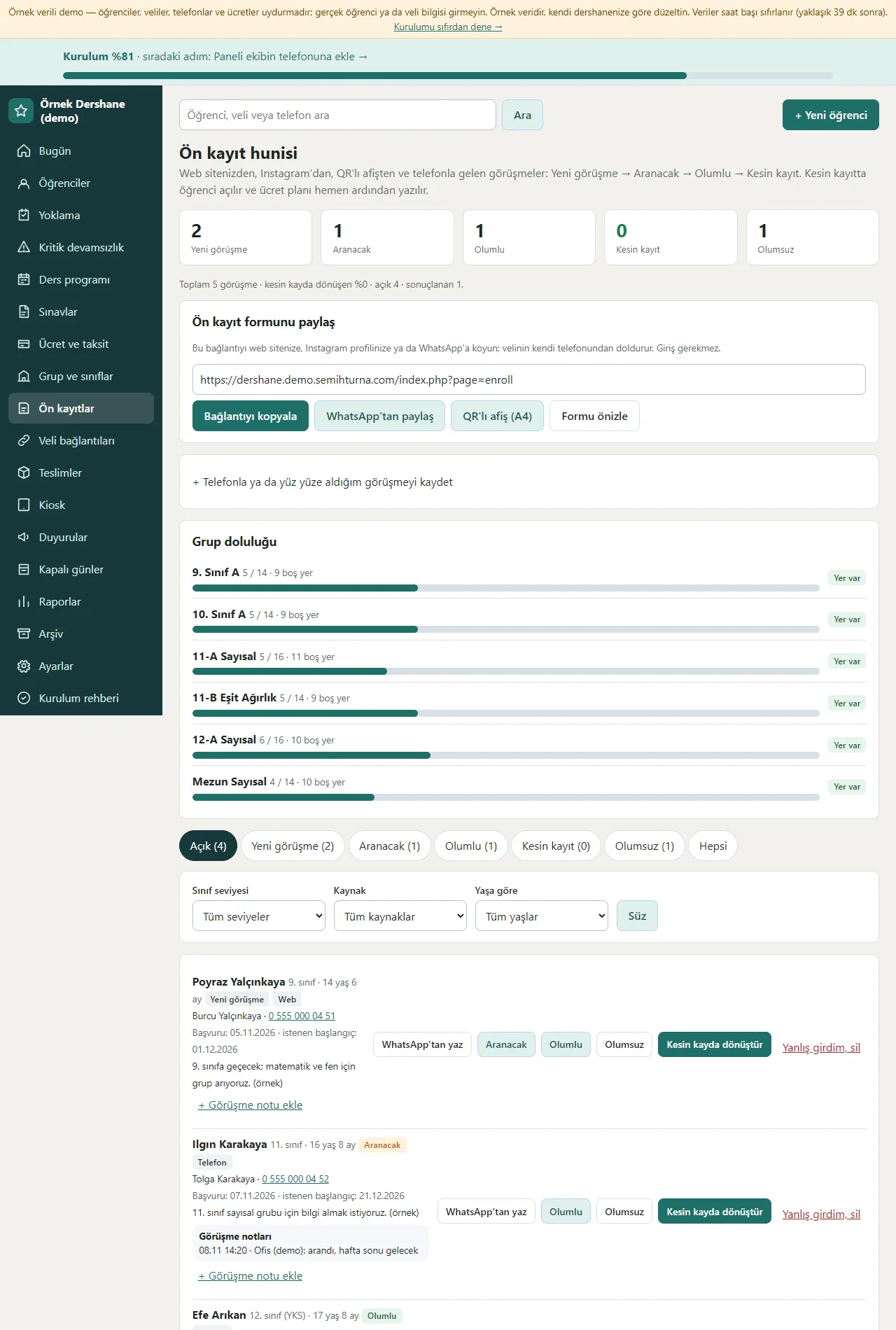
Enrolment funnel
The link of the pre-enrolment form is copied and shared from WhatsApp or on a QR poster. Applications are counted in the Yeni görüşme, Aranacak, Olumlu and Kesin kayıt stages; group fill levels show as bars, and each conversation has WhatsApp’tan yaz (write on WhatsApp), a conversation note and “Kesin kayda dönüştür” (turn into a confirmed enrolment) buttons.
- On screen (Turkish interface)
- “Yeni görüşme” — new enquiry
- “Aranacak” — to call
- “Olumlu” — positive
- “Kesin kayda dönüştür” — confirm enrolment
-
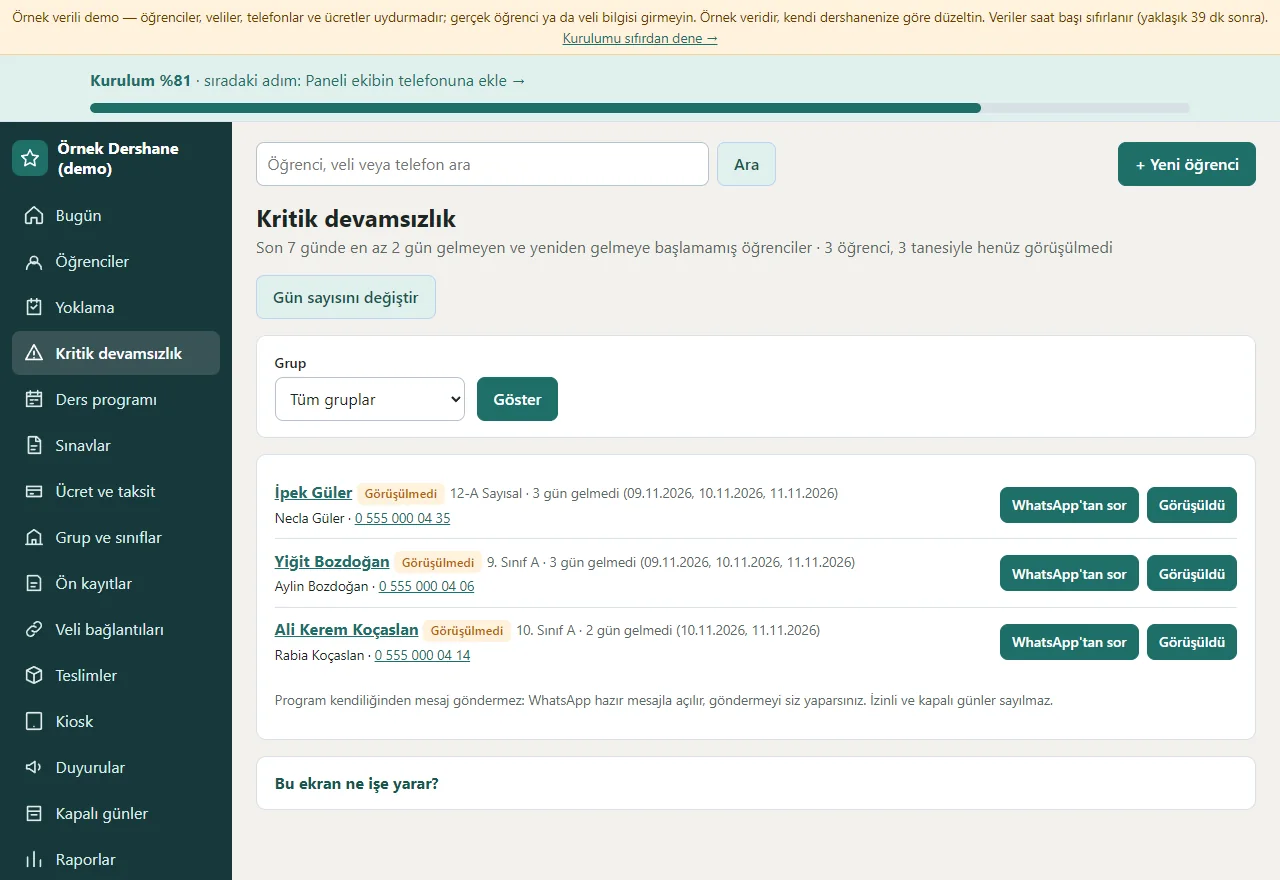
Critical absences
Students who have not come on several recent days are listed with the parent’s name and phone; each row has a ready WhatsApp message and a “Görüşüldü” (talked to) button with a note, who and when. A student who has been talked to shows “Görüşüldü” until a new absence is written.
- On screen (Turkish interface)
- “Görüşüldü” — talked to
- “WhatsApp’tan sor” — ask on WhatsApp
- “Gün sayısını değiştir” — change the number of days
-
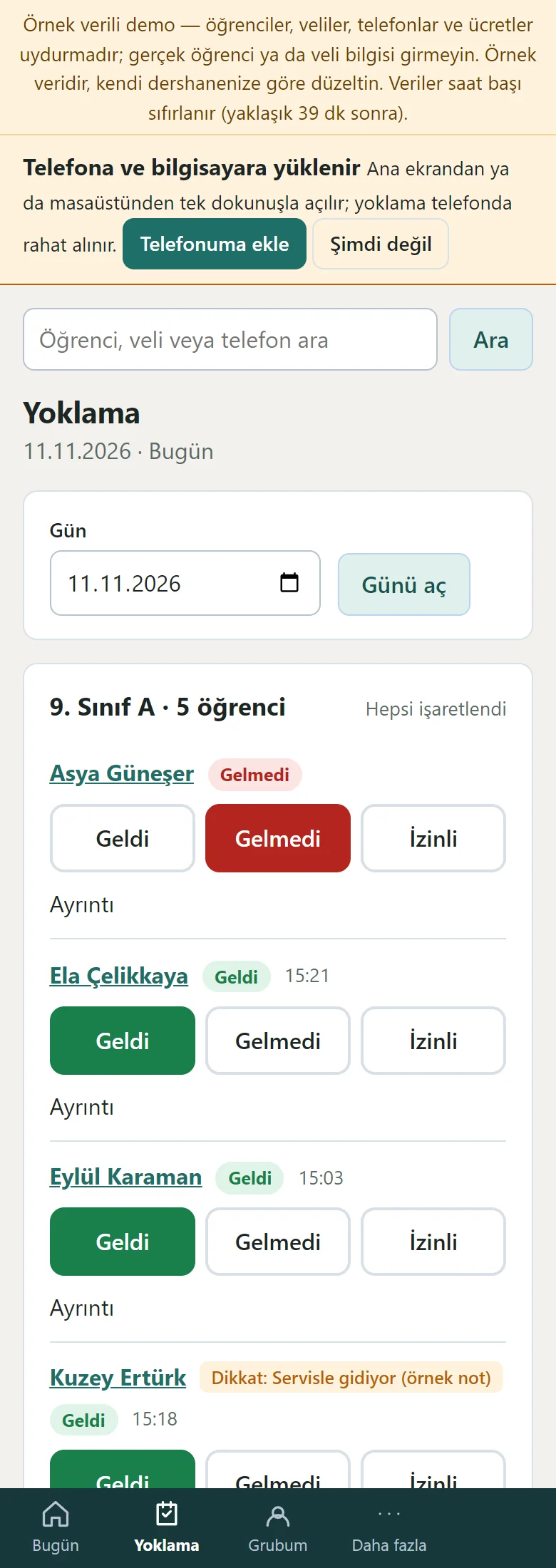
Attendance on a phone
On a phone the group buttons are at the top and each student sits one under another with large Geldi, Gelmedi and İzinli buttons; a tap is enough. The bottom menu is Bugün, Yoklama, Grubum and Daha fazla.
- On screen (Turkish interface)
- “Yoklama” — attendance
- “Geldi” — present
- “Gelmedi” — absent
- “İzinli” — excused
-
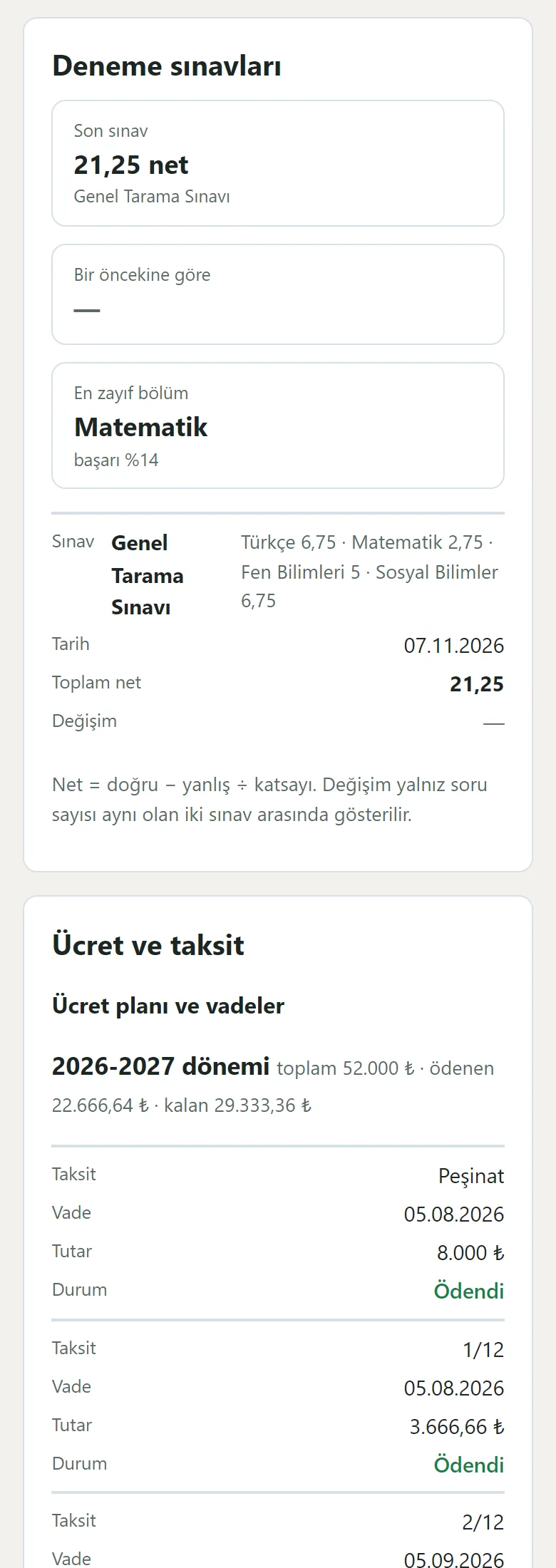
Parent page on a phone
A parent opens the link without an account: the student’s status for today, the last 14 days, the weekly timetable, mock exams, the fee plan, due dates and payments, announcements and the persons who may collect the student. The page is large-print and simple; the important note does not appear on this page.
- On screen (Turkish interface)
- “Deneme sınavları” — mock exams
- “Ücret ve taksit” — fees and instalments
- “Ödendi” — paid
- “Bekliyor” — pending
- What do they see at the end?
- A parent sees their student’s attendance, timetable, mock-exam nets and instalment status on their own page; the office sees the late instalments in one list and opens a ready WhatsApp reminder, and payments and receipts are recorded.
- What is it good for?
- Instalments, attendance, the timetable and mock-exam results no longer scatter over a notebook, Excel and phone calls; they are in one place.
Everything that is not included, and all limits
- Not delivered to a client and not used by a real school. The school, students, parents, phone numbers and amounts on the screens are made up.
- There is no automatic SMS or WhatsApp sending; WhatsApp messages open as a ready text and the school sends them from its own phone. The program sends parents no message on its own; only a phone notification (Web Push) is sent.
- There is no card payment of instalments over the internet, e-invoice or e-archive, optical reader, turnstile or fingerprint device, AI call center, MEB or e-Okul reporting, multi-branch use or official promissory-note handling; the program takes no payment, it only records.
- A real Web Push delivery, iPhone/Safari, Firefox, the WhatsApp in-app browser and a real phone have not been tried; it was run on PHP 8.3 and a single hosting account (PHP, SQLite) only.
- In the demo the data is reset every hour; sign-in is without a password through role buttons. The app interface in the screens is in Turkish.
Delivery and sales status
How does it work?
You try the demo and tell us about your institution, and we send you a quote. We install it and we host it. The yearly price includes installation, hosting, data transfer and support; it is for a single institution and there is no extra charge by number of students.
Price
The yearly list price is 4,500 TL. Installation, one year of hosting, data transfer, bug fixes and written usage support are included; it is for a single institution and there is no extra charge by number of students. Automatic SMS or WhatsApp sending, online card payment of instalments, e-invoice / e-archive, optical readers, turnstile or fingerprint hardware and MEB e-Okul reporting are not included; messages to parents go the free way (a phone notification, or the institution sending it in WhatsApp itself).
Possible delivery options
Other delivery options
Requirements and version history
Installation requirements
- PHP 8.1 or newer (with the pdo_sqlite, mbstring and openssl extensions; curl is recommended for the phone notification) and HTTPS are needed; the data is kept in a SQLite file. The live demo was run on a single hosting account and PHP 8.3 only.
Release notes
- No version has been delivered to a client. The sample-data demo is open to everyone and is shown with the screenshots on this page.
- 0.4.0 (11 November 2026): critical absences with a “Görüşüldü” (talked to) record, an activity log, an archive (restoring a deleted student) and a handing-out (loans) record.
- 0.3.0 (11 November 2026): a weekly class timetable with clash warnings, mock-exam and net-score tracking (importing results from Excel/CSV, a student progress chart).
- 0.2.0 (11 November 2026): an instalment plan wizard, payments and a late-instalment list, an enrolment funnel and turning an enquiry into a confirmed enrolment.
- 0.1.0 (11 November 2026): student and parent records, groups, attendance, payments and receipts, a sign-in-free parent page, roles, importing from Excel/CSV, a setup guide and installing on a phone.
There is no cart, customer account or online payment on this site for now. Reach out by phone, WhatsApp or the form; in a first conversation your need and the software’s fit are reviewed. The form does not create an order, a contract or a payment.