Tailors and alterationsDemo with sample data
Tailor and Alterations Order and Appointment Tracker: screen-by-screen guide
The full version of the short description on the product page: every feature, how each screen is used step by step, all limits and the delivery details.
All features
The flows below were run in the app’s version with sample data (0.4.0). The screens were taken on 8 November 2026 from the live demo; the business in the demo is “Örnek Terzi Atölyesi (demo)” (sample), and its customers, phone numbers, measurements and amounts are made up.
- Measurement card: centimetre measurements per customer by garment type (trousers, jacket, shirt, dress, coat…); when a measurement changes, the new record moves the old one into the history with its date, “copy from the previous measurement” speeds up a new record; the card code (such as OK-0001) is numbered automatically
- Order: sewing, alteration or repair; the work to be done, the delivery date (7 days ahead by default), the tailor, photos and line items (supplies and labour; quantity, unit price, discount, VAT rate); a number such as SP-2026-0001 is given automatically and the totals are worked out for you
- Status flow: Alındı (received), Ölçü/prova (measurement/fitting), Fiyat onayı (price approval), Dikişte (being sewn), Hazır (ready), Teslim edildi (delivered) and İptal (cancelled); the price approval (method, who approved, when) is recorded; on the order board orders sit in status columns
- Ready jobs: alterations such as shortening a hem, taking in a waist or changing a zip are defined once with a name, price and line items, then added to an order in one tap
- Fabric and supplies stock: metres, pieces and reels; the amount set aside in a quote and the amount actually used are followed separately, supplies that fall below the critical level are flagged and stock movements are listed
- Deposit and payment records: cash, bank transfer and card are entered by hand; open balances are listed; the program takes no payment
- Slip and form: an order slip with the measurements and a priced order form are printed or saved as PDF; the slip carries the customer’s order-tracking address and a QR code
- Customer side, no sign-in: a large-print booking-request page (sewing, alteration or repair and the garment type) and the customer’s own order status page (“Siparişiniz alındı / dikişte / hazır”, order received / being sewn / ready); internal notes, costs and labour amounts are not shown; a request does not enter the booking book until approved
- Booking book and multi-day leave: measurement/fitting, delivery and consultation appointments; when multi-day leave or closed time is entered, no booking is taken on those days; the upcoming-leave list has “Yanlış girdim, sil” (entered it wrong, delete) on every row
- Today and reminders: what is due today, late deliveries, ready-but-uncollected orders and orders waiting for price approval on one screen; a ready WhatsApp message opens, the workshop sends it, the program does not send it on its own
- Workload per tailor and tailor earnings: open, late and soon-due orders per tailor with the spread by stage; for the manager only, the earnings of the chosen period from delivered jobs at a rate per garment type, and an Excel/CSV export
- Importing customers and measurement cards from Excel/CSV: column recognition from the header, a preview before saving, the same phone number counts as one person and the last import can be undone; no message is sent during an import
- Roles: manager, staff and read-only (for an accountant or an observer); pages, menu items and buttons not allowed are never shown, and the server refuses an address typed by hand or a write request
- A setup guide, help boxes and installing on the phone and computer (“Telefona ekle”, add to the phone); a free phone notification and an e-mail for a new booking request; in the demo “Boş siteyle yeniden başla” (start with an empty site) and “Örnek veriyi geri yükle” (restore the sample data)
- Trial installation mode: if ticked in the setup wizard, the installation starts as a 15-day trial; when the time ends the panel and the customer pages close, no data is deleted, sign-in and CSV export stay open; only the “destek” (support) account can restart the period. There is no trial in the demo; this mode has not been tried in a real customer installation
Screen by screen: how it is used
The interface in these screens is Turkish; only the captions and explanations on this page are in English. The screens were taken on 8 November 2026 from the live demo (version 0.4.0) with sample data; the business (“Örnek Terzi Atölyesi (demo)”, a made-up name), the customers, phone numbers, measurements and amounts are made up. The phone views were taken by setting the browser to a phone size.
- Who uses it?
- The owner and staff of a tailor, alteration or curtain workshop, who take orders, write down measurements and follow deliveries; an accountant who only wants to look.
- Where do they start?
- Open the demo address and enter with a role button; when an order is taken, the customer’s measurement card is picked and the work to be done, the tailor and the delivery date are written in.
What do they do on screen? Step by step
-
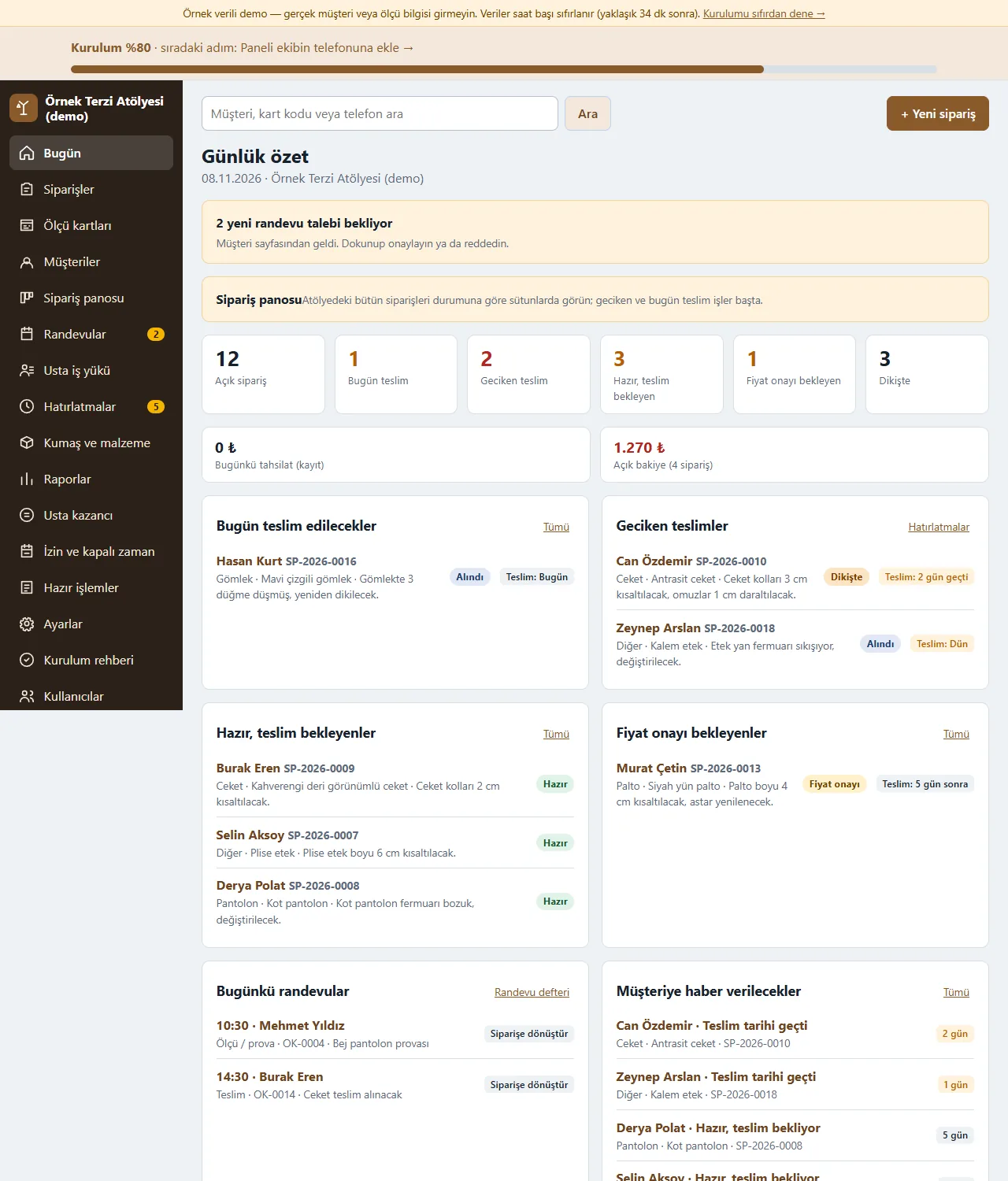
Today screen
The numbers of open, due today, late, ready and awaiting-price-approval orders in boxes you can tap; below them what is due today, late deliveries, ready orders waiting, orders awaiting price approval, today’s appointments and customers to be told. New booking requests wait at the top as a warning.
-
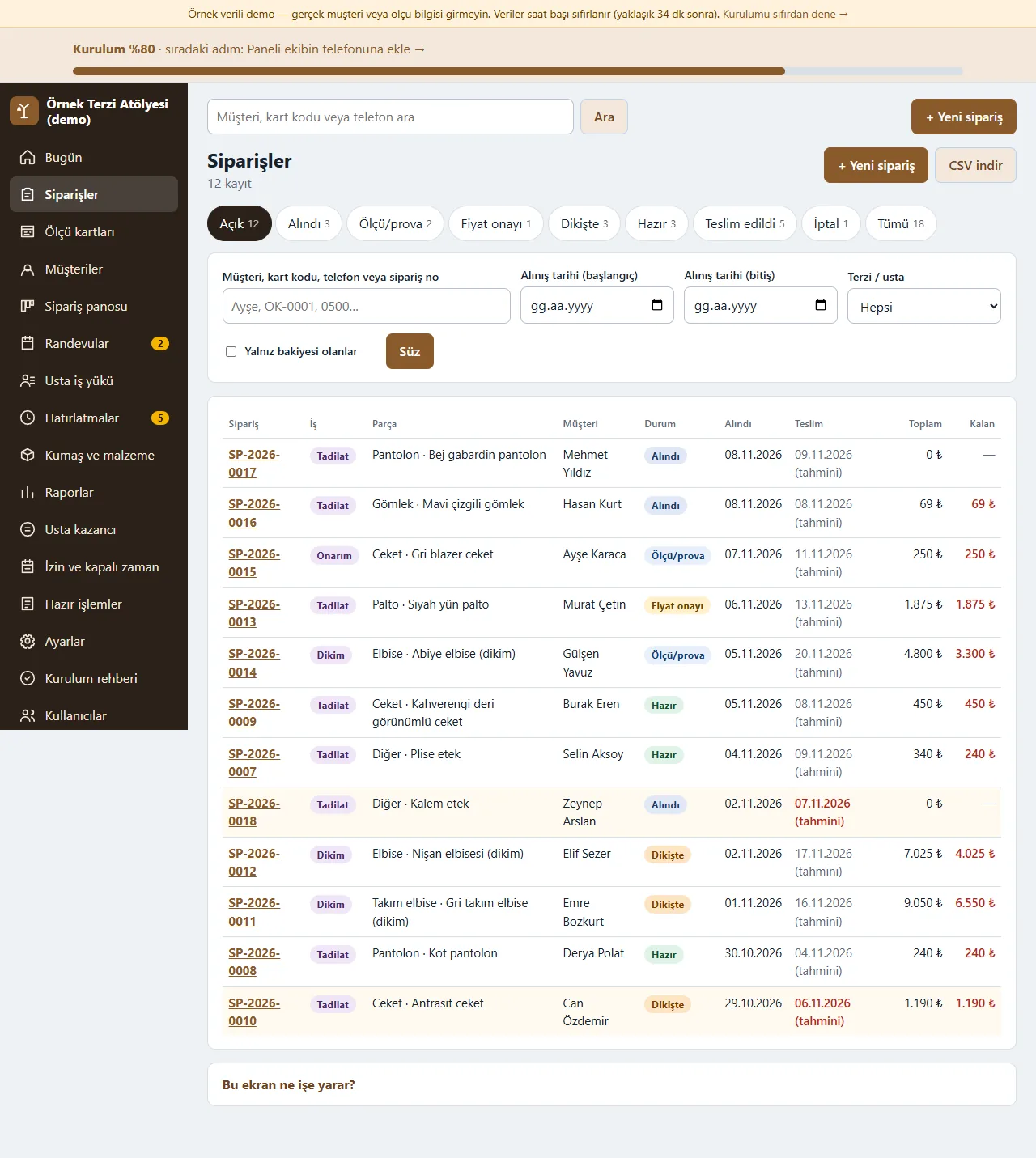
Order list
Filter by status, date and tailor; search by name, card code or phone. Each row shows the order number, type of work, garment, customer, a status label, the delivery date, the total and the remaining amount.
-
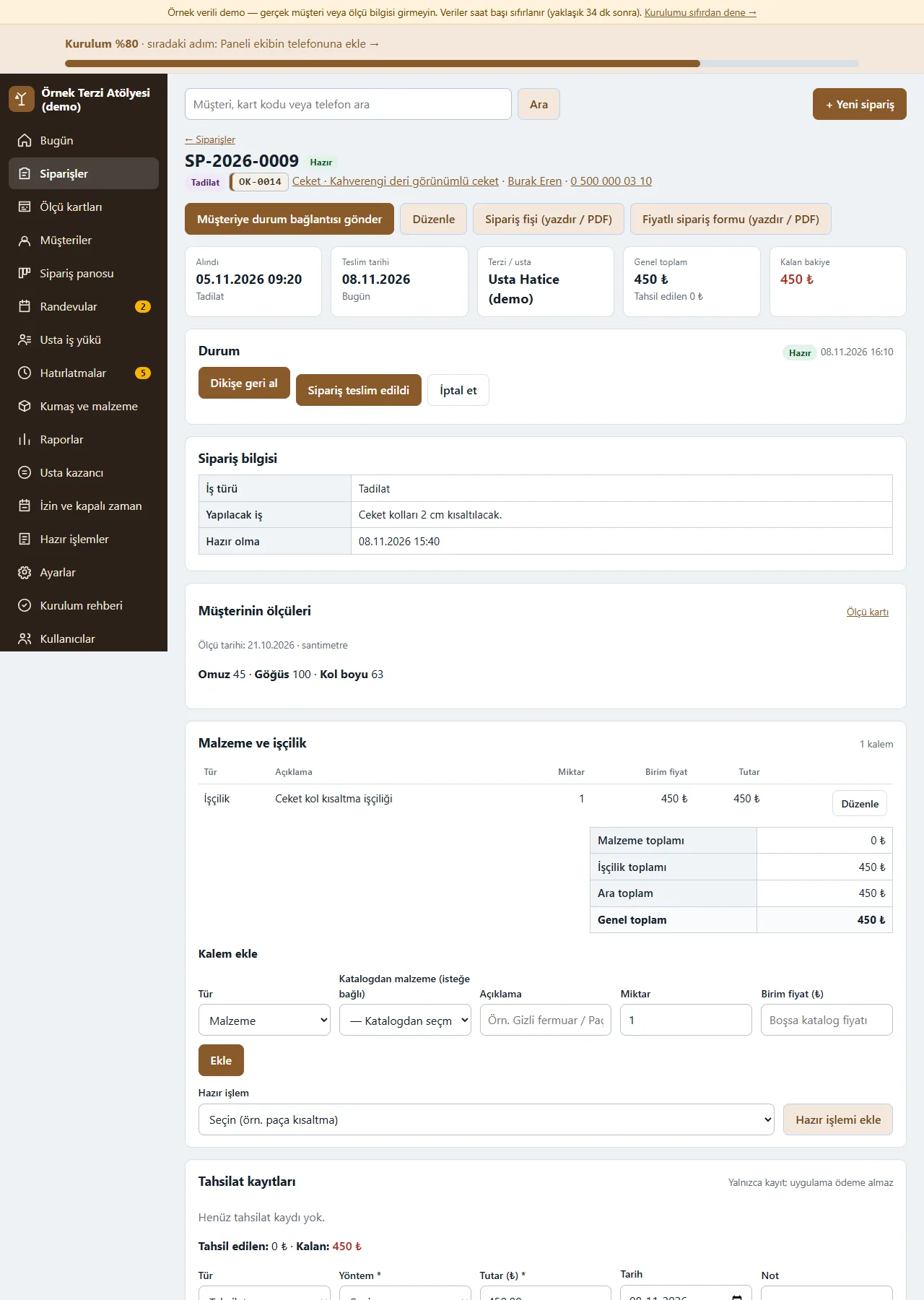
Order detail
The status buttons move the order from Alındı to Teslim edildi; the customer’s measurements, supply and labour line items, totals and payment records are on the same page. A ready job is added as a line item in one tap; the customer status link and the ready WhatsApp texts open from here.
-
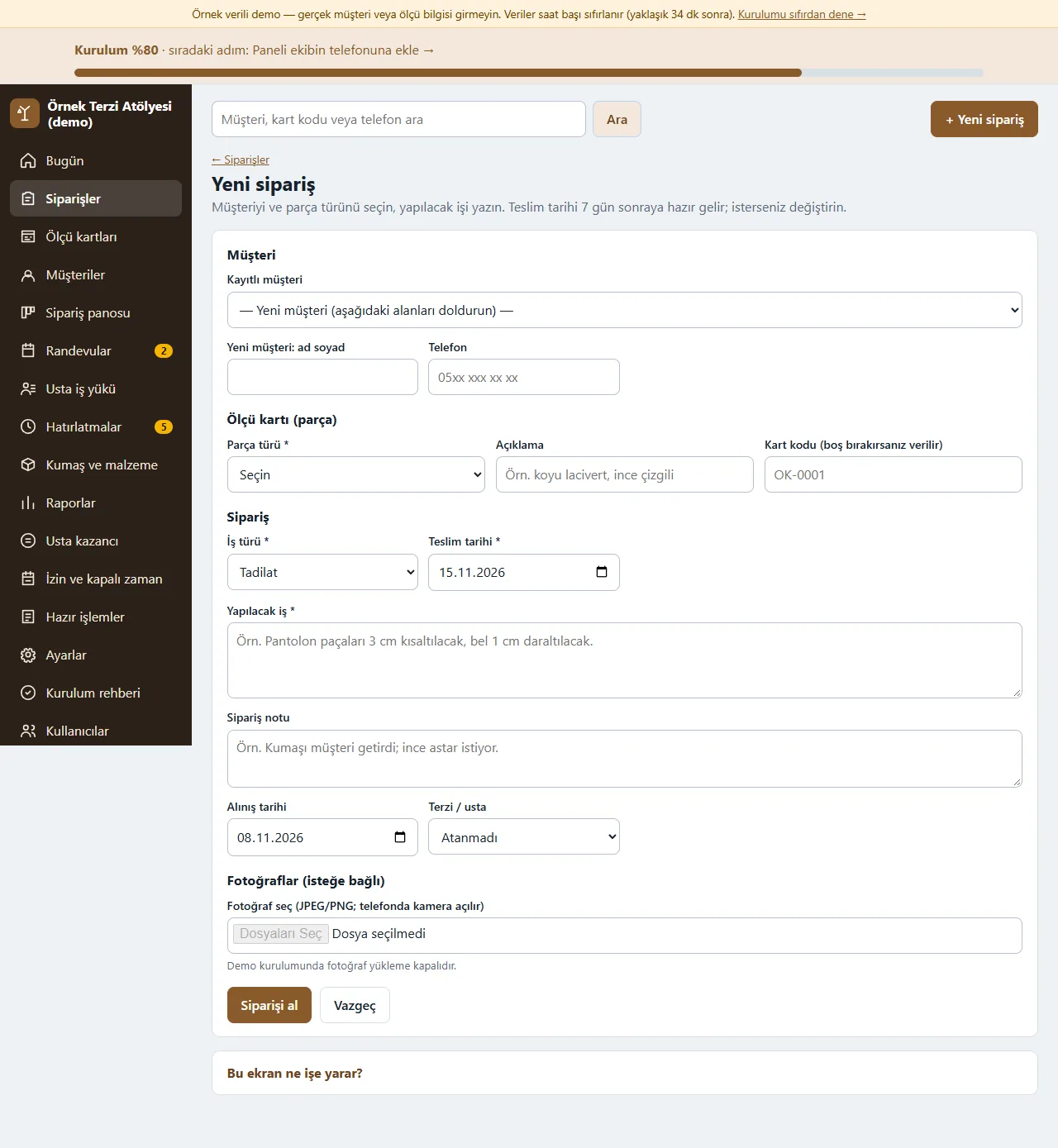
New order
Pick a saved customer or type a new one; for the measurement card enter the garment type, a description and a card code (given automatically if left empty). Then the type of work (sewing, alteration, repair), the work to be done, an order note, the delivery date (7 days ahead by default), the tailor and optional photos are written in. Photo upload is switched off in the demo.
-
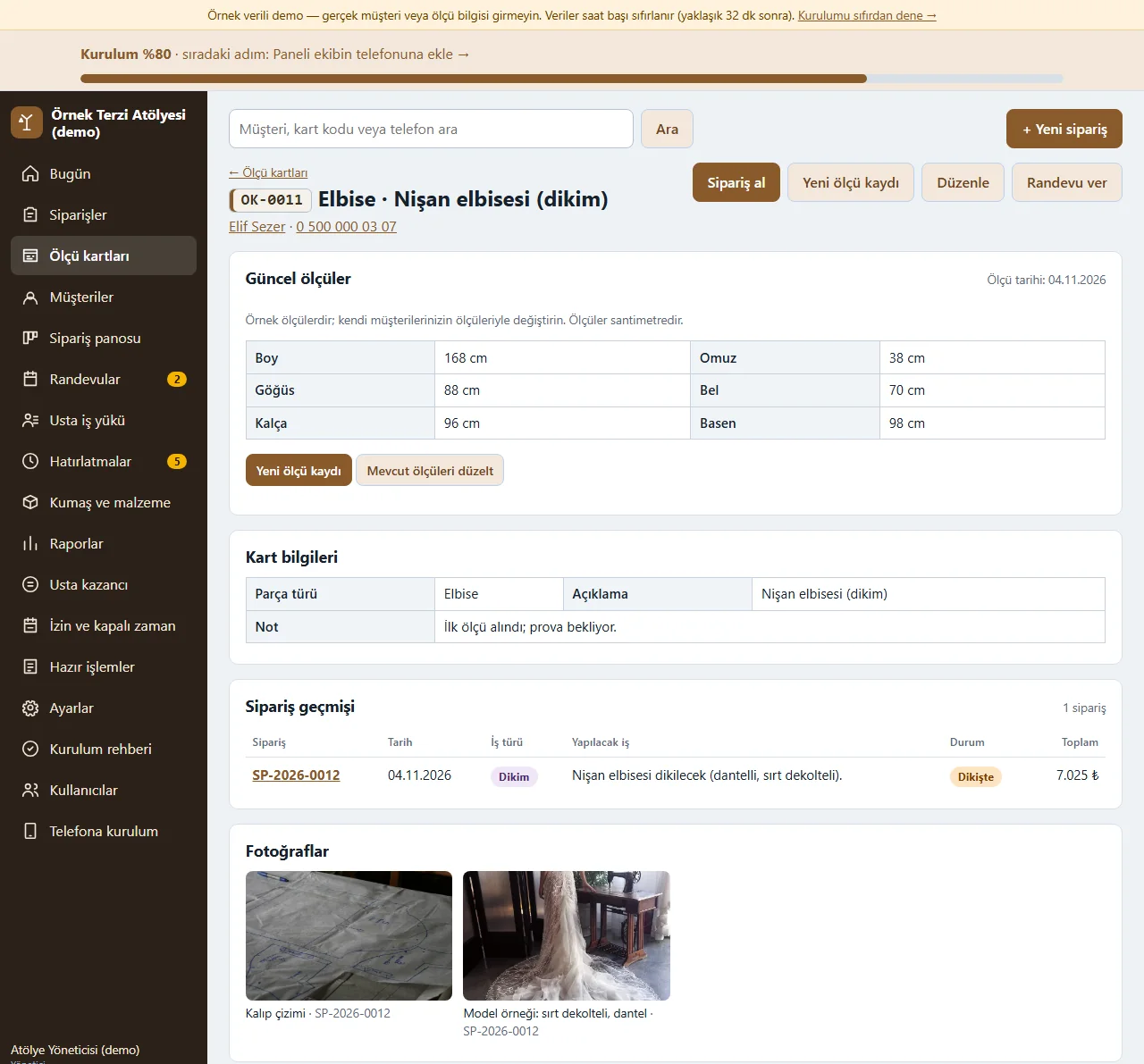
0.5.0 · 10 November 2026 Measurement card
Centimetre measurements by garment type are kept with their date; when a measurement changes “Yeni ölçü kaydı” (new measurement record) moves the old one into the history, and “Önceki ölçüden kopyala” (copy from the previous measurement) speeds up a new record. The card’s orders and movements are listed on the same page.
-
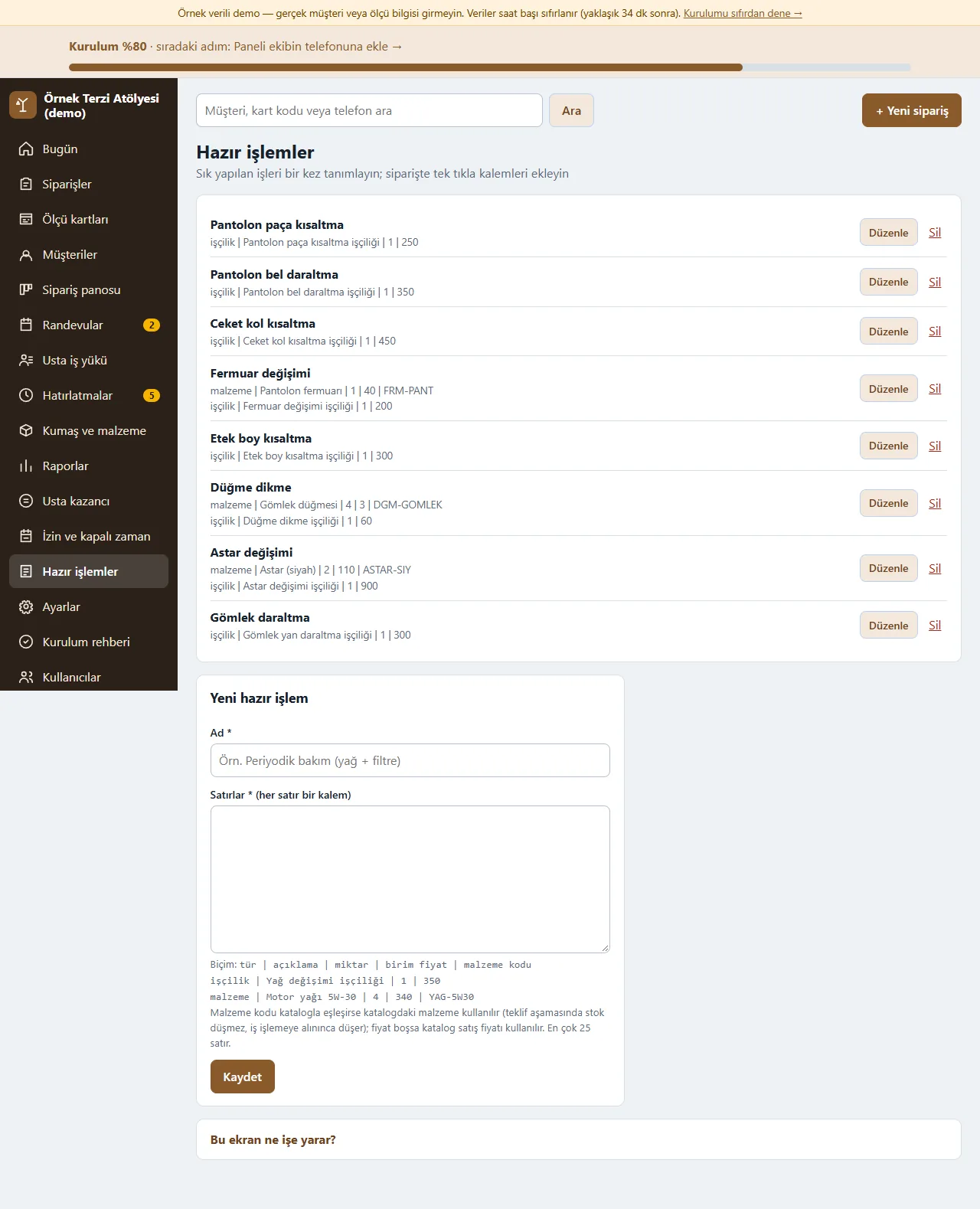
Ready jobs
Common alterations such as shortening a hem, taking in a waist or changing a zip are defined once with a name, price and line items; in an order they are added as line items in one tap. A staff member without price permission does not see the price.
-
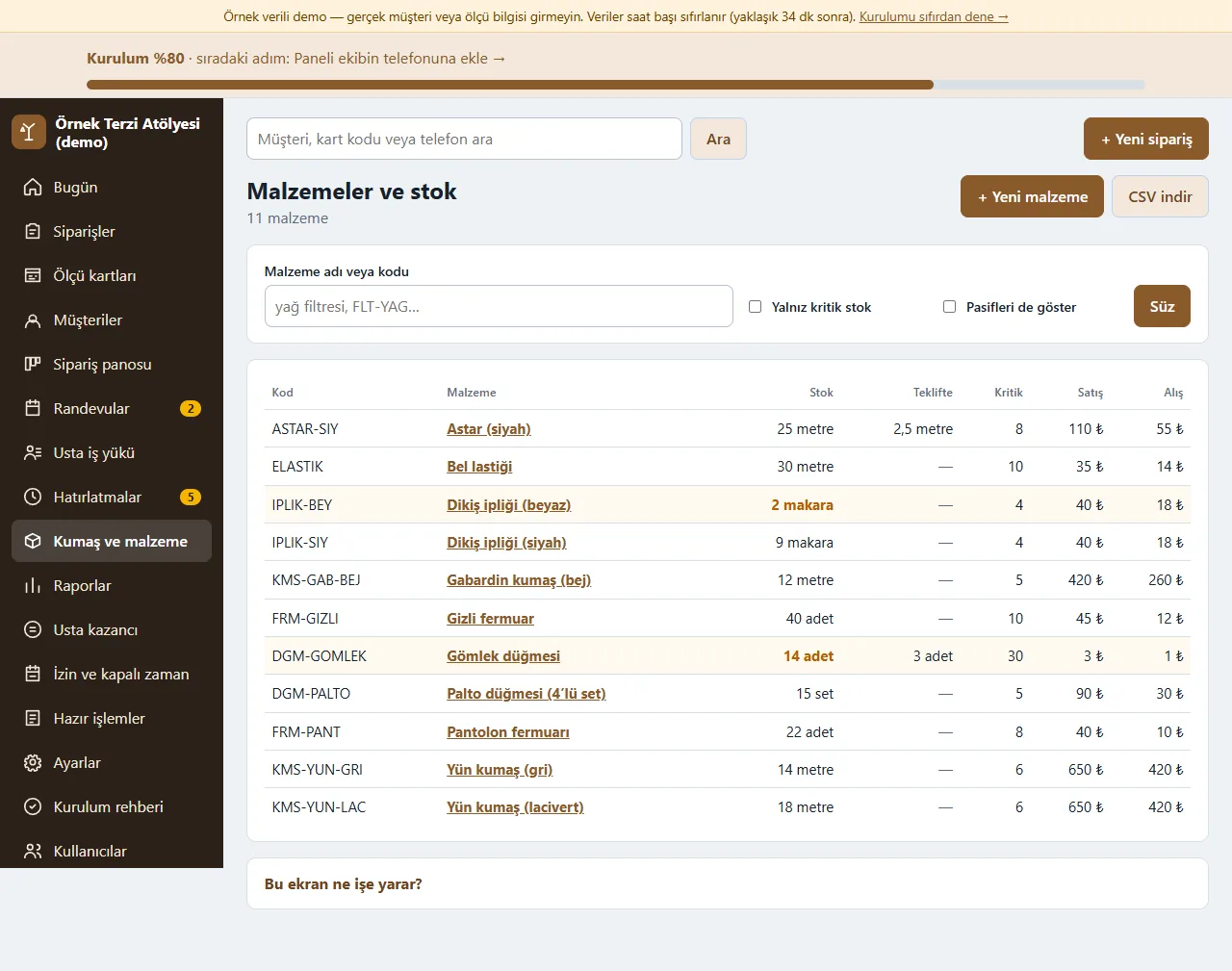
Fabric and supplies stock
Fabric, lining, zips, buttons and thread are kept in metres, pieces or reels; those below the critical level are flagged and there is a “Yalnız kritik stok” (critical stock only) filter. The amount set aside in a quote and the amount actually used are followed separately.
-
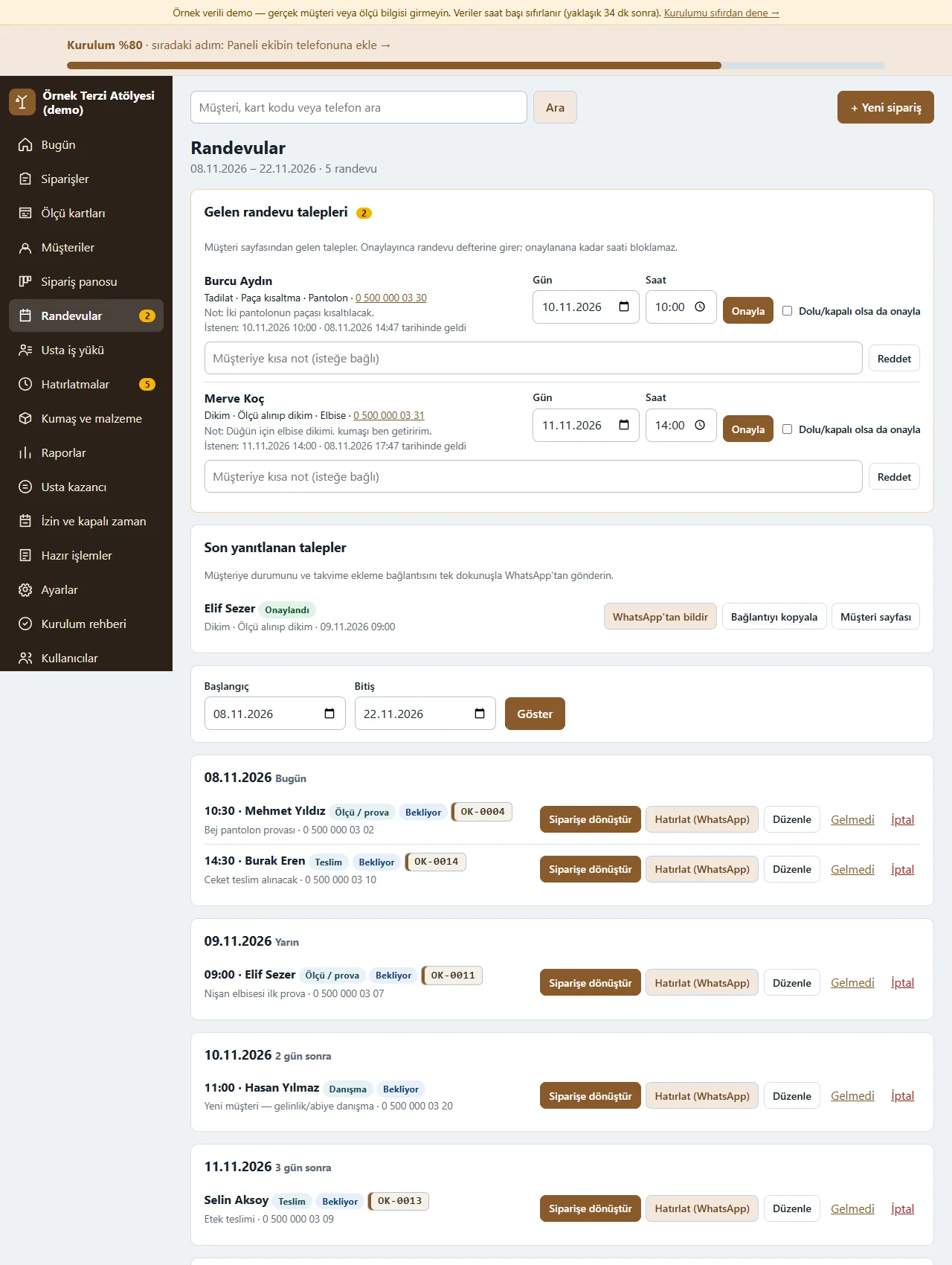
Booking book and incoming requests
Booking requests from the customer page wait at the top: check the day and time and press Onayla (approve) or Reddet (reject). Measurement/fitting, delivery and consultation appointments can be turned into an order; “Hatırlat (WhatsApp)” opens a ready text and the workshop sends it.
-
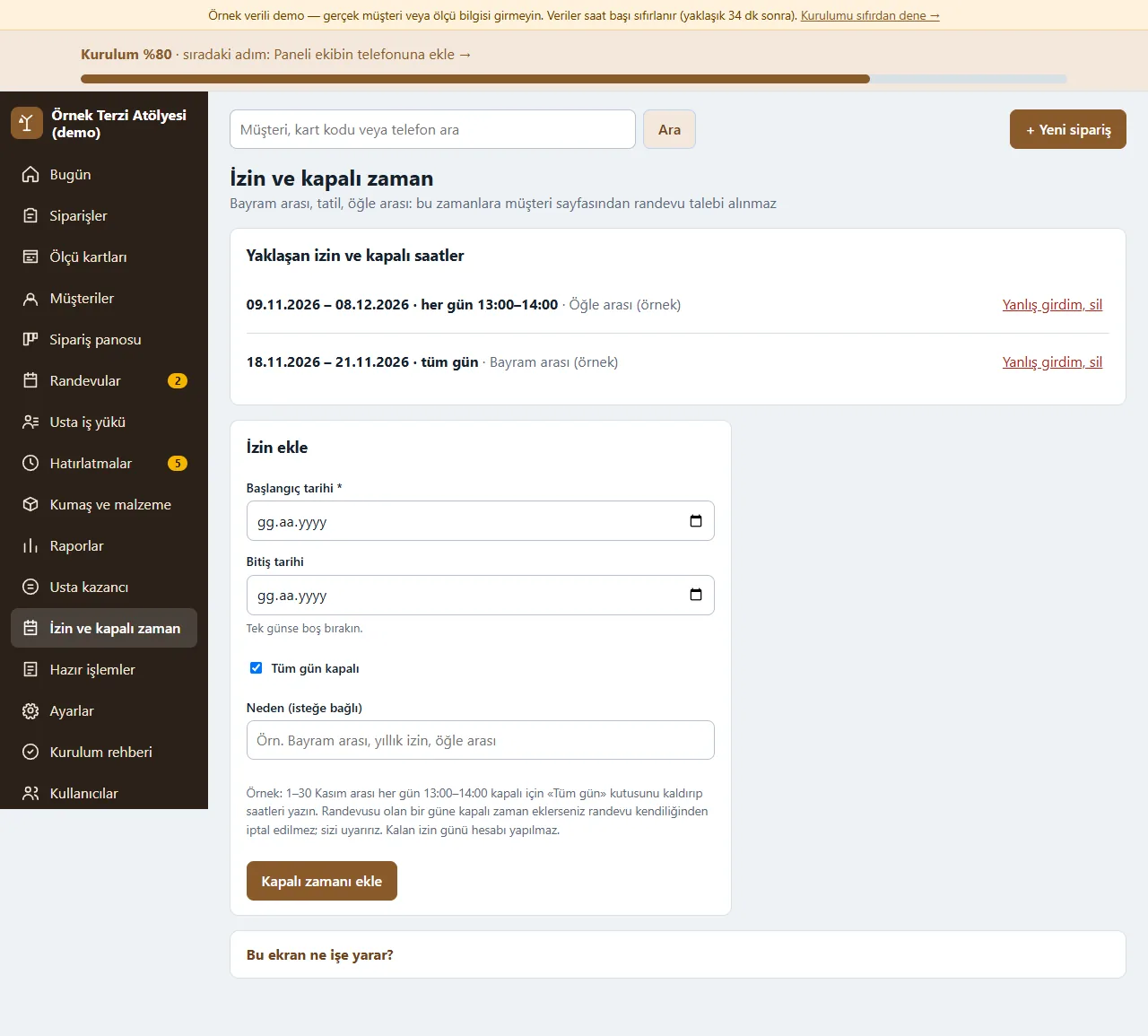
Leave and closed time
Multi-day leave or closed time is entered with a start and end date, with “Tüm gün” (all day) or the same hours each day; no booking can be made on those days on the customer page. Upcoming leave is listed and a wrong entry is removed with “Yanlış girdim, sil”.
-
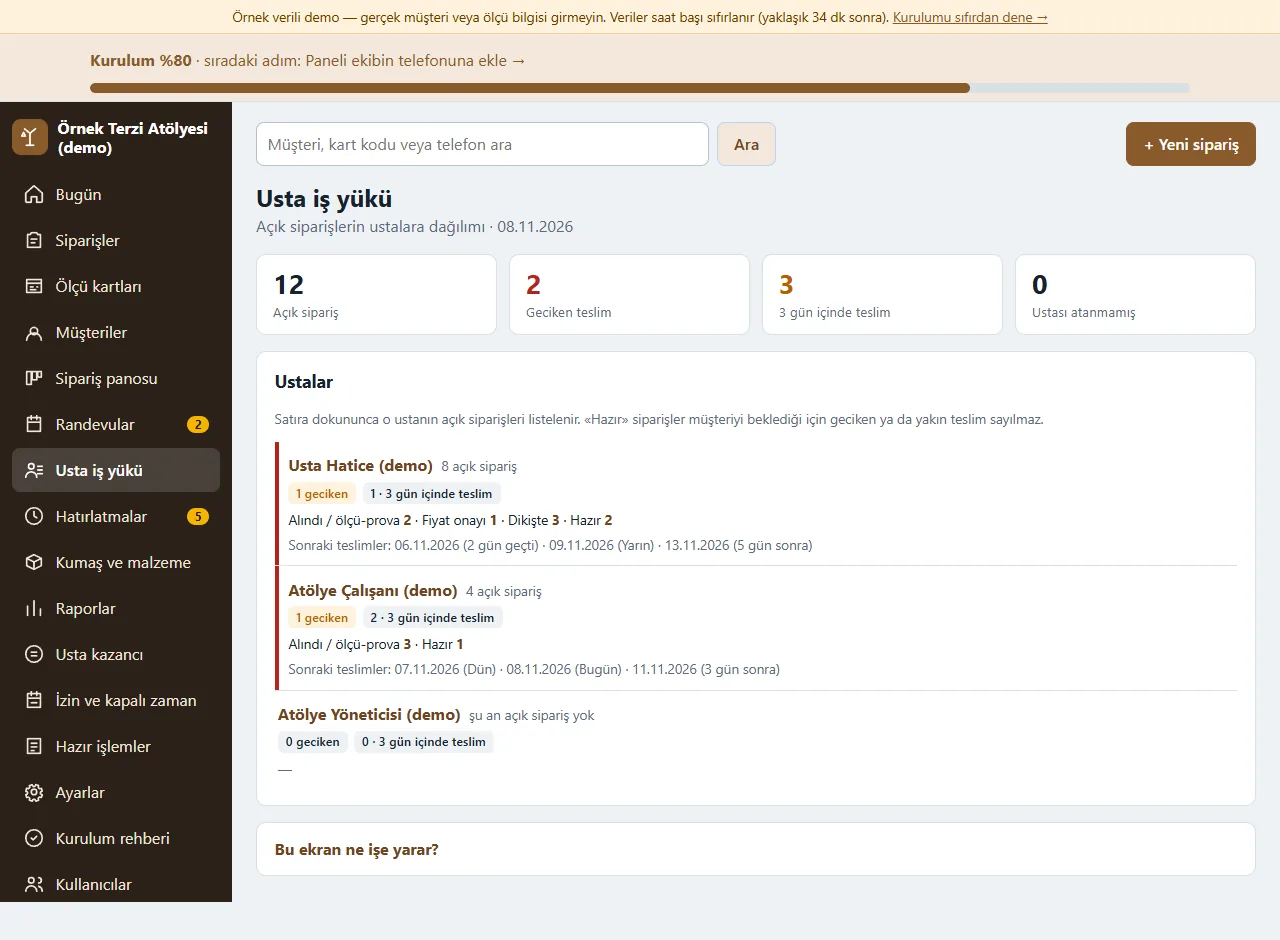
Workload per tailor
For each tailor the open orders, late ones, the number due within 3 days and the spread by stage; orders with no tailor assigned show on a row of their own. Tapping a row opens that tailor’s open orders.
-
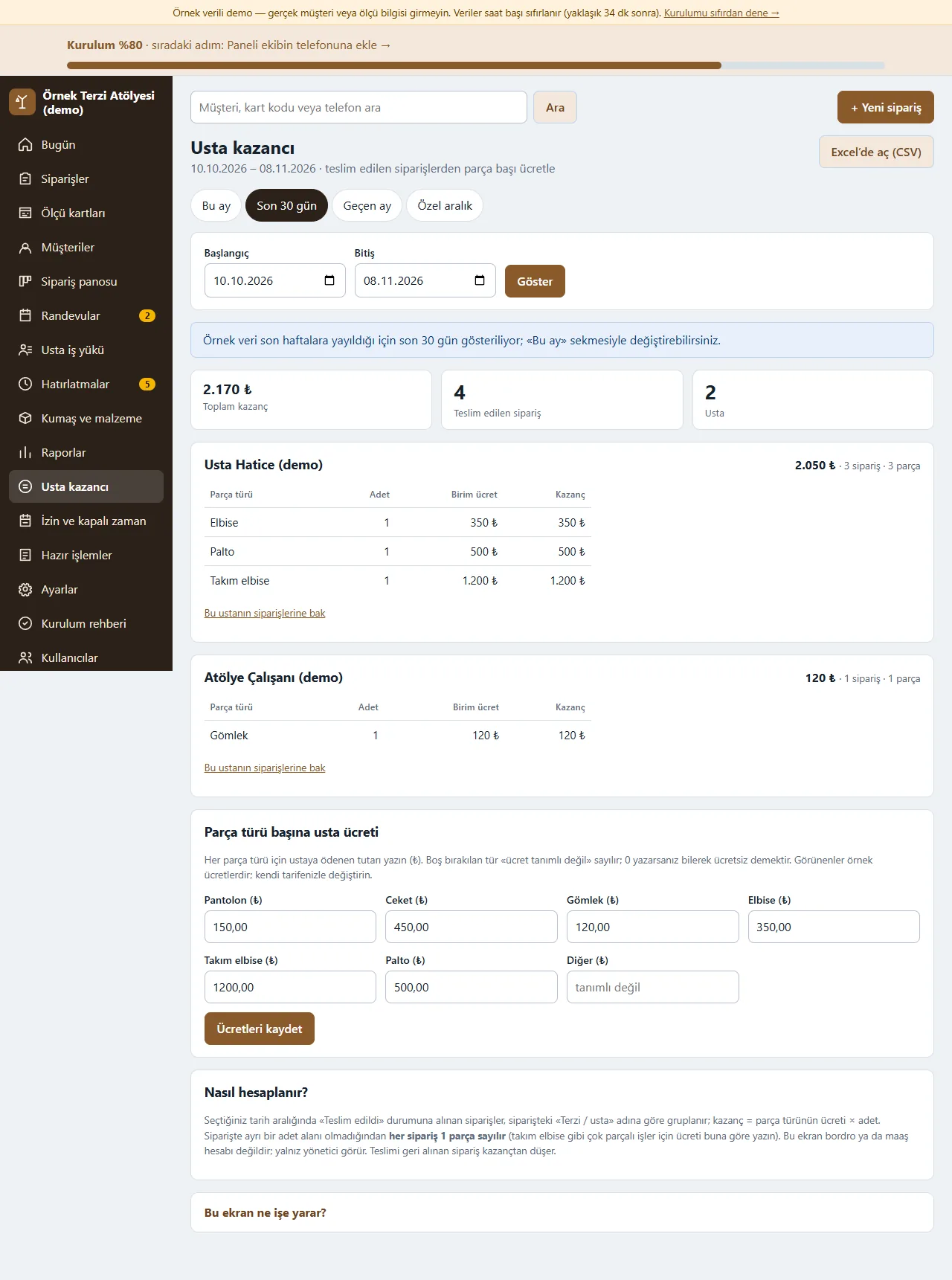
Tailor earnings
Visible to the manager only. A rate per garment type is defined for each tailor; for the chosen period the number of orders and the earnings per tailor are worked out from delivered orders. An order has no quantity field, so every order counts as 1 piece; the screen is a calculation only and pays nothing. “Excel’de aç (CSV)” downloads it.
-
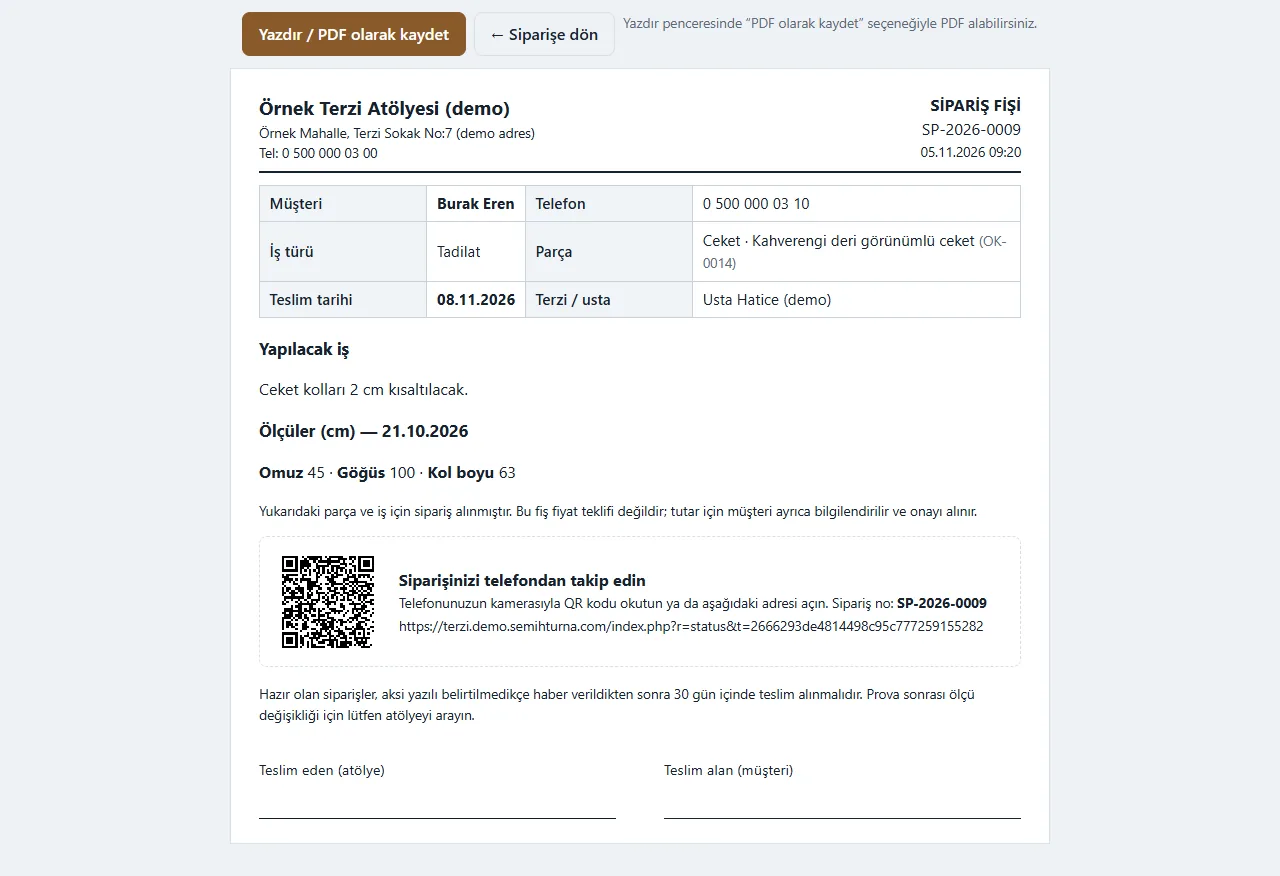
Order slip and tracking QR code
A numbered order slip with the measurements is printed or saved as PDF; the customer’s order-status address and a QR code are printed on it. A priced order form comes out separately. The slip is not a fiscal document.
-
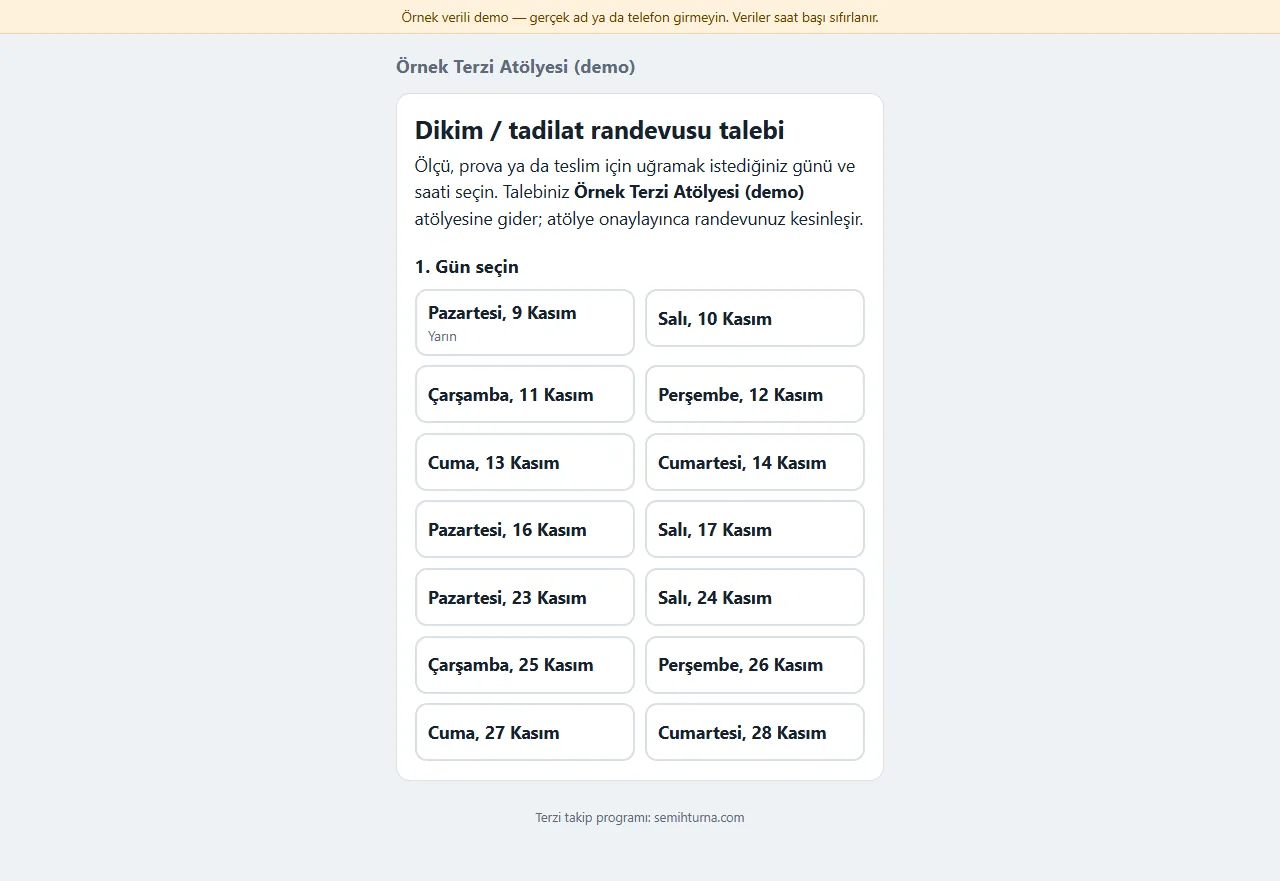
The customer’s booking-request page
Without signing in, the customer picks a day and time from a large-print page and says whether it is sewing, alteration or repair and the garment type. A request does not enter the booking book until the workshop approves it; the maker’s link sits at the bottom of the page.
-
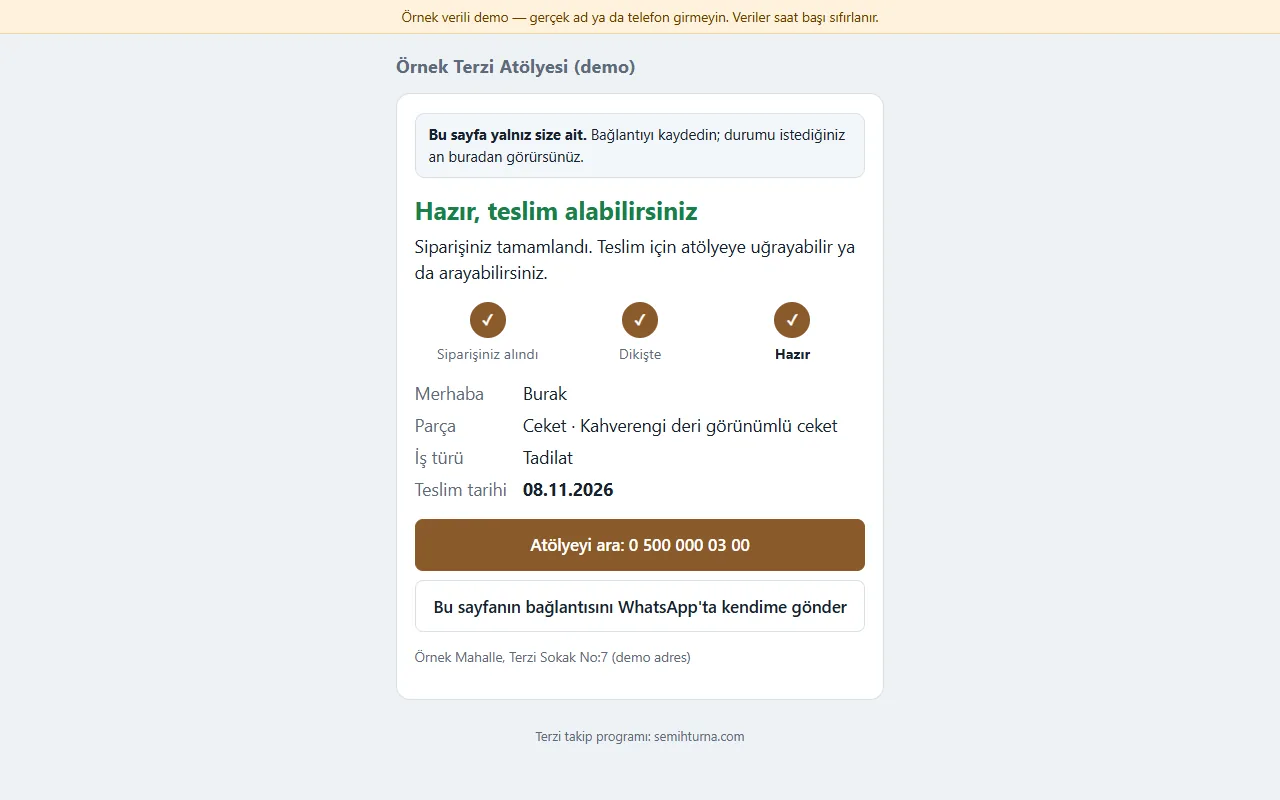
The customer’s order status page
With the QR on the slip or a link sent to them, the customer sees the steps “Siparişiniz alındı / dikişte / hazır” (order received / being sewn / ready); there are buttons to call the workshop and to send the link to themselves. Internal notes, costs and labour amounts are not shown.
-
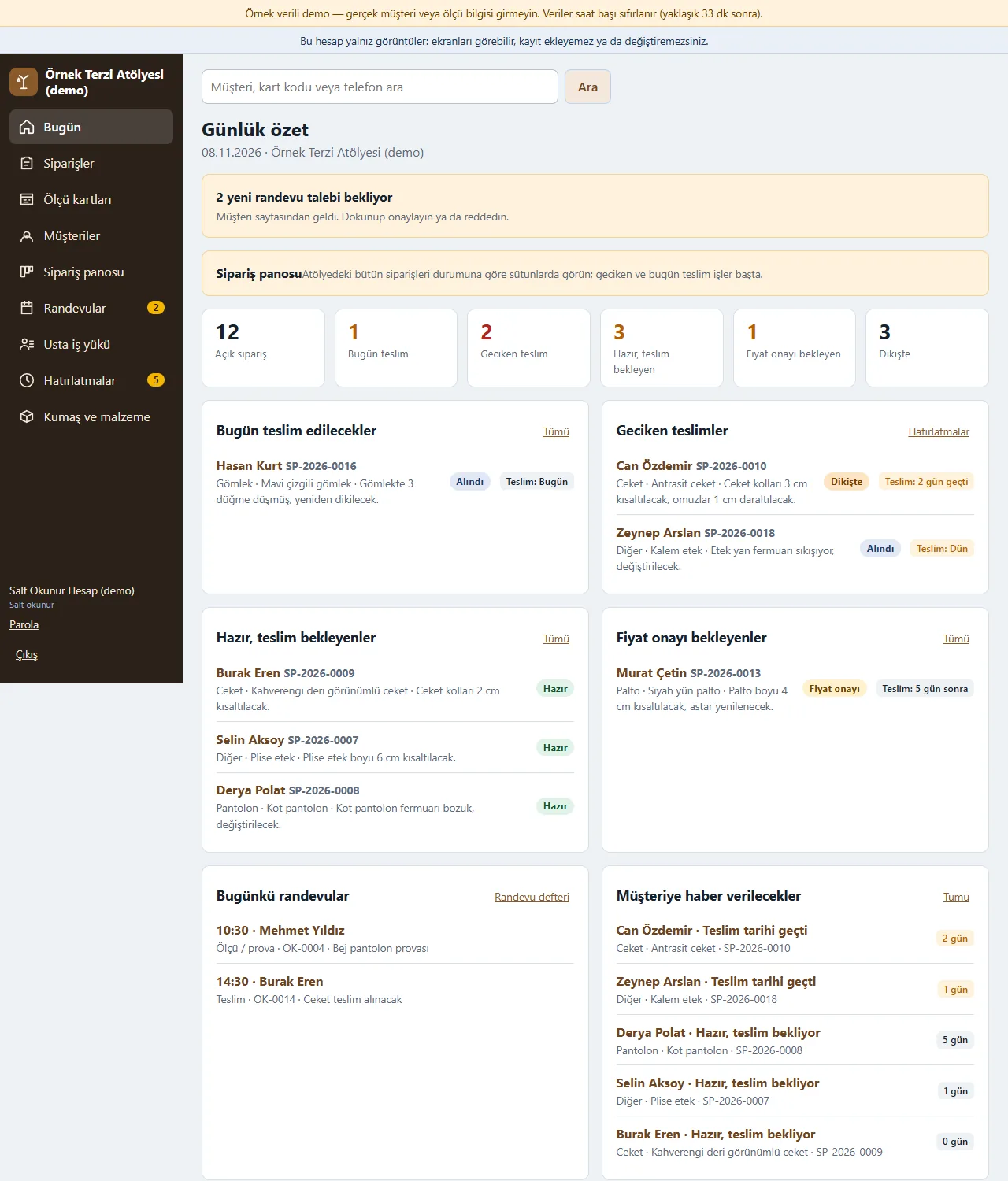
Read-only account
A third account type for an accountant or an observer: it sees the screens but cannot add or change any record. Write buttons, forms and settings are never shown, and the server refuses this account’s write requests as well.
-
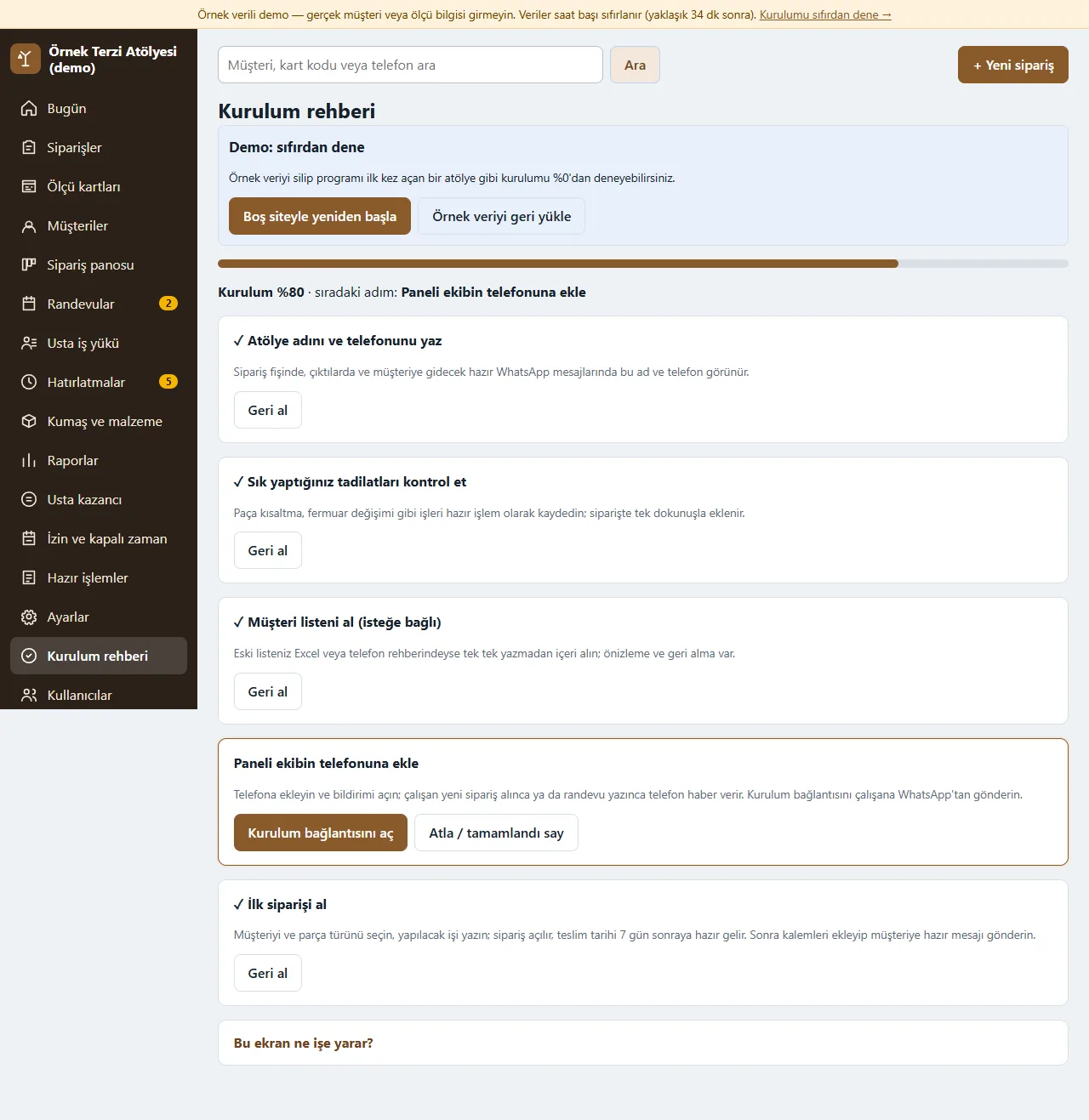
Setup guide
Steps such as the workshop name and phone, ready jobs, the customer list and adding to the phone are listed with a progress bar; every step can be skipped. In the demo the “Boş siteyle yeniden başla” (start with an empty site) and “Örnek veriyi geri yükle” (restore the sample data) buttons show; they do not show in a real installation.
-
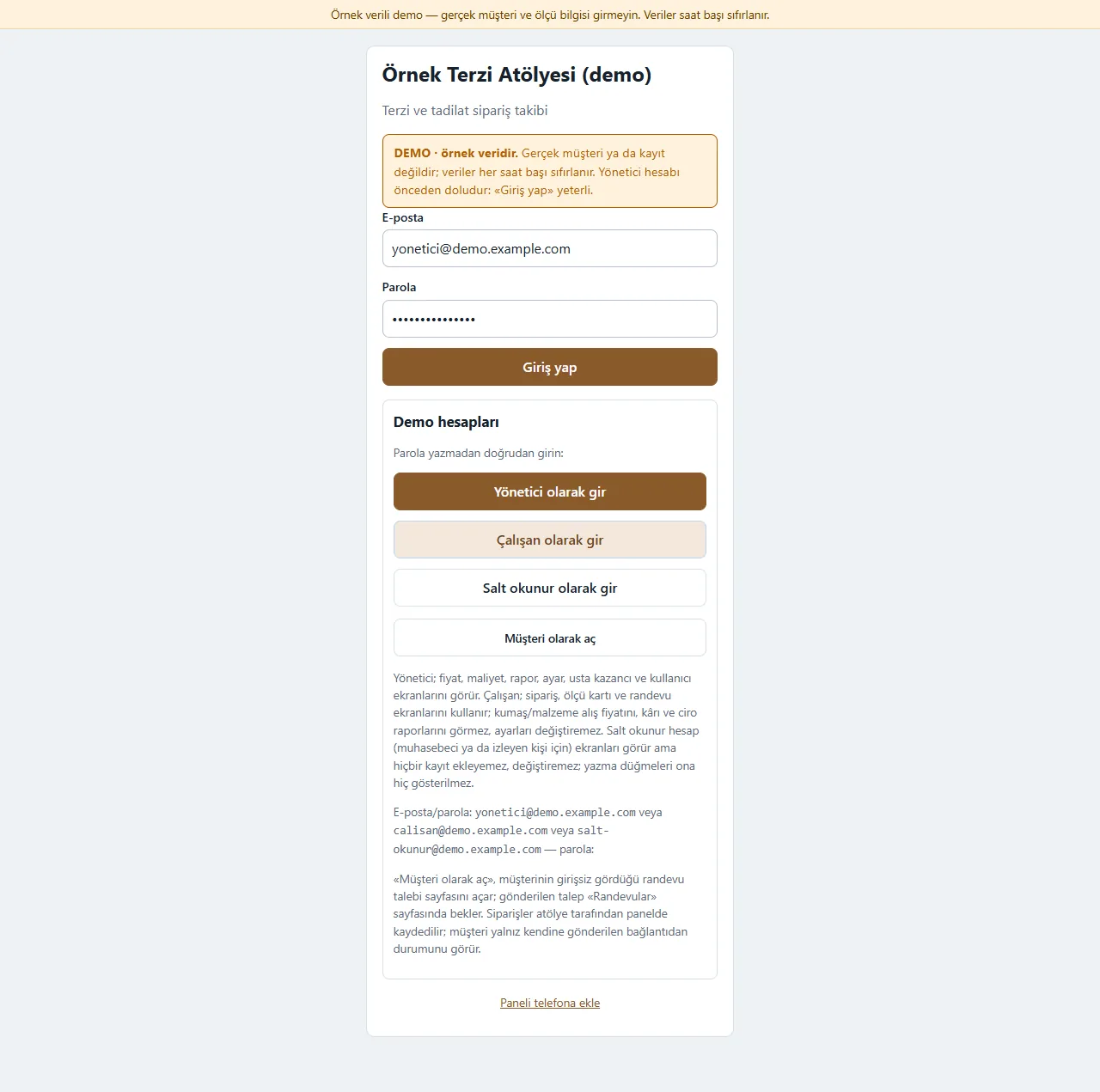
Demo sign-in page
The demo needs no password: “Yönetici olarak gir”, “Çalışan olarak gir” or “Salt okunur olarak gir” signs in with one tap; “Müşteri olarak aç” opens the booking page the customer sees. A normal installation asks for an e-mail and a password.
-
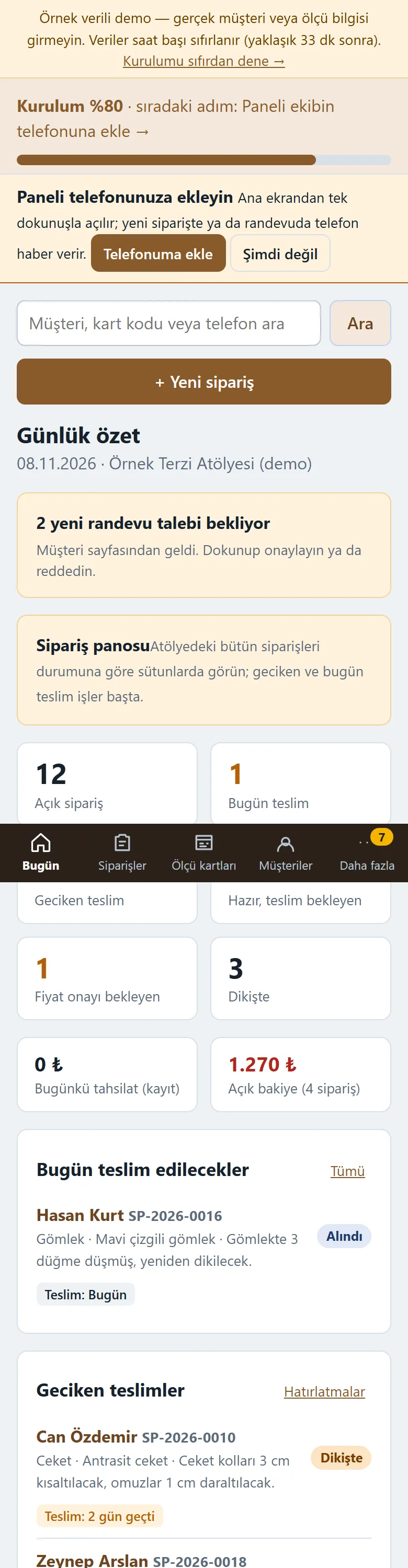
Today screen on a phone
Used from a phone at the counter: the boxes fall into one column and there are Bugün, Siparişler, Ölçü kartları, Müşteriler and Daha fazla tabs at the bottom; the panel can be installed on a phone and a computer.
-
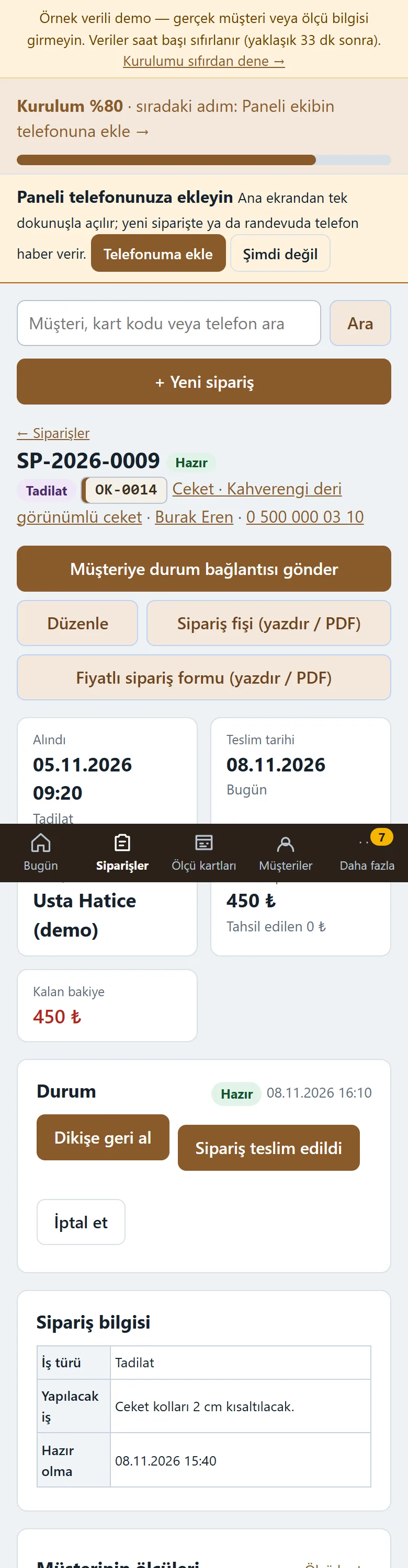
Order detail on a phone
The status buttons, measurements, line items and payments are on the order page on a phone too; the customer status link and slip buttons are in the same place.
-
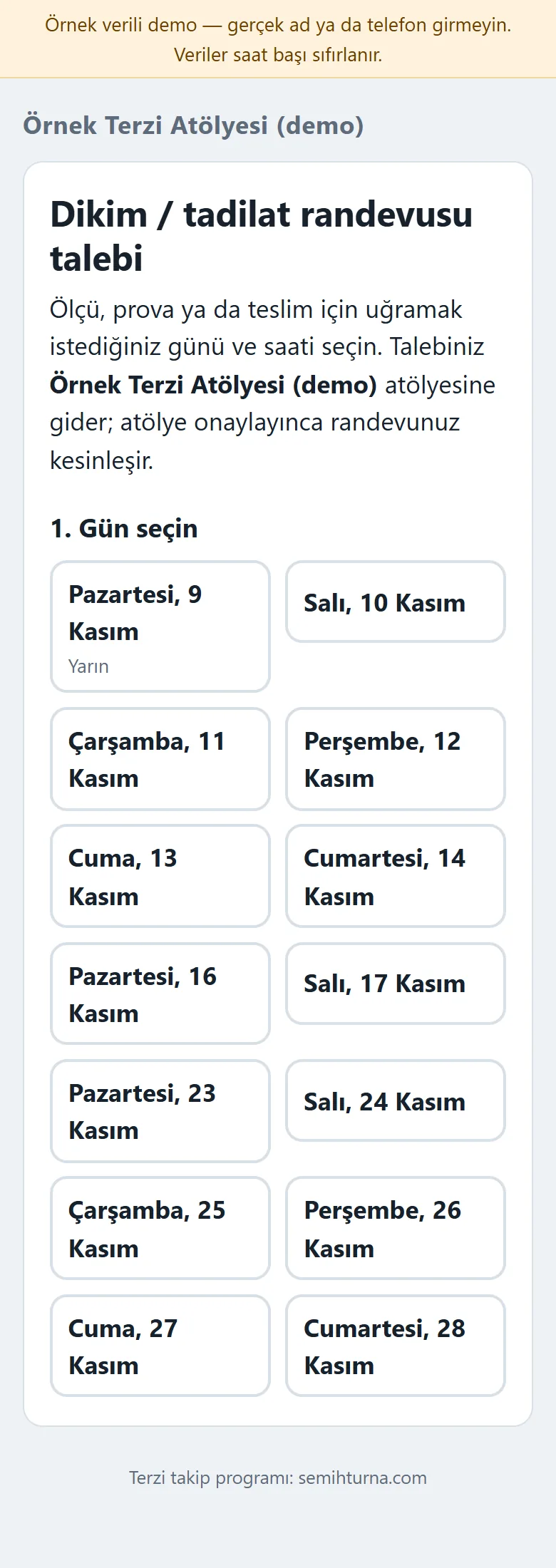
The customer booking page on a phone
The customer picks the day and time on their phone with large buttons; the page is plain and in large print.
- What do they see at the end?
- Each order shows its status, remaining balance and delivery date; what is due today and late, ready orders waiting to be collected and orders waiting for price approval sit on one screen; a customer sees a booking request and the order’s status on pages that need no sign-in.
- What is it good for?
- Measurements, orders, delivery dates, deposits and fabric stock do not scatter across a ledger and scraps of paper; which job is with which tailor, what will be late and how much balance is owed can be followed in one place.
Everything that is not included, and all limits
- Not delivered to a client and not used by a real tailor or workshop. The business, customers, phone numbers, measurements and amounts on the screens are made up.
- There is no automatic SMS or WhatsApp sending; a ready WhatsApp text opens and the workshop sends it from its own phone. The program sends nobody a message on its own.
- There is no online card payment, virtual POS or e-invoice; deposits and payments are entered by hand, and the slip and form are not fiscal documents. There is no multi-branch use.
- An order has no quantity field: tailor earnings count every order as 1 piece. The tailor earnings screen is a calculation and a record only; it makes no payment and does not replace payroll or accounting.
- Adding to the phone and the free phone notification have not been tried on a real phone, in iPhone/Safari or in the WhatsApp in-app browser; the QR code on the slip was not scanned with a phone camera. Photo upload is switched off in the demo.
- The live demo was run on one hosting account only (PHP, SQLite); the app was tried only on PHP 8.3. In the demo the data is reset every hour; sign-in is without a password through role buttons. The app interface in the screens is in Turkish.
Delivery and sales status
How does it work?
You try the demo and tell us about your workshop, and we send you a quote. We install it and we host it. The yearly price includes installation, hosting, data transfer and support; it is for a single business.
Price
The yearly list price is 2,500 TL. Installation, one year of hosting, data transfer, bug fixes and written usage support are included; it is for a single business. Automatic SMS and WhatsApp sending (a ready message and link come with it, you send it), online card payment, e-invoicing / e-archive and multiple branches are not included. New feature requests and work beyond the scope are discussed separately.
Possible delivery options
Other delivery options
Requirements and version history
Installation requirements
- PHP 8.1 or newer (with the pdo_sqlite and mbstring extensions) and HTTPS are needed; the data is kept in a SQLite file and no separate database server is needed. The app was tried only on PHP 8.3 and the live demo on a single hosting account only.
Release notes
- No version has been delivered to a client. The sample-data demo is open to everyone and is shown with the screenshots on this page.
- 0.4.0 (8 November 2026): an optional 15-day trial installation (when the time ends the panel and the customer pages close, no data is deleted, CSV can be downloaded), only the “destek” (support) account can start the period, and a usage summary behind a secret key that shows numbers only.
- 0.3.0 (8 November 2026): a read-only role, tailor earnings (a rate per garment; manager only), workload per tailor, and the customer’s tracking address and a QR code on the order slip.
- 0.2.0 (8 November 2026): multi-day leave and closed time and an upcoming-leave list.
- 0.1.0 (8 November 2026): the first server version; measurement cards with a history, sewing-alteration-repair orders and a status flow, ready jobs, fabric and supplies stock, deposit and payment records, a booking book and a customer booking-request page, a customer order status page, Today and reminders, ready WhatsApp messages, importing customers and measurement cards from Excel/CSV, manager and staff roles, a setup guide, adding to the phone and a free phone notification.
Decisions not made yet
- Rights to use, modify, transfer and receive the source code: to be set in a written agreement; not decided yet.
- Whose name the hosting and domain are opened in, and where the software is installed, have not been decided yet.
There is no cart, customer account or online payment on this site for now. Reach out by phone, WhatsApp or the form; in a first conversation your need and the software’s fit are reviewed. The form does not create an order, a contract or a payment.