Real estateDemo with sample data
Real Estate Portfolio and Viewing Tracker: screen-by-screen guide
The full version of the short description on the product page: every feature, how each screen is used step by step, all limits and the delivery details.
All features
Manager sign-in and panel opening were verified on the live demo on 10 October 2026. On 26 October 2026, on the live demo before this version, it was checked, signed in as an agent, that the “Sözleşmeye git” (go to the contract) button on the Today page and the contract “Aç” (open) link and the owner link on the listing page do not appear. On 3 November 2026 the Today, setup guide, client link, listing, transaction, rental record, data transfer and report screens were opened on the live demo (1.2.1) with the manager sign-in and screenshots were taken. On 3 November 2026 on the live demo (1.3.0) the cash book and the calculators were opened with the manager sign-in, a cash line was added and deleted and the CSV downloaded; signed in as an agent, the cash book was seen not to open (403) and the calculators to open. The product’s 1.3.0 local unit tests (SQLite, PHP 8.3) passed 2067 with 0 failing.
- Cash book (manager only): the money in and out of the office line by line, with a monthly total and a CSV statement; it is not linked to the fee records by itself and works out no VAT
- Calculators: title-deed fee, loan instalment, rent yield and price per square metre; arithmetic on typed numbers, not an official amount or an offer
- Record listings and property details; office-only notes: sahibinden, hürriyetemlak and emlakjet listing numbers, banner and key location (not shown on public pages)
- Link clients and requests to listings; save a client and the property they look for in one form
- Plan viewings on a calendar, track viewing records and agent time off (several days; “all day” or a time range); no viewing can be planned in time off, and there is no remaining-leave counter
- A no-sign-in, secret-code progress page for the client of a sale or rental (four steps); no amount, ID number or address is shown
- Rental record: tenant, guarantor, inventory, yearly increase rate and a warning on the Today screen 60 days before the end or the increase; the guarantor’s ID number is stored encrypted; it does not produce a legal contract text
- Panel access for manager and agent roles: an agent does not see pages and links it has no permission for; the manager can transfer an agent’s clients, requests, listings and viewings to another agent after a preview and confirmation (no undo)
- A setup guide, a ready WhatsApp message and an A4 poster/flyer with a QR code for the office site, adding to the phone and free phone notifications (no SMS); a visitor follows the status on their own request page
- Importing the client and owner lists from Excel/CSV (manager only): a preview, duplicate phone numbers set apart, undo of the last import; no message is sent and no request or contract is opened (.xlsx only when the server has the zip extension)
- Reports and document screens; backup and restore
Screen by screen: how it is used
The screens come from the live demo (version 1.2.1, 3 November 2026; version 1.2.2 looks the same; “Kasa defteri” and “Hesap makineleri” are from 1.3.0), signed in as the manager; client, phone and property details are samples. The property photos are copyright-free (CC0) sample photographs and show no person or real address. The app interface is in Turkish.
- Who uses it?
- A real estate office manager and agent.
- Where do they start?
- Sign in with the sample account.
What do they do on screen? Step by step
-
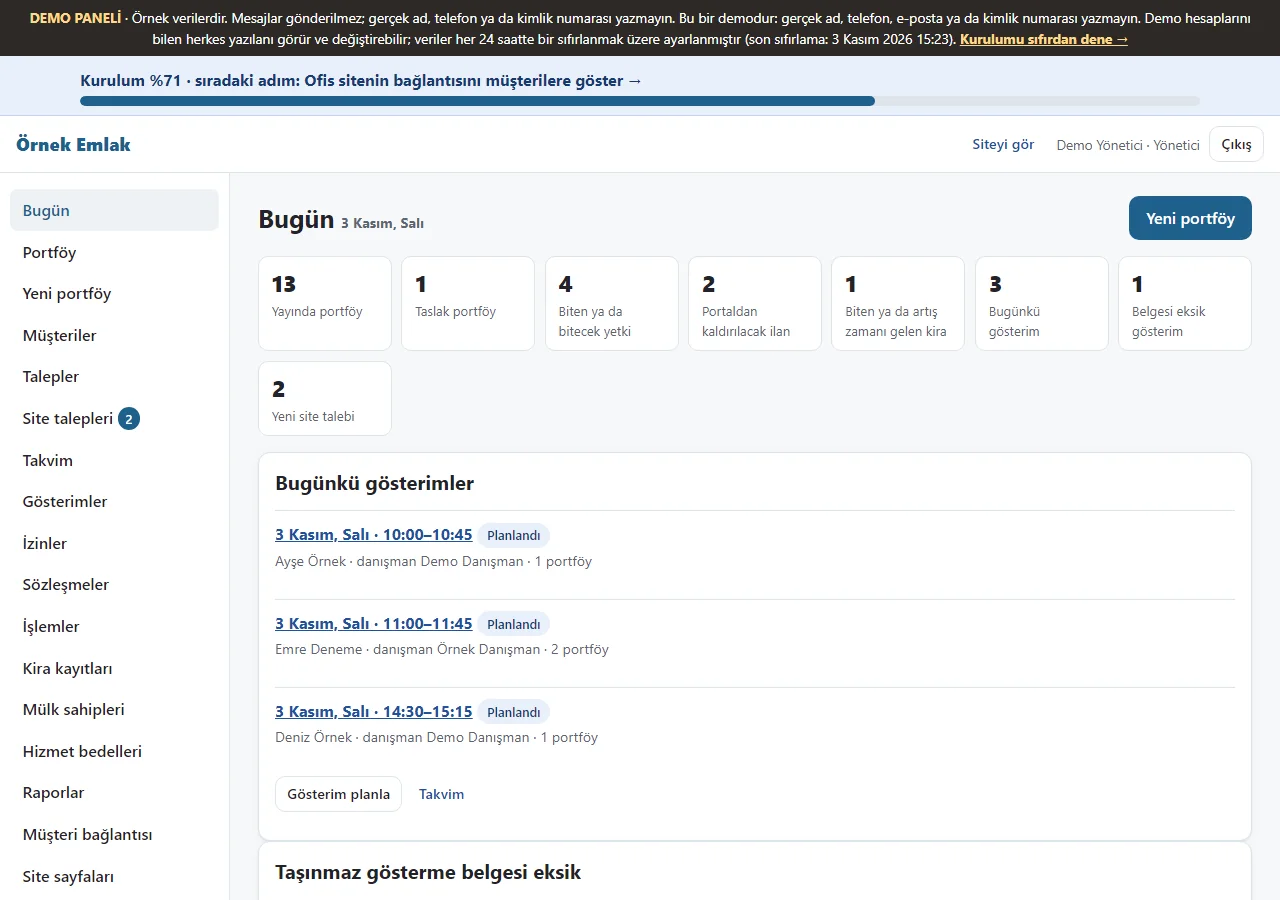
Today dashboard
Published and draft listings, expiring authorisations, listings to take off portals, rentals ending or due an increase, today’s viewings and new website requests appear as tappable boxes; a setup progress strip runs across the top.
- On screen (Turkish interface)
- “Bugün” — today
- “Portaldan kaldırılacak ilan” — listing to remove from portals
- “Yeni site talebi” — new website request
-
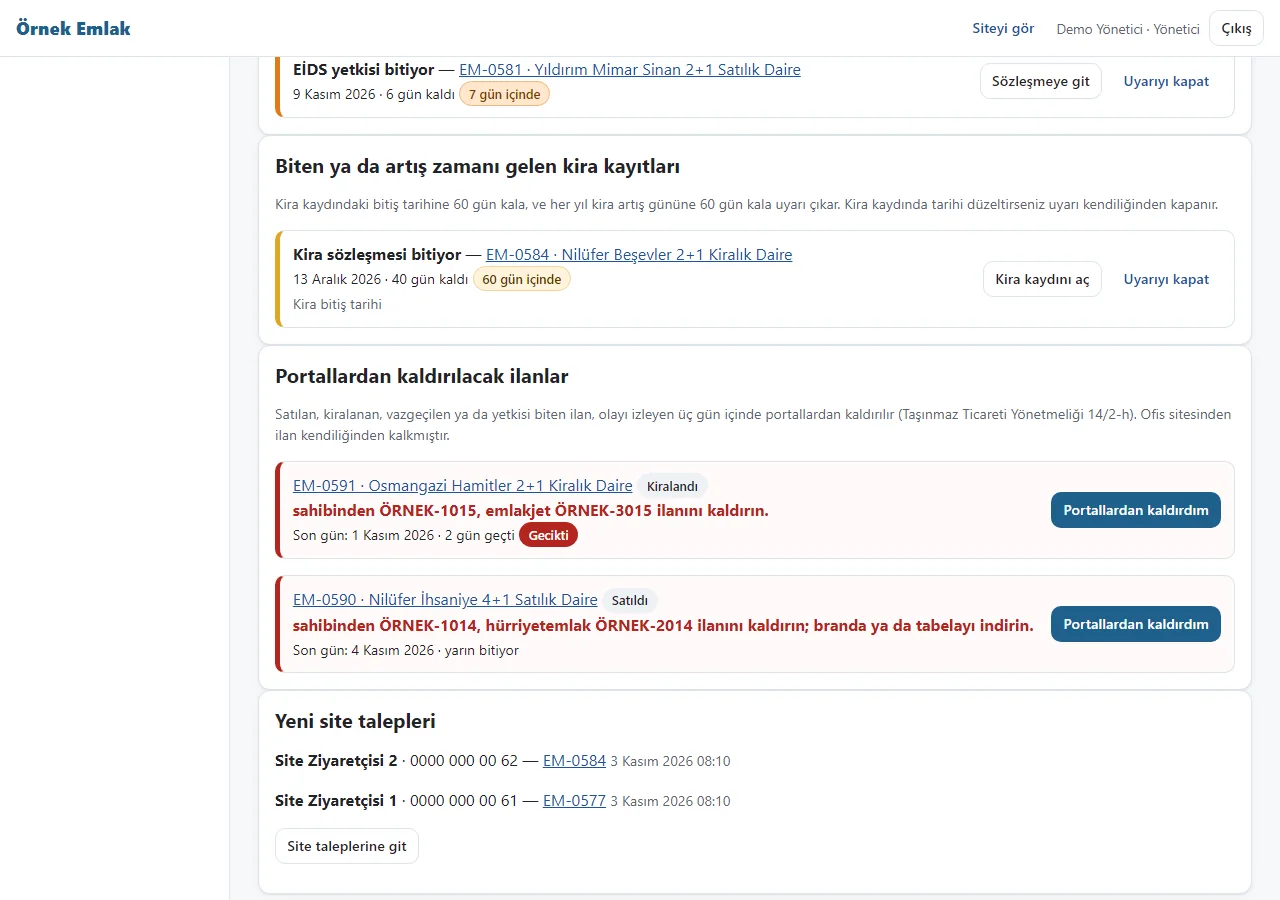
Rental and portal warnings
A rental record warns 60 days before its end and before the yearly increase day. For a sold or rented listing a removal task counts the portal numbers; the app does not take the listing off a portal, you tap “Portallardan kaldırdım” (I removed it from the portals) once you have.
- On screen (Turkish interface)
- “Portallardan kaldırılacak ilanlar” — listings to remove from portals
- “Portallardan kaldırdım” — I removed it from the portals
-
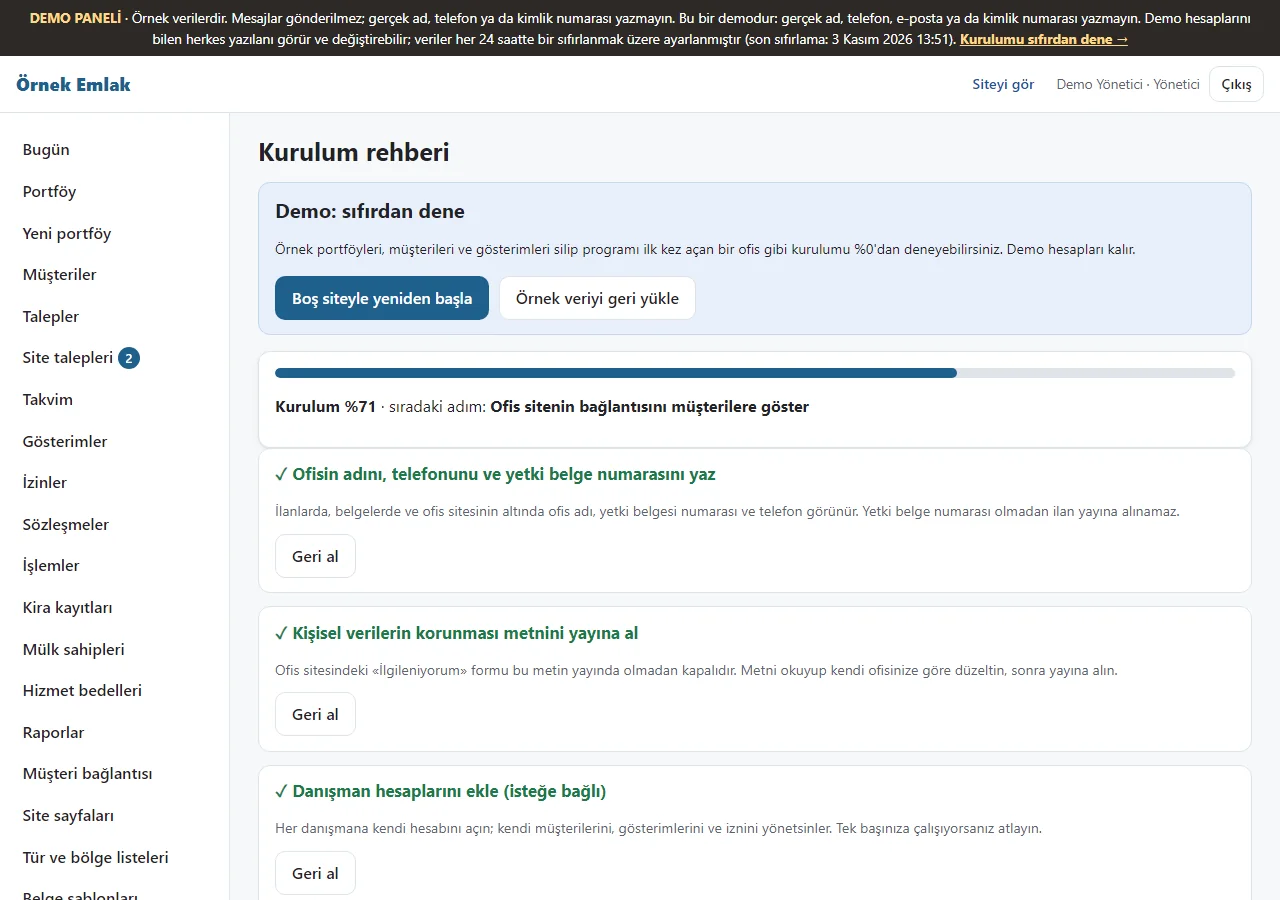
Setup guide
Seven steps are shown in order: office details, the personal data notice, agent accounts, the client and owner list, the first listing, sharing the link and adding to the phone. Each step saves on its own and can be skipped. On the demo there are “Boş siteyle yeniden başla” (start over with an empty site) and “Örnek veriyi geri yükle” (restore the sample data) buttons at the top.
- On screen (Turkish interface)
- “Kurulum rehberi” — setup guide
- “Boş siteyle yeniden başla” — start over with an empty site
-
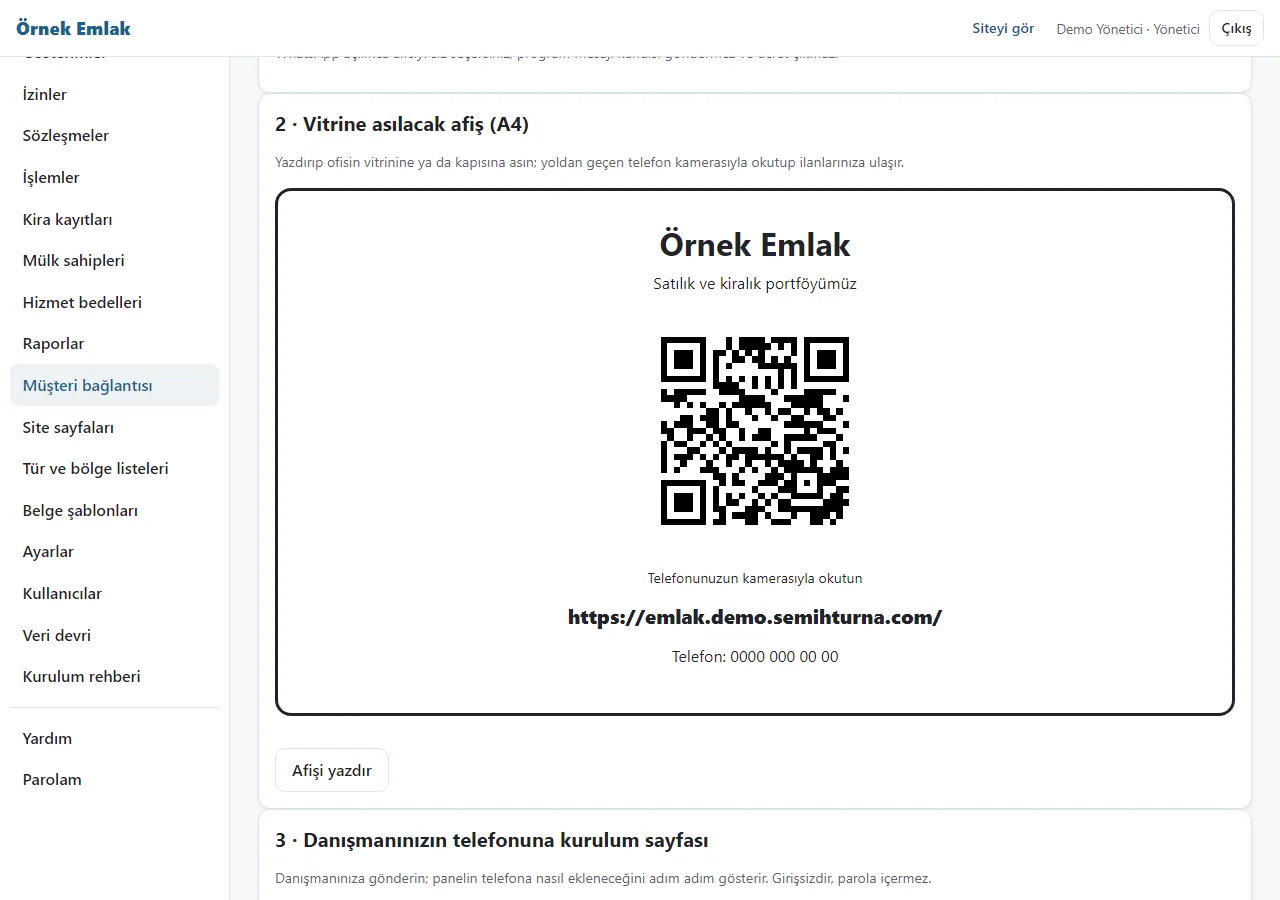
Client link and QR poster
The office site link is sent as a ready WhatsApp message or copied; an A4 poster with a QR code is printed for the shop window. Each listing page also has “Müşteriye gönder” (send to the client) with the listing link, a ready message and a flyer with a QR code. When WhatsApp opens you choose the recipient; the app sends nothing.
- On screen (Turkish interface)
- “Müşteri bağlantısı” — client link
- “Müşteriye gönder” — send to the client
-
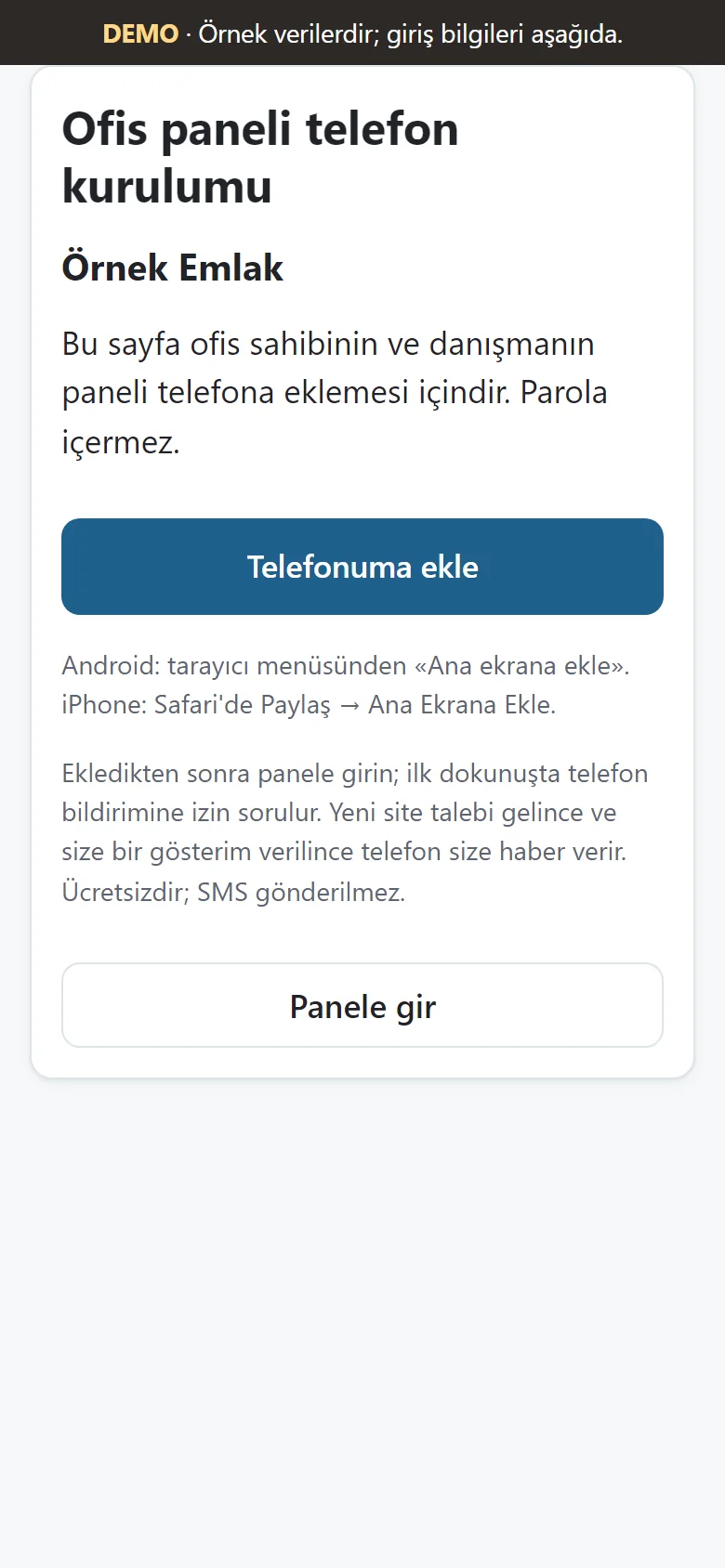
Phone setup page
A no-sign-in, no-password page for an agent: office name, a large “Telefonuma ekle” (add to my phone) button, instructions for the phone, and “Panele gir” (enter the panel). The browser asks its own permission for free phone notifications on the first tap; there is no SMS.
- On screen (Turkish interface)
- “Telefonuma ekle” — add to my phone
- “Panele gir” — enter the panel
-
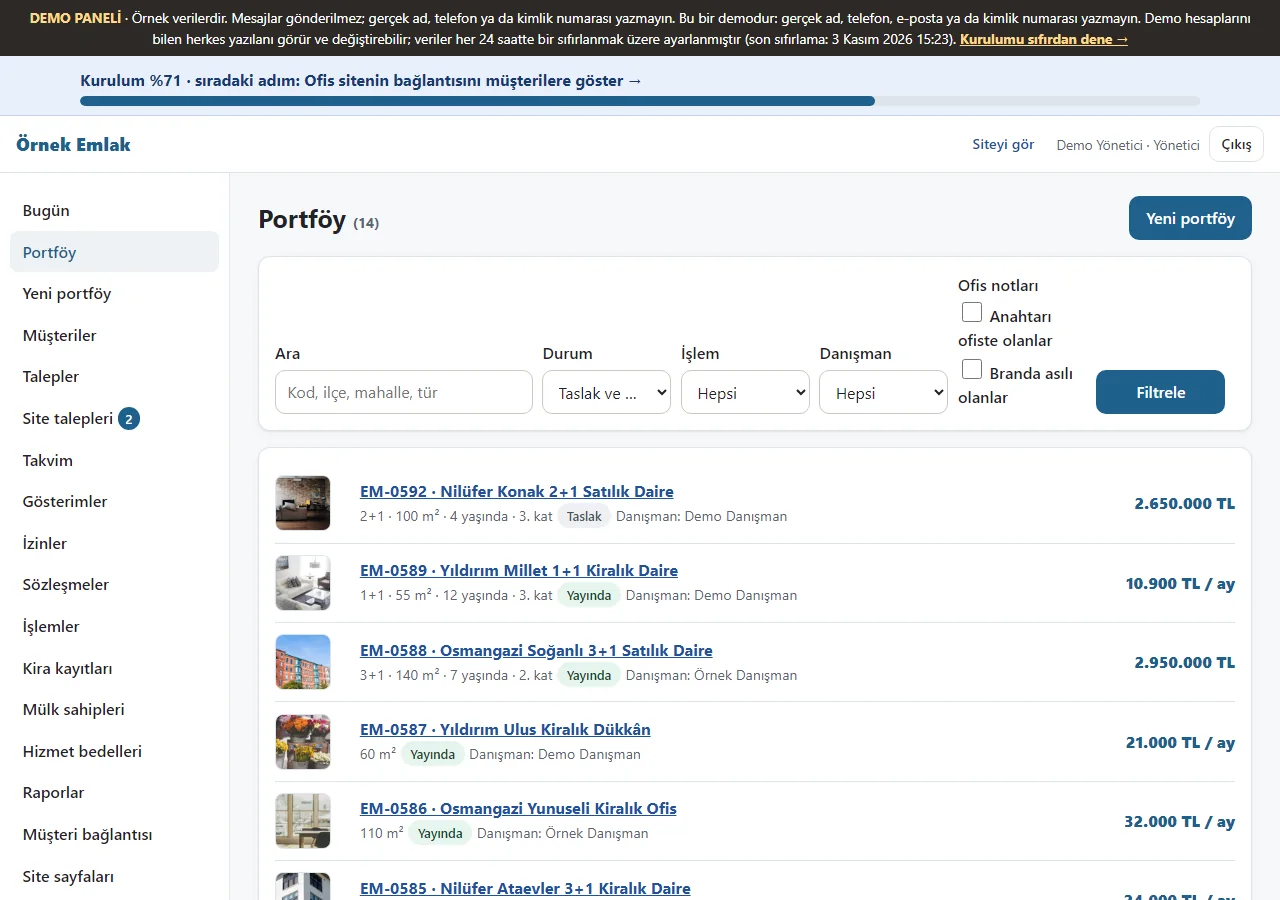
Listings
Listings can be filtered by status, transaction and agent, with “Anahtarı ofiste olanlar” (keys at the office) and “Branda asılı olanlar” (hanging on a banner) filters. A listing with an office note shows an “Anahtar ofiste” or “Branda” label on its row.
- On screen (Turkish interface)
- “Portföy” — listings
- “Anahtarı ofiste olanlar” — keys at the office
-
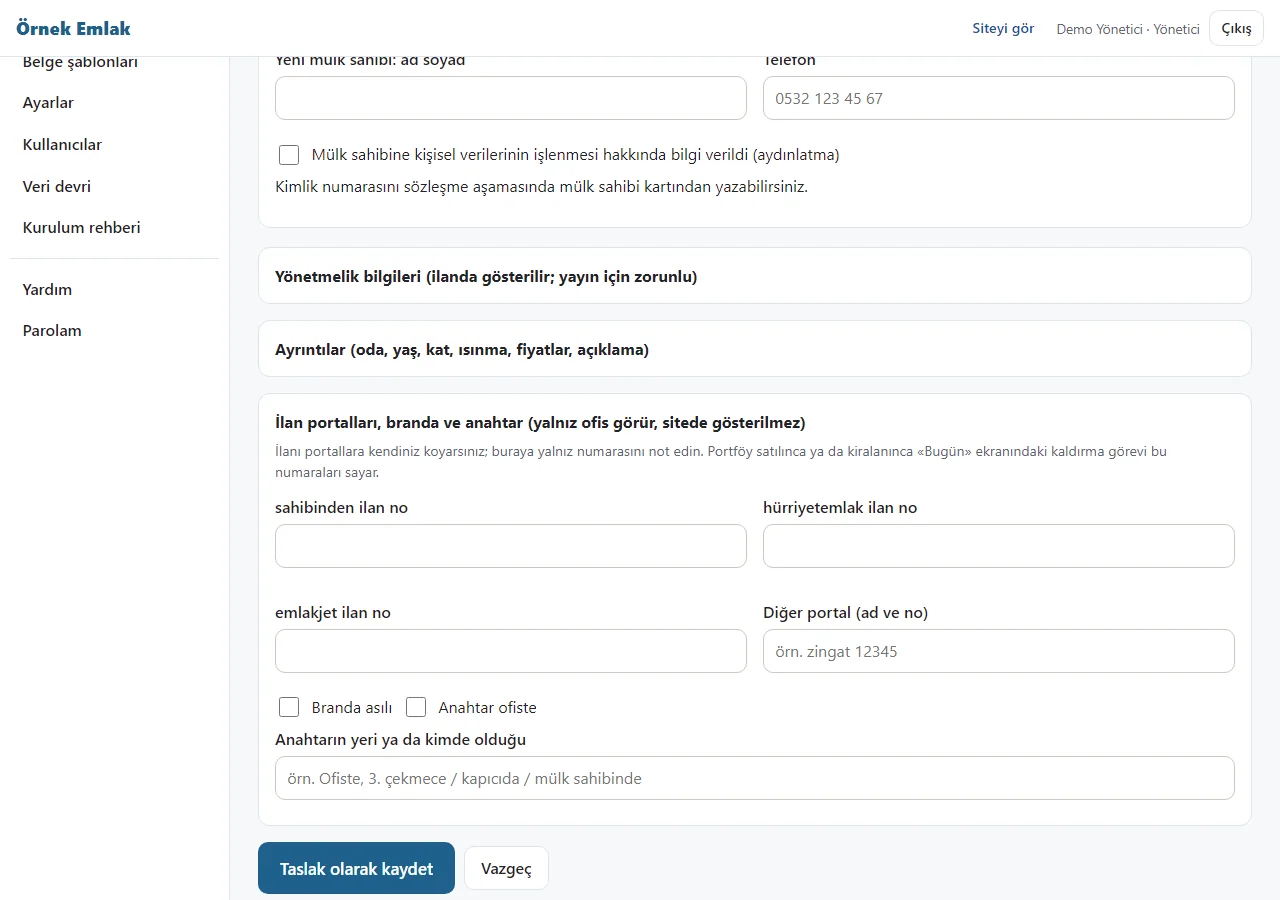
Portal, banner and key notes
The listing form has room for the listing number on sahibinden, hürriyetemlak, emlakjet and another portal, “Branda asılı” (banner hung), “Anahtar ofiste” (key at the office) and where the key is. Only the office sees these notes; they are not shown on the listing, the list, the flyer or the sitemap. The app does not push listings to portals.
- On screen (Turkish interface)
- “İlan portalları, branda ve anahtar” — listing portals, banner and key
-
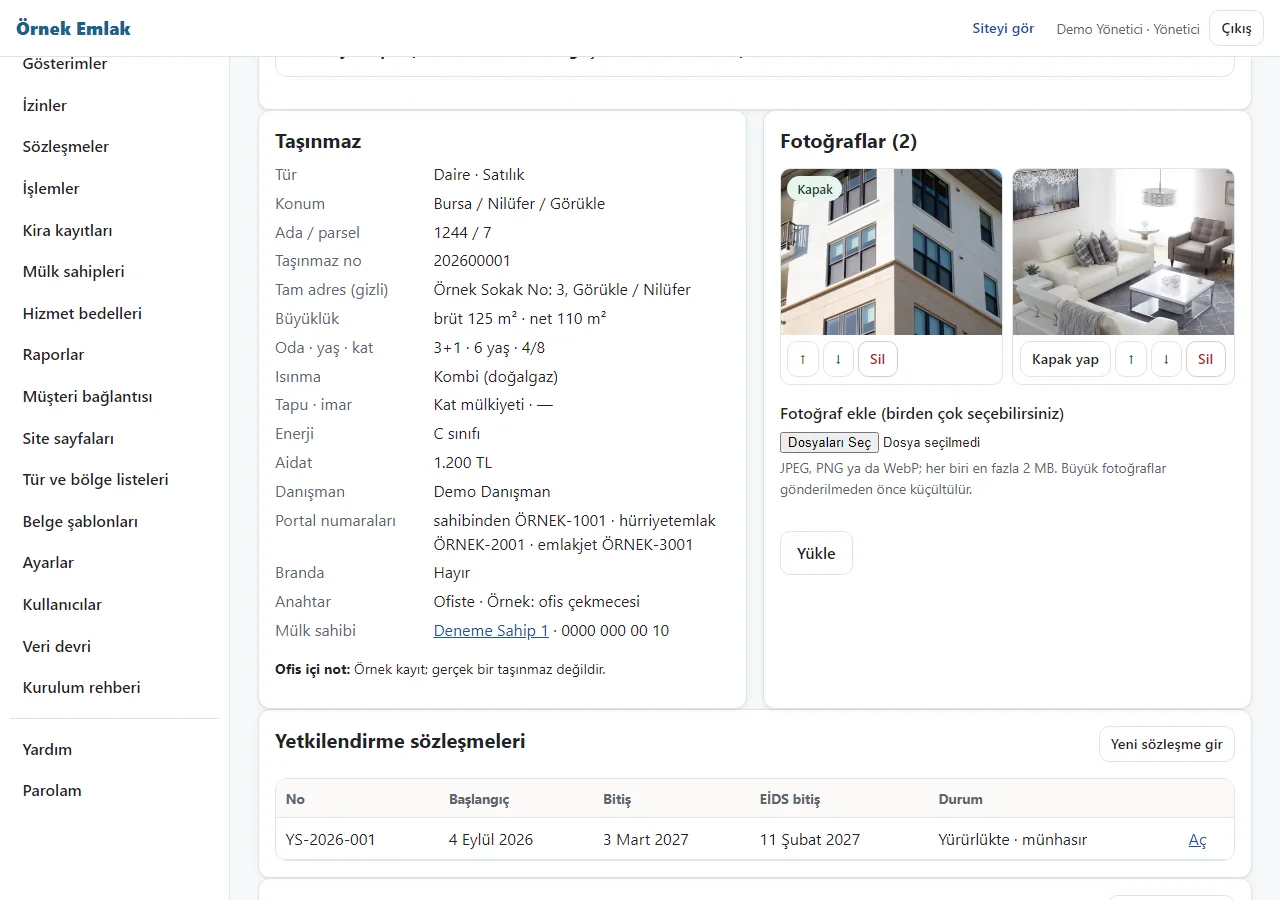
Listing details
A property’s saved details, photos, authorisation contracts and viewings are shown; the portal numbers, banner and key lines are office-only notes (this sample record shows made-up portal numbers such as ÖRNEK-1001 and the key note “Ofiste · Örnek: ofis çekmecesi”).
- On screen (Turkish interface)
- “Portal numaraları” — portal numbers
- “Branda” — banner
- “Anahtar” — key
-
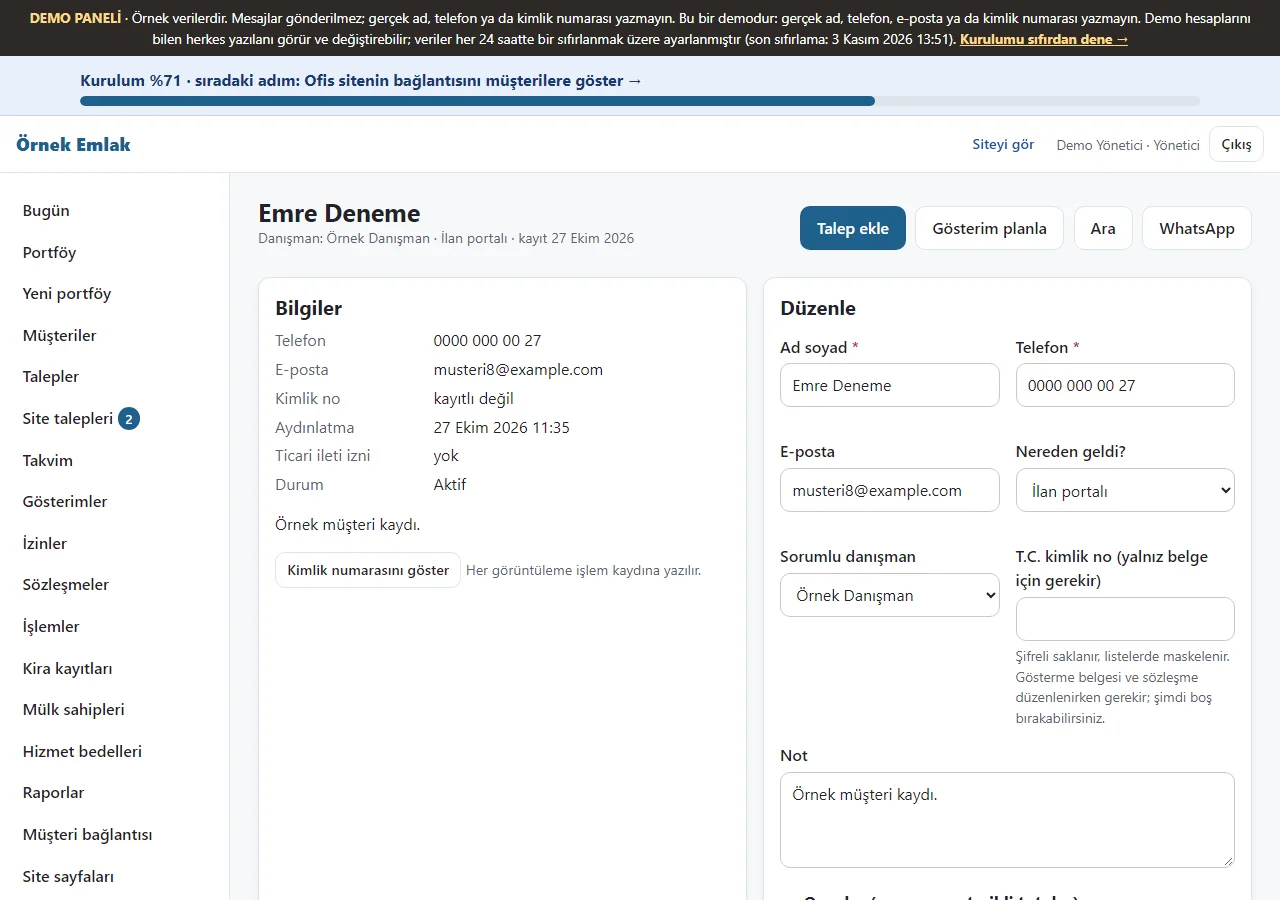
Client card
A sample client’s saved details are shown; from the card you add a request, plan a viewing, call the client or open WhatsApp.
- On screen (Turkish interface)
- “Müşteriler” — clients
- “Gösterim planla” — plan a viewing
-
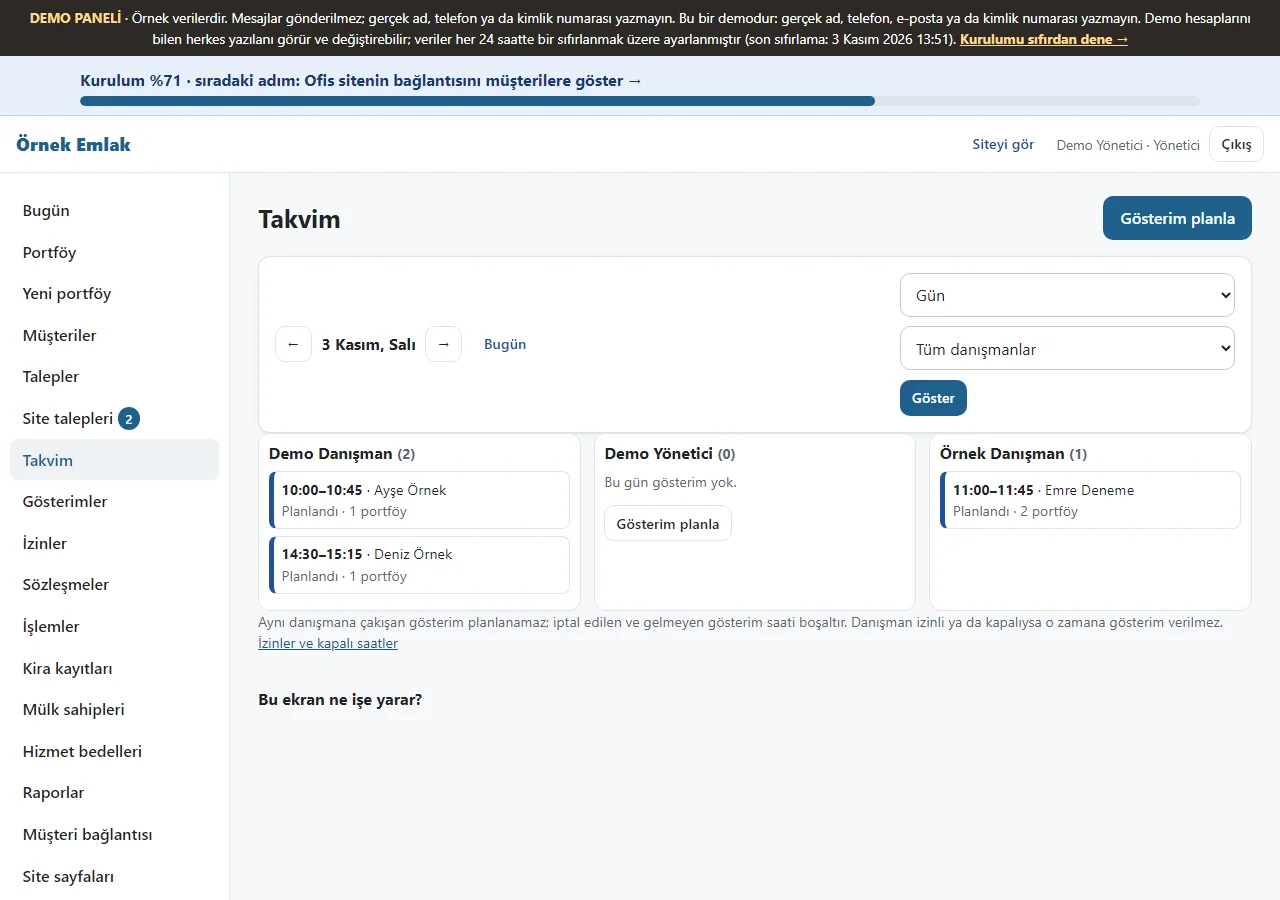
Calendar
Viewing appointments appear by agent for the day. A viewing that clashes with the same agent cannot be planned; when an agent is on leave or closed, no viewing is given for that time.
- On screen (Turkish interface)
- “Takvim” — calendar
- “İzinler” — time off
-
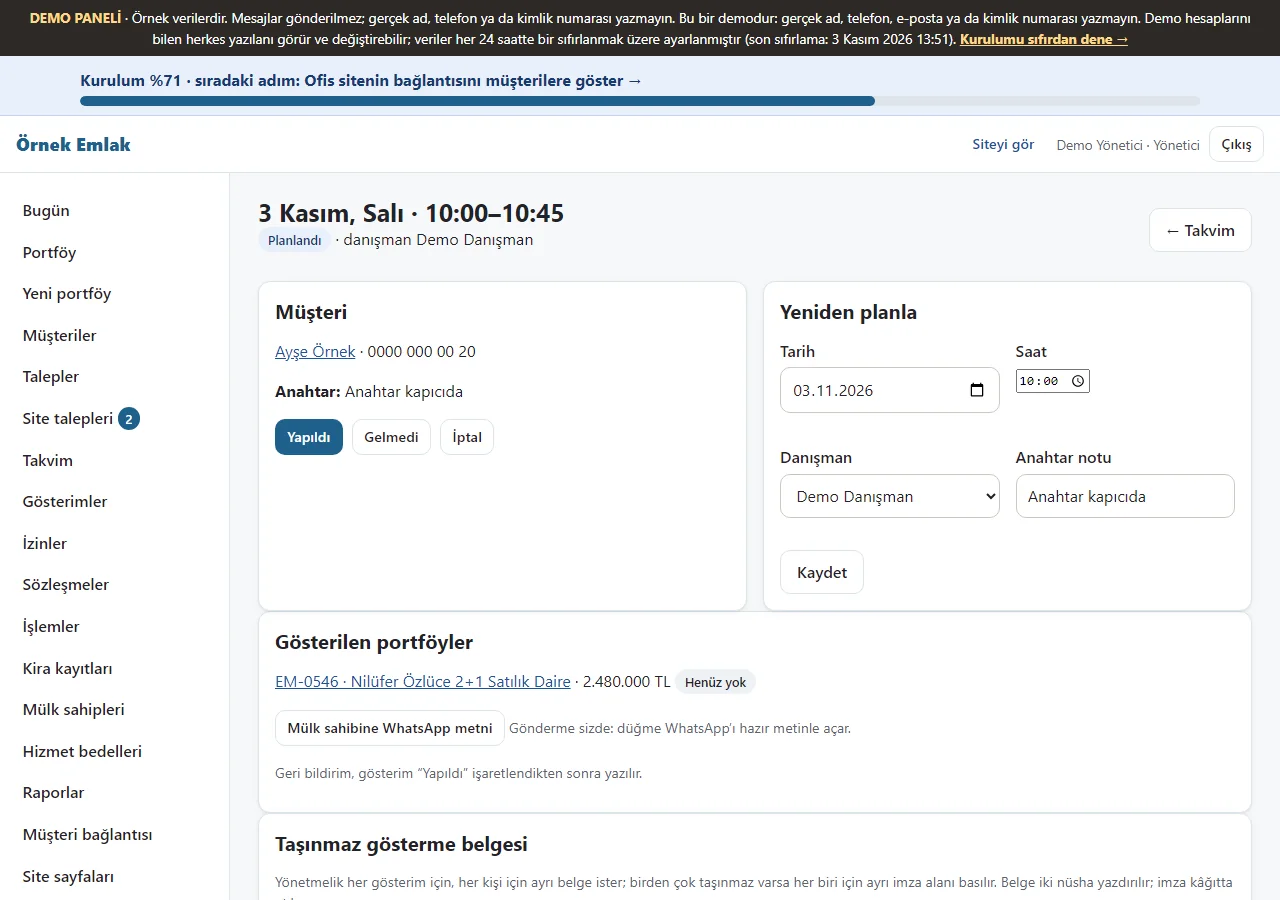
Viewing record
The planned viewing’s client, the listings shown and the viewing document appear; it is marked “Yapıldı” (done), “Gelmedi” (no-show) or “İptal” (cancelled), and can be rescheduled.
- On screen (Turkish interface)
- “Gösterimler” — viewings
- “Yapıldı” — done
-
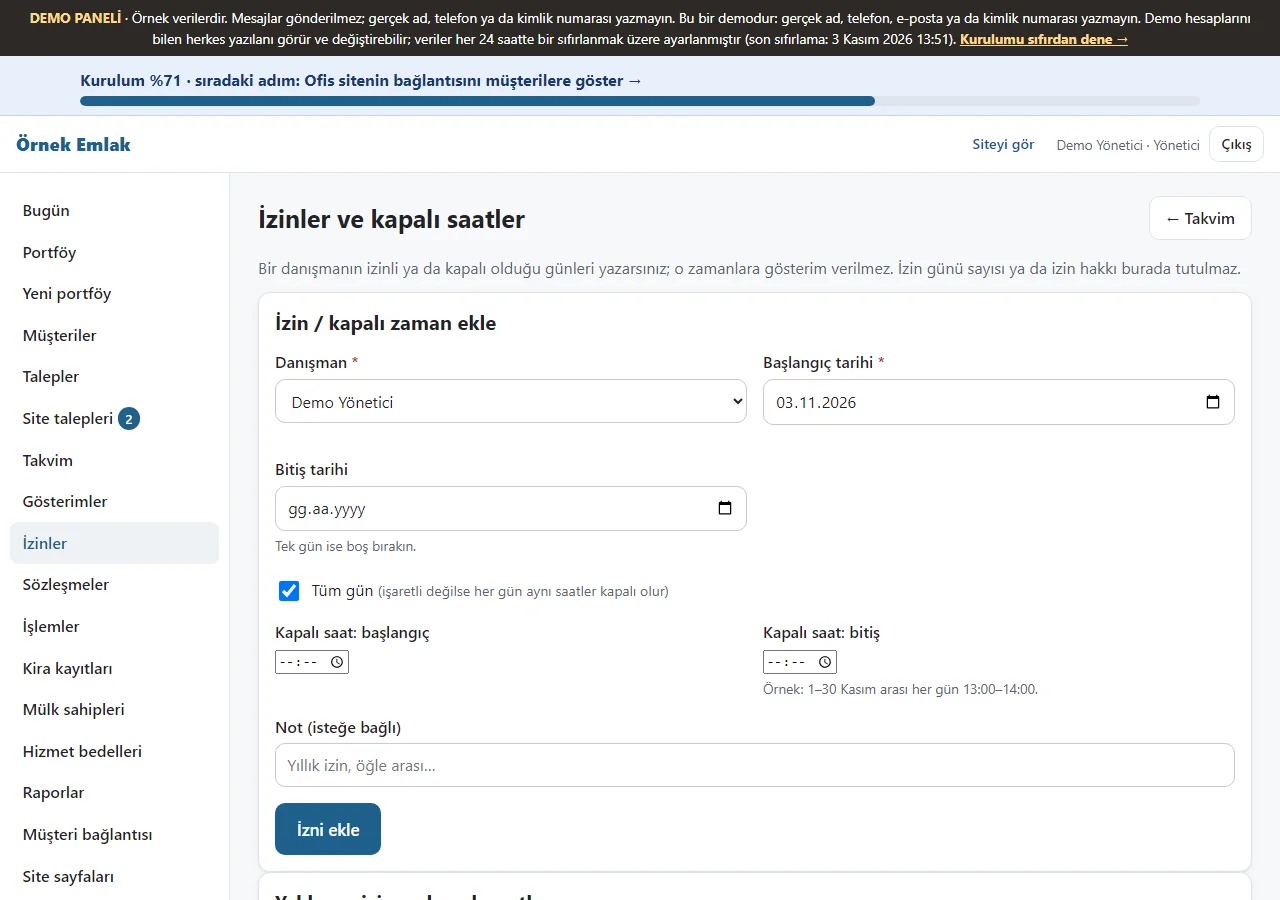
Agent time off
A start and end date with “Tüm gün” (all day) or the same hours every day are chosen; no viewing can be planned then. Upcoming time off is listed, with “Yanlış girdim, sil” (I made a mistake, delete) on every row. There is no remaining-leave counter.
- On screen (Turkish interface)
- “İzinler ve kapalı saatler” — time off and closed hours
- “Tüm gün” — all day
-
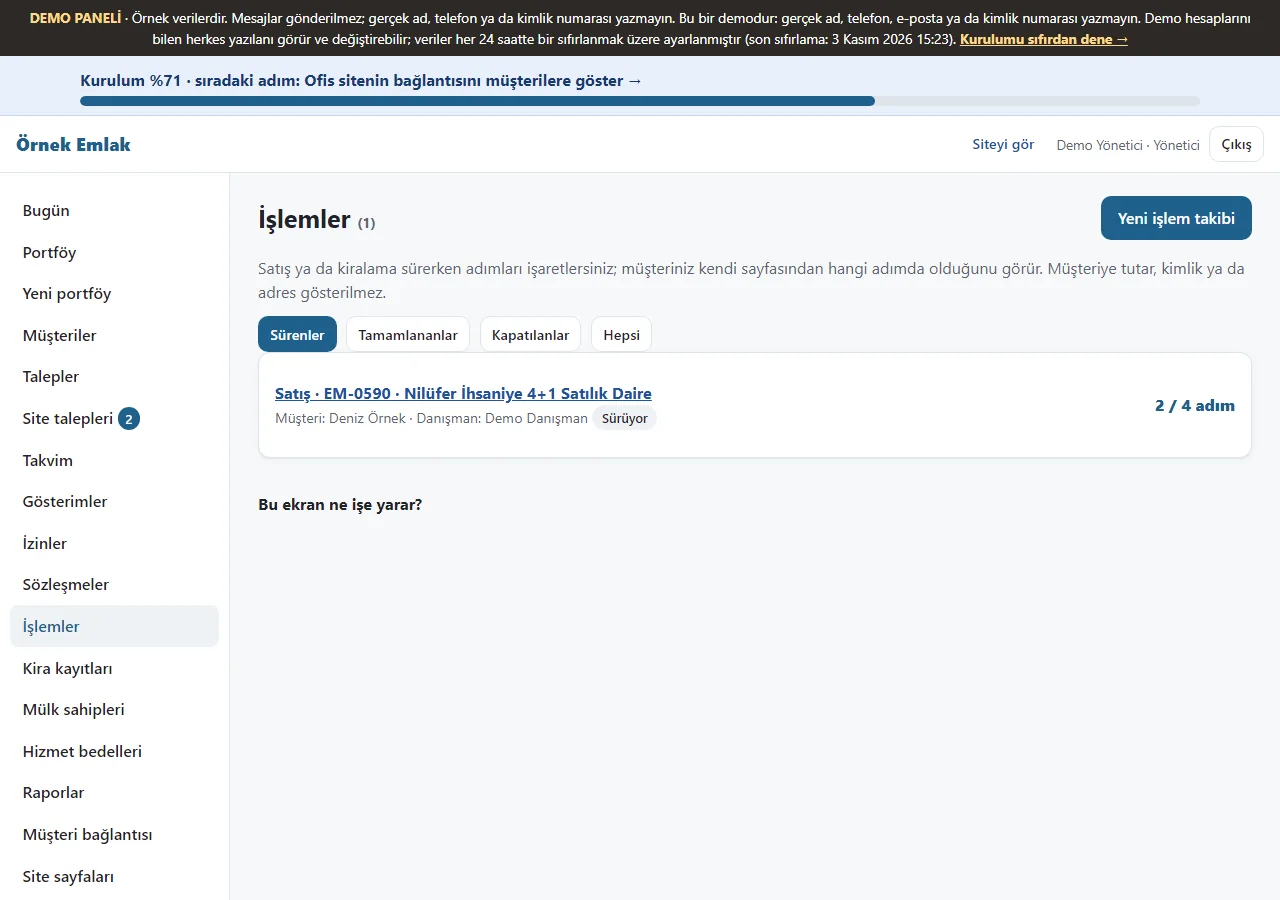
Transactions list
Ongoing, completed and closed transactions are filtered with tabs; each row shows the type, listing, client, agent and the step it has reached (for example 2 / 4 adım) in a readable width. Tapping a row opens the transaction page.
- On screen (Turkish interface)
- “İşlemler” — transactions
- “Süren” — ongoing
-
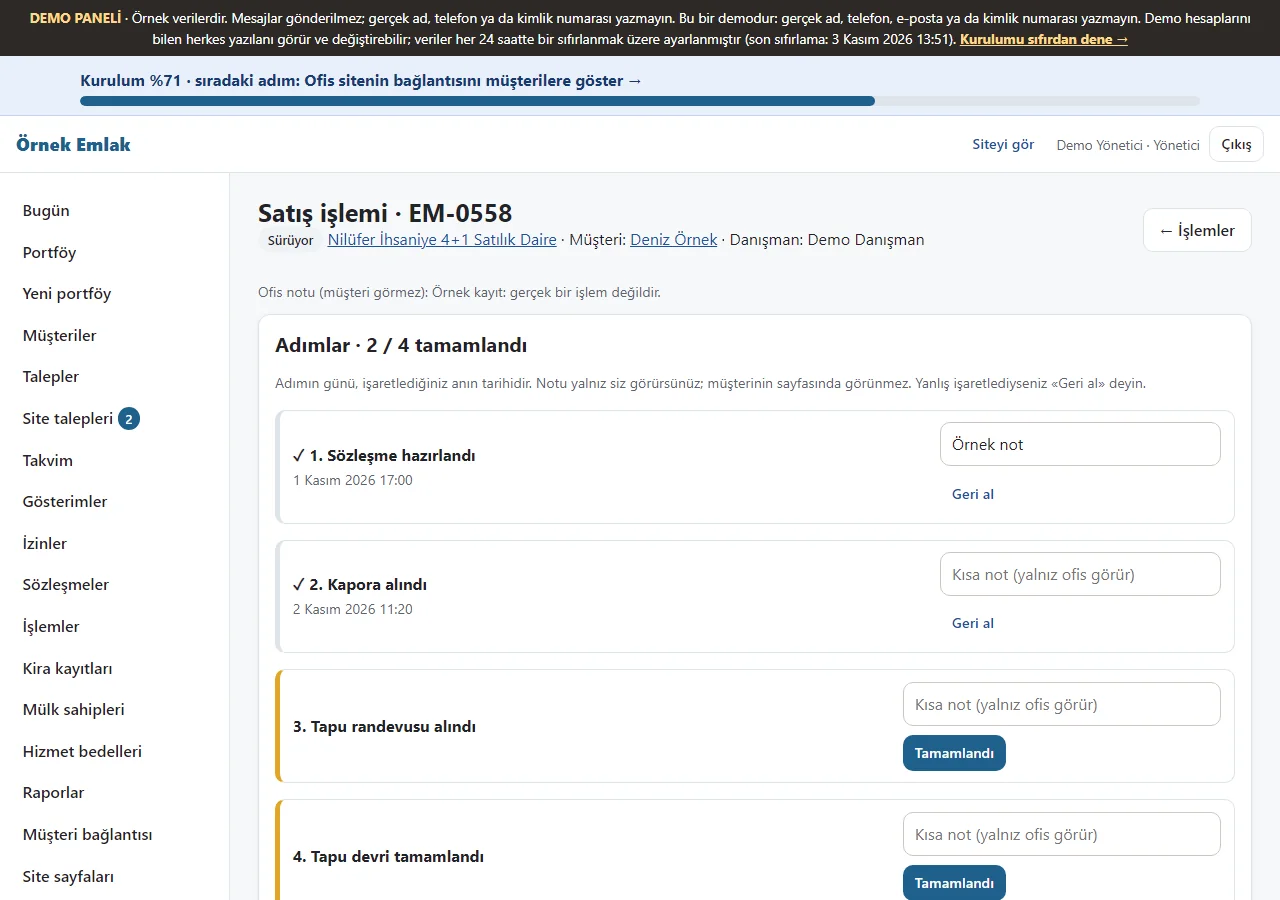
Transaction tracking
For a sale (contract prepared, deposit received, title deed appointment made, title deed transfer completed) or a rental, the office ticks four steps; a step can be undone, and each step takes a short note that only the office sees. From the transaction page the client gets a ready WhatsApp message, a copyable link and a card with a QR code.
- On screen (Turkish interface)
- “İşlemler” — transactions
- “Tamamlandı” — completed
-
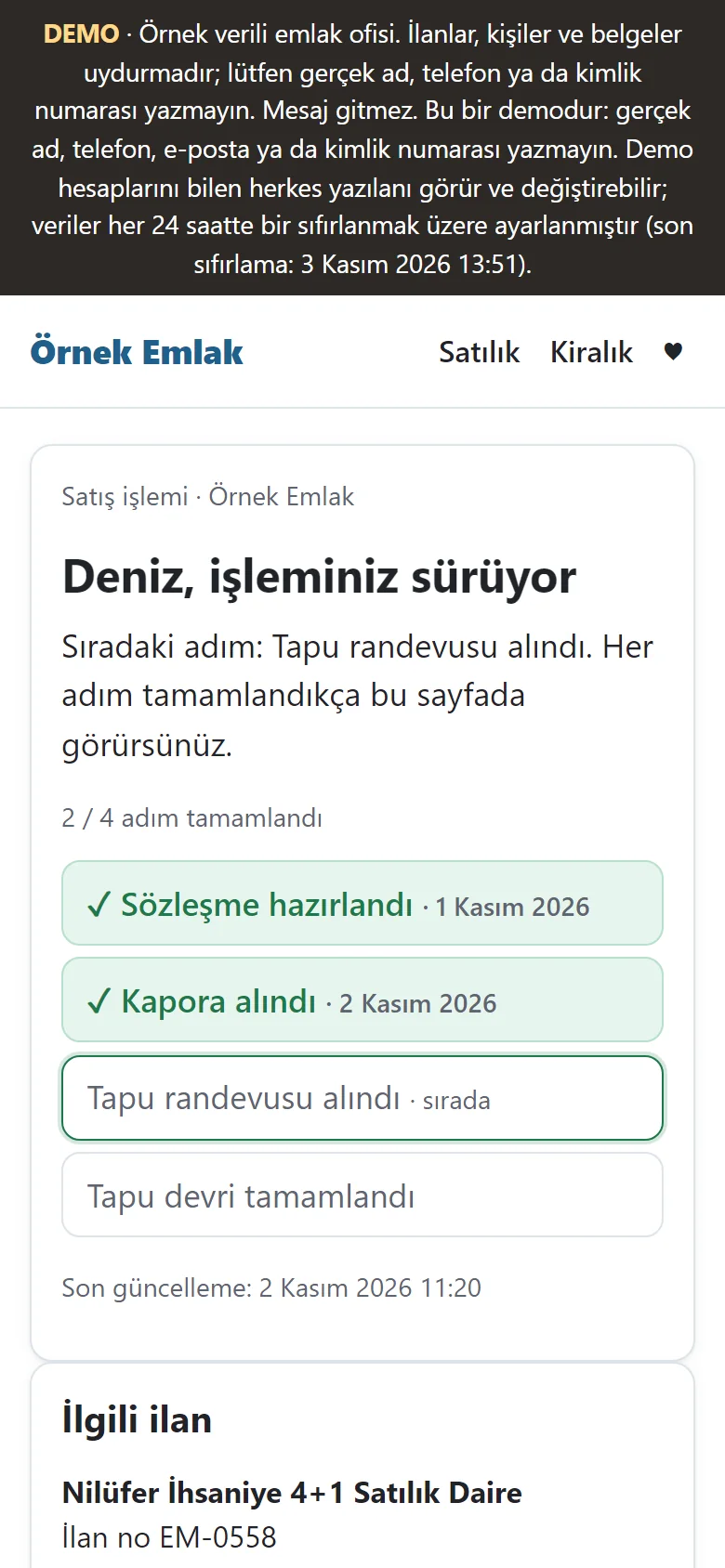
Client’s transaction page (phone)
The client sees the steps on a no-sign-in page with a secret code; it shows the office’s contact details and the listing’s public title. No amount, ID number, address, owner or office note is shown, and only the client’s first name appears. If the client picks “Durum değişince bu telefona haber ver” (tell this phone when the status changes), a step ticked sends a free phone notification.
- On screen (Turkish interface)
- “İşlem” — transaction
- “Durum değişince bu telefona haber ver” — tell this phone when the status changes
-
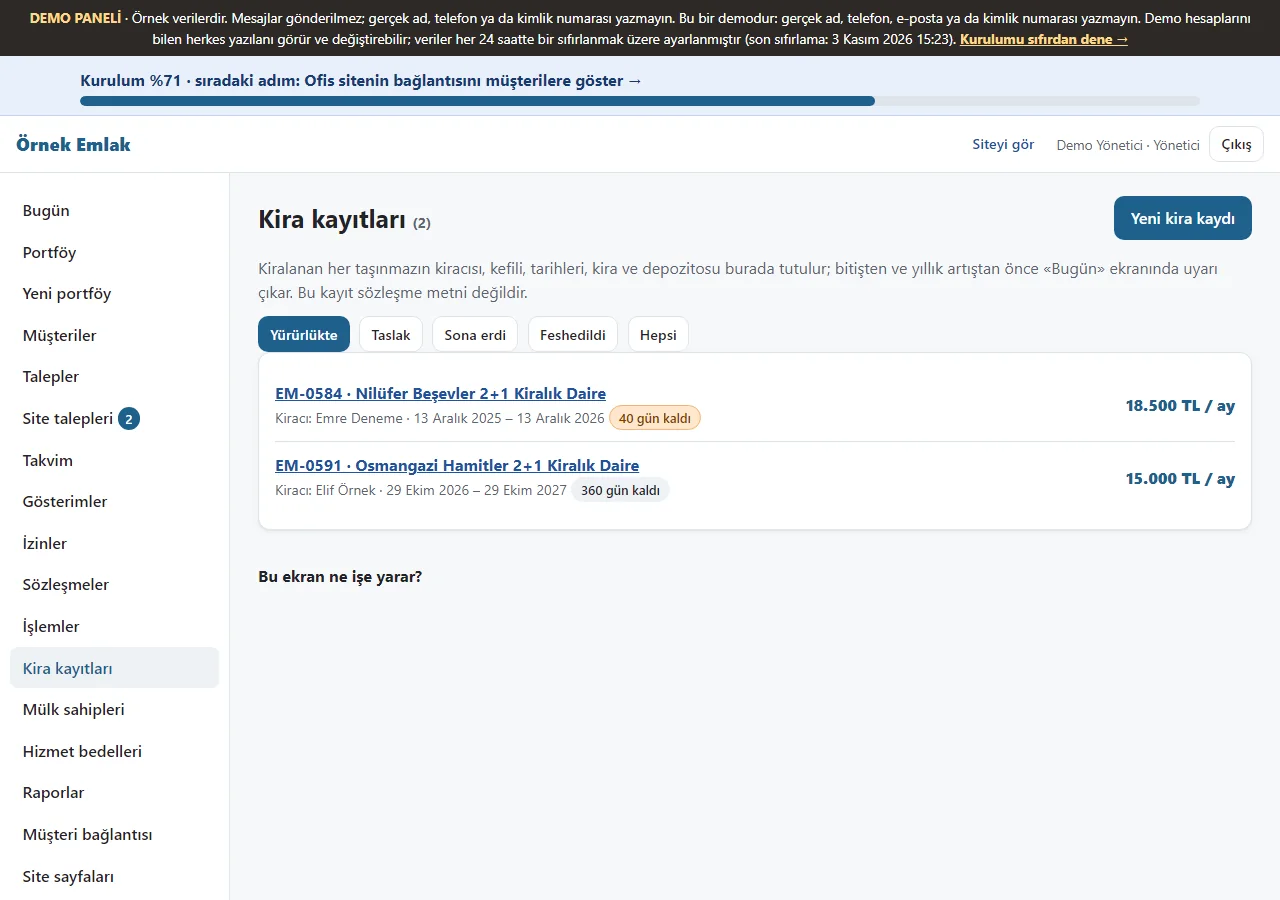
Rental records list
In-force, draft, ended and terminated records are filtered with tabs; each row shows the listing, tenant, rental period, monthly rent and the days left to the end (for example 40 gün kaldı). Tapping a row opens the rental record.
- On screen (Turkish interface)
- “Kira kayıtları” — rental records
- “gün kaldı” — days left
-
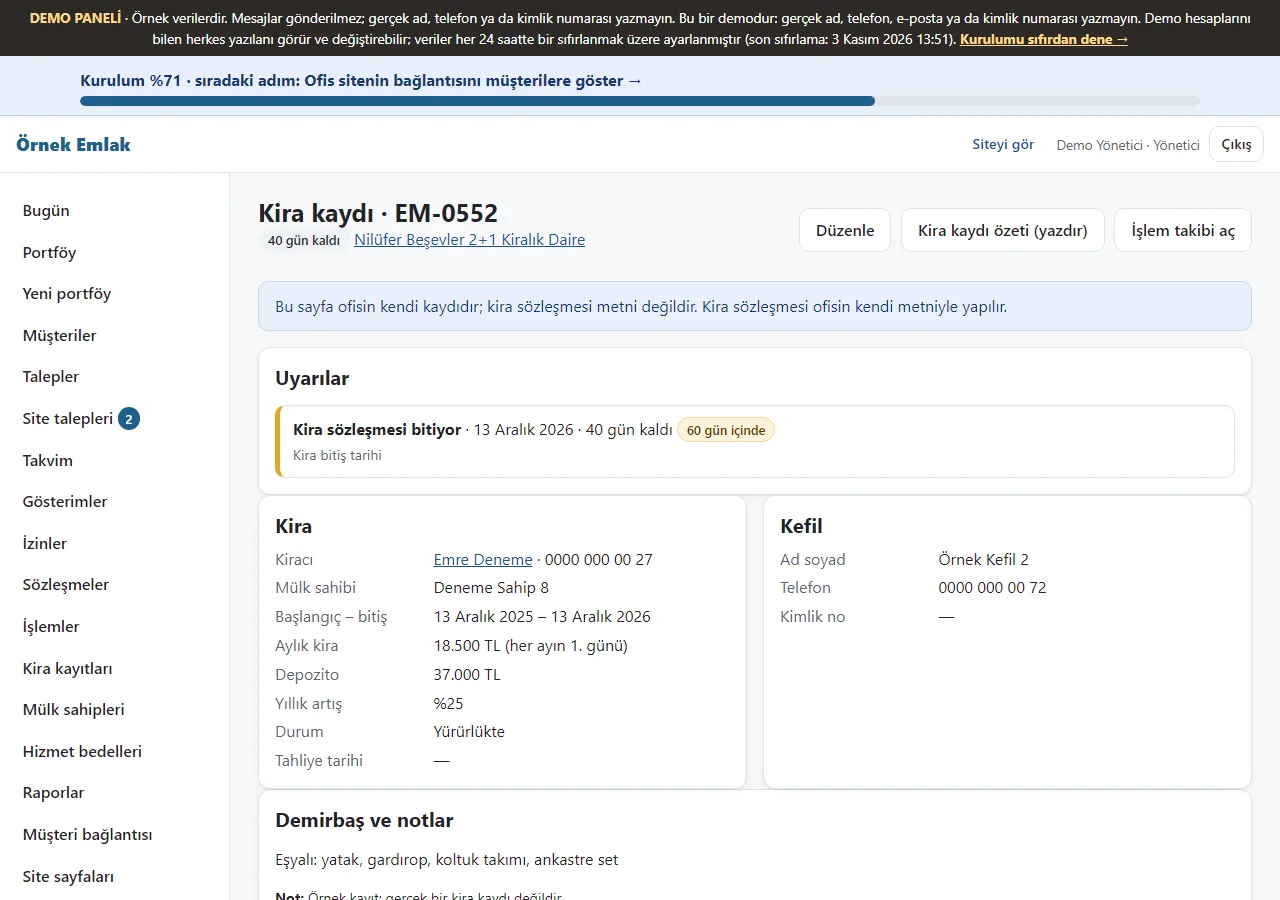
Rental record
The tenant, guarantor, dates, monthly rent and deposit, yearly increase rate and an inventory list are kept; a warning appears 60 days before the end and before the increase day. The guarantor’s ID number is stored encrypted and only its last four digits are shown. A “Kira kaydı özeti” (rental record summary) can be printed; the app writes no legal contract text, the rental contract is made with the office’s own text.
- On screen (Turkish interface)
- “Kira kayıtları” — rental records
- “Kira kaydı özeti” — rental record summary
-
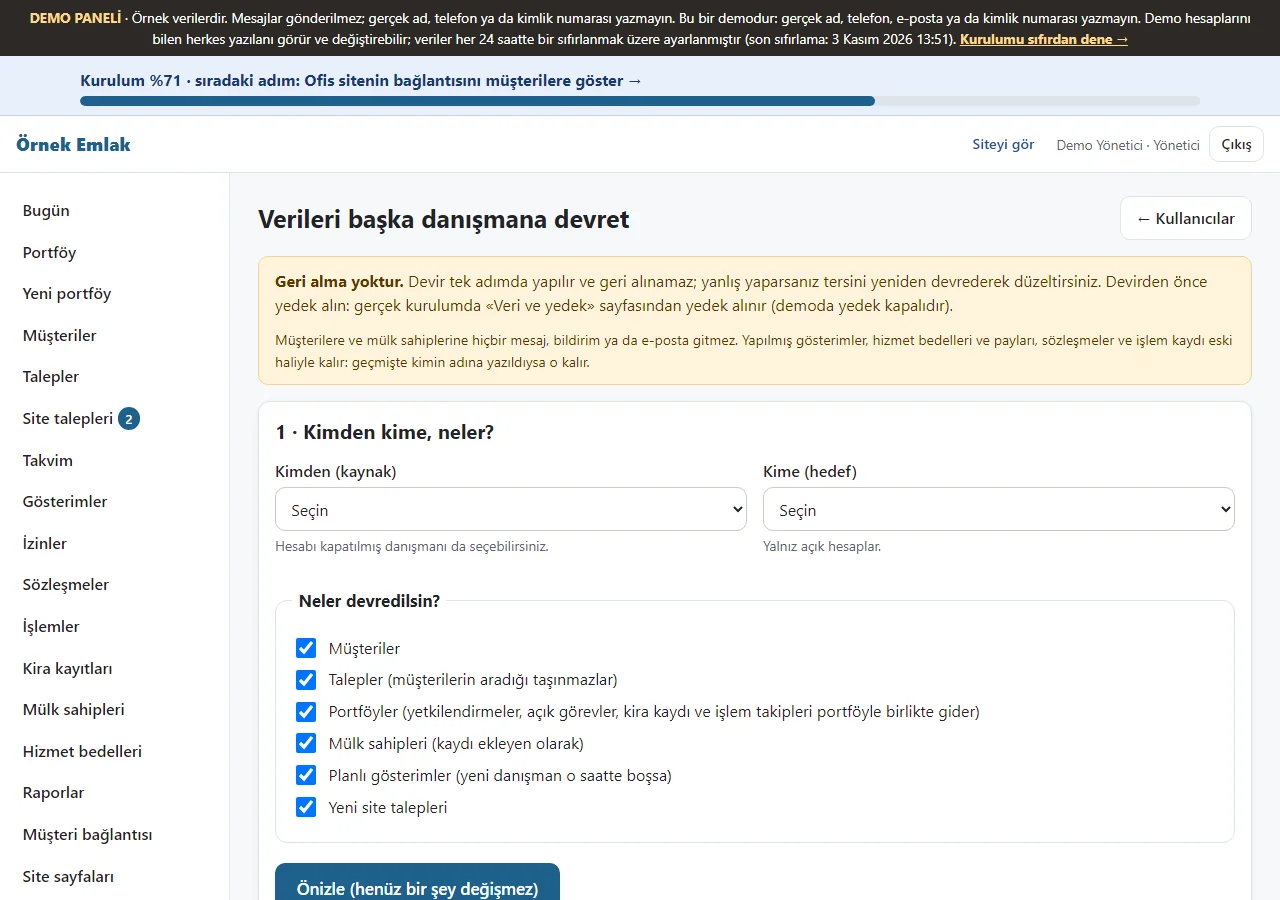
Data transfer (manager only)
An agent’s clients, requests, listings, owners, planned viewings and new website requests are transferred to another agent; a preview comes first, then the transfer after a confirmation box. No message goes to clients; there is no undo, and completed viewings, fees and contracts do not change.
- On screen (Turkish interface)
- “Veri devri” — data transfer
- “Önizle” — preview
-
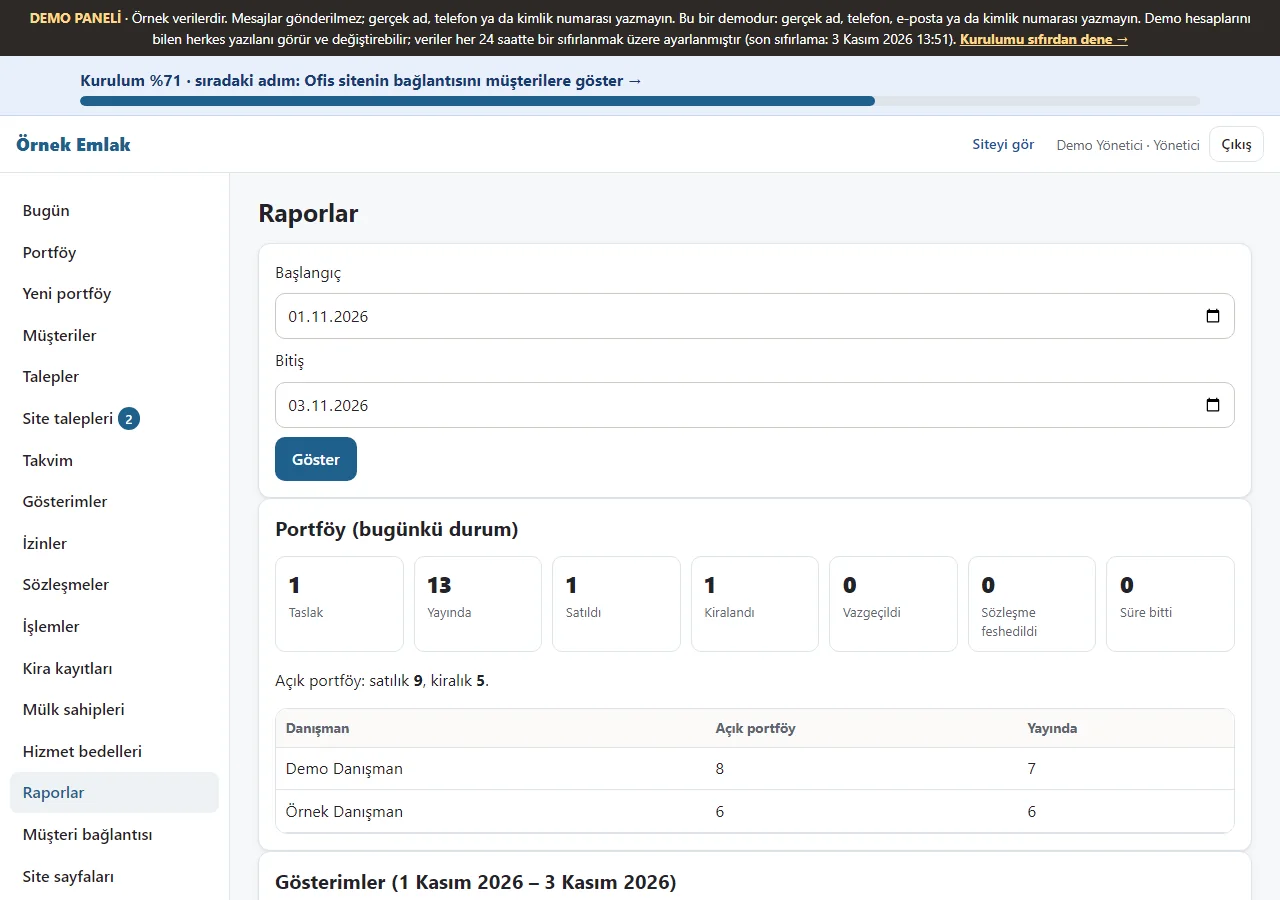
Report
The listings’ current state and the viewings of the chosen period are listed by agent.
- On screen (Turkish interface)
- “Raporlar” — reports
-
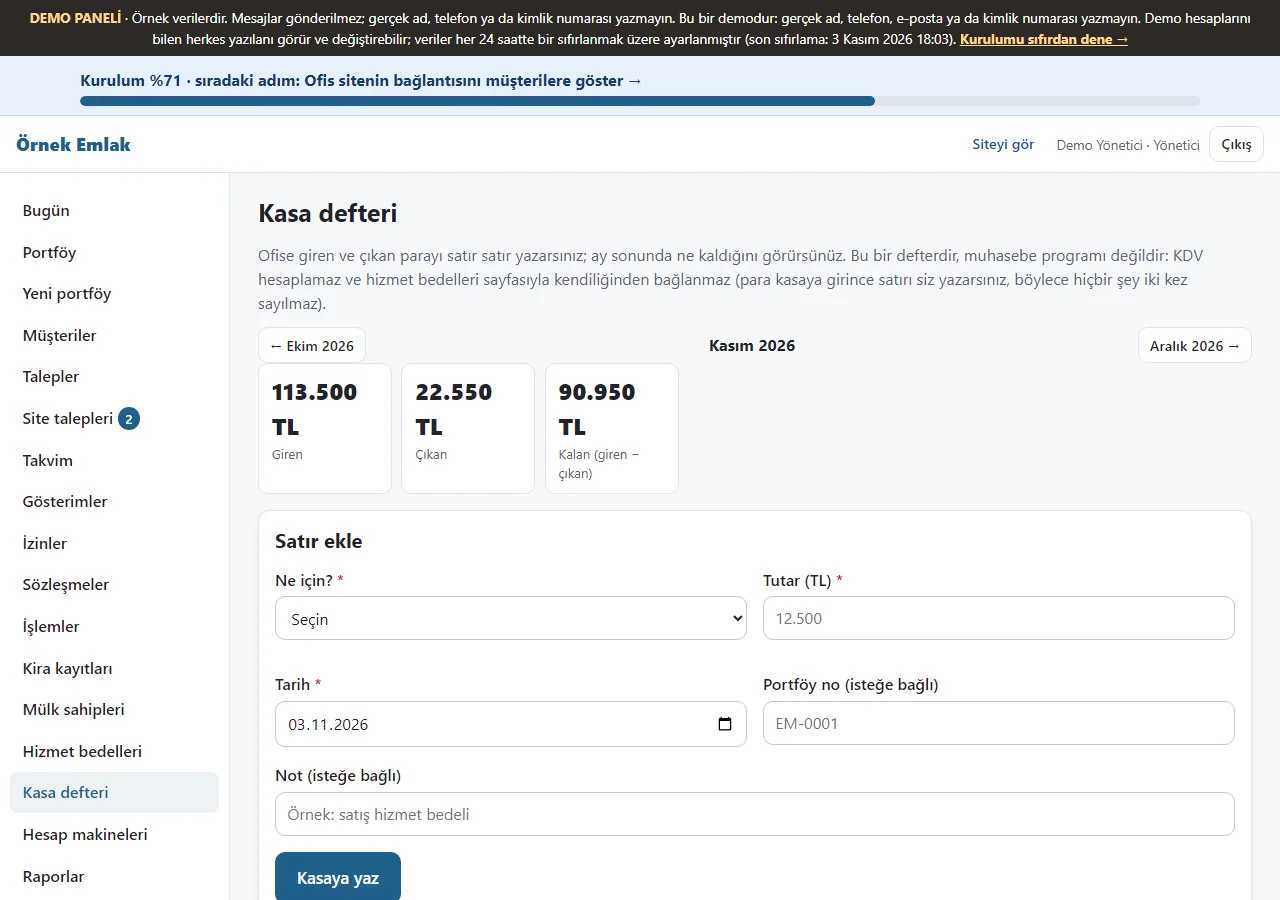
1.3.0 · 3 November 2026 Cash book
Only the manager sees it. You write the money that came into and went out of the office line by line, with a type, a date, an amount and an optional listing number; you browse month by month, see money in, money out and what is left with the total by type, each line has “Yanlış girdim, sil” (delete a mistake) and the month downloads as Excel (CSV). It is not linked to the service-fee page by itself (you write the line when the money reaches the till); it does not work out VAT and is not an accounting program. The demo has sample lines.
- On screen (Turkish interface)
- “Kasa defteri” — cash book
- “Yanlış girdim, sil” — I made a mistake, delete
-
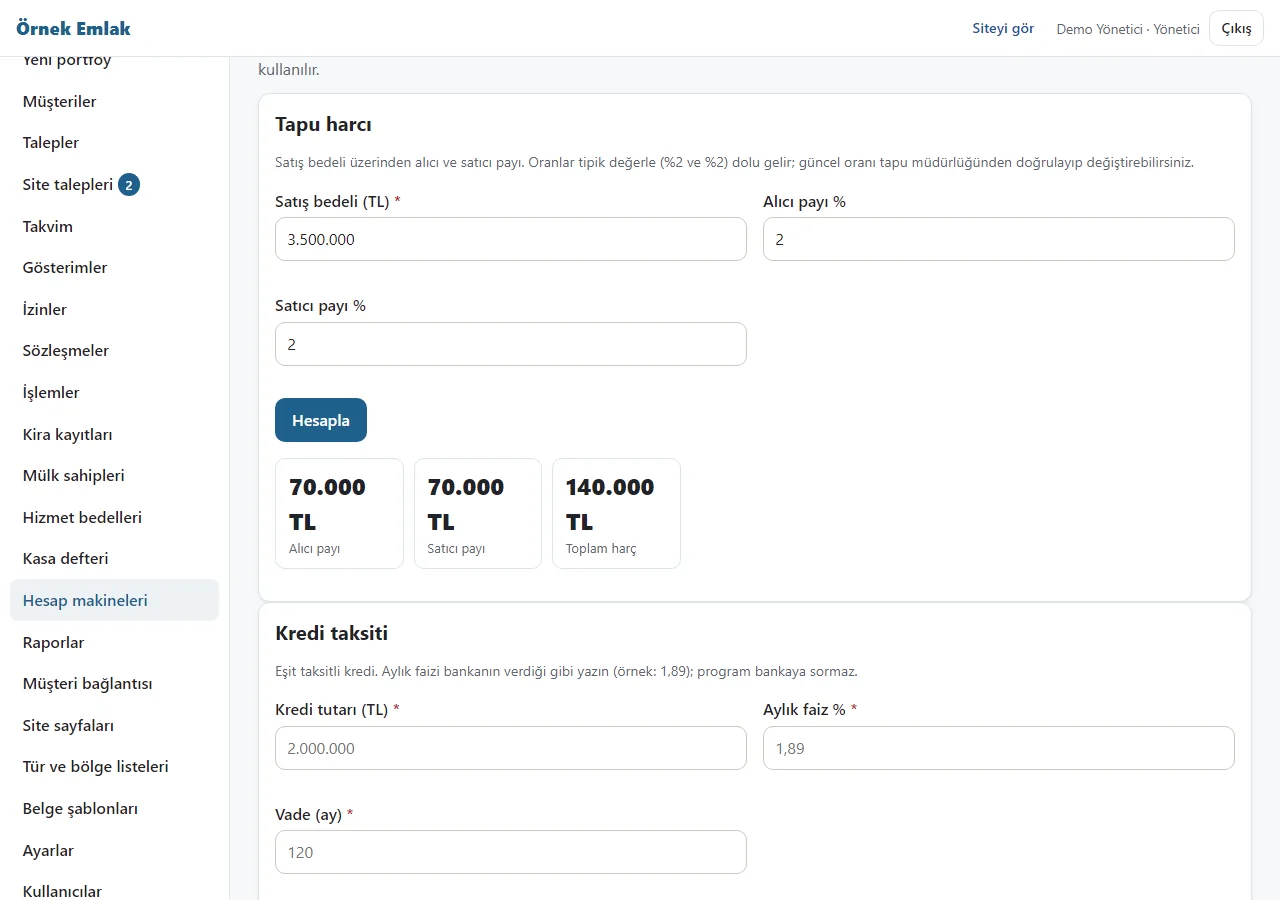
1.3.0 · 3 November 2026 Calculators
Used by the manager and agents. It works out the title-deed fee (the buyer’s and the seller’s share of the sale price; 2% and 2% are filled in and can be changed), a loan instalment (the monthly rate is typed; the instalment, the total repaid and the total interest), the rent yield (the yearly yield and the years to pay back) and the price per square metre. Everything is arithmetic on the numbers you type; the program knows no bank’s rate and no current duty rate, and the result is not an offer or an official amount. Nothing is saved.
- On screen (Turkish interface)
- “Hesap makineleri” — calculators
- “Tapu harcı” — title-deed fee
-
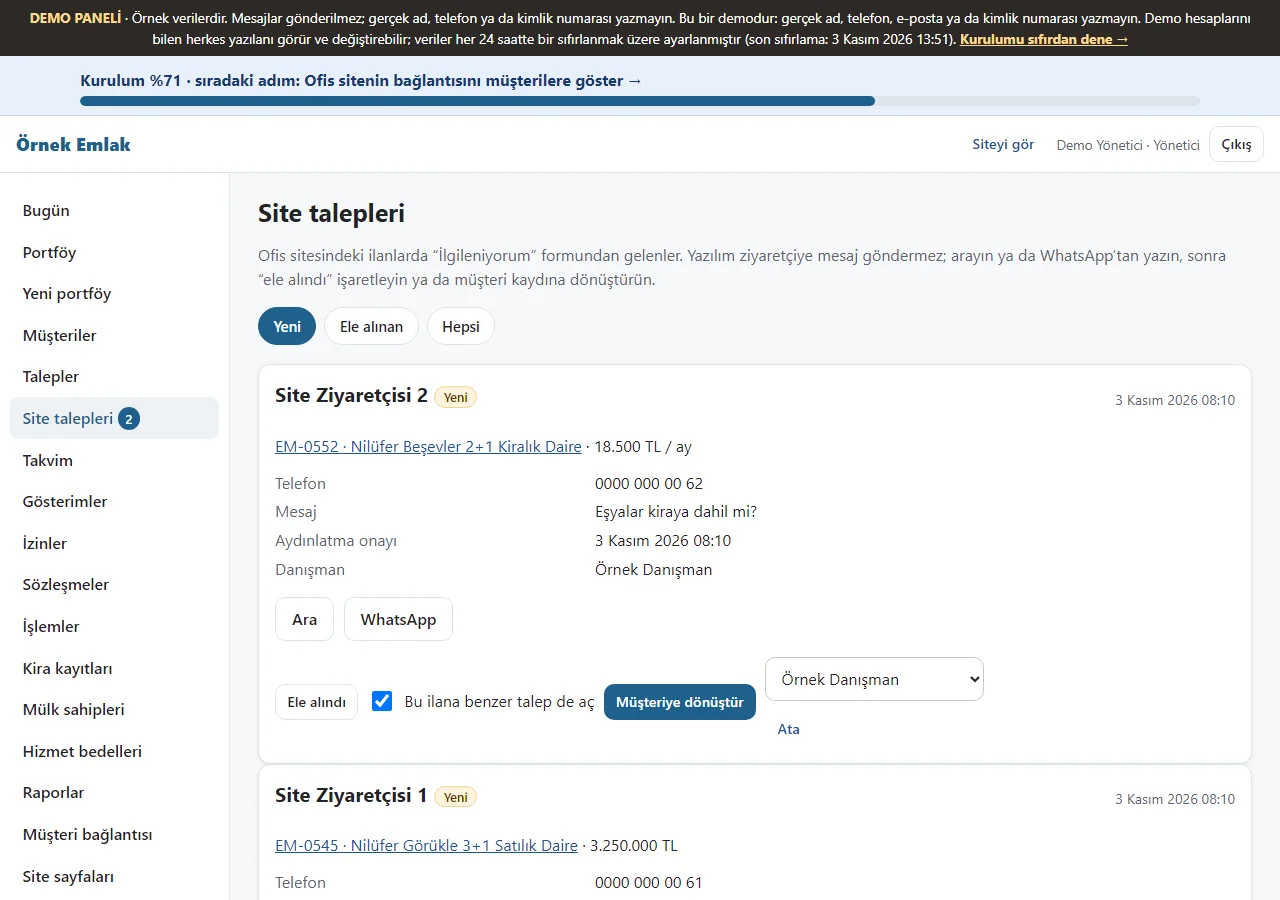
Website requests
Requests from the “İlgileniyorum” (I’m interested) form on the office site’s listings are listed; you can call, write on WhatsApp, mark “Ele alındı” (handled) or turn them into a client record. The app sends the visitor no message; the visitor sees the status on their own request page.
- On screen (Turkish interface)
- “Site talepleri” — website requests
- “Ele alındı” — handled
- What do they see at the end?
- Listings, viewings, transaction tracking and rental records appear in the panel; the client follows the transaction on their own link.
- What is it good for?
- Viewings, listings to take off portals and ending rentals are not missed.
Everything that is not included, and all limits
- This is a demo with sample data. It has not been delivered to a client or used by a real estate office. Do not enter real personal or property data.
- A daily reset job is configured for the demo; on 3 November 2026 the demo banner showed the last reset as 15:23.
- The screens on this page were taken from the live demo (1.2.1; the cash book and the calculators 1.3.0) on 3 November 2026 with the manager sign-in; the visitor’s own request page is not shown as a screenshot. Phone notifications (Web Push), adding to the phone and the QR poster were not tried on a real phone. The property photos are copyright-free (CC0) sample photographs.
- The app does not push listings to portals or take them down (portal numbers are the office’s own notes); there is no SMS, automatic WhatsApp message, e-signature, payment taking or legal text writing; the WhatsApp buttons open a ready message and the user taps “send”.
- Installation, business workflow, support and price are agreed separately with a customer. The app interface is in Turkish.
Delivery and sales status
How does it work?
You try the demo and tell us about your office, and we send you a quote. We install it and we host it. The yearly price includes installation, hosting, data transfer and support; the number of agents and listings is not limited.
Price
The yearly list price is 3,000 TL. Installation, one year of hosting, data transfer, bug fixes and written usage support are included. Automatic SMS and WhatsApp sending, posting to listing portals, artificial intelligence and multi-office (MLS) are not included.
Possible delivery options
Other delivery options
Requirements and version history
Installation requirements
- Requirements as written in the documents: PHP 8.2 or newer; the pdo_sqlite or pdo_mysql, mbstring, openssl, fileinfo and zip extensions; SQLite (recommended) or MySQL/MariaDB as the database. The product was tried locally with SQLite and with MariaDB 11.4; it has not been tried on real hosting.
Release notes
- Summarised from the version history; no version has been delivered to a client. A live sample-data demo exists.
- 1.3.0 (3 November 2026): a cash book (manager only: money in and out, a monthly total, an Excel statement) and calculators (title-deed fee, loan instalment, rent yield, price per square metre); the schema goes from 6 to 7.
- 1.2.2 (3 November 2026): tapping anywhere on a list row opens the record; in the client and owner tables any cell of the row opens it.
- 1.2.1 (3 November 2026): the text column of the Transactions and Rental records lists is a readable width; the demo sample data has the portal numbers, key and banner notes filled in.
- 1.2.0 (3 November 2026): the office’s own notes on a listing (the sahibinden, hürriyetemlak and emlakjet listing numbers, banner, where the key is; not shown on public pages) and a task to take it off the portals; the manager’s transfer of data between agents (with a preview and confirmation); a sign-in-free page with a secret code that tracks a transaction for the client (four steps); a rental record (tenant, guarantor, inventory, increase, end warning).
- 1.1.0 (3 November 2026): a step-by-step setup guide, a progress bar and “Bu ekran ne işe yarar?” (what is this screen for?) boxes; in the demo “Boş siteyle yeniden başla” and “Örnek veriyi geri yükle”; the office showcase and, per listing, a ready WhatsApp message, a QR poster and a sheet; the visitor’s own request page; adding to the phone and free phone notifications (no SMS); multi-day agent leave.
- 1.0.9 (28 October 2026): a role link from the product page: one-tap demo sign-in (demo mode only).
- 1.0.8 (26 October 2026): a page, button or link an agent may not use is never shown.
- 1.0.7 (21 October 2026): importing the client and owner lists from Excel/CSV (a preview, removal of duplicate phone numbers, undoing the last import; nobody is messaged).
- 1.0.0 – 1.0.6 (7 – 18 October 2026): the first version (listings, clients and requests, matching, viewing calendar and viewing certificate, authorisation contracts and expiry warnings, service fee, reports and backup), review fixes and copyright-free photos in the sample data.
Decisions not made yet
- Rights to use, modify, transfer and receive the source code: to be set in a written agreement; not decided yet.
- Whose name the hosting and domain are opened in, and where the software is installed, have not been decided yet.
There is no cart, customer account or online payment on this site for now. Reach out by phone, WhatsApp or the form; in a first conversation your need and the software’s fit are reviewed. The form does not create an order, a contract or a payment.