Repair serviceDemo with sample data
Repair Service and Ticket Tracker: screen-by-screen guide
The full version of the short description on the product page: every feature, how each screen is used step by step, all limits and the delivery details.
All features
Manager sign-in and panel opening were verified on the live demo on 10 October 2026; on 21 October 2026 the three role buttons on the sign-in page (manager and two technicians) were tried on the live demo and the “WhatsApp’ta müşteriye haber ver” button on the ticket page was seen. The complete local product suite passed 1307/0 (with version 1.0.5). On 26 October 2026, on the live demo before this version, a technician sign-in was tried with the demo button: of 11 customer cards, 6 (those with the technician’s own job) show the device and service ticket buttons, and the 5 other cards do not and show a “the manager does this” note. On 2 November 2026 the live demo (1.2.0) was walked through with the manager sign-in: the dashboard, the ticket list and details, the payment section, the price list, upcoming maintenance, the device card and label, the report, the setup guide, the customer link, the quick ticket, settings, the customer’s status page and the ticket printout were opened, and the screens on this page were taken from that walk-through; the technician role was not tried separately in this version.
- Customer, device and service ticket records
- Received, under inspection, waiting for parts or approval, ready and delivered states
- Jobs past their estimated delivery date, tickets waiting for payment and devices due for maintenance shown in the panel
- Panel access for manager and technician roles; a technician does not see the device and service ticket buttons on a customer card whose job is not theirs (a “the manager does this” note appears)
- Importing the customer list from Excel/CSV (manager only): a preview, duplicate phone numbers set apart, undo of the last import; no message is sent and no ticket or device is created (.xlsx only when the server has the zip extension)
- Customer status lookup page; backup and restore
- A “WhatsApp’ta müşteriye haber ver” (tell the customer on WhatsApp) button on the ticket page (1.0.6): a ready message opens for the customer’s own number (a “your device is ready” message when the ticket is ready); the user taps “send”, the app sends nothing and costs nothing
- Payment record and balance due (1.2.0): the ticket shows the items total, the amount received and the balance; recorded as cash, bank transfer, card (on your own POS device) or other; a “waiting for payment” filter and a total on the dashboard; “I entered it wrong, delete” for the manager only. The app takes no payment, it only records it; payments and the balance do not show on the customer’s status page
- Price list (1.2.0, manager only): jobs and parts done often are kept with a name, code and unit price; picking one on a ticket fills in the type, item and price, writing by hand always works; the list does not change earlier tickets, and an item is closed rather than deleted
- Periodic maintenance plan and “Upcoming maintenance” (1.2.0, manager only): a maintenance interval per device; overdue, this month and the next 90 days; “WhatsApp’tan hatırlat” opens a ready message and the user decides to send it; there is no automatic SMS or notification
- Device card and a label with a QR code (1.2.0): details, the maintenance plan and the device’s tickets on one card; the QR on the label opens the device’s panel card and asks for a sign-in, and the label carries no personal data
- Report (1.2.0, manager only): a period choice; tickets opened, ready and delivered, the average resolution time, a breakdown by technician and device type, payments by method and the total waiting for payment; CSV download for Excel
- Setup guide (1.1.0): steps with a progress bar, a closed “Bu ekran ne işe yarar?” (what is this screen for) box on every screen; in the demo, “Boş siteyle yeniden başla” and “Örnek veriyi geri yükle” buttons
- Customer link (1.1.0): the status page link, a ready WhatsApp message in one tap, copying the link and an A4 poster with a QR code; a tracking link and QR card per ticket; a small maker line on the customer pages (it cannot be switched off)
- Add to the phone and free instant notifications (1.1.0): a setup page without sign-in; a phone notification (Web Push) when a ticket is opened, assigned to a technician or a quote decision is recorded; there is no SMS
- Quick ticket (1.1.0): the customer, device and ticket open in one form from a name, phone, device and fault
Screen by screen: how it is used
The screens come from the live demo (version 1.2.0, 2 November 2026); customer, phone and device details are samples. The app interface is in Turkish.
- Who uses it?
- A repair service manager and technician.
- Where do they start?
- Sign in with the sample account.
What do they do on screen? Step by step
-
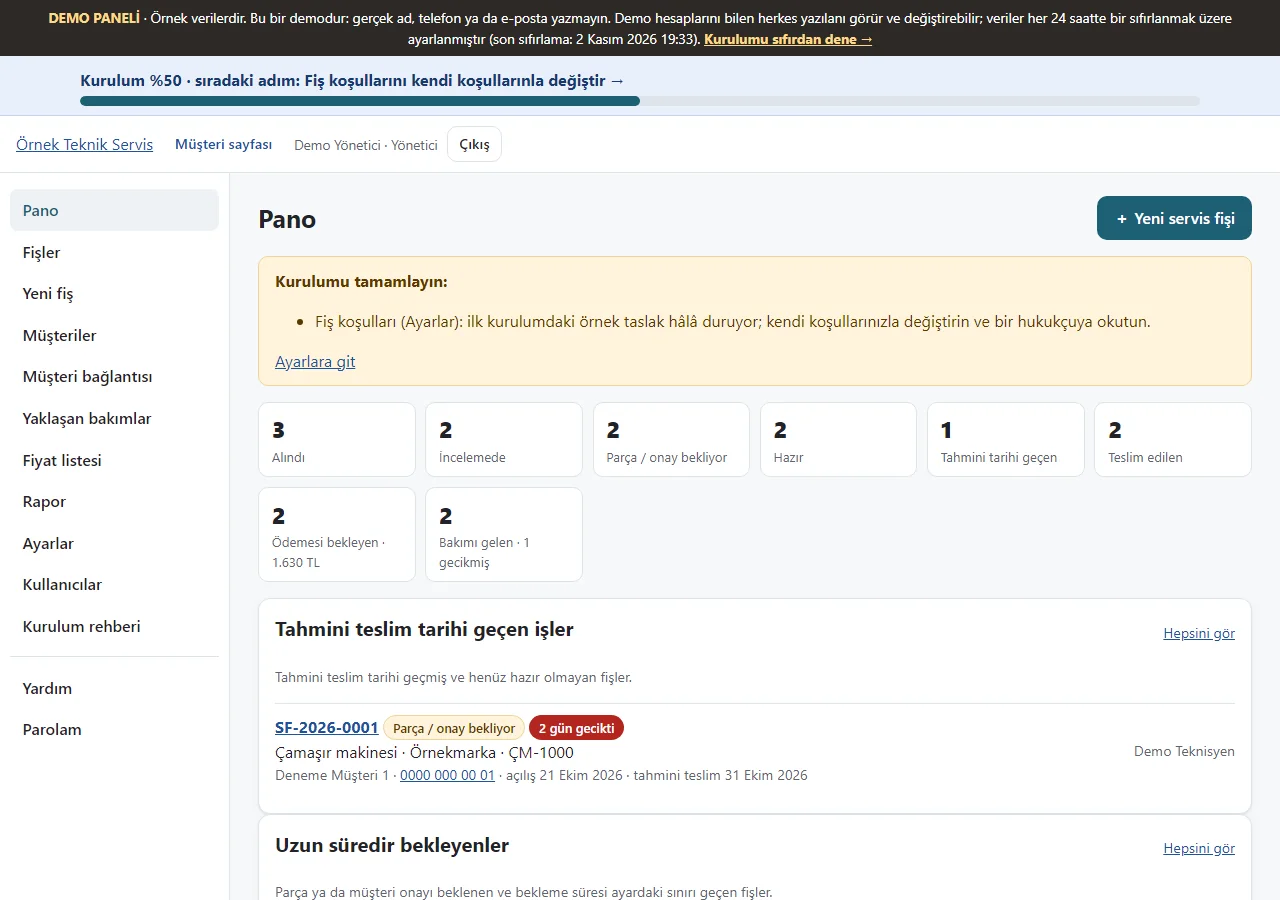
Service dashboard
Ticket counts by status, jobs past their estimated delivery date, the total of tickets waiting for payment and devices due for maintenance appear as cards.
- On screen (Turkish interface)
- “Pano” — dashboard
- “Ödemesi bekleyen” — waiting for payment
- “Bakımı gelen” — due for maintenance
-
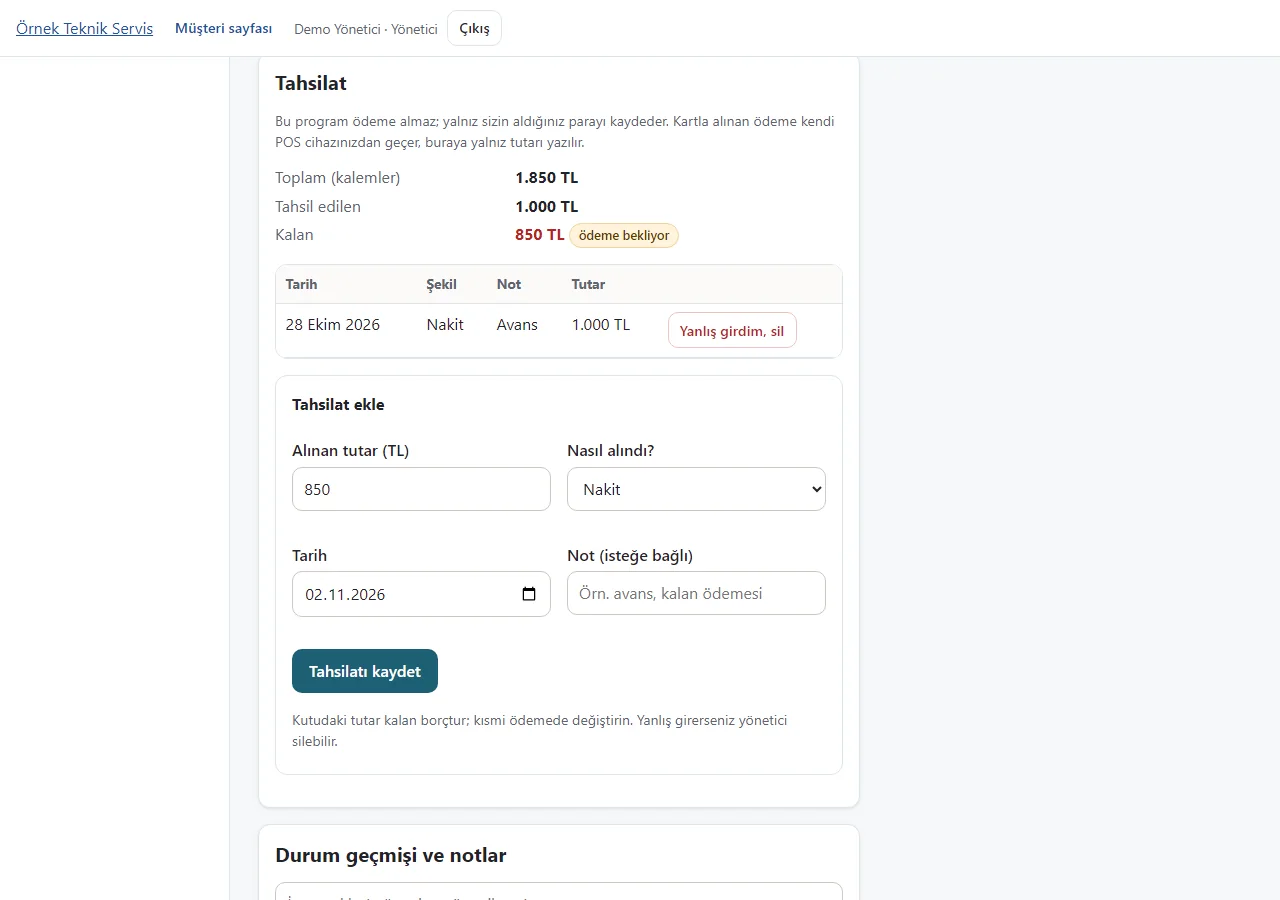
Payment record and balance due
The ticket shows the items total, the amount received and the balance; you record the money you took as cash, bank transfer or card. The app takes no payment: it only records the money you received.
- On screen (Turkish interface)
- “Tahsilat” — payment
- “Tahsil edilen” — received
- “Kalan” — balance
-
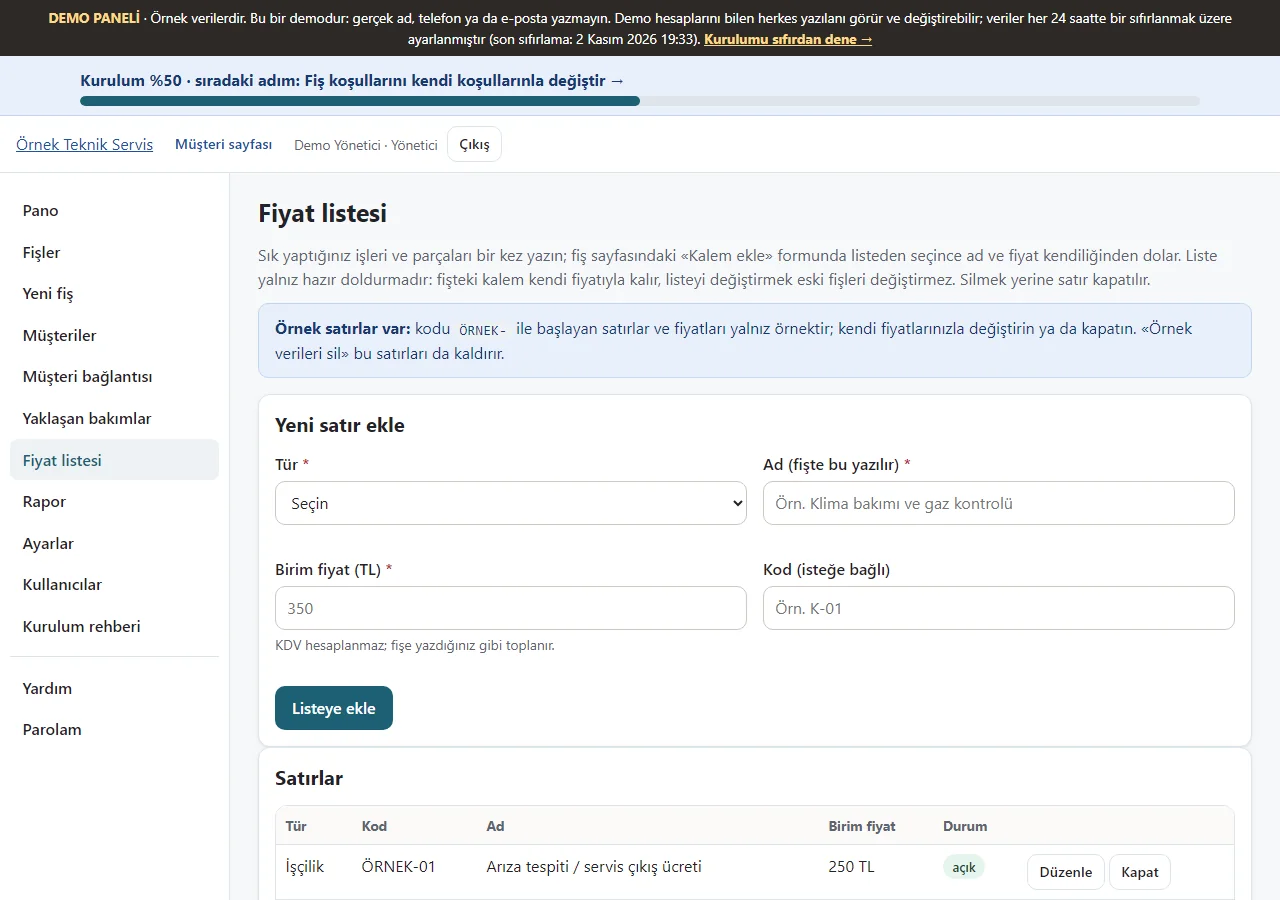
Price list
Jobs and parts you do often are written once with a name, an optional code and a unit price; only the manager edits them. The list only pre-fills: it does not change earlier tickets.
- On screen (Turkish interface)
- “Fiyat listesi” — price list
-
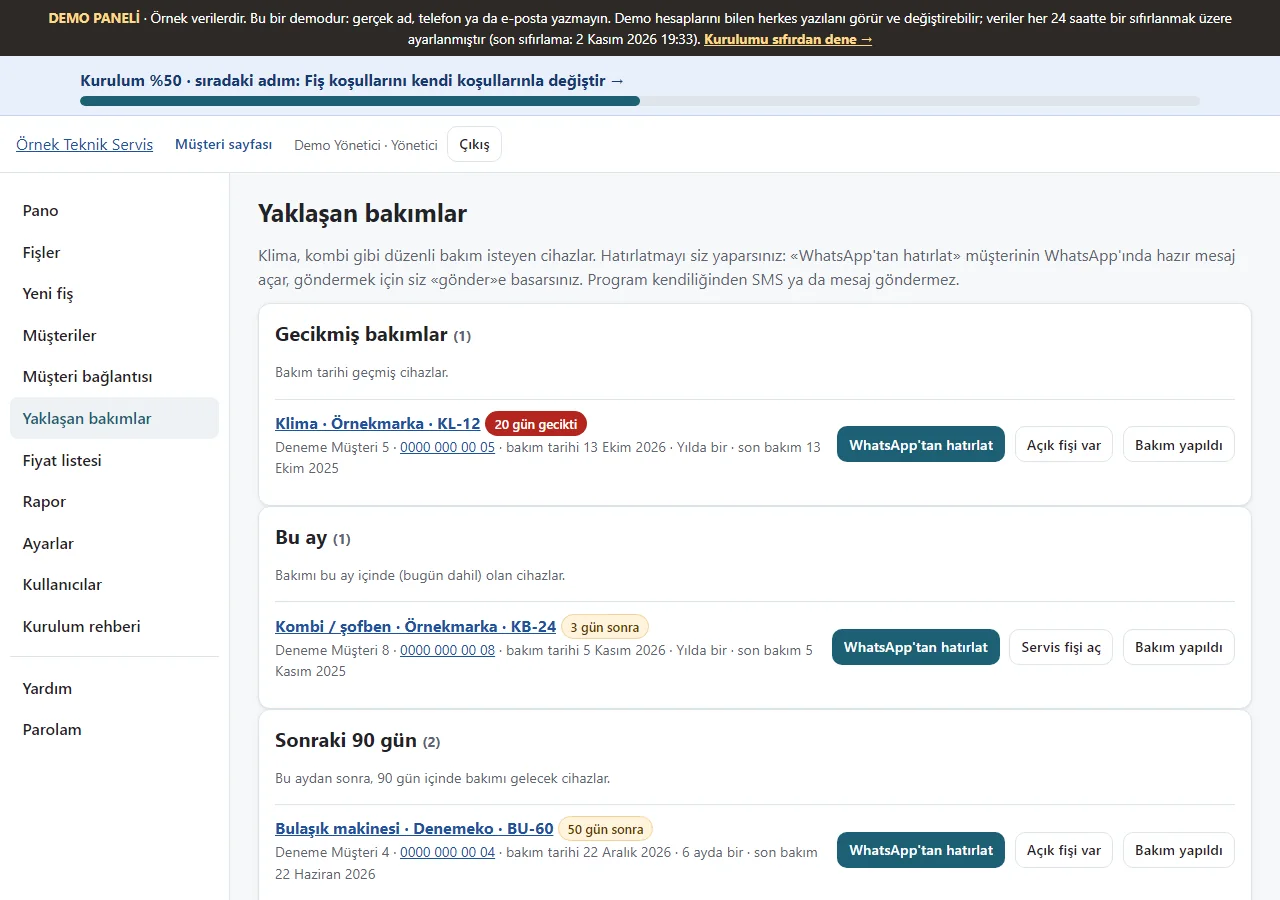
Upcoming maintenance
Devices with a maintenance plan are listed as overdue, this month and the next 90 days. “WhatsApp’tan hatırlat” opens a ready message; you decide to send it, and there is no automatic SMS or notification.
- On screen (Turkish interface)
- “Yaklaşan bakımlar” — upcoming maintenance
- “WhatsApp’tan hatırlat” — remind on WhatsApp
-
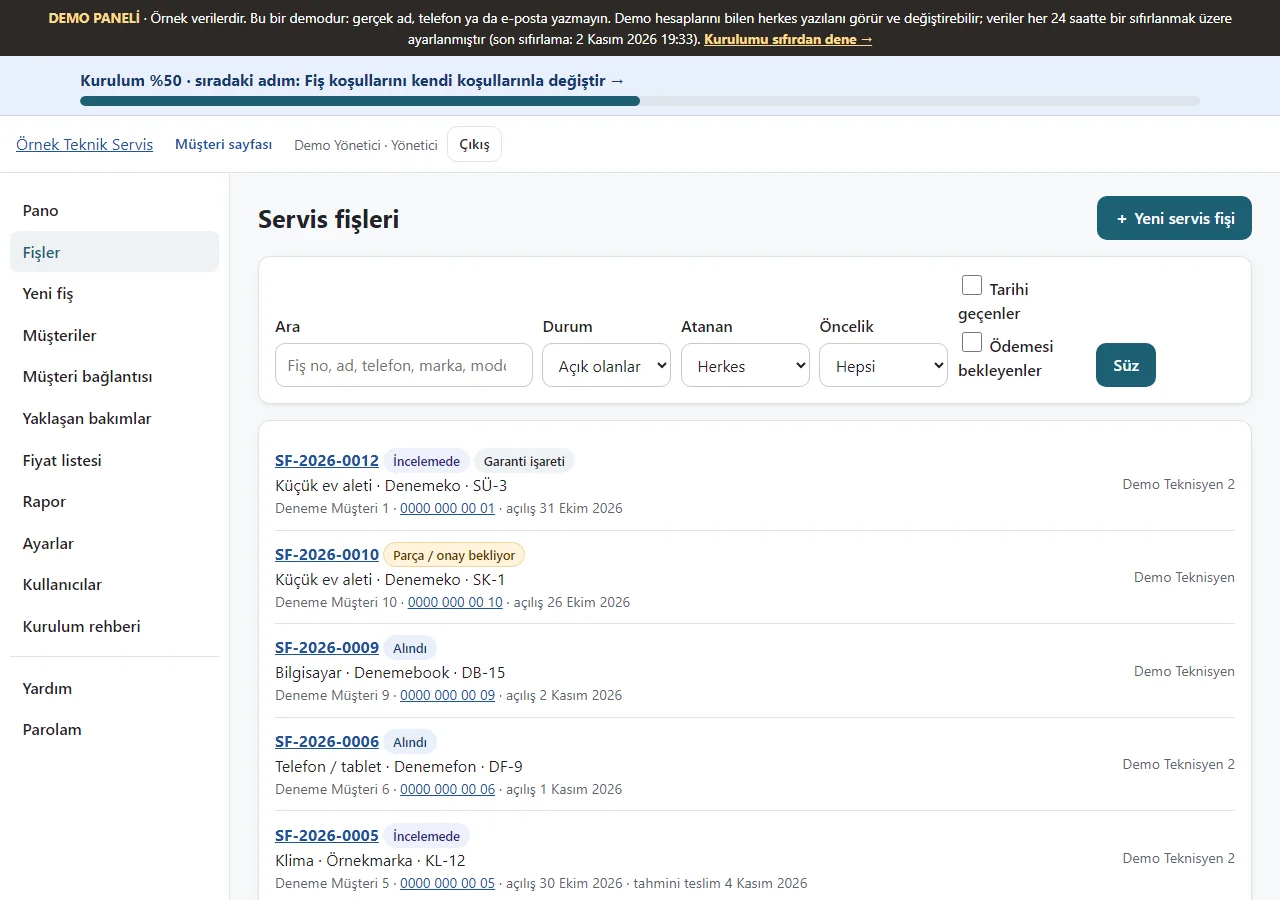
Tickets
Tickets are listed with their status; the “Ödemesi bekleyenler” filter and the balance mark on a row help you not to miss money owed.
- On screen (Turkish interface)
- “Servis fişleri” — service tickets
- “Ödemesi bekleyenler” — waiting for payment
-
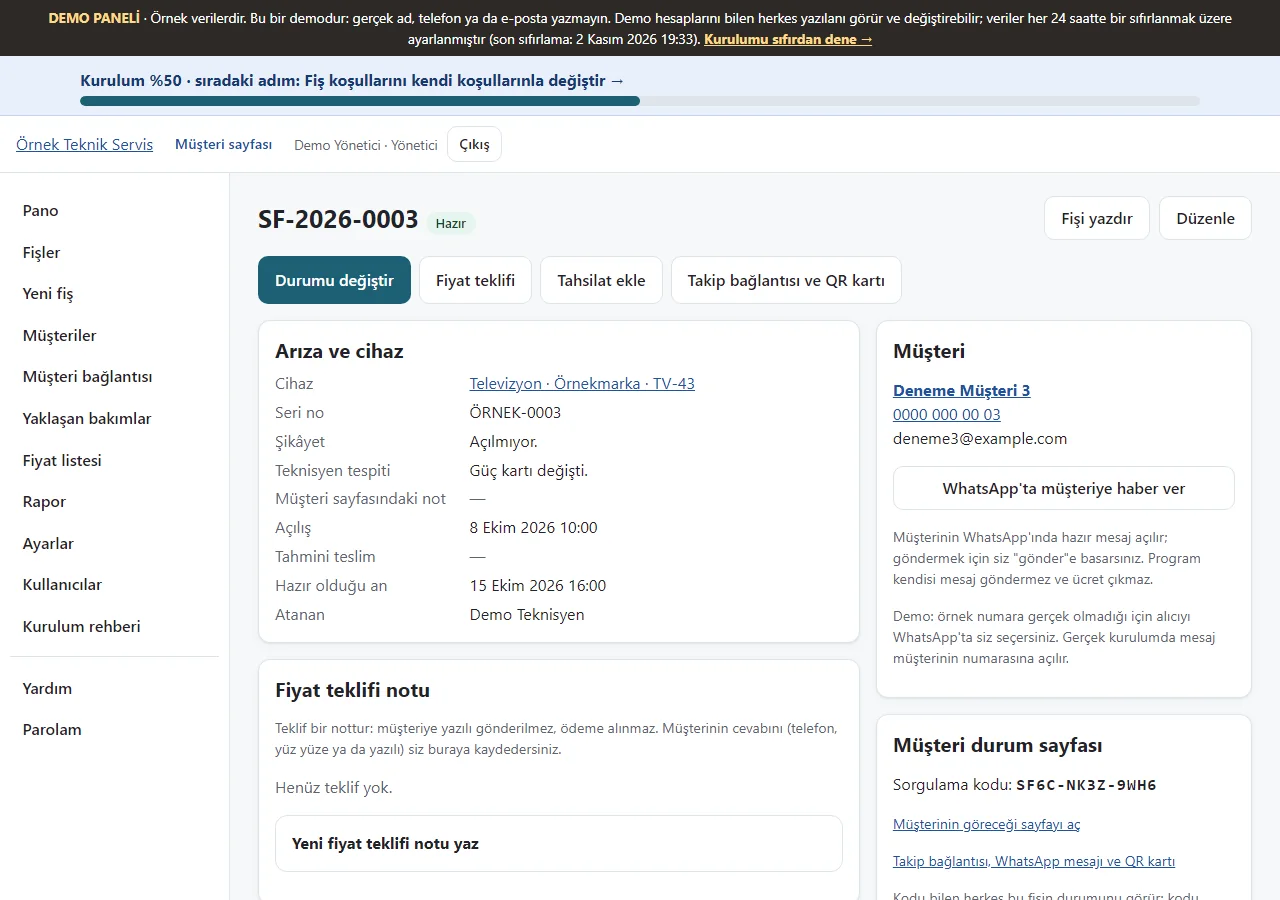
1.0.6 · 21 October 2026 Ticket details
A device’s service record and status are shown; the bar above has change status, price estimate, add payment and the tracking link. When the customer’s phone is visible, “WhatsApp’ta müşteriye haber ver” opens a ready message; you tap “send” yourself, the app sends nothing.
- On screen (Turkish interface)
- “Servis fişi” — service ticket
- “WhatsApp’ta müşteriye haber ver” — tell the customer on WhatsApp
-
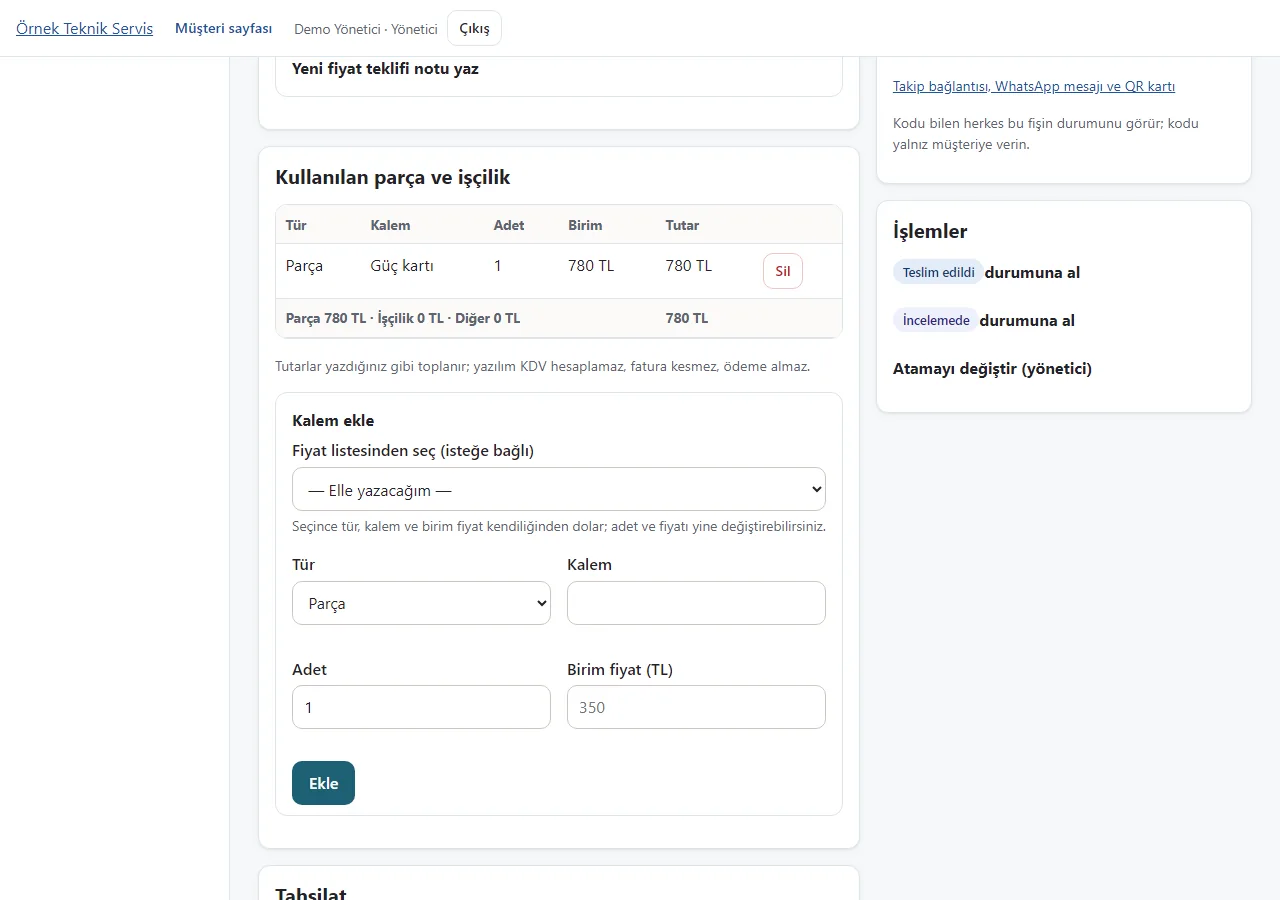
Adding an item from the list
When you add an item, picking it from the price list fills in the type, item and unit price; you can still change the quantity and price, or write the item by hand.
- On screen (Turkish interface)
- “Kalem ekle” — add item
- “Fiyat listesinden seç” — choose from the price list
-
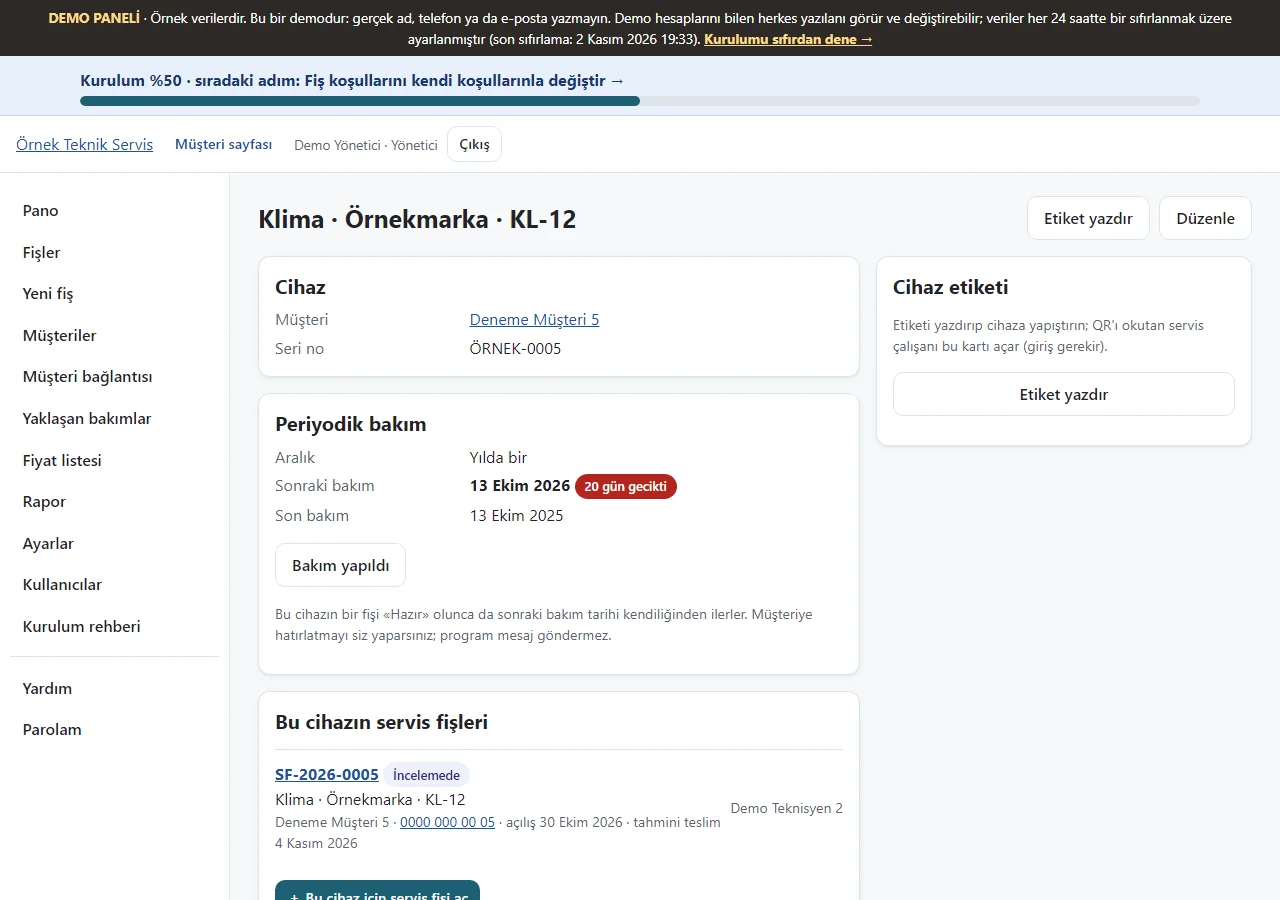
Device card
The device’s details, its periodic maintenance plan, the next maintenance date and its service tickets appear on one card.
- On screen (Turkish interface)
- “Periyodik bakım” — periodic maintenance
-
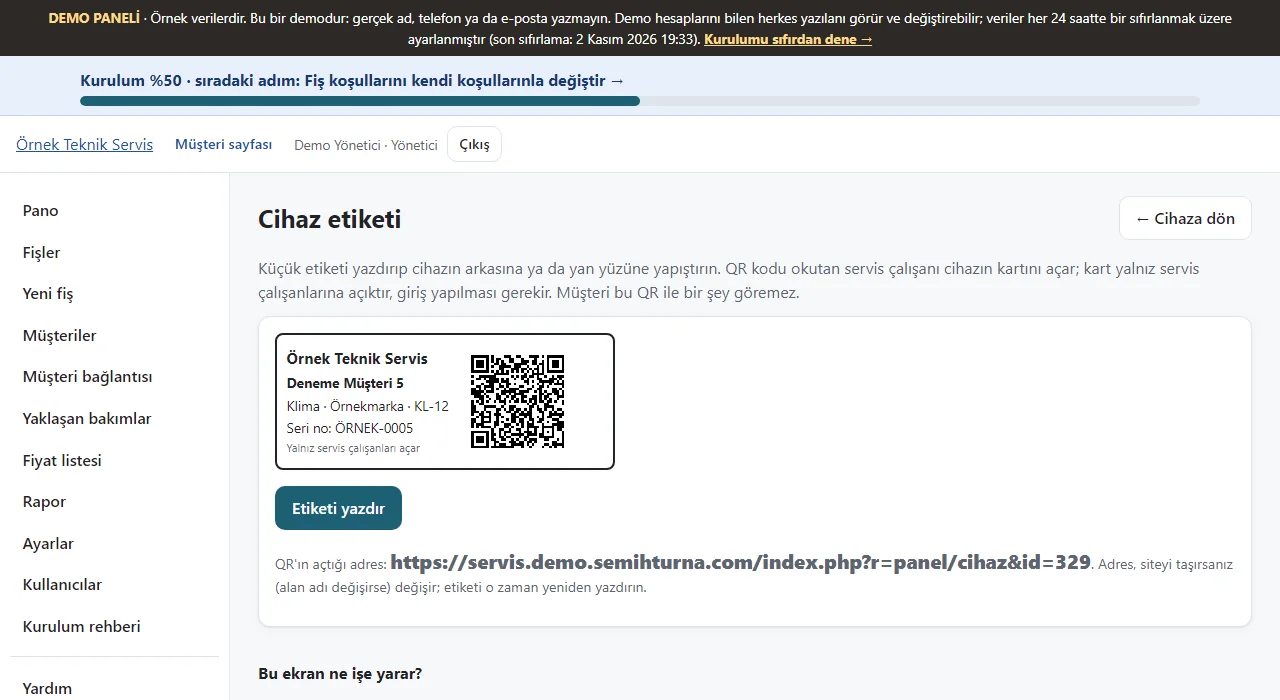
Device label
A small label with the customer, device, serial number and a QR code is printed. The QR opens the device’s panel card and asks for a sign-in; the label says only service staff can open it and carries no personal data.
- On screen (Turkish interface)
- “Cihaz etiketi” — device label
- “Etiketi yazdır” — print the label
-
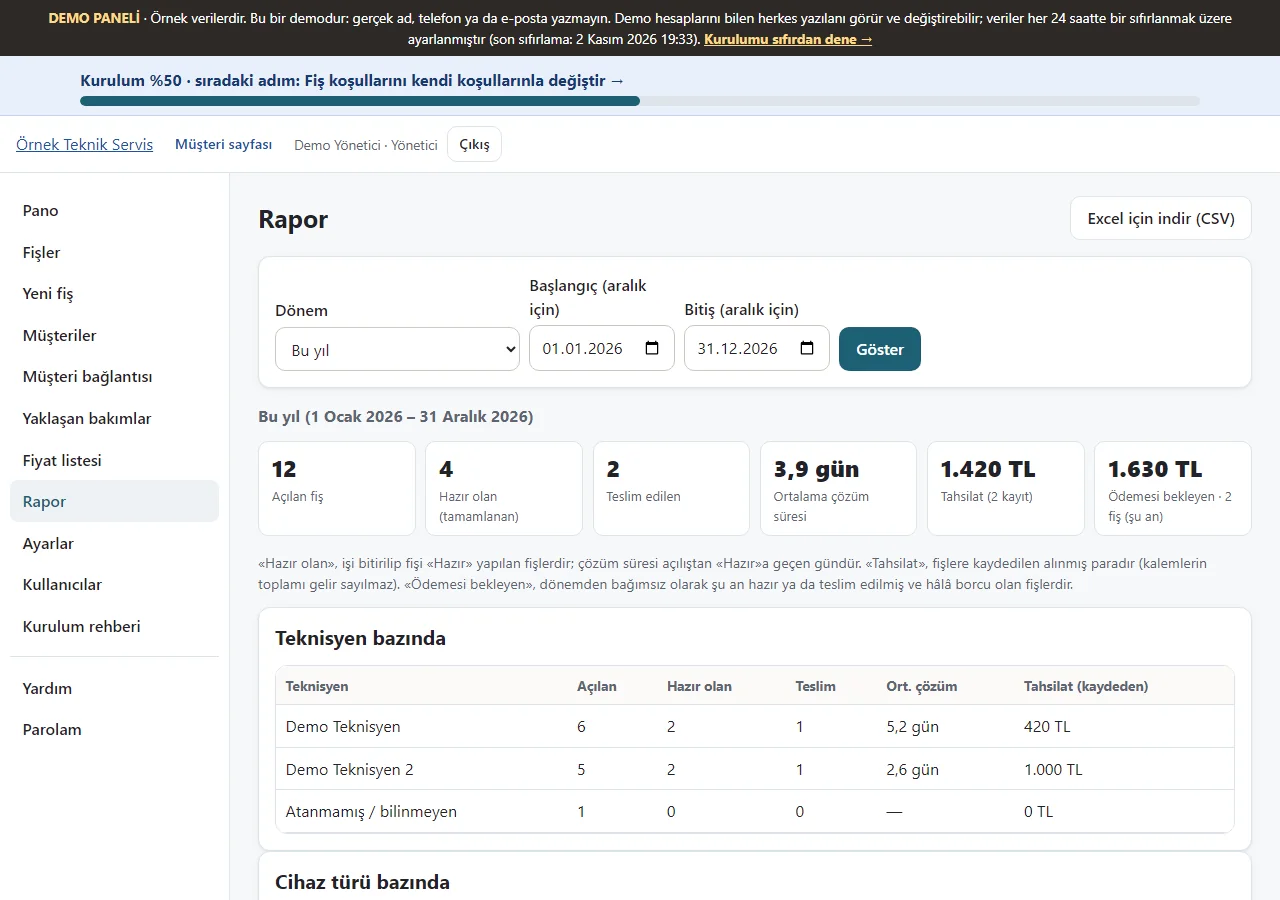
Report
For the chosen period the tickets opened, ready and delivered, the average resolution time, payments received and the amount waiting for payment appear, with a breakdown by technician and device type and a CSV download for Excel. Only the manager sees it.
- On screen (Turkish interface)
- “Rapor” — report
- “Excel için indir (CSV)” — download for Excel (CSV)
-
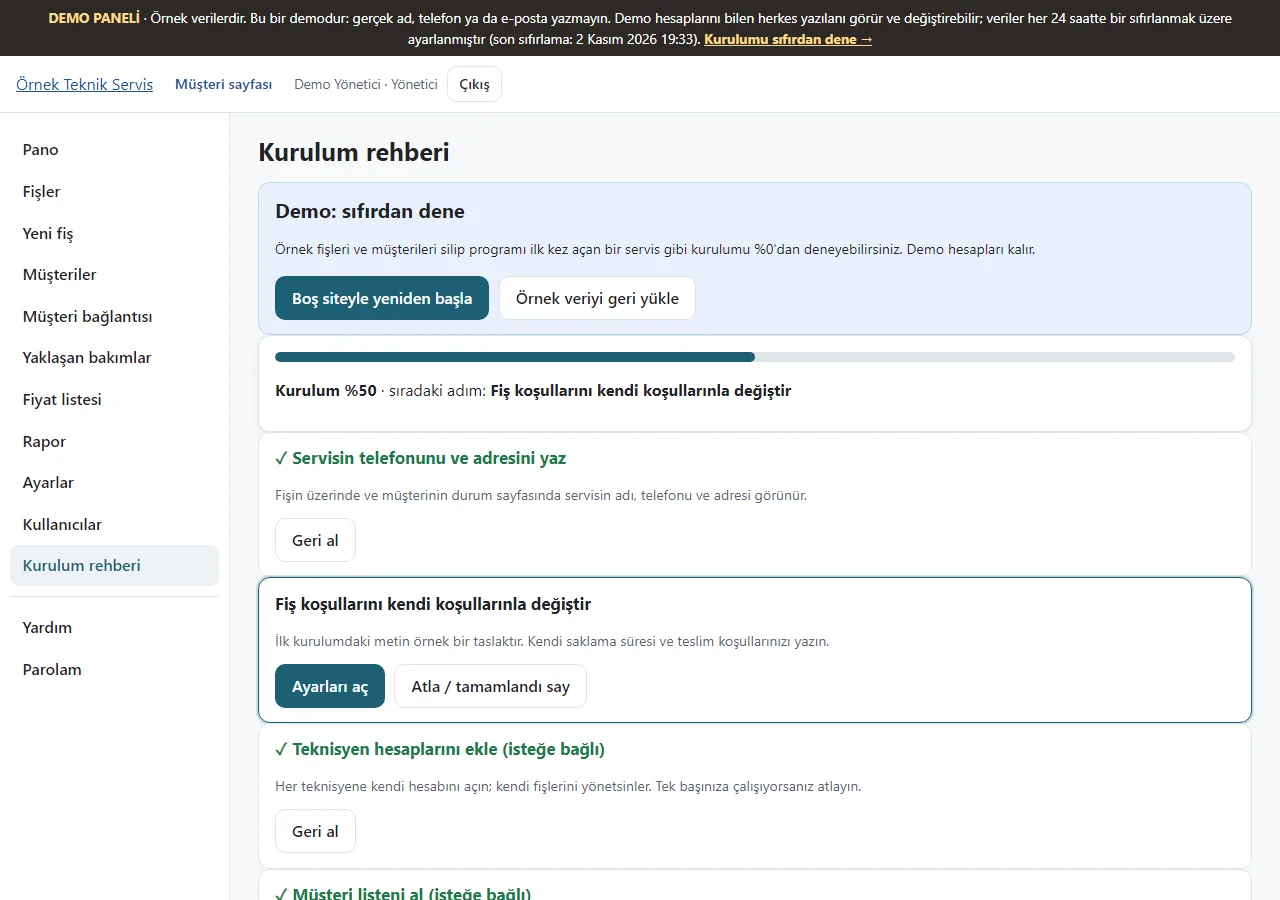
Setup guide
Steps are shown with a progress bar; each step completes from its own data or can be skipped. In the demo, “Boş siteyle yeniden başla” and “Örnek veriyi geri yükle” let you try the setup from scratch.
- On screen (Turkish interface)
- “Kurulum rehberi” — setup guide
- “Boş siteyle yeniden başla” — start again with an empty site
-
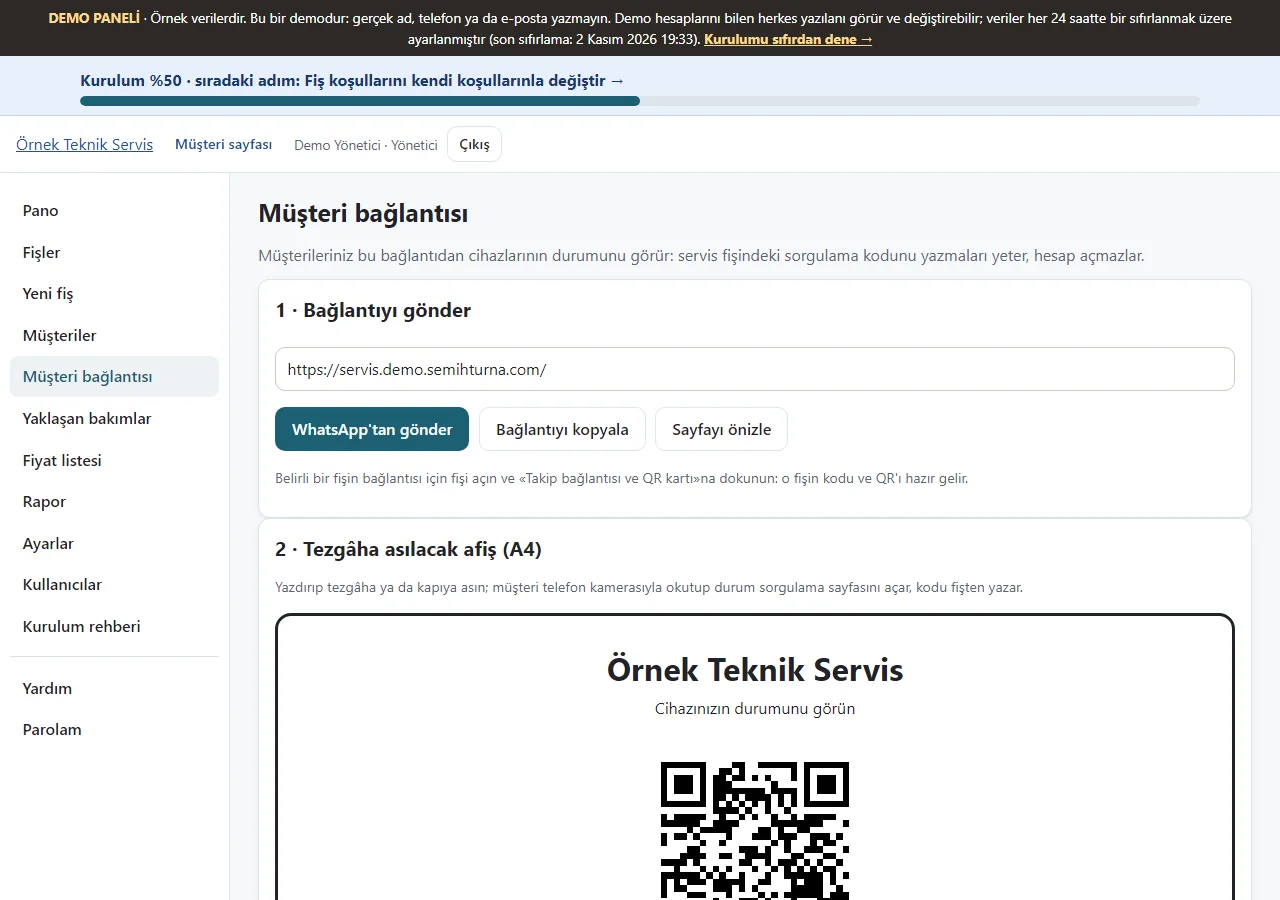
Customer link
The link to the customers’ status page, a ready WhatsApp message in one tap, copying the link and an A4 poster with a QR code to put up at the counter are shown.
- On screen (Turkish interface)
- “Müşteri bağlantısı” — customer link
- “WhatsApp’tan gönder” — send on WhatsApp
-
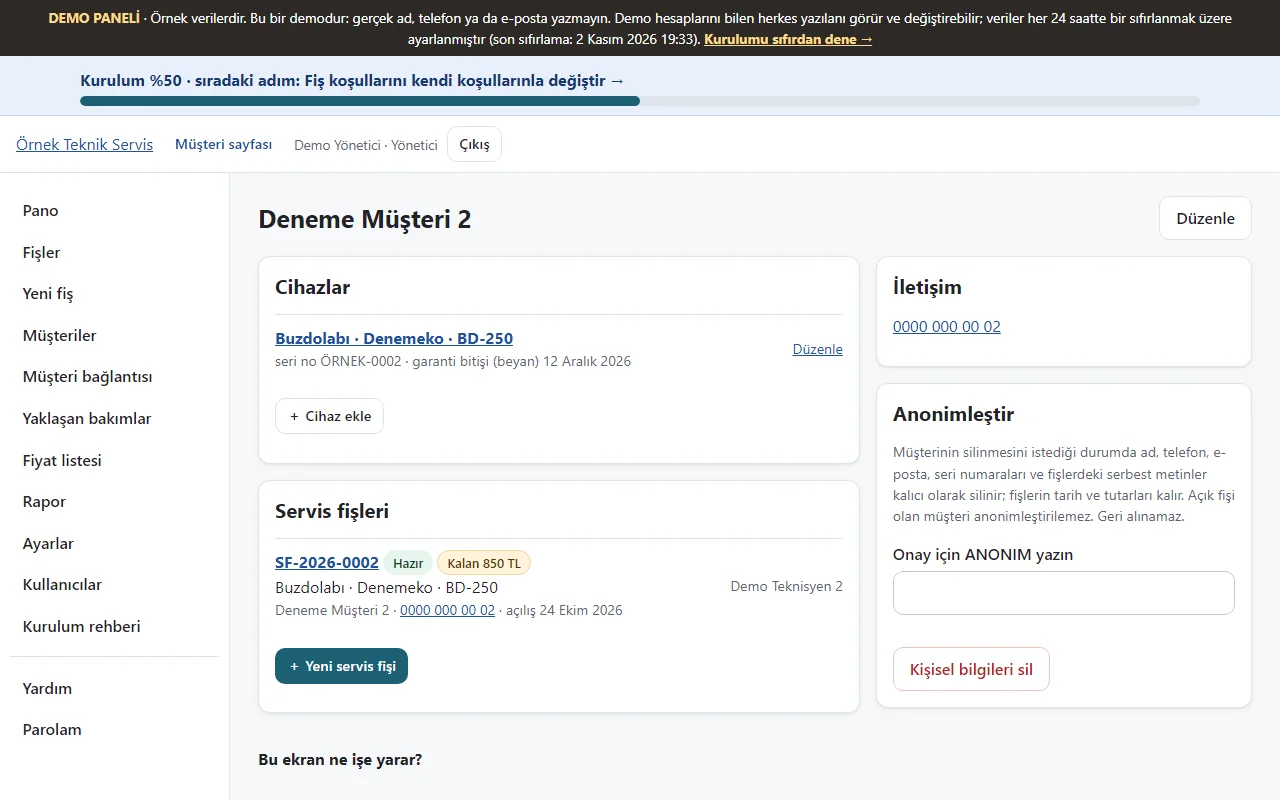
Customer card
A sample customer’s devices and service tickets appear; the balance on a ticket is shown with a mark.
- On screen (Turkish interface)
- “Müşteriler” — customers
- “Kalan” — balance
-
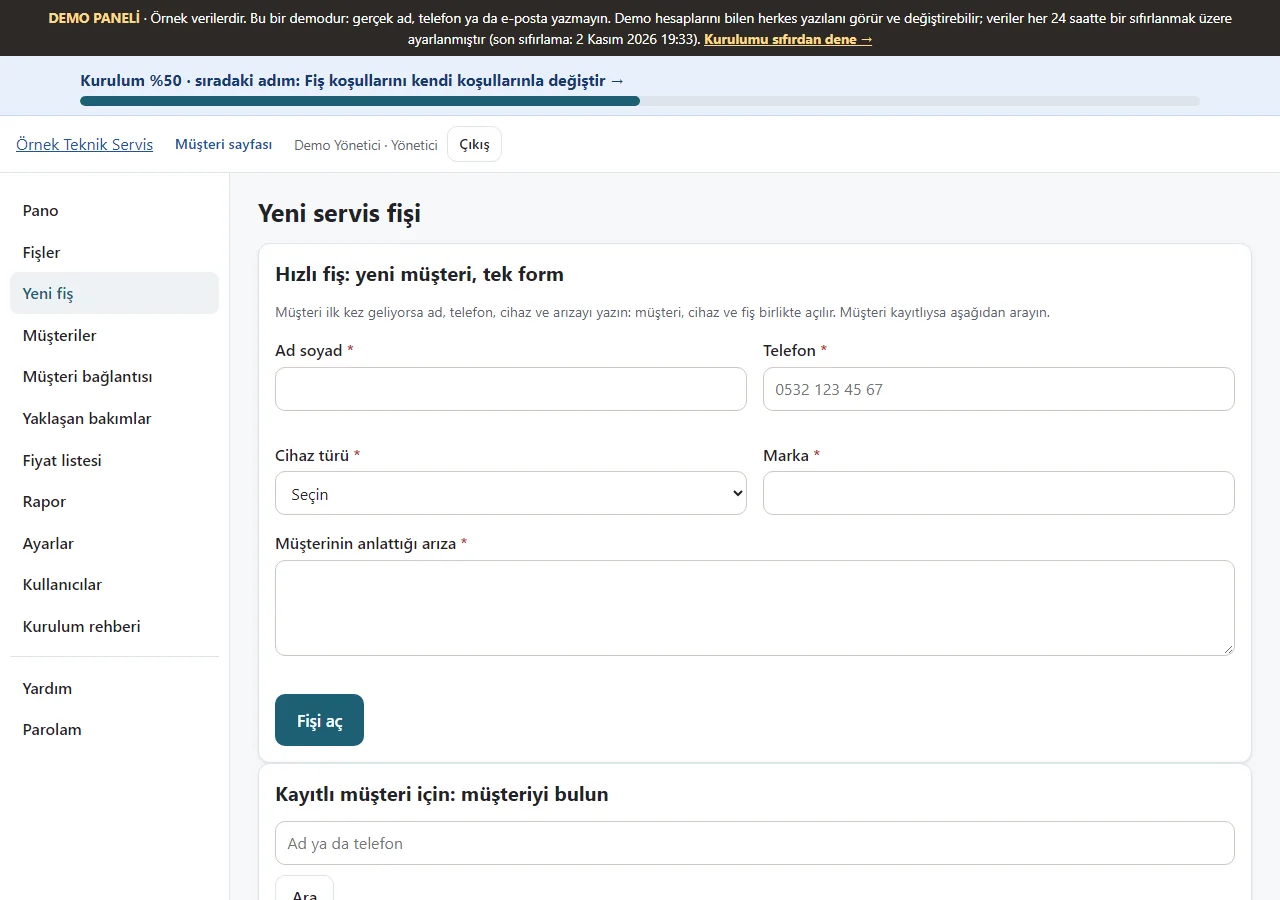
Quick ticket
In the first box you write the name, phone, device type, brand and fault; the customer, device and ticket open in one form. For a saved customer, search for the customer below.
- On screen (Turkish interface)
- “Yeni servis fişi” — new service ticket
- “Hızlı fiş” — quick ticket
-
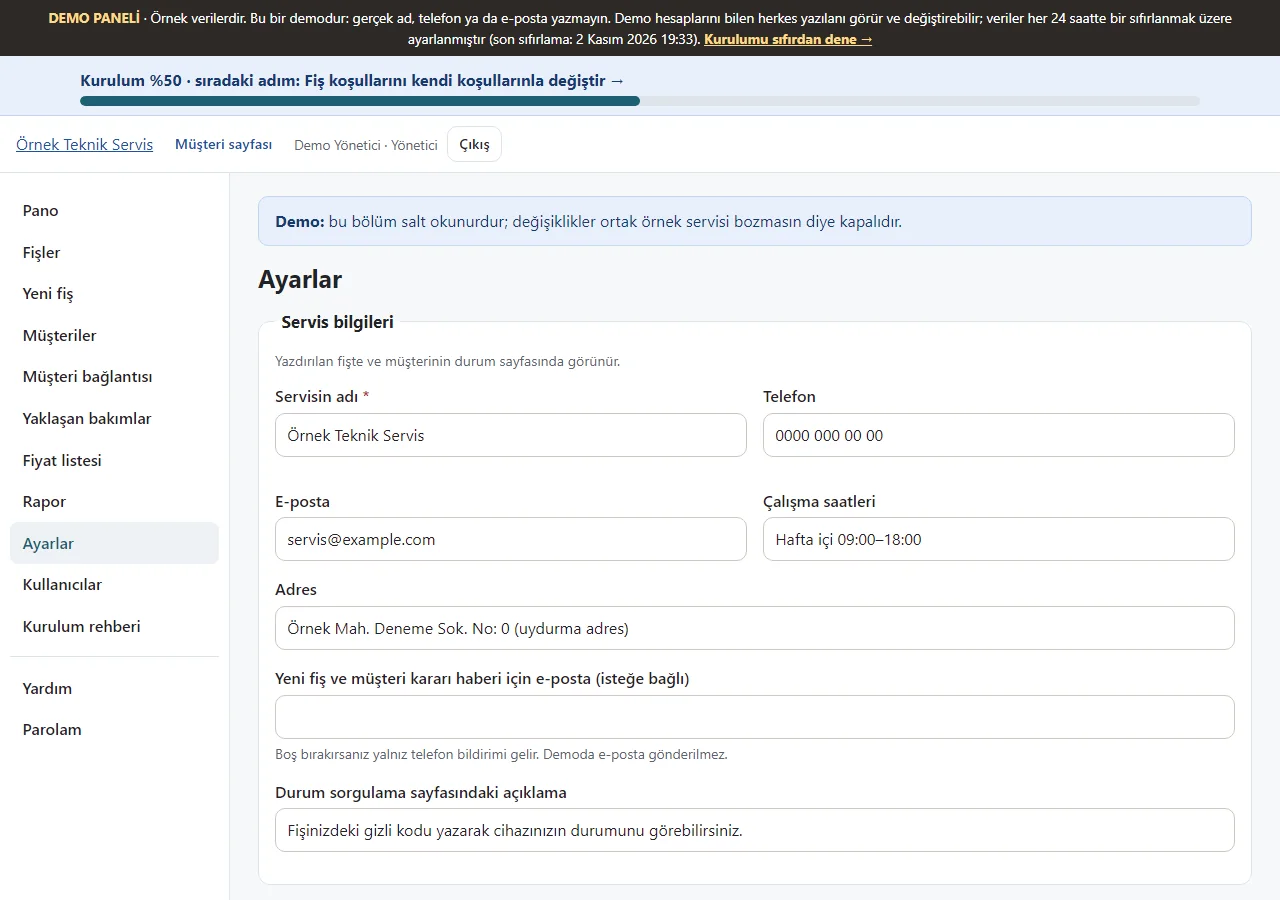
Settings
Settings such as the service name, phone, address and the text on the status lookup page are read; this section is read-only in the demo.
- On screen (Turkish interface)
- “Ayarlar” — settings
-
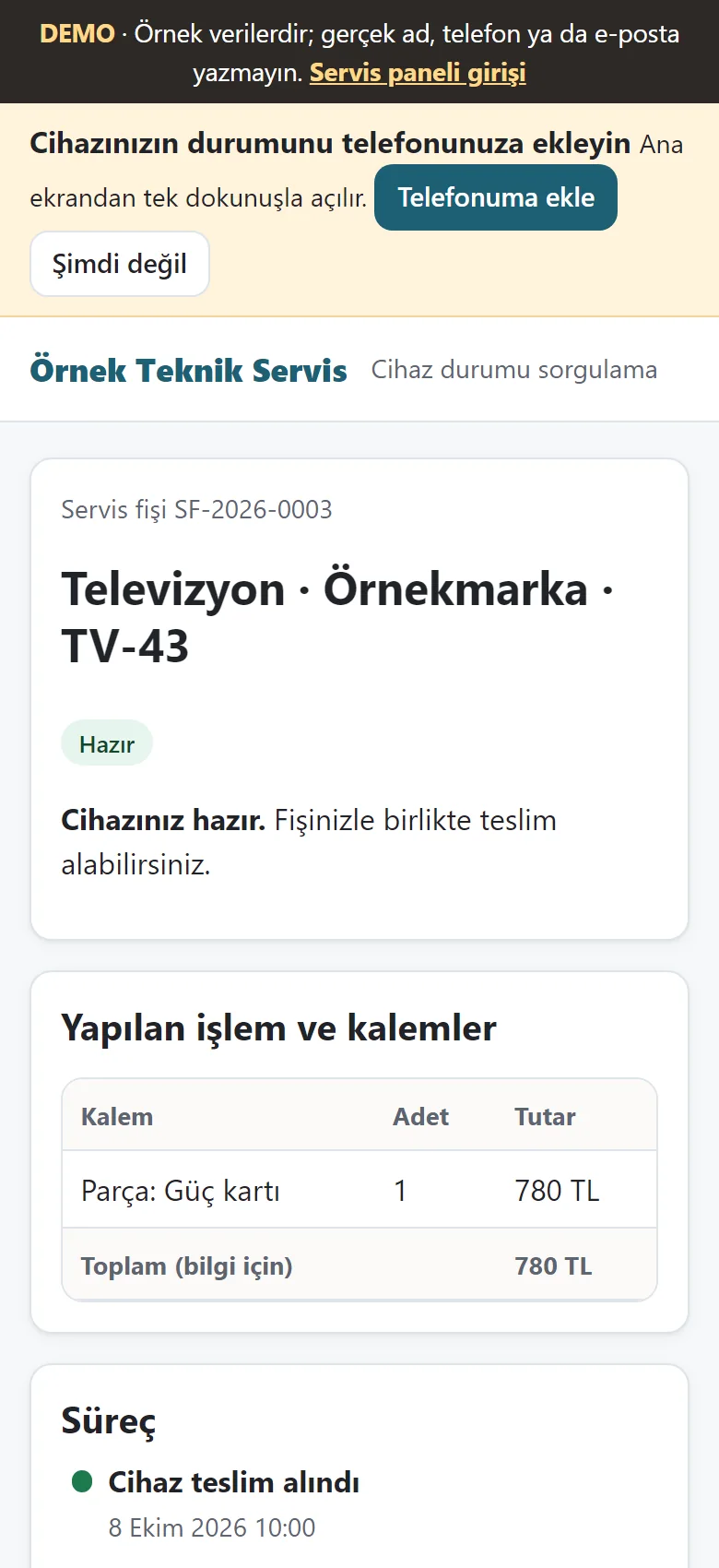
The customer’s status page
With a private code the customer sees the status of their own ticket on a phone; the status sentence, items and timeline appear, and the payment record and balance are not on this page.
- On screen (Turkish interface)
- “Cihaz durumu sorgulama” — device status lookup
- “Süreç” — timeline
-
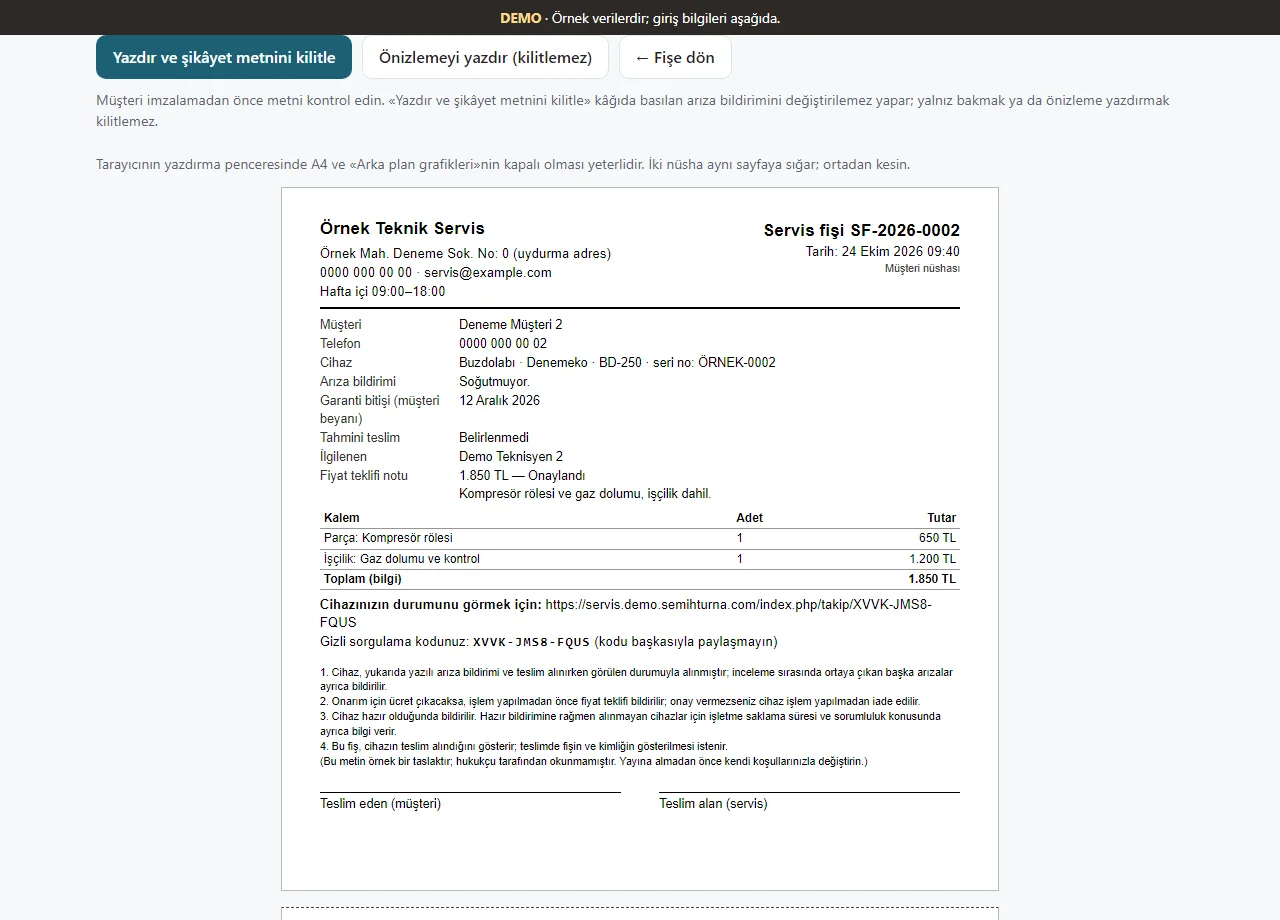
Ticket printout
A printable service ticket for the customer to sign appears, with the status link and the private lookup code.
- On screen (Turkish interface)
- “Servis fişi” — service ticket
- What do they see at the end?
- Tickets, payment records, maintenance reminders and a report appear in one panel.
- What is it good for?
- Waiting jobs, money owed and devices due for maintenance are not missed.
Everything that is not included, and all limits
- This is a demo with sample data. It has not been delivered to a client or used by a real repair shop. Do not enter real customer or device data.
- The demo data is set to reset every 24 hours; on 2 November 2026 the demo banner showed the last reset as 19:33.
- The screens on this page were taken from the live demo (1.2.0) on 2 November 2026 with the manager sign-in. Phone notifications (Web Push), adding to the phone and the QR poster were not tried on a real phone.
- The app takes no payment, issues no invoice or e-document and calculates no VAT; payments and debts are records only. There is no automatic SMS, WhatsApp or e-mail reminder to customers: the ready message and the maintenance reminder open as a ready message and the user decides to send it.
- Installation, business workflow, support and price are agreed separately with a customer. The app interface is in Turkish.
Delivery and sales status
How does it work?
You try the demo and tell us about your business, and we send you a quote. We install it and we host it. The yearly price includes installation, hosting, data transfer and support.
Price
The yearly list price is 2,500 TL. Installation, one year of hosting, data transfer, bug fixes and written usage support are included. You send the status and maintenance messages to customers yourself from WhatsApp; automatic SMS and WhatsApp sending, online card payment, e-invoice / e-archive and accounting, an app published in the app stores (there is a web app that installs on the phone), AI features and multiple branches are not included. New feature requests and work beyond the scope are priced separately and you are told before it is done.
Possible delivery options
Other delivery options
Requirements and version history
Installation requirements
- Plain PHP 8.2 or newer is needed; the data can be kept in a SQLite file or in MariaDB/MySQL. The product was tried locally with PHP 8.3 and on a single demo hosting account; it has not been tried on other PHP versions.
Release notes
- No version has been delivered to a client. A live sample-data demo exists; the live demo runs version 1.2.0.
- 1.2.0 (2 November 2026): a price list for jobs done often, payment records and the balance on a ticket, tickets waiting for payment, a periodic maintenance plan per device and upcoming maintenance (a reminder as a ready WhatsApp message), a device label with a QR code, a report summary and CSV. Data schema 3.
- 1.1.0 (2 November 2026): guidance pack: a setup guide and progress bar, “Bu ekran ne işe yarar?” (what is this screen for) boxes, “Boş siteyle yeniden başla” (start again with an empty site) in the demo, a customer tracking link and a QR code A4 poster, a ready WhatsApp message, adding to the phone, a free instant phone alert and an e-mail, a quick ticket.
- 1.0.9 (28 October 2026): a one-tap manager and technician screen from the product page (demo only; closed on a real installation).
- 1.0.8 (26 October 2026): permission view: a technician does not see the device and service ticket buttons on a customer card whose job is not theirs.
- 1.0.7 (21 October 2026): importing the customer list from Excel/CSV for the manager only; a preview, duplicate phone numbers set apart, undo of the last import.
- 1.0.6 (11 October 2026): a “WhatsApp’ta müşteriye haber ver” (tell the customer on WhatsApp) button on the ticket page.
Decisions not made yet
- Rights to use, modify, transfer and receive the source code: to be set in a written agreement; not decided yet.
- Whose name the hosting and domain are opened in, and where the software is installed, have not been decided yet.
There is no cart, customer account or online payment on this site for now. Reach out by phone, WhatsApp or the form; in a first conversation your need and the software’s fit are reviewed. The form does not create an order, a contract or a payment.